


Search  for anything...

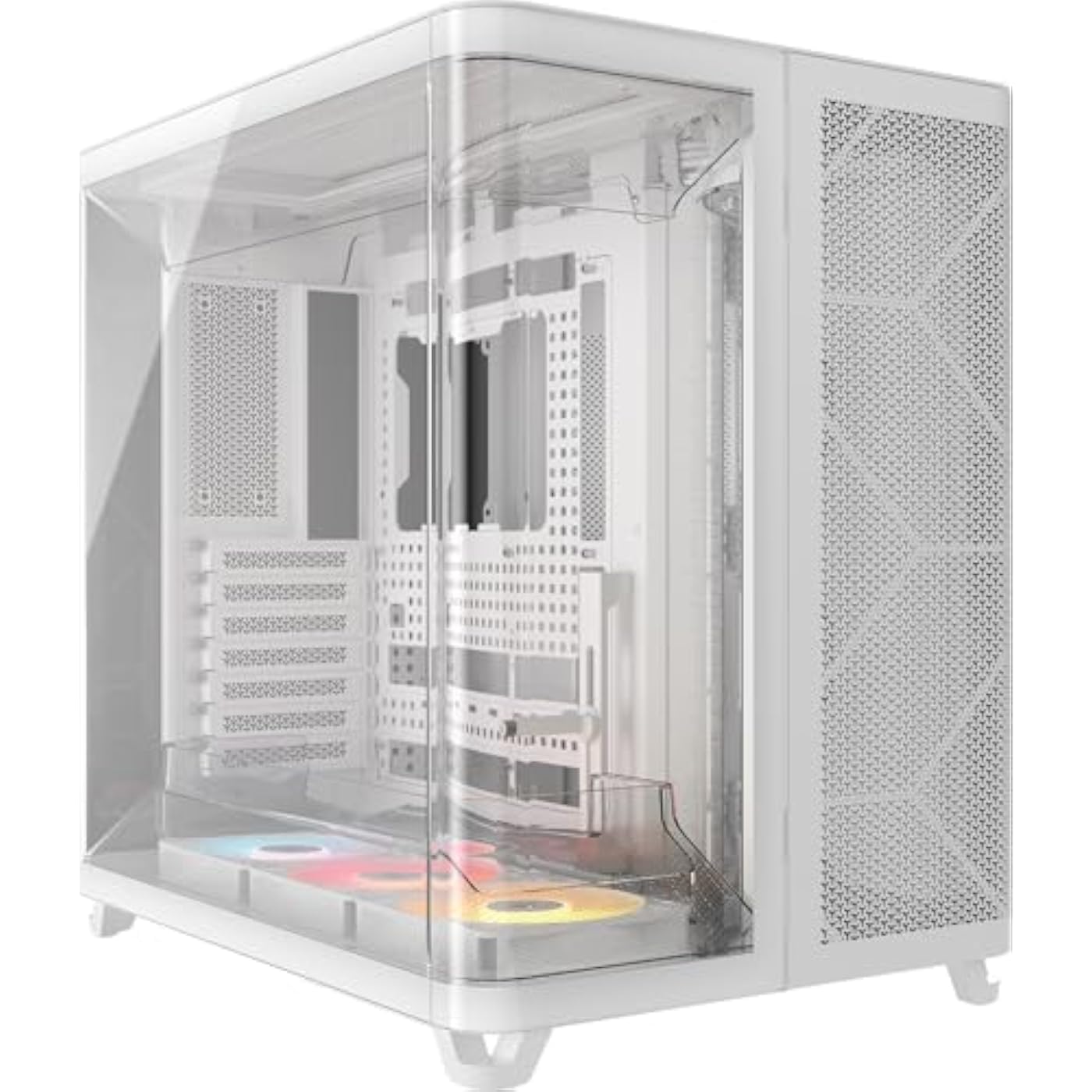
CORSAIR AIR 5400 RS-R ARGB Triple-Chamber Mid-Tower Panoramic PC Case – 3X Pre-Installed Reverse-Rotor RS120-R ARGB Fans, Low-Noise, High Airflow Ducts, Reverse Motherboard Support – White
  • Based on 0 reviews
Condition: New
Checking for the best price...
$204.99 Why this price?
Save $25.00 was $229.99

Buy Now, Pay Later


As low as $34.17 / mo
  • – 6-month term
  • – No impact on credit to apply
  • – Instant approval decision
  • – Secure and straightforward checkout

Ready to go? Add this product to your cart and select a plan during checkout.

Payment plans are offered through our trusted finance partners Klarna, Affirm, Afterpay, Apple Pay, and PayTomorrow. No-credit-needed leasing options through Acima may also be available at checkout.

Learn more about financing & leasing here.

Selected Option

Free shipping on this product

FREE 30-day refund/replacement

To qualify for a full refund, items must be returned in their original, unused condition. If an item is returned in a used, damaged, or materially different state, you may be granted a partial refund.

To initiate a return, please visit our Returns Center.

View our full returns policy here.


Availability: In Stock.
Fulfilled by Amazon

Arrives Sunday, Apr 26
Order within 5 hours and 11 minutes
Available payment plans shown during checkout

Protection Plan Protect Your Purchase
Checking for protection plans...

Color: White


Features

  • Triple-Chamber Design Superior cooling performance is possible due to isolated chambers for the most powerful hardware including CPU, GPU, and PSU
  • Isolated CPU Cooling Chamber Separate chamber on the front of the chassis holds a 360mm radiator for CPU cooling, ensuring none of the heat generated in the chamber affects other components
  • GPU and Motherboard Chamber The central chamber is designed to offer massive vertical airflow to cool all the components thoroughly and then exhaust the hot air out of the chassis
  • PSU and storage chamber A third chamber houses the power supply, storage, and cables, and it has its own dedicated intake and exhaust locations as well
  • Airflow Ducts An innovative duct on the bottom fan array in the main chamber accelerates airflow as its forced into a narrow channel. This increases airflow velocity without requiring increased fan speed, improving cooling power without added noise

Description

The CORSAIR AIR 5400 features an innovative triple-chamber design that delivers exceptional cooling along with a radical new look for DIY PCs. It sports a dedicated 360mm radiator chamber, keeping the heat associated with CPU cooling out of the main chamber for improved thermals. The main chamber is also kept frosty with airflow ducts on the top-and-bottom fan arrays, which increase airflow velocity for chilly temps with very low noise. The wraparound glass exterior provides a stunning panoramic view, and the included reverse- rotor RGB fans offer powerful cooling with unobstructed RGB lighting for a PC that looks as good as it performs.

Brand: Corsair


Motherboard Compatability: ATX, micro ATX, Mini ITX


Case Type: Mid Tower


Recommended Uses For Product: Gaming


Color: White


Material: Acrylic, Plastic, Tempered Glass


Power Supply Mounting Type: Bottom Mount


Cooling Method: Air


Model Name: AIR 5400 RS-R ARGB


Item Weight: 13.92 Kilograms


Supported Motherboard: ATX, micro ATX, Mini ITX


Case Type: Mid Tower


Power Supply Mounting Type: Bottom Mount


Cooling Method: Air


Light Color: RGB


Total USB 3.0 Ports: 2


Other Special Features of the Product: Built-In Fan, Dust Filter, RGB Lighting


Internal Bays Quantity: 2


Compatible Devices: ATX, mATX, ITX motherboards, standard GPU lengths, standard PSU sizes, 3.5" and 2.5" storage drives, standard CPU cooler heights


Color: White


Enclosure Material: Acrylic, Plastic, Tempered Glass


Item Weight: 13.92 Kilograms


Item Dimensions D x W x H: 18.5"D x 13.39"W x 18.39"H


Brand: Corsair


Model Name: AIR 5400 RS-R ARGB


Manufacturer: Corsair


UPC: 840440406563


Global Trade Identification Number: 63


Warranty Description: 2 Year Manufacturer


Antenna Location: Gaming


Frequently asked questions

If you place your order now, the estimated arrival date for this product is: Sunday, Apr 26

Yes, absolutely! You may return this product for a full refund within 30 days of receiving it.

To initiate a return, please visit our Returns Center.

View our full returns policy here.

  • Klarna Financing
  • Affirm Pay in 4
  • Affirm Financing
  • Afterpay Financing
  • PayTomorrow Financing
  • Financing through Apple Pay
Leasing options through Acima may also be available during checkout.

Learn more about financing & leasing here.

Top Amazon Reviews


  • Works extremely well and is beautiful
Color: White
Amazing case and really does keep the temps down. I have an overclocked pc that ran around 160 f doing nothing and with this case it stays at 102 now. I used all the same parts including the case fans. I replaced the ones it came with. I love and always use the thermaltake fans. This case is amazing and was easy to install and the cable management is wonderful. The only thing is that it is huge! You need a lot of space for it. If you do then I highly recommend it! ... show more
Reviewed in the United States on January 24, 2026 by Hawk2526

  • Very Unique Design Allows for CPU and GPU AIOs (Measure Carefully!)
Color: Black
This case first came to my attention over the summer, but I didn't think much of it until I had to put a new system together in November. The triple chamber design allows you to put your CPUs AIO into the third chamber which is sealed off from the rest of the system so that exhaust air never enters the other two chambers. The front mesh panel and top panel are sturdy and tool-less. The glass panels open easily, but the main side glass panel must be opened first before the front glass panel since it doesn't have it's own detente at the bottom. The metal panel on the right that gives you PSU access is also easy to pen. The case was very easy to work in and I enjoyed my build. This is compatible with BTF boards which I did use. The cable management features were excellent and let me keep things tidy. I wanted to use two AIO's in this, one for the CPU and one for the GPU. I put the GPU radiator into the third, dedicated chamber, while the CPU radiator is in the top of the main chamber. My temps have been great. My 5090 has not gone over 65C while gaming for hours, my CPU (AMD 9950x3D) sits around 60 and below. My idle temps are incredible as well. Overall, I'm very happy with this case. ... show more
Reviewed in the United States on January 1, 2026 by Kerwin

  • 99% Amazing! Missing on technicality.
Color: White
I had a Lian Li O11D with 9 140mm Corsair QX-140 fans, Corsair h170i huge AOI, Rog Strix OC 4080 super. I had the fans and the AIO set up for max cooling. With a 9800X3d running 100% use CPU temps would throttle out at 85C. GPU running at 100% would hit 90C with all fans maxed out and end up throttling. Swapped to this case. Now have a 360mm cooler which is a huge size smaller, have 3 intake, 3 exhaust on top, and 1 exhaust in the back. New AOI is the MSI P13, new fans are the MSI EZ120. CPU max temp so far at 100% is 58C, and GPU at 100% is 55C. This case has amazingly cooled down my components. Every fan is 20mm smaller and every aspect of temperature is lower. The feet keep the case nice and high so the intake fans at the bottom can pull air easily, all that while keeping a snazzy look. There are many places to route cables out of the way and keep things hidden. At first I didn't like the look of the furry brush type cable entries but that is growing on me. It was easy to get the cables through. I really like the modularity and easy the case can come apart to place things. I am not a fan of the included velcro straps they provide, the little finger grab thing just doesn't hold which had me use alternative cable restraints, but that is ok. I love the wrap around glass and how it joins together that is really super smooth! It has a front panel opening which is easy to access for AOI monitoring, and the power supply side panel makes for super easy access. Things to know before hand. The back exhaust fan looks pretty janky. Only half the fan is usable and the other half hangs over the glass. Every thermal review I read says it helps gpu temp by 3C minimum so I still use it, but it looks bad. I am not sure how strong the glass would be but I would have rather had a square cut out of the glass and the vent go all the way through. AOIs when mounted vertically should have the hoses at the bottom of the AOI. This allows air bubbles to float to the top of the radiator and not have to be pumped through the pump. When the hoses are at the top any air in the radiator floats to the top and gets sucked into the cooling stream and into the pump. This reduces pump life, reduces cooling capacity, and makes noise when the pump cavitates. Corsair even has a document stating the tubes need to be at the bottom. Even when the cooler is higher than the pump hoses on top is a problem as it puts the suction where all the air will be. Why I share this is with the heat shield and without cutting it there is no off the shelf AOI that will install with hoses down. The heat shield blocks it and the hoses needed would be longer than options on the market. This case REQUIRES the hoses to be mounted at the top of the AOI. One more note on the AOI, many AOIs come only with 400mm tubes between the pump and the radiator. This can be extremely tight on this case. I found that having the tubes at the bottom of the pump makes the 400mm really a stretch on the P13 AOI. It looks really bad covering my memory like that. If you have one with 400mm save yourself a cryosheet or some thermal paste and mount the pump with the hoses on the right side. Or, you can go with the Corsair Titan cooler that has 450mm hoses. Not saying any one AOI is better than the other just saying the Titan 360 has 50mm longer hoses that may help with routing if you want the hoses on the bottom of the pump. Interestingly enough, the PSU takes a suction close to where the AOI is dumping its warm air. This has not caused any issues and the PSU runs at a cool temp. The fluid dynamics of the AOI seem to port the air away from the suction though it looks close, in my experience it has not been. Last note, I use NVME drives that mount on motherboard. But if you don't or need to use other drives the place they want you to mount the drives requires you to remove the fan controller in the upgraded model, or if you add a fan controller you will have to think again. ... show more
Reviewed in the United States on February 3, 2026 by Tanndog

  • Amazing case
Color: Black
Case is amazing. Triple chamber design has greatly dropped the cpu temps in my build. Case brakes down very well for building. Super easy to run cable management. Case is large, takes a lot of desk space, however very premium build, super high quality parts. Integrated GPU stand. easy to get to back of power supply. ... show more
Reviewed in the United States on February 15, 2026 by Austin

  • Not a gimmick - It truly works!
Color: Black
Needed a case and this one is very clever. No longer is hot intake recirculated inside the case. A vertical mounted 360 AIO is in an isolated chamber. It gets its own fresh air and exhaust directly out of the case away from the other intakes and, if seated on a desk, away from the user too. I thought it was a gimmick but I was happily surprised! I use two 360 radiators, one for CPU (7800x3d) and the other for GPU (5080). Both rads fit fine. Only issue is that the removable duct on the top cannot be mounted. No biggie it is toolless removeable. With all fans on silent curve I cannot hear any fan sound. Even with GPU at 100% (Temps high 30C to high 60C) and CPU (Temps low 50C to mid 60C) at 80% I hear no noise. I am using a BeQuiet silent loop 3 and MSI 5080 suprim liquid with stock fans. If you need a case give this one serious thought!! ... show more
Reviewed in the United States on March 9, 2026 by GPST

  • Solid Case
Color: Black
First off this is an amazing case, and does help with CPU temps, but only a degree or two. Having said that be ready to fight the fitment if you have a large 360 AIO as it will create an issue when installing your AIO. Also, if you own a Asus Ryujin III 360 Your screen will be upside down and it is an ultra tight fit. I would be cautious if you own this aio. Once you get past the 360 AIO fitment, this is a great case and looks very nice. My Astral 5080 with Wire View 2 Pro fits nicely in this case. 4 stars because how difficult it can be to fit certain AIO's in this case. ... show more
Reviewed in the United States on March 29, 2026 by J. Reynolds

  • Awesome Corsair!
Color: White
Awesome case. My CPU temps have dropped by almost 7-8 degrees. My GPU temp has gone down 1-2 degrees. Yes this case is huge. This case is also extremely expensive. The airflow in the case is phenomenal. This thing will most definitely cool down your CPU and possibly GPU by a decent bit. 5 stars as this case just is awesome all around. ... show more
Reviewed in the United States on April 12, 2026 by Jared

Can't find a product?

Find it on Amazon first, then paste the link below.
Checking for best price...