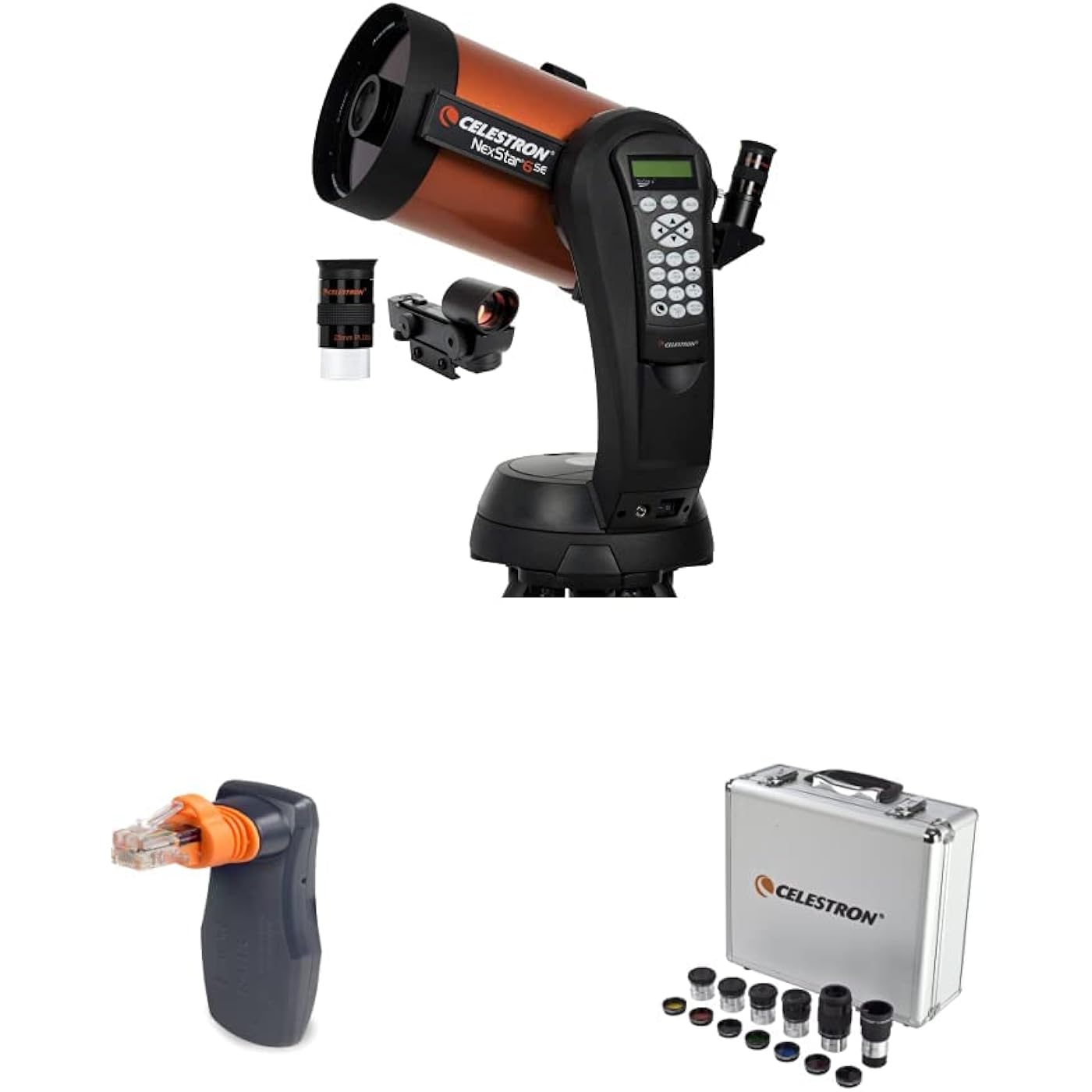
Celestron - NexStar 6SE Telescope - Computerized Telescope & SkyPortal WiFi Module - Control Your Celestron Computerized Telescope via Smartphone & 1.25” Eyepiece and Filter Accessory Kit – 14 Piece


Notify me when this product is back in stock
Buy Now, Pay Later
- – Up to 36-month term if approved
- – No impact on credit to apply
- – Instant approval decision
- – Secure and straightforward checkout
Payment plans are offered through our trusted finance partners Klarna, Affirm, Afterpay, Zip, Apple Pay, and Google Pay. No-credit-needed leasing options through Acima may also be available at checkout.
Learn more about financing & leasing here.
Selected Option
Returnable until Jan 31, 2026
To qualify for a full refund, items must be returned in their original, unused condition. If an item is returned in a used, damaged, or materially different state, you may be granted a partial refund.
To initiate a return, please visit our Returns Center.
View our full returns policy here.
Recently Viewed


Style: NexStar 6SE Computerized Telescope
Set: Telescope + Module + Accessory Kit
Features
- Product 1: NEXSTAR 6SE COMPUTERIZED TELESCOPE: Celestrons iconic orange tube telescope combines legendary 8" Schmidt-Cassegrian optics with updated technology and the latest features for an amazing stargazing experience for beginners and experienced observers.
- Product 1: 6-INCH APERTURE SCHMIDT-CASSEGRAIN TELESCOPE: Large, 6-inch primary mirror packs enough light-gathering ability to deliver impressive views of the Moon and planets, along with deep-sky objects like the Orion Nebula, while retaining a compact form.
- Product 1: FULLY-AUTOMATED GOTO MOUNT: With a database of 40,000+ celestial objects, NexStar SE's GoTo mount locates and tracks objects for you. It's the perfect telescope for astronomy beginners. NexStar SE is also compatible with StarSense and SkyPortal WiFi.
- Product 2: WIRELESS TELESCOPE CONTROL: Align and control your telescope using your smartphone or tablet with Celestrons free SkyPortal app for iOS and Android.
- Product 2: 100,000 plus CELESTIAL OBJECT DATABASE: Tap any celestial object you see in the sky to identify it instantly. Tap again and your telescope slews to that object, centering it perfectly in the eyepiece.
- Product 2: SKY TOUR FEATURE: SkyPortal automatically generates a list of all the best stars, galaxies and nebulae currently visible based on your exact time and location.
- Product 3: THE PERFECT ALL-IN-ONE EYEPIECE AND FILTER KIT: See more with your telescope! This expertly curated kit features the most popular 1.25" telescope eyepieces and filters, plus a 2x Barlow lens. The sturdy, foam-lined case has room to grow your collection.
- Product 3: 5 SUPERIOR-GRADE PLOSSL EYEPIECES: The Celestron Accessory Kit includes 5 Plossl telescope eyepieces, ranging from low to high power: 32mm, 17mm, 13mm, 8mm, and 6mm. Each eyepiece features a four-element design with a 52-degree field of view.
- Product 3: 2X BARLOW LENS: The 2x Barlow lens pairs with each of the 5 eyepieces in this kitor any 1.25 eyepieceto double its magnification, enhancing your view and instantly boosting power. Its like having 10 telescope eyepieces in your kit!
Description
Celestron - NexStar 6SE Telescope - Computerized Telescope for Beginners and Advanced Users - Fully-Automated GoTo Mount - SkyAlign Technology - 40,000 plus Celestial Objects - 6-Inch Primary Mirror The best telescope is the one used often to enjoy the beauty and intrigue of the night sky. For those searching for telescopes for astronomy beginners that are infused with the latest computer technology, Celestron’s NexStar 6SE Schmidt-Cassegrain Telescope fits the bill perfectly. The NexStar 6SE Computerized Telescope features Celestron’s iconic “orange tube” design and updated technology with the latest features for amazing stargazing for beginners and experienced observers. Celestron’s signature telescope combines advanced features and excellent optics in one easy-to-use system, the NexStar 6SE. It’s the perfect choice for your first serious telescope, offering striking views at an economical price. We recommend a load of no more than 10 pounds at 2.3 inches away from the 6 inch Schmidt corrector. The six-inch primary mirror in this computerized telescope packs enough light-gathering ability to observe the best that our Solar System has to offer, from Saturn’s rings to the cloud bands on Jupiter and geographic features on the surface of the Moon. When it comes to deep sky objects, take your 6SE to a dark-sky site and you’ll see hundreds of pinpoint stars in the Hercules Globular Cluster, the spiral arms of the Whirlpool Galaxy, and more. Featuring a database of more than 40,000 celestial objects, the 6SE’s GoTo mount automatically locates and tracks objects for you. You can also take a Sky Tour and let your telescope show you the best objects currently visible. The single fork arm design and sturdy steel tripod all assemble and break down from separate components for easy transportation. SkyAlign technology gets your telescope aligned and ready to observe in minutes. Even if you’re unfamiliar with the night sky, you can easily align your telescope on any 3 bright objects. The NexStar 6SE is a telescope that will grow with you as you advance in the hobby of astronomy. It’s compatible with all the high-tech accessories advanced users love. Provide GPS coordinates to your telescope with SkySync, or add automatic alignment functionality with StarSense AutoAlign. Buy with confidence from the world’s 1 telescope brand, based in California since 1960. You’ll also receive a two-year warranty and unlimited access to technical support from our team of US-based experts. Manufacturer Description Portability and serious performance come together in the NexStar 6 SE. Celestron's first new Schmidt- Cassegrain optical system in over a decade is now available in a high performance altazimuth computerized telescope. With a total weight of 30 pounds including the tripod, the ultra portable 6 SE features a precision optical system with 1500mm focal length (f10) and offers 44% more light gathering than a 5-inch telescope. The NexStar 6 SE has all the same features as Celestron's most advanced computerized GoTo telescopes, including our revolutionary SkyAlign alignment technology, a sky tour feature, a database of over 40,000 celestial objects, and easy-to-use hand control. Plug the optional SkySync GPS Accessory (93969) into NexStar's auxiliary port and download data from orbiting GPS satellites for truly quick and easy alignments. The universe may be full of mysteries, but using the NexStar 6 SE isn't one of them. In the tradition of Celestron's famous orange optical tubes, the NexStar SE Family combines the classic heritage of the original orange tube telescopes with state-of-the-art features including a fully computerized operating system, flash upgradeable hand control, our superior StarBright XLT coatings, our revolutionary SkyAlign telescope alignment software, and much more. Whether you are a seasoned astronomer looking for a portable scope with advanced features, or just starting your astronomy adventure and looking for an easy way to enjoy the night sky, a NexStar SE will help you take a closer look. Every NexStar SE includes a free download of Celestron Starry Night Special Edition. Available for PC and Mac. Celestron - SkyPortal WiFi Module - Control Your Celestron Computerized Telescope via Smartphone - Telescope Wi-Fi Accessory Celestron's SkyPortal WiFi Module turns your smartphone or tablet into your own personal planetarium and observatory. Simply plug the WiFi module into your telescope’s hand control or AUX port and connect to its wireless signal with your device. Instantly, your device becomes a wireless hand control for your telescope, guiding you through the alignment process and slewing to any celestial object with a simple tap. As SkyPortal WiFi Module slews your telescope to an object, you can listen to hundreds of included audio descriptions on your device, which explain the history, mythology, and key features of the most popular celestial objects. Not sure what to observe? Select Tonight’s Best in the search menu and the SkyPortal app will display a list of the best objects to view based on your exact time and location. There’s no need to input GPS coordinates or set the time and date—SkyPortal WiFi takes this information directly from your device. SkyPortal WiFi Module makes a great gift for telescope users of all ages and skill levels, from kids to advanced users. Take your family on a guided tour of the universe with SkyPortal WiFi! Abou the Celestron SkyPortal App Celestron’s SkyPortal WiFi Module works with our full featured planetarium app, SkyPortal. Available free on the Apple App Store and Google Play, SkyPortal is your key to the universe—with or without SkyPortal WiFi Module. Developed in collaboration with the experts at SkySafari, SkyPortal offers an intuitive user interface with a robust database of more than 100,000 celestial objects. You can even plan your observing session before you set up your telescope. Find out when transits and other notable celestial events will occur—up to 100 years into the future. Compatibility Information SkyPortal WiFi Module is compatible with the following Celestron mounts: Advanced VX | Astro Fi | CG-5 (with CG-5 Aux. splitter) | CGE | CGE Pro | CGEM | CGEM DX | CGEM II | CGX | CGX-L | CPC | CPC Deluxe HD | LCM | NexStar Evolution | NexStar GT (2015 models and newer with Aux. splitter) | NexStar SE Series | NexStar SLT | SkyProdigy SkyPortal WiFi Module is NOT compatible with the following Celestron mounts: NexStar i Series | NexStar GPS | Ultima 2000 | Early generation GoTo mounts (such as Compustar). Celestron – 1.25” Eyepiece and Filter Accessory Kit – 14 Piece Telescope Accessory Set – Plossl Telescope Eyepiece – Barlow Lens – Colored Filters – Moon Filter – Sturdy Metal Carry Case The Celestron 1.25” telescope eyepieces and filter accessory kit is a great way to expand the functionality and enjoyment of your telescope. Inside your metal, foam-lined carrying lens filter case, you’ll find the following accessories: 32 mm Plossl Eyepiece – 1.25”,17 mm Plossl Eyepiece – 1.25”,13 mm Plossl Eyepiece – 1.25”, 8 mm Plossl Eyepiece – 1.25”, 6 mm Plossl Eyepiece – 1.25”, 2X Barlow Lens – 1.25”, No.80A Blue Filter – 1.25”, No.58 Green Filter – 1.25”, No.56 Light Green Filter – 1.25 , No.25 Red Filter – 1.25”, No.21 Orange Filter – 1.25”, No.12 Yellow Filter – 1.25”, and a Moon Filter – 1.25.” All five Plossl eyepieces can be used in any telescope with a 1.25” focuser, making them great for observing the moon, planets, and deep sky objects—especially when seeing conditions are good. Colored filters can be used to bring out certain details on a planet’s surface or its cloud structure. Your Celestron Eyepiece Accessory Kit will remain safe and organized in a durable and sturdy metal case with a foam lining Buy with confidence from the world’s No.1 telescope brand, based in California since 1960. The Celestron Accessory Kit contains: Five superior- grade 1.25-inch Plössl eyepieces: Four-element design with a 52-degree AFOV, superb color, resolution, edge sharpness, and clarity. All eyepieces are fully multicoated for maximum contrast and resolution. Supplied eyepiece sizes: 6mm, 8mm, 13mm, 17mm, and 32mm. Barlow 2X lens: Complements the Plössl eyepieces and gives you a total of 10 power combinations. The highest-grade glass optics with fully multicoated lenses are used, so there is no degradation of image. Six colored eyepiece (planetary) filters: Included are Kodak Wratten Nos. 12, 21, 25, 56, 58A, and 80A. Since all the eyepieces necessary to study the planets and moon in detail are provided, these filters will greatly enhance your enjoyment of the solar system. Moon filter: A neutral-density filter that allows you maximum enjoyment of the moon, especially during the brighter phases. Aluminum carrying case: This sturdy and well-built case fits all of the above items in its die-cut foam interior with room for additional accessories.
Brand: Celestron
Model Name: NexStar 6SE Telescope
Eye Piece Lens Description: Plossl
Objective Lens Diameter: 152.4 Millimeters
Telescope Mount Description: Altazimuth Mount
Focus Type: Auto Focus
Power Source: Solar Powered
Finderscope: Reflex
Compatible Devices: Smartphone, Tablet
Lens Coating Description: Fully Multi-Coated
Date First Available: April 23, 2023
Manufacturer: Celestron
Frequently asked questions
To initiate a return, please visit our Returns Center.
View our full returns policy here.
- Klarna Financing
- Affirm Pay in 4
- Affirm Financing
- Afterpay Financing
- Zip Pay in 4
- Financing through Apple Pay
- Financing through Google Pay
Learn more about financing & leasing here.