Search  for anything...

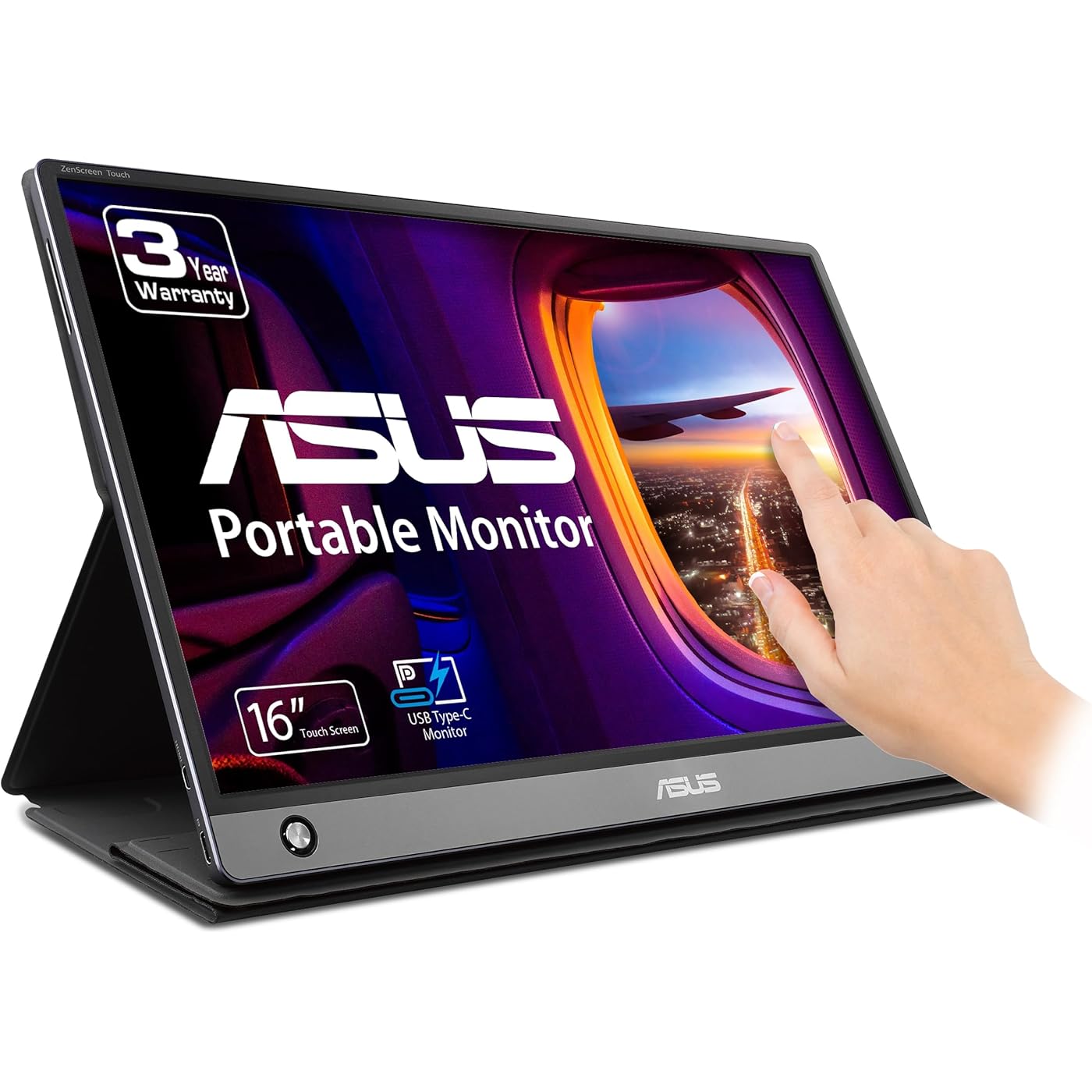
ASUS ZenScreen Touch Screen 15.6” 1080P Portable USB (MB16AMT) - Full HD (1920 x 1080), IPS, Anti-Glare, Built-in Battery, Speakers, Eye Care, USB Type-C, Micro HDMI, Smart Case, 3-Year Warranty
  • Based on 1,080 reviews
Condition: New
Checking for the best price...
$395.95 Why this price?
Save $112.04 was $507.99

Buy Now, Pay Later


As low as / mo
  • – Up to 36-month term if approved
  • – No impact on credit to apply
  • – Instant approval decision
  • – Secure and straightforward checkout

Ready to go? Add this product to your cart and select a plan during checkout.

Payment plans are offered through our trusted finance partners Klarna, Affirm, Afterpay, Zip, Apple Pay, and Google Pay. No-credit-needed leasing options through Acima may also be available at checkout.

Learn more about financing & leasing here.

Selected Option

Free shipping on this product

30-day refund/replacement

To qualify for a full refund, items must be returned in their original, unused condition. If an item is returned in a used, damaged, or materially different state, you may be granted a partial refund.

To initiate a return, please visit our Returns Center.

View our full returns policy here.


Availability: 11 left in stock
Fulfilled by Performance Tech

Arrives Friday, Jul 31
Order within 12 hours and 43 minutes
Available payment plans shown during checkout

Protection Plan Protect Your Purchase
Checking for protection plans...

Style: 16" IPS USB-C Battery Touch Screen Speakers


Features

  • 15.6 FHD IPS USB Type-C portable monitor with hybrid signal solution for compatibility with USB Type-C and Type-A sources (Note: DisplayLink driver needed for Type-A connection)
  • Ultra-portable award-winning design at 2 pounds and 0.3 inches slim to pair perfectly with ASUS laptops, phones, tablets
  • Built to be on-the-go with two integrated speakers and 7800mAh battery for ultimate compatibility
  • Smart cover and smart pen hole allow landscape and portrait orientations to adapt easily with auto rotation
  • ASUS Eye Care technology with TUV Rheinland-certified flicker-free backlighting and blue light filter minimizes eye fatigue
  • 3-month Adobe Creative Cloud: Receive complimentary access with the purchase of this product (valid until 8/31/2026)

Description

Designed for portability, The 15.6” Full HD IPS zenscreen MB16AMT USB monitor features a responsive 20-point touch functionality for maximum accuracy. At only 2 pounds and 0.3 inches slim, the MB16AMT easily slides into briefcases to become the ideal travel companion for laptops to maximize productivity and simplicity

Brand: ASUS


Screen Size: 15.6 inches


Resolution: FHD 1080p


Aspect Ratio: 169


Screen Surface Description: Glossy


Aspect Ratio: 169


Screen Finish: Glossy


Contrast Ratio: 7001


Refresh Rate: 60 hertz


Display Type: LCD


Display Technology: LCD, LED


Viewing Angle: 178 degrees


Brightness: 250 cd


Picture Quality Enhancement Technology: IPS


Screen Size: 15.6 inches


Item Dimensions D x W x H: 12.01"D x 19.1"W x 2.99"H


Item Weight: 2 pounds


Resolution: FHD 1080p


Display Resolution Maximum: 1920 x 1080


Native Resolution: 1920x1080


Voltage: 9 volts


Response Time: 5 milliseconds


Connectivity Technology: USB


Hardware Connectivity: Micro-HDMI, USB


Adaptive Sync: G-Sync Compatible


Additional Features: Blue Light Filter, Built-In Speakers, Eye Care, Portable, Touchscreen


Specific Uses For Product: Business, Multimedia, Personal


Color: Dark Gray


Mounting Type: Desk Mount


Compatible Devices: Gaming Console, Camera, Laptop, Smartphone


Warranty Type: 3 Years Manufacturer Warranty


Shape: rectangular prism


Brand: ASUS


Model Number: MB16AMT


Model Name: MB16AMT


Warranty Description: 3 Year Warranty with ARR


UPC: 192876331101


Manufacturer: ASUS


Unit Count: 1 Count


Built-In Media: USB Type-C, Micro HDMI, Smart Case


Item Type Name: ASUS ZenScreen MB16AMT 15.6" Full HD Portable Monitor Touch Screen IPS Non-glare Built-in Battery and Speakers Eye Care USB Type-C Micro HDMI w/ Foldable Smart Case


Total Number of HDMI Ports: 1


Total Usb Ports: 2


Number of Component Outputs: 1


Total USB 3.0 Ports: 2


Frequently asked questions

If you place your order now, the estimated arrival date for this product is: Friday, Jul 31

Yes, absolutely! You may return this product for a full refund within 30 days of receiving it.

To initiate a return, please visit our Returns Center.

View our full returns policy here.

  • Klarna Financing
  • Affirm Pay in 4
  • Affirm Financing
  • Afterpay Financing
  • Zip Pay in 4
  • Financing through Apple Pay
  • Financing through Google Pay
Leasing options through Acima may also be available during checkout.

Learn more about financing & leasing here.

Top Amazon Reviews


  • Gets the job done
Style: 16" IPS USB-C Battery Touch Screen Speakers
I bought this because I travel a ton for work and pleasure and needed a way to match office efficiency. I got this portable monitor because of a sale during Prime Day, a free 3-year warranty, and the monitor has a built in battery, which was rare for portable monitors in this price range. I've used the monitor for close to 2 months and have enjoyed the use of it so far. Here are my opinions: The battery life is decent. I can use the monitor without charging for 4 hours. I wish the battery was better, but the charging output is the same as my computer so it's easy to switch from charging my computer to charging my monitor so it's not a big deal. It is important to note that the charger that came with the monitor is short and is not suitable for computers or monitors as outlets are usually closer to the floor than the top of a desk/table. The monitor sleeve is also decent and serves as an okay stand so I bought a foldable portable stand for $15 so that problem is solved. The monitor came with an adapter so that I can connect to my computer, the adapter is pretty small and is just the right size for me and my work needs. I did, however, buy a second longer adapter just in case I need it. The monitor is touch screen, though it seemed somewhat buggy to me. This didn't really impact me because I don't care for touch screens on my monitors and I just turned it off. The visuals are good and functionality of the monitor are great. I utilize the monitor to use different software and mapping tools for work and there is no lag/delay and are visually similar to what you'd get on any office monitor. Consensus: The monitor gets the job done and for the discount/warranty I got, it was an excellent deal. I either bought or had several parts in hand to improve my experience with the monitor (charger, portable stand, etc). For the purpose that this monitor serves me, I am very pleased. However I recognize that there are substantially better portable monitors, but they all cost considerably more than this one. I would buy this monitor again, but only during a huge sale like Prime Day or Black Friday. The monitor is fine, but it's not so amazing that you have to buy this very second. Do what I did and wait for the next big Amazon sale. ... show more
Reviewed in the United States on September 11, 2023 by Diego Lopez-Duran

  • Definately a top of the line portable display, even if I first received a lemon..
Style: 16" IPS USB-C Battery Touch Screen Speakers
This review is for the touch/battery (AMT) model. When checking these reviews make certain you filter or at least pay attention to which monitor the review is for. This listing includes the base model (AC), battery (AP), and touch/battery (AMT) models depending on what style is selected, which makes filtering through reviews and questions/answers very confusing. The first monitor I received was Dead On Arrival, which made me quite skeptical. I reluctantly opted for a replacement instead of a refund and I am VERY glad I did. In the past I've owned the AC model, and the touch/battery is a huge upgrade. I've always been a fan of the pen stand and folio cover/stand; but my main complaint with the AC model was the brightness. The battery allows for MUCH more satisfying brightness, and the touch is very convenient. Additionally the optional mini-HDMI input allows connection to many more devices than previously possible. One huge benefit that is seldom mentioned to using the ASUS zenscreen over a different brand portable monitor is the graphics processing hardware inside. Usually, with integrated graphics on your computer you are limited to 2 additional displays. Because this display can do graphics processing on the device, this limit is not considered, and you can use this as a 3rd display, potentially even more than that if you have multiple of these screens and enough USB ports. I am very pleased with this screen, and my only concern is that it may stop working one day (like the defective unit I initially received); but only time will tell, and I only worry because of how much I enjoy this device. ... show more
Reviewed in the United States on January 12, 2020 by Zach B.

  • Stopped working and bad customer service by ASUS
Style: 16" IPS USB-C Battery Touch Screen Speakers
I really liked the product until it suddenly died a couple of hours ago. I had been using it for a week, and I loved it! It looks sleek, I love the magnetic cover and the fact that it's a touch screen. I have another ASUS portable monitor (really old version) and that one is still working though it's been years, so I expected quality from the new one too. Unfortunately I was mistaken. The monitor worked great for a week. I was using it this morning with my laptop. Then when I was off for a bit, both my laptop and this ASUS monitor went to sleep. The monitor never wakes up after that. The light indicator is green (fully charged), but it will not connect to my laptop, my desktop nor my wife's laptop. I changed the cables and turned my laptop and desktop on and off. Nothing. So I contacted ASUS customer service. Note that I don't think I've ever left a bad review. Manufacturing defects happen, though I rarely got one, and I'm pretty understanding on that front. HOWEVER, bad customer service finally prompted me to post this review. I called hoping that there's a simple troubleshoot that could be done, since I really need this monitor because I'm working in my kitchen while watching the kids (shelter in place), and I seriously didn't want to return it. The wait wasn't long, like 10 minutes. However, when I got connected the agent basically read a script saying that due to Covid19 they weren't able to provide support over the phone, and told me that I need to use the live-chat on their website. I already went to the website prior to the call and couldn't find a working chat feature (the link for "chat" just opens a self-help page, which I already read through). I told him I really needed this to work and if I couldn't get it to work I would have to return it. Note that I wasn't yelling or even upset. The agent basically told me okay. At the end (that was pretty much the end) he told me there's a brief survey and please participate. I was NOT planning to, since TBH it's a waste of time and wouldn't get the monitor fixed. But then the line went dead without going to the survey, since he hung up on me. And THAT'S the reason I feel I need to post a review here. A defective product happens (possibly tied to the portable battery or the USB-C port or the driver). It's unfortunate, but it happens occasionally. However, when it happens and the company does not provide a good service to the customer, THAT is a big problem. So to whoever is buying this product, note that the issue of the monitor suddenly stop working is real, but the worst part is ASUS will not give you any technical support and will hang up on you if you call them. ... show more
Reviewed in the United States on May 20, 2020 by adrianto azali

  • Great Idea, but the Asus ROG 17' might be a better buy. Also... Questionable reliability.
Style: 16" IPS USB-C Battery Touch Screen Speakers
I gave it four stars instead of 5 due to reliability. - Pros The ZenScreen Touch is a sleek device, its small and slim 9mm profile, and fits easily into a backpack. It's great for road warrior on the who likes the convenience for a dual-screen work environment. It's also great for connecting it to your Phone (Not Compatible with all phones) to watch a movie or play a mobile game on a larger screen. The model with the built-in battery is great for when you are not close to a charging source. - Cons There are only two ports on the ZenScreen Touch placed on the bottom left edge - a micro HDMI and a USB-C that supports DisplayPort and is the sole charging port. This means that if you use USB C as you primary connection, the source will be it's only the only option to power to the monitor. This is an issue when you have this connected to your laptop when you are not close to a power outlet. This will serverly impact your Laptop's battery life. There is an option built into the Monitor that will prevent the Zen screen drawing power from the laptop (the model with Battery option) which address this issue. If this is an issue, Asus does have a 17" ROG (Republic of Gamers) model that looks almost identical to this model with an additional dedicated USB-C charging port. (The ROG model also has high refresh hitting 144hz to 240hz.) This brings me to the biggest issue of the ZenScreen model with the internal battery. When I run the battery level down to 0%, The monitor will not turn on at all. Any electrical charged from the USB-C cable will be directed to charging the battery, so the monitor will be useless until it reaches a predetermined power level. This happened to me already, but I didn't take note of the minimal charge level before it could turn on. I think it is safe for me to say that it'll turn on around 5%-10% battery levels. Which brings up another issue. If you allow the battery to drop to 0% and forget to charge it, you may break your monitor. Lithium batteries tend to have minimal safe power levels. If the battery drops below that power level, it will disable itself and the battery is no longer useable. (This is actually a safety feature and is used in all devices using Lithium Batteries.) That means, your monitor will be stuck in the charging state and will not turn on again until the battery is replaced by Asus. Be very aware of this if you do not plan to use your Zenscreen for an extended amount of time. You should charge your device to 80% (not 100%) before storing it away. Although the battery model sounds convenient, I recommend buying the model without the battery. Final Advice. I'm an Asus Fanboy, particularly with their premium ROG lines of products. I feel that the Quality of Asus products has been dropping drastically. If Amazon gives you an option to purchase a protection plan for this monitor, I HIGHLY recommend buying it, and this is why; I've had my Zenscreen for almost 2 months, and now the Menu button is not working. I might have to RMA this. I've also purchased a $600 Asus ROG Motherboard, and it had two dead memory ports. Asus has issued an RMA for it under warranty. I'm planning to send it out later this month. I'm responsible for the shipping fee. I've purchased a $1000 Asus ROG Phone 2 in April and it was Dead in Box. I got it replaced by Amazon. Shipping paid by Amazon Prime. I've purchased a $300 Asus Twin View dock in May and it was dead inbox. Asus is issuing an RMA under warranty, I have to pay for shipping. Now I think my $300 Asus Ryojin AIO CPU cooler is malfunctioning, I am preparing to request for an RMA. ... show more
Reviewed in the United States on August 10, 2020 by Robert

  • Finally the Touch version. Works with Samsung DeX and slight improvement over the non-touch version.
Style: 16" IPS USB-C Battery Touch Screen Speakers
When I bought the non-touch screen version last year, I wished that it had touch. Asus finally made one so I and bought it. The original MB16AP I bought suited my uses quite well, and my review of that unit still stands and basically everything I wrote for that one can be said for this one except for a few things I'll address. This one has touch, has a bit more brightness (250cd/m vs 220cd/m), has a non-glare vs glare screen and an extra micro hdmi port for different connection setups. Everything else is the same as the MB16AP. Btw, Amazon really needs to make separate filters for reviews when it comes to these devices. having them all grouped together doesn't help anyone. Anyway,... I bought the original (non-touch) one for travel so I can connect it to my laptop and have extra screen space. That one will go to my spouse, while this one will also be used for travel. The previous one had a button to control the menu while the new one has a 5 way OSD navigation button. Either one can be frustrating to use after a while so its best to download the Asus control widget. This monitor comes with the necessary USB Type C cables, and a Type C to A adapter. It includes a real ink pen to use as a stand in the event you forget the stand cover, but I doubt if one is traveling with this, that they will carry it around with out the cover. As for the pen, I wish Asus would have included a digital pen, be it wacom or otherwise, but doing so would probably increase the price to include a digitizer screen. Maybe in the next version. The monitor being touch, works well with Windows. And depending on your laptop or PC's power, you can attach the monitor to a multi monitor setup. While that may be overkill, I tested it with my existing 3 monitor laptop setup at home and it worked really well without any hiccups. (see images and diagram) But the main purpose is for travel. I plan on using my Samsung Galaxy Note 10 Plus to stream over Samsung Dex onto either the laptop or the monitor. You might ask why use Samsung DeX when I'm already bringing a laptop? Well some hotels don't have a good wi-fi so using my phone signal through DeX overcomes this obstacle. Connecting the phone to the monitor can be done a few ways. One is with a hub/adapter or directly to the phone as shown in the diagrams I uploaded. If I use a Type-C adapter hub (setups 1 and 2) Dex works, but the touch features of the Asus Touch monitor do not. (This is probably more due to Windows than Asus or the adapter used). With the previous MB16AP monitor, being that it is not touch, it doesn't matter. But if I wanted to use the touch feature on this monitor with Samsung DeX, the phone has to be connected directly to the laptop and then route the Asus cable from the laptop to the monitor (as in setup # 3). Then touch works great. Asus supplies a leaflet manual, but I found it useless. It better to see the youtube videos or at their website directly (as well as get the latest updates). Pros: Much of the pros on my previous non-touch monitor applies. (https://www.amazon.com/gp/customer-reviews/R1Q5DWKN6EIY1B) Has touch. Has an additional connection port. Battery lasts about the same as the previous non-touch model. has an additional USB cable and port for specific connections. A few side notes: While Asus supplies the necessary cables, I ended up getting better (10Gbps Gen 2) cables. Cable Matter USB-C to USB-C 3.1 Gen 2 cables (B01L0F6AJI) AmazonBasics USB-C to USB-A 3.1 Gen 2 cables (B01GGKYR2O) Dockcase USB-C to USB-C 3.1 Gen 2 small length (B01GGKYR2O) Better adapter/hub to use with DeX, Meco 7 in 1 Type C adapter (B07NKB697F) Cons: Leaflet manual is way to simple. Better to go on the web to get more info via their website or videos. No dedicated power port. Asus should still include a dedicated power port to charge the monitor while in use instead of using your laptop or phones battery. Come on Asus, make it so. The one 5 way control button gets annoying, better to download the widget. Pen is just a ink pen not a digitized pen and by extension, not a digitizer screen. (but my laptop is, so not much of a con) Overall, another great device from Asus and improves upon the previous model by offering extra connection and touch screen. ... show more
Reviewed in the United States on September 10, 2019 by David Vega

  • Pretty awesome, except for one stupid "feature" and the cable routing / plug locations
Style: 16" IPS USB-C Battery Touch Screen Speakers
This has pretty much everything I'd want in a portable monitor, with two gripes: 1. the monitor goes to sleep after FIFTEEN SECONDS if the input signal drops. If you have to reboot your computer, the monitor GOES TO SLEEP AFTER FIFTEEN SECONDS. It is always going into power saving mode, even when it's fully charged and PLUGGED IN AND I DON'T WANT TO GO INTO POWER SAVING MODE EVER -- EEEVVVEEERRR. They 10000% need to publish a firmware update to give the option to permanently disable this feature because IT SUCKS. GOING TO SLEEP IN 15 SECONDS IS THE DUMBEST POSSIBLE CHOICE - WTF ASUS. 2. The cables come out of the side of the monitor on one lower corner. This makes it hard to situate the screen next to a laptop if you want to do side-by-side for dual screen with the least possible gap. Since the stock USB-C cable is so dang short, and depending on which side your ports are on your laptop, you might wind up with the cables pointing out where the laptop should be sitting, so you have to move the thing behind, and then you get a weird gap and it screws up the viewing angle. I bought this thing for a business trip and spent two weeks with it in quarantine. I had yanked it by the cables on accident a couple of times and eventually yanked it off the table onto a hard tile floor, splitting the frame in two. Luckily, with some banging to straighten out the dented metal, it went back together and had 0% damage to the screen. The cable routing is dumb and they should come out of the back, or be right angle, or do anything other than what they have. ... show more
Reviewed in the United States on March 1, 2021 by Paul

  • Great portable battery powered monitor.
Style: 16" IPS USB-C Battery Touch Screen Speakers
Love this screen but I can't give a review on a brand new out of the box one. I bought mine on a scratch and Dent from Amazon for a decent price after some adjustments when the product had slightly more than cosmetic damage. I will say even though mine isn't perfect condition it's a really great portable monitor. The battery lasts a surprisingly long time. The screen is plenty bright for me. Because it has its own power it doesn't suffer from the same problem powered by your phones ones do. I use a single USB c cord to connect to my Samsung phone for Dex or mirroring. This setup is like having a very large powerful tablet and it's fantastic. The single usb c cord comes with it and supports touch screen through it if your monitor is the touch enabled one. It also can be used with hdmi but that does not pass touch screen through it so you will have to use the phone for imput. I only use that when I want to charge the screen while watching it. The built in speakers are pretty decent IMO. And the on screen controls are very intuitive unlike most monitors I've owned. I dont find that it is heavy considering it's battery and the size of it and it's very thin even with a battery built in. Pros are everything I mentioned so far. Cons are that this isn't a rugged device by the nature of it I'm sure you could easily break it dropping it even once. They are kind of flexible so I keep mine in a built ny brand hoodie sleeve that's made for laptops. It has a good buffer between the edge of the screen and any contact points. It's definitely wider in this but worth the extra stiffness and protection for carrying around. I think a little more stiffness and it's a five star item. Would definitely buy again. ... show more
Reviewed in the United States on December 29, 2019 by Straybullet

  • Work like a Rock Star...
Style: 16" IPS USB-C Battery Touch Screen Speakers
I don't often write reviews for monitors because in general, they either work or don't work (and usually in the first 5 minutes of your most demanding purpose.. you either print out the return label or toss the box it came in).. but this is a TRAVEL monitor.. which carries a different set of rules.. (for the record, I ditched the box) Just for an understanding of who I am.. I'm a person that travels a lot and basically keeps a mobile desk.. Laptops, additional screens, tablets, multiple phones, peripherals up the wazoo, and so many cables/adapters that if I could trade them for money, I would be a millionaire (small). So now that we have established the player.. on to the show. The simple, It's a monitor. And unlike its MB16AHP brother, this one lacks a speaker.. but this monitor is geared towards being an extension of a tablet/phone rather than a computer so that's not really a negative.. But it's a touch screen monitor. I use this with my mac and windows laptops.. (Windows recognizes this as a touch screen and loads appropriately.. sadly with OSX, you have to get a 3rd party driver (Using the Touch Base driver (it only supports 9 points vs. the monitor can do 10).. I wish Asus would include this somehow, but as the driver is about 150 dollars for a single install.. not sure if that's feasible.. but tis the price we Mac people pay.. *sniff*. Just something to think about Asus. The colours are rendered pretty accurately.. (primary monitor is Adobe 1998 colour calibrated.. and this after adjusting is pretty much on-par with the primary). Something I find is often an issue with monitors of different types/brands (especially travel ones) No flicker was detected even with some games (tested with Battlefront, and Witcher 3).. Low light is pretty solid (I tend to do a lot on airplanes at night, so a monitor that is solid in low/no light is important and this little baby is perfect with that. The battery life isn't bad (rated for 4 hours, I got about 3 hours and 35 minutes of use out of it (might have gotten a little more if I drop the brightness down.. but still 3.5 hours for a 15 inch screen is pretty good.. my macbook pro 15 does about the same with all the bells turned on.. so it matches with my primary use case well) .. (you can switch between using the onboard battery with phones/tablets) or cable charging (from a computer/desktop).. The screen doesn't "auto-rotate" but it can be rotated in software (via driver) or in the setup (via local controls). About the only thing am not so keen on is I wish the bezel was thinner.. but as it is, its pretty good.. When traveling, I use it vertically.. and when "local", horizontally.. when vertical its perfect as the screen clips don't take up any screen real estate, but horizontally... I'm taking up space and a half-inch on a 15" screen matters.. (especially if gaming). (but that's more when I want it mounted the way I have it in the picture.. otherwise I would just use the included cover/stand. (a la apple tablet) Some suggestion for purchasers. While this is geared toward tablet/phone purchasers.. Apple users will need a lightening to HDMI adapter (until apple starts supporting Type C like everyone else). so plan accordingly. For laptop/Desktop people its a little easier. Also take the time to go on Asus support site to get an explanation of all the options (I wish they would have included a printed book, but then again, I remember that had they did that, I would have tossed it away and gone to their site when I needed it.. so makes sense.. save a few trees because most of us won't really read the book until we NEED to). Yes, its a little more expensive than most of the other ones out there.. But I honestly found this one to be worth the money (and I don't say that lightly.. I have 4 mouths to feed, and a wife that believes tech = drugs (ie: both should be avoided whenever possible) so anything I spend has to be worth it (near term and long term). (its thin, light, has a battery (most don't.. only wish it would flow OUT to use as a secondary power source/battery pack) good resolution (1600x900 max).. and no ghosting for gaming.. (a lot of the cheap ones are fine for "work" (word processing, a few excel spreadsheets, or other graphically undemanding tasks.. but the second you put something with a high refresh rate.. you start seeing ghosting so bad you think the meds have kicked in (or worn off) then its not the one to get. In other words.. very nice Asus.. keep it up. ... show more
Reviewed in the United States on August 26, 2019 by The Shadow

Can't find a product?

Find it on Amazon first, then paste the link below.
Checking for best price...