




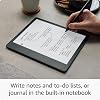
Kindle Scribe (16 GB) the first Kindle for reading, writing, journaling and sketching - with a 10.2” 300 ppi Paperwhite display, includes Basic Pen +3 months of Kindle Unlimited (with auto-renewal)
Condition: New




$339.99
Save $160.00
was $499.99
Buy Now, Pay Later
As low as
/ mo
Learn more
- – Up to 36-month term if approved
- – No impact on credit to apply
- – Instant approval decision
- – Secure and straightforward checkout
Ready to go? Add this product to your cart and select a plan during checkout.
Payment plans are offered through our trusted finance partners Klarna, Affirm, Afterpay, Zip, Apple Pay, and Google Pay. No-credit-needed leasing options through Acima may also be available at checkout.
Learn more about financing & leasing here.
Selected Option
Free shipping on this product
30-day returns
Learn more
This item is eligible for return within 30 days of receipt
To qualify for a full refund, items must be returned in their original, unused condition. If an item is returned in a used, damaged, or materially different state, you may be granted a partial refund.
To initiate a return, please visit our Returns Center.
View our full returns policy here.
Availability:
Only 1 left in stock, order soon!
Arrives
within 30 days


At a glance
- Condition
- New
- Option
- Basic Pen
- Setup
- 16 GB
- Offer Type
- With 3 months of Kindle Unlimited
Features 7
- Amazon Kindle Scribe (16 GB) the first Kindle and digital notebook, all in one, with a 10.2” 300 ppi Paperwhite display, includes Basic Pen
- EXPLORE KINDLE NOTEBOOKS – A digital notebook you can write on. Journal, sketch, take notes, and more.
- CONVERT HANDWRITTEN NOTES TO TEXT – View or share your notes with contacts and browse notes on the go through the Kindle app.
- READ AND WRITE AS NATURALLY AS YOU DO ON PAPER – The world’s first 10.2" 300 ppi glare-free, front-lit display.
- TAKE HANDWRITTEN NOTES AS YOU READ – Write notes within millions of titles in the Kindle Store.
- IMPORT AND MARK UP DOCUMENTS – Review and take notes directly on PDFs, or create sticky notes in Microsoft Word.
- THE LONGEST BATTERY LIFE OF ANY KINDLE – Unlike tablets, Kindle Scribe offers months of reading and weeks of writing on a single charge.
Frequently asked questions
If you place your order now, the estimated arrival date for this product is:
within 30 days
Yes, absolutely! You may return this product for a full refund within 30 days of receiving it.
To initiate a return, please visit our Returns Center.
View our full returns policy here.
To initiate a return, please visit our Returns Center.
View our full returns policy here.
- Klarna Financing
- Affirm Pay in 4
- Affirm Financing
- Afterpay Financing
- Zip Pay in 4
- Financing through Apple Pay
- Financing through Google Pay
Learn more about financing & leasing here.
Similar Products


![Clear Case Compatible with Kindle Scribe 10.2" (2024 Release/ 2022 Release) Skin Cover with Pen Holder, [Lightweight] Silicone Slim Thin Soft Protective TPU Back Shell - Transparent, DIY with Stickers](https://m.media-amazon.com/images/I/71m8ne8IRTL._AC_US500_.jpg)

Top Amazon Reviews
Wonderful
Option: Basic Pen
Setup: 16 GB
Offer Type: Without Kindle Unlimited
I’ve had my scribe for a few weeks now and while I rarely write reviews, thought I would for this since I’ve had kindles since they came out. First, I’ve had kindles hd and the paperwhite and while I like the paperwhite better for my eyes, I’ve not found one I consistently used one, since the kindle DX (which only recently died), because the screens were so small. I have trouble with my eyes and need to enlarge the print, so the small kindles really don’t work as well for me. That said, I still have a kindle hd with my scribe. I haven’t tried the website on the scribe — I don’t see it — and I like to be able to look things up based on what I read as I’m reading so that is an advantage to the hd. I’ll have to see about the web browser on the scribe when I find it (I missed the return date on the hd too, so that’s why I have it. I love the larger size of the scribe. This and the pencil are what really sold me. I feel like I have my dx back (off only it had cellular!!!), my favorite kindle ever. It allows me to enlarge the font based on how my eyes feel, which is great when I pass the 3 hour mark. I also love the ability to change the screen from grey to a warmer color. I am one who prefers warmer colors to cool colors, so that’sa nice thing they added. What I most like is the ability to take handwritten notes and to have the notes you’ve taken across books collected together into one notebook. I need to play with this more, but I’ma writer, so this feature is amazing for me for many reason. I start with a vague idea that different books not necessarily having anything to do with each other May actually be put together to form a premise, so to have mother from those books smushed together is incredibly helpful. That’s basically how I would organize my hard paper research. I don’t know if this is possible but if not, this would be a great update, and that is to create collections of notes in different notebooks, to create a collection of books and then have a notebook within that collection with all the notes for the books in that collection. That would be pretty easy to code. Finally the pencil. I love it. I love it so much better for writing than my Apple Pencil. I feel like I’m writing on paper. It’s beautiful. I like the Apple Pencil for things like procreate and my scribe for taking notes. I’m left handed and I usually don’t have problems. Every now and then my palm will change it from a handwritten note to a text note, but it’s not a big deal. I use the pencil to tap on handwritten note and it puts me back. As a lefty you get used to dealing with these things. I’ve had worse problems trying to write in apps. I also tried the oasis. It was nice. It also worked with my eyes. The buttons for the pages was a nice added touch. It is small, but it makes great use of the real estate available on the page. I was a little frustrated because I twice ordered the cellular version and both times received the Wi-Fi version, so I gave up on the oasis and bought the scribe, which I hadn’t bought because it was Wi-Fi. I’m so glad I did. Aliso, I’m case you don’t know, you can change your kindle address to something simple like [email protected], so it’s easy to tell someone where to send documents or books to you (and easier to send things to yourself). If all you want to do is read books, the oasis is fabulous. If you like having things in color and want the ease of a quick Internet to research concepts you read about, the hd is great. If you like to research and like the idea of having your notes from different books collected in one notebook, or would appreciate a larger screen, or would enjoy a writing experience, the scribe is great. There’sa kindle out there to meet just about everyone’s needs. (I’m posting without proofing, so please forgive typos.)
...
show more
Reviewed in the United States on August 30, 2023 by Liefde
Perfect for my needs.
Option: Basic Pen
Setup: 16 GB
Offer Type: Without Kindle Unlimited
I have been wanting a bigger screen kindle since the slow death of the DX. I love reading, I read and listen to between 50 and 100 books a year. The screen on the scribe is terrific, better than the competitors I've seen, I love the e-ink screen. It's also, and this is crucial as it is part of my profession, PERFECT size for textbooks. I write on paper quite a bit. But, I also have a surface I've been taking to meetings and the like. It's heavy, and I have to keep it charged. Then, I lost my pen and the university I work for said they couldn't purchase me a new one. They could, however, purchase a new surface, which, well, is the idiocy of bureaucracy. So, in protest, I went back to the ubiquitous yellow legal pads. My note taking is rudimentary, I am not a digital artist, I have a huge kindle library, and I like the bigger screen to read from. This is probably who the Scribe is made for. The writing experience is great. It has a tactile feel, a bit like that you get from the surface pro pen 2, or, you know, actual paper, but, you never have to charge the pen. It also has the digital eraser on the pen, just flip it over and rub away (heh). The premium pen has a button that is set out-of-the-box as the highlighter button. There is no lag in the writing, if there is, I can't tell. It feels goooooooood, and looks good. There are some things you won't get. You won't get any kind of compatibility with note-taking apps, but, you can quickly send your note or whole notebook to your email as a pdf. If you want to use that pdf with your note taking apps or the like on your tablet, it's really straightforward. I imagine this is something that Amazon will add at a later date. Very important was the ability to mark-up pdfs. I do a lot of writing and research, and look at a lot of pdfs. I usually print them out and mark them up, because I care more about my comfort than trees. I don't have to do that, now. For ebooks and the like, you have a sticky note feature, which opens a box for you to write a note and then the box closes, like adding a comment in Word. For the peer-reviewed papers I download, I make sure they are in pdf and then just send them to my kindle using email. It isn't hard, and anyone making it out to be is missing something completely, like how to use email. Compose a new email, drag your pdfs to it, send it to your kindle email. On the pc, and I think the kindle app now, too, you can just drag and drop on amazon, too. It is painless. Once the pdfs are on my kindle, I can mark them up as if I'm writing on the pages, just like the notebook feature. So, this has been worth it to me. Load it up with pdfs, I'm able to read through them and mark them up, send them back to myself through email if I want. So, for me, this is great. I also got the discount for trading in my old kindle, so the price point was very reasonable. I don't need flashy. I don't need colors or brushes to paint with. I just needed something I could use to mark up pdfs and read my kindle books, and not have to charge EVERY DAY. Probably won't have to charge it every week. The battery life is magnificent. Ill say that again.... The battery life is magnificent. I've used it for 5 hours straight, including using the notebook a lot, and I've lost 2% of the battery. I'll leave it to others to complain about the price, or the writing not having enough features, or whatever else they want to complain about. I do not use the kindle to surf the web, because I have a computer, a tablet, and a phone, and I do not need to use it as a digital artist. My doodles are pretty impressive, but that's the most I need to get out of it. 1) I don't have to jack around with books, kindle has the best access and the best library and I want it to be easy and 2) I can mark my stuff up without having to charge my pen or my tablet. That's all I need and this Kindle has delivered. Edit: I see reviews about the little notebook tool bar thing hanging out on the margin of your page, including a picture with it circled. It's pretty easy to hide, click those three buttons at the top and HIDE THE TOOLBAR. Not rocket surgery at all. There are a lot of reviews complaining about features that they don't understand, or complaining about something not being a feature....when it actually is. So, do your research before believing any reviews, mine included. It's a lot of money to spend or not spend based on the opinion of people who may not use it like you would want to or who are complete morons who can't figure out how to use it.
...
show more
Reviewed in the United States on December 16, 2022 by AJ
The most exciting Kindle in years
Option: Basic Pen
Setup: 16 GB
Offer Type: Without Kindle Unlimited
When this first came out, I was pretty sure I didn't want one: "it is too large" "I don't need a notebook" "an iPad is a better value and it's more versatile" "I don't need to mark up PDF and Word documents" "I don't see the value of making handwritten notes for my Kindle books"... However, when it was marked down a couple of weeks ago, and I realized I could save even more by trading in a Kindle Oasis which I got a few months earlier, and did not like, I decided to get one. Of course it has the same reading features as any recent Kindle. The only difference for reading Kindle books is that you can create so-called Sticky Notes in addition to Notes typed in with Kindle's virtual keyboard. The biggest functional change is the Notebooks section, where you pretty much have to abandon typing (except for titles of the documents created there). My biggest surprise was how natural it feels to write with the Pen. I've had iPads with Pencil for several years, but while the Pencil is a flagship feature, and the handwriting recognition is pretty good, I've never felt comfortable writing with it (am trying some alternative tips, which helps somewhat). I've been jotting down ideas for some small software projects I want to undertake, and finding some traction in actually getting started with a couple of them. So while there may be additional features coming to Notebooks, I am not going to sit around waiting for them. It's good enough now to be useful to me. What I'm excited about are the changes to the Personal Documents service, which has been around for years, but which are finally getting an overhaul to support Word and PDF workflows. I'm not so interested in those in their own right, but already ePub and Word documents sent to the service look and feel like Kindle books (support 'enhanced typography' features). PDFs have been poorly supported: they are somewhat functional on Kindles, but the notes, annotations, reading position do not 'sync' to other Kindles and Kindle apps registered to your account. The annotations can only be pulled off a Kindle using My Clippings log file. In the Kindle apps, PDFs are virtually read-only; you cannot search, highlight, or set books marks. When the are sent to Scribe, however, they are converted to one of Kindle platform's fixed-layout formats, known as Print Replica. This is the format used for many textbooks and engineering books in Kindle Store, and previously Kindles could not read these. Currently the files converted from PDF are not fully functional: you cannot select and nightlight and search for text, for example. But if you take the file from the Scribe and side load it to the Kindle for iPad app, you can interact with the text just as you can with any Print Replica content from Kindle Store. So it is reasonable to assume there will be an update that will provide this expected functionality, and that Scribes will eventually be able to download Kindle Store content in this format. Conversely, these will sync with the Kindle apps for iOS and Android, and probably other Kindles. I do have some books in PDF format, but heretofore they have not been welcome on Kindle platform. When the Print Replica personal document support is rolled out, they will be. I'm not expecting all of this to happen in the next week or two, but hopefully within the next few months we'll have an update or two to fix the Print Replica issue and perhaps see it show up on another platform or two. And I'm hoping we see other Kindles and Kindle apps start seeing the 'enhanced' features with ePub and Word imports soon. If you require a true PDF or Word markup workflow, this is not the time to get a Scribe. Amazon hasn't give a lot of details about what this will look like. The current Share PDF does in fact return a PDF file, but it looks like a placeholder now. While I'm not the customer for this, Amazon needs to implement a more credible round trip if they want to succeed with customers who are looking for it. To summarize, I'm very happy I got one, it's much more than I thought it was, and I am looking forward to what comes in the next update.
...
show more
Reviewed in the United States on January 24, 2023 by TSemple
Superb, wish I got the 36GB w/ premium pen
Option: Basic Pen
Setup: 16 GB
Offer Type: Without Kindle Unlimited
The Kindle Scribe, it’s been the best kindle I’ve read on. I have a paper white for when I’m out and about for ease of mobility but that’s not to say I don’t miss the real estate of the Kindle Scribe when I do. I read a lot of nonfiction and textbooks on my down time and the big screen really does make a difference. I love reading on the big screen, it made reading more fun for me and let me get engrossed in the book. Somehow it easily helped me comprehend the information faster than on the paper white that I might have to reread or flip the page after a paragraph. This might have been the honeymoon phase for it but I am all about it! Especially in highlighting parts of a book which was so much easier with the pen than my finger on the paper white. Paper white is great however it’s got its own advantages for use as the Kindle Scribe does in certain circumstances. I still use both depending on the situation. I wish I got the premium pen but I got used to the basic pen quickly, later having decided to invest in this device I opted for the STAEDTLER Noris Digital Jumbo that writes like a dream, just glides on the screen and that pen really made a difference in my note taking experience. I downloaded a great planner app with hyperlinks that made it so easy to plan and organize my day, it took over my writing in a paper planner everyday. The only drawback to using it on the kindle instead of the calendar app on my phone is that I couldn’t access it on my phone when I was out and about. Well, I guess I could through the app but there was no changing anything on there and I wasn’t going to bring my kindle scribe to the grocery store to scratch off my list. Battery life is amazing, I’ve charged it once and then haven’t had to in a week. Still at 65% and have been reading and using in intervals all day everyday this week. The Kindle Scribe is thin and lightweight, sometimes not easy to hold with one hand and write although doable. Reading however was quite easy to do one handed which was practiced very often while putting little ones to sleep and comforting them while reading a bed time story. I haven’t dropped it yet but I got a clear case for it as the Leather Folio that came in the bundle is about a week later than anticipated. I feel as if it would be durable and withstand a good drop but I don’t see that occurring in the way I use it even with my small children running around. It’s light and thin but not fragile with the way it’s feel is. I could be wrong but I don’t plan on finding out. All in all, a great set up. Definitely recommend even with the new Kindle Scribe coming out in December which does look super snazzy. Amazon said they’ll be keeping updates for the original Kindle Scribe. So unless you like that white border or are willing to wait for the Jade color I would just stick to the OG Kindle Scribe. I appreciate it just as it is at least that’s what I plan to do. On a side note: if you’re here to compare this to the Remarkable or the Supernote Nomad for note taking, this is an ereader that can take notes. Not a note taking device that you can read books on. You’ll know what your priorities are and go accordingly. I would’ve absolutely have loved this if I were a student. Having my textbooks available AND be able to take notes. I’d carry this around without breaking my back with a heavy backpack. However, I wouldn’t have bought this just for the note taking capabilities, in that aspect it’s limited however as an ereader with the note taking capabilities this is top of the line especially with all the updates they added.
...
show more
Reviewed in the United States on October 21, 2024 by Andrea
Childhood dream come true!
Option: Basic Pen
Setup: 16 GB
Offer Type: Without Kindle Unlimited
There is only one con: it's not waterproof. It's 2025, why isn't waterproof technology the industry standard?? Anywho. This is hands down the single best purchase I have ever made. I've been dreaming of this ever since 1999 when I won a Game Boy off a Mountain Dew bottle top at a Thunder Skate USA facility. It came with a game called Wave Rider. It was because of that infuriating game that I realized my true nature- I'm a nerdy book worm to the core. Why couldn't this game be a book? The Kindle Scribe is a childhood dream come true! My favorite feature of this device is the notebooks. I have journaled since I was 8 years old. I'm now 35. Do you have any idea how difficult it is to keep nosy noses from rifling through your most private paper thoughts? I do. I had taken to burning my journals after filling them up. No need to literally hang on to my mind garbage. I have always had too many thoughts taking up space in my head, creating the need to jot them down and make them go away. Now, with the Scribe, I can click a button and the brain baggage is instantly destroyed. No more wasting paper (the poor trees!) No more searching (and stealing!) perfect pen to write with. The Scribe comes with the perfect pen! A forever pen! I got the basic pen. A basic pen for a basic... you know. The fountain pen feature is revolutionary! I've been "perfecting" my penmanship for decades and still write little better than a chicken's left foot. Woe is me and any who have to read my scratch. No more! The best part is that the ink never runs out, it always writes perfectly smooth. I also love how big this Kindle is. I'm blind as a butt in blue jeans, so this size is a huge plus for me. With my OG Kindle, setting the font to large yielded only a few sentences per page making me feel like I was back in pre school learning to read. No more! Other bonuses- I had signed up for a free month of Kindle Unlimited before ordering the Scribe. When I did order, it came with THREE months of free KU! A total of FOUR FREE MONTHS! But it got better. I ordered an OG Kindle for my mom (who is not as blind as a butt in blue jeans) and it came with another THREE MONTHS OF FREE KU! A grand total SEVEN MONTHS OF FREE KU! I was over the moon! I had also found it on sale (January of 2024) for $270. I put an $80 dollar gift card toward it and it brought my total down to $204! Woohoo! I ordered a fancy flippy pink adjustable magnetic cover for it separately. I am in love with this device. Never have issues with battery life or charging. I will say this though; I think the Scribe was marketed to the wrong demographic. I abhor writing on books, highlighting, dog-earing, and otherwise desecrating books, so I don't give a hoot in a hay storm about the sticky notes debacle other reviewers take issue with. I use this for pure entertainment purposes; sometimes I switch from reading to simply scribbling my brains out for the fun of it. Seriously. I have no idea if this is a good buy for work related tasks and I don't care. It's perfect for keeping track of what the one year old is eating, doodle notebooks for the nine year old, and reading and scribbling until there's drool pooling and crusting at the corners of my mouth for me. Like I said, it's a childhood dream come true! The only way I'd come off my Scribe is if they made a new one that is waterproof. Which reminds me- I got the software update of the new one! Thanks amazon! Seriously, best 200 bucks I've ever spent. A year of daily use and zero complaints (except the waterproof issue- grr *shakes fist*.) I can't recommend this enough. This is THE Cadillac of reading/ writing toys for adults!
...
show more
Reviewed in the United States on February 19, 2025 by Edward
Updated Review: I Love the 64 GB Version with a Premium Pen, & a Separately Purchased Cover
Option: Basic Pen
Setup: 16 GB
Offer Type: Without Kindle Unlimited
After all the issues I experienced and mentioned in my original review (see original review below) and returning the 16 GB Scribe I purchased, I went ahead and purchased the 64 GB version to try one more time. I am very glad I did. I have for some time been wanting to lighten my load and keep all of my journaling, notes, doodles, ideas in one place but organized separately without having to carry around multiple notebooks and the weight associated with them. I have been using it for 3 months now traveling across the states and the world to journal, write, and draw as well as taking it to technical classes for notes and ideas. To my great surprise and satisfaction, the feature I mentioned in my original review that was available in the UK but not the U.S. but really wanted was made available on the U.S. Scribes by the time I received the 64 GB Scribe in August 2024. I was so pleased that I could now have different page formats within the same Notebook!!!! I use my Scribe every day in some capacity. I am so pleased with it. I have even shared and sent both the searchable PDFs and transcribed searchable text to my PC. I could not find a mistake in the searchable PDFs. The transcribe to searchable text is impressive but not perfect. I write in a combination of cursive and print. My handwriting can be very messy at times and the transcription of my messy cursive handwriting is impressive. Where the imperfection occurs is when I use proper nouns especially ones from other languages other than English such as the names of geographic areas in South America. Another area is where I had created check lists, the transcription often put more than one line onto the same line running them together. The transcription would place check marks or boxes with "x's" in them where I had marked items as complete but was not consistent. Some how the transcription process inserted smiley face emoji's in some places. Have not noticed the pattern for this yet. Once transcribed, the finished document will do a spell check and let you know where a word might be spelled incorrectly. All in all, I am very pleased. If I wanted to use my writing for a paper or something, I would just need to clean up formatting in the editing and version rewriting process. I have also created my own page templates by uploading a PDF and using it as a page format. I can then write over it. This would be helpful for processes or projects or even games where you use a form over and over again. You can duplicate the master PDF form after uploading it to the Scribe then write on the duplicated form page and then save it under its own title. I have started reading books on the Scribe. This is a pleasant experience. I love real books, but they are heavy while traveling. I will not mark up a real book; however, I do like taking notes on my thoughts or questions when reading technical books or articles. I can now do this directly in the book on the Scribe if it is available for the Scribe. So now I will purchase for the Scribe the books I plan to read while traveling . And if the book I want is a technical book for a class or project, I will buy both versions, one I can read and flip through, and one for the Scribe so I can take notes directly in the book and travel with as needed. I have even uploaded knitting patterns to the Scribe and been able to mark through each row instruction as I complete it. I can then easily remove these marks if I need to undo and redo some of my rows as well as make the pattern mark free again by erasing my markups. This has made traveling with my knitting projects much easier without worry that I will misplace or tear my pattern. If you are going to get a Scribe, I recommend the 64 GB over the 16 GB. The Premium Pen is a must because the non writing end acts as an eraser and the button on the side allows you to quickly change settings, both saving a lot of time. Also, a cover of some sort it a must. I find holding and using the Scribe as well as traveling with the Scribe is awkward without a cover. Get a cover with a holder for the pen because the magnetic attachment of the pen to the Scribe is great for using it at a desk so the pen will not roll away, but not strong enough to keep the pen attached if walking or moving around. The seller still needs to improve its customer service. =============================== ORIGINAL PUBLISHED REVIEW: My first review for this was not allowed because of a focus on one or more of the following: the seller, the packaging, the pricing, or the availability. I bought this as a Prime Day deal. I was excited about this product after watching a YouTube video showing how each page within each notebook created on the Kindle Scribe could have a different page template per page. I like to bullet journal both personal and work but keep them in separate real notebooks. I have different style pages in each journal to accomplish different planning and journaling such as calendar pages mixed in with ruled pages mixed in with blank pages for illustrations, etc. I was excited because I could have both work and personal journals in one place, but still separate journal notebooks and only one item to carry around and keep up with. When I received the device, there were technical issues setting it up, and I could not find the page template functions that sold me on the product. After 6+ hours on the phone across ~8 different calls, a couple of emails, and 8 or so people, most of whom I could not understand or they could not understand me, it was determined that the U.S. version of the device does not have the ability to have multiple page templates in the same notebook. (The video I saw demonstrating the desired functions was featuring the same device but in the U.K.) My first review was mostly about the terrible customer service and technical support I experienced. Within ~ 2 hours of submitting my original review, I received a call from the seller. This person was friendly, knowledgable, and patient. I could understand this person, and this person could understand me. This person was able to immediately get info from technical people who were familiar with the Scribe and the settings & functions. This is how it was determined the U.S. version of the Scribe lacks the ability to have more than one page template style within the same notebook. It is a shame that I only got support after I submitted a negative review. The call ended with me trying to decide whether I wanted to keep it without what now seems like a simple and obvious function to include or return it. I also was not pleased about the memory that 2 notebooks with 7 pages across both notebooks were taking up. These had reduced the 16GB to ~12.5GB. Unfortunately about an hour after hanging up, the Scribe froze, displayed a memory error message, crashed, and now will not turn on. I started a return or replacement action. My only option is to return it. Am not given an option to replace. As I mentioned, this was a Prime Day deal so if I want a Scribe, I am now going to have to pay the current full price, which is more than the Prime Day price. So I am being punished for an item that does not work. Something that is not my fault or within my control. To rub salt in my wounds, since I do not have a printer—I am all virtual and paperless except for my bullet journals—I have to either pay a UPS store to print the label or pay FedEx $7.99 to pick up and package. I HAVE TO PAY MONEY TO RETURN A DEFECTIVE ITEM!!! AND I LOSE MONEY IF I WANT ANOTHER BECAUSE HAVE TO BUY AT CURRENT FULL PRICE SINCE REPLACEMENT NOT OFFERED!
...
show more
Reviewed in the United States on July 29, 2024 by Tracy Winters
Great for reading, not so great for notes
Option: Basic Pen
Setup: 16 GB
Offer Type: Without Kindle Unlimited
The Kindle Scribe is a 5/10 for me. If you get this just to read books, it is fantastic. With the large screen it feels like reading a hardcover book. And I like the extra bezel space on the side because it feels like a larger Kindle Oasis. I personally can't not recommend this as a note taking device. The software for notes is super basic compared to the Remarkable devices and Boox devices. It's hard to organize notebooks well. There is no "favorites" menu for your main notes. If you want to use the home screen to access your notes, your books and all the book recommendations at there. And you can't set up a different default Home Screen. So it caters to reading books vs being a notebook. Plus, it takes a while for the screen wake up. And when it comes to screensavers, you either have the option of using the book you are reading or Amazon's random images. The screensaver issue is a little annoying for me because I would like to have it just be blank or I could pick my own image. Exporting notes is a pain. You have to email them to yourself and then download them. Boox and Remarkable have a convient way to backup notes through their apps or integrate Google Drive/Dropbox. Kindle Scribe does not. I was using this as a journal, but I stopped doing that because at least once a week I will tap to open up a notebook and it will say "loading" but the notebook never opens. I will have to restart the device to get the notebook to open again. That is workable for journaling. But imagine having to restart your device during a meeting because a notebook won't open. Also had an issue where I lost notes in a notebook after restarting it. So if you are looking to take notes, I would suggest checking out the Remarkable devices or Boox devices. If you are looking for a bigger e-reader, this is a solid option. Lastly, beware of any Kindles right now because of glitchy software updates.
...
show more
Reviewed in the United States on November 22, 2024 by smarksman
Good for writing and for pdfs (!); some things cumbersome, though
Option: Basic Pen
Setup: 16 GB
Offer Type: Without Kindle Unlimited
I have both a Kindle Paperwhite and a Kindle Oasis, so buying a Scribe felt like more of the same--but better. I didn't care about the writing aspect; all I wanted was a truly big screen for reading books hardback-style. It still feels a tad bit smaller than a hardback, but that's fine. The tradeoff is that it's considerably lighter than a book. One surprising aspect is that I enjoy reading pdf's on it. Those free pdf books that you find on Internet Archive and elsewhere look good on a Scribe. In fact I never thought I would use the words "joy" and "pdf" in the same sentence, but there you have it. Marking up pdf books is a joy, too. Writing on Kindle documents is less than joyful. You have to open up a separate text box and write it in. After you close it, all you're left with is a tiny icon that you will never, ever be able to find on page for the rest of your life (though you can open annotations separately). Even with a bigger icon, I'm not sure I would use it. It's too cumbersome. Surprisingly, too, is the drag of the pen on the Scribe. It feels like real paper but a bit smoother. I have had a few system freezes, where the pen won't write (you need to page up and back again to clear it). I thought that the eraser on the premium pen would be unnecessary but now I wish I had gotten it. The alternative is to go through the little menu to activate the eraser on the pen. Erasing is strange. It tends to erase more than you want it to. You do need a cover. Its slipperiness combines with its weight means that it will get dropped some day. All in all, fairly satisfied for now.
...
show more
Reviewed in the United States on February 19, 2024 by Backlot Lover