Search  for anything...

acer 23.8” Full HD 1920 x 1080 IPS Zero Frame Home Office Computer Monitor - 178° Wide View Angle - 16.7M - NTSC 72% Color Gamut - Low Blue Light - Tilt Compatible - VGA HDMI DVI R240HY bidx

Based on 15,418 reviews
Condition: New
Checking for the best price...
$129.90
Save $20.09 was $149.99

Buy Now, Pay Later


As low as $21.65 / mo
  • – 6-month term
  • – No impact on credit to apply
  • – Instant approval decision
  • – Secure and straightforward checkout

Ready to go? Add this product to your cart and select a plan during checkout.

Payment plans are offered through our trusted finance partners Klarna, Affirm, Afterpay, Zip, Apple Pay, and Google Pay. No-credit-needed leasing options through Acima may also be available at checkout.

Learn more about financing & leasing here.

Selected Option

Free shipping on this product

30-day refund/replacement

To qualify for a full refund, items must be returned in their original, unused condition. If an item is returned in a used, damaged, or materially different state, you may be granted a partial refund.

To initiate a return, please visit our Returns Center.

View our full returns policy here.


Availability: Only 1 left in stock, order soon!
Fulfilled by Emma's Market (Made in USA)

Arrives Nov 6 – Nov 8
Order within 16 hours and 35 minutes

Available payment plans shown during checkout

Protect Your Purchase

Easy claims online, fast replacements, no fees

Checking for protection plans...

At a glance

Condition
New
Size
23.8-in 60Hz
Model
R240HY bidx
Screen size
23.8 in
Dimensions
7.3"D x 21.3"W x 16"H
Weight
6.4 lb
Color
Black
In the box
1 x HDMI1 x DVI (withHDCP)1 x VGA
Works with
Devices with HDMI, DVI, or VGA output, potentially including those with AMD graphics cards supporting FreeSync

Features 1

  • 23.8" Full HD IPS widescreen with 1920 x 1080 resolution.Aspect ratio:16:9.Specific uses for product - Business

Description

The Acer R Series 23 8" wide viewing IPS display shows every detail clearly and vivid without color difference from any viewing angle Its zero frame design puts no boundary on your visual enjoyment while the brushed hairline finish stand matches any environment With Full HD resolution and superior 100 Million 1 contrast ratio you get detailed imagery for viewing photos browsing the web and also makes viewing documents side by side easy It also supports VGA DVI & HDMI inputs so you can easily power and extend the enjoyment from your smartphone or tablet on Full HD display What's more this display features power-saving technologies to conserve cost and resources (UM QR0AA 001)

Specs 39

Brand Acer
Screen Size 23.8 inches
Resolution FHD 1080p
Aspect Ratio 169
Screen Surface Description Matte
Screen Finish Matte
Contrast Ratio 100 Million1 MAX (ACM)
Refresh Rate 60 hertz

Frequently asked questions

If you place your order now, the estimated arrival date for this product is: Nov 6 – Nov 8

Yes, absolutely! You may return this product for a full refund within 30 days of receiving it.

To initiate a return, please visit our Returns Center.

View our full returns policy here.

  • Klarna Financing
  • Affirm Pay in 4
  • Affirm Financing
  • Afterpay Financing
  • Zip Pay in 4
  • Financing through Apple Pay
  • Financing through Google Pay
Leasing options through Acima may also be available during checkout.

Learn more about financing & leasing here.

Top Amazon Reviews


Solid budget monitor with basic tilt-only stand
Size: 23.8-inch 60Hz
My old monitor was my brother's old one and the screen finally started flickering until it just quit. I needed something cheap and basic for my home office where I mostly just do email and spreadsheets. Likes: * The screen is bright and colors look great for a monitor at this price. I wasn't expecting much and got a snazzy little display. * It's zero frame on three sides, so if you run two of these side by side the gap in the middle is tiny. Looks pretty clean on a desk. * I have VGA, HDMI and DVI all available on the back. Old office PC only had VGA out and the picture still came in sharp. * The stand tilts back and forth and that's really all I need. I don't miss height adjustment for this setup. * It weighs next to nothing. I set it up by myself in like two minutes, no tools needed beyond snapping the stand on. No likes: * The stand only tilts. No swivel, no height adjust. If your desk height is jacked up at all you're stuck propping it on books like I did. * Bezels on the bottom are still pretty thick even though they call it zero frame. It's really just the top and sides. * Speakers aren't included so if you want sound you need something else hooked up. Would I pay full price for this product: Yes Final thoughts: This isn't going to wow anyone with fancy features, its just a clean, basic monitor. ... show more
Reviewed in the United States on September 1, 2026 by Amazon Customer

Excellent monitor by Acer
Size: 23.8-inch 60Hz
Excellent value for money. I suspect this to be one of the best choices of monitors in the category. I am very satisfied with it's performance and have found no evidence of leaks around the perimeter (as a review I had read might have suggested). Picture image is absolutely steady and color and detail are vivid and sharp. The frame around the image is arguably the thinnest in its category. This is a big plus when it comes to long sessions of work. Also, it would be a plus when using multiple monitors. As I expected, there is a relatively wide viewing angle from any direction - so there is little need to adjust the stand constantly. Again, during long sessions of work I change my angle and height of viewing quite a bit, the wide viewing angle is much more comfortable in such cases. One small issue I have noticed while testing is that I would have preferred a height adjustment on the stand. My preferred viewing height would have been about an inch shorter than the fixed 4.5 inch height (bottom of image to desktop). Sometimes I have to place the monitor on a standard tabletop at work, which is particularly where this need becomes apparent. I thought of mentioning this only for the manufacturers, but it is not really a big problem since I am quite accustomed to it even at this time, three weeks after putting the monitor into use. Since I use this monitor with a new build, its generic drivers were installed by Windows during assembly. However, I replaced these with the Acer drivers. Regardless of how impressed I was with this monitor, I have to state that although I have been a computer builder and business user/enthusiast for many years, I have not been able to figure out how to use the physical buttons on the monitor to tweak its settings - I gave up and used the Windows Control Panel instead. The monitor comes well tuned and does not need much or any tweaking out of the box. Overall, I think most customers would be entirely satisfied with buy and I recommend it highly. ... show more
Reviewed in the United States on June 20, 2016 by Standpipe

Great value monitor
Size: 23.8-inch 60Hz
I’ve been using this monitor for the past year without issues and think it is a great product for the price. I work from home so I am a heavy user of my monitor. My old monitor was beginning to flicker all of the time which led me down a research rabbit hole and ultimately deciding between this Acer model and an HP. I opted to go Acer because it was slightly cheaper. I could not be more pleased. Connections: there are numerous ports that connect to different cords so it is a breeze to switch from my laptop to my husband’s laptop and our Chromebook. My laptop is 99% attached. Colors and clarity: my old monitor was old and small and pixel-y so anything was a step up. I had lower expectations for this monitor given the price and really just needed something that did not flicker. The first day I plugged my laptop in I was amazed by the colors and the clarity of everything. The Microsoft lock screen that swaps new stock pictures daily is absolutely gorgeous. My eyes do better when looking at Excels too. Size: I went with the 23.8 bc I did not want to get something obnoxiously large. I almost regret not getting the 27 bc the monitor is so light and thin. The 23.8 is nowhere near overwhelming and definitely is a great everyday size that blends into a workspace, but don’t be afraid to go big. Reliability: I have been using this exactly a year and the monitor has had no issues. It’s been great. I highly recommend this monitor for anyone looking for a great monitor that is thin and light at a great price. ... show more
Reviewed in the United States on January 26, 2019 by MIchael

Amazing monitor! However...
Size: 23.8-inch 60Hz
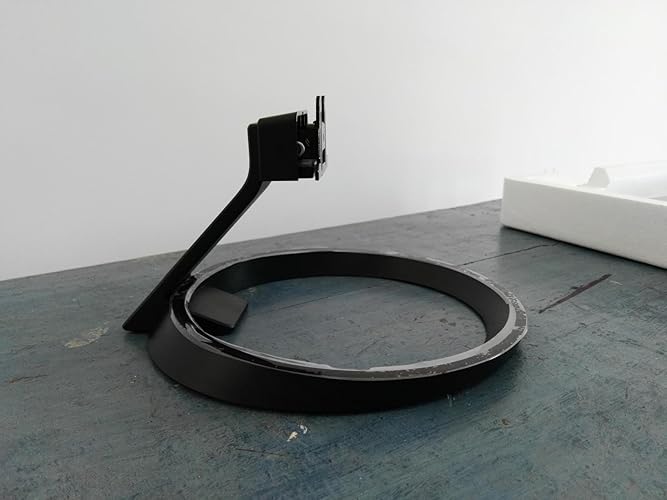
So the title of my review is to catch anyone's attention. Now that you're here, I'll explain why I want your attention. This monitor is very good (so far). I am typing this review on this monitor and it is amazing but there are some things that I would like to point out. Here we go. PACKAGING 5/5: the packaging was very well done. No missing cables or components or anything. The panel came very well guarded and didn't have any type of damage of any kind. INSTRUCTIONS TO SET UP 2/5: Ok, here is where I am really going to complain. It was very difficult to set this monitor up. I have uploaded some pictures to give you an idea. Here is the thing, the manual says the following "The monitor base is attached onto the monitor before shipment and it is undetachable". Well, one of the pictures that I have uploaded shows the monitor (covered in a white protector); the ring base; and another piece that connects both that I will call the bridge separately from each other. English is not my first language so I may be mistaken but, "monitor base attached to monitor" to me means exactly that and not that the parts come separately. I have NO problem with setting it up, that's not my complaint. My complaint is that it says that it comes attached and then doesn't tell you how to attach the bridge part to the monitor Now, I will break it up into a few steps. Step 1. You take the ring part and the bridge part and you join them together. Plug and play. Once you do that, at the base of the ring piece, there is a white screw that you have to tighten using a coin. So far, so good. This part is clearly explained in the manual, no problem. Step 2. You take the bridge + ring and insert it into the bottom of the monitor and you press it hard. I mean VERY HARD until you hear a sort of POP and it locks in place. This sounds simple, right? It actually is if you have instructions, which Acer doesn't give you. The instructions manual does not explain this. I kept pushing the bridge + ring into the monitor and couldn't understand why it wasn't working. I looked for a locking mechanism of some sort and couldn't see it. I was trying to be gentle because I didn't want to smudge the monitor but I also had to hold it hard to put the bridge + ring in place. I unscrewed the bridge from the ring and tried to connect that to the monitor. It would just fall off and I didn't know how to make it stay. Out of pure luck and 20 minutes of trying, I guess I must have used too much force and it finally locked in. I was scared for a second because I thought I broke it but then I saw it didn't fall of anymore and I was relieved. After that, it was pretty straightforward. Now, some of you may say that I should have known to use a lot of force to lock it together but, sorry, I didn't know and I wonder if anyone else has experienced the same thing. PERFORMANCE 5/5. Coming from a 1366x768 resolution monitor, all I can say is that I am BLOWN AWAY!. Everything looks so beautiful and crisp and sharp. It is amazing. I am using a DVI-D (Dual link) from Amazon Basics connected to a R9 380 Nitro and it works perfectly. I play a lot of Rocket League and I can't believe how good the game looks now, it is surreal. Overall, the monitor looks and performs very well. For this reason, I think a 4 out of 5 stars is adequate. I will upload more pictures if anyone is interested in seeing them. Just ask. ... show more
Reviewed in the United States on August 1, 2016 by Enzo BC

Very Very happy with this monitor!!!
Size: 23.8-inch 60Hz
So I game on my ps4 along with pc and Netflix, other broadcasting and YouTube stuff. My goal was to get a 27 inch monitor and a 24 inch monitor. One for my PlayStation 4 and one for my PC. Well not only will this monitor allow me to hook up to both platforms, it can automatically sense which input is being used and switch over. The picture is very crisp and clean and you also have the option to select different picture qualities. And what I mean by that is you can choose gaming or energy saving mode, movie, standard or you can customize to your liking. This item came in roughly 2 to 3 days. It was packed very well and did not have any trouble putting the stand together. The stand does tilt a little bit down and back. The only negative thing I saw is there was no option for a mount. Overall this monitor was a great purchase for me. As good as the picture is I don't think I would've found anything better for the price that I paid. I do play Lotta first person shooters so the less lag the better and I noticed hardly none whatsoever. I bought this item around February 28 and Amazon let me know that if I wasn't satisfied I could return it up until March 29. So if you are worried take that into account as well. If you are on the fence about this monitor or another one I would recommend this monitor, especially if you were looking for one on a low budget. It does come with a VGA cable to hook up to your computer but it doesn't come with an HDMI cable for systems which is kind of a bummer but owell. I hope I have managed to help some of you out, if you have any questions please let me know. I would be glad to help any of you out. ... show more
Reviewed in the United States on March 1, 2017 by Derek Titus

... 23 bw monitor that has developed LCD panel issues like horizontal reddish lines on the right side of the ...
Size: 23.8-inch 60Hz
I purchased this monitor to replace an HP 23 bw monitor that has developed LCD panel issues like horizontal reddish lines on the right side of the screen and image burn-in. That monitor was a 1080p IPS LED backlit monitor just like this one, but is a 23 inch monitor instead of a 24 inch monitor like this one is. This monitor handles anything that's thrown at it very well. Doesn't matter if it's a movie, an old TV program, games, photos, or graphics. I'm very impressed with its picture quality. I tested the Overdrive settings on both "Normal" and "Extreme" and found out it only results in annoying colored motion blur artifacts called "inverse ghosting" on the edges of every object in a game for instance. I found that it is best to turn off Overdrive and that when it is off, motion blur is really only noticeable when you specifically look for it and it doesn't get any worse as you turn down the brightness setting, even down to zero. The one negative about this monitor is the on-screen menu. It isn't as user-friendly as on the other monitors I own, but I know it will become easier to use as I start to get used to how it works. I only had to do some fiddling with the presets to set it to the "User" presets and tweak the color controls slightly to get the best picture quality. I feel that a less than ideal on-screen menu isn't enough to take a star away. It is possibly the best deal for a monitor on the market right now given that this monitor is on sale for $130. You don't see many IPS displays that perform well in this price range. I'd recommend this monitor to anyone who needs a 1080p monitor that performs well. ... show more
Reviewed in the United States on June 28, 2017 by Sean

Great monitor for personal use
Size: 23.8-inch 60Hz
Despite the backlight bleeding, I have really enjoyed using this monitor. I use it for personal digital content creation, gaming at 1080p 60hz,and general PC browsing. The low-blue setting is easy on the eyes for extended work sessions. For the price, you'd be hard pressed to find a comparable product. It is not a "professional" monitor, but a great PC monitor I'd recommend to more casual gamers or freelancers on a budget. Thin bezel, good looks, sharp screen, great IPS viewing angles, decent color reproduction, and all the inputs I need (1x each VGA, DVI, and HDMI). Plus it has an HDMI 3.5mm audio out for headphones or speakers which is a nice feature , though i use my onboard digital output. Response times are a gray area (pun intended) and advertised response times often have little credibility. the gray-to-gray I've experienced using blender and watching movies is great. very little ghosting. Again, it's not top of the line so if you look really hard you're going to find it. No "smart" features so there is no noticeable input lag. The user menu leaves something to be desired, but it is functional. Just don't buy it expecting perfection for the price-tag. notice its 27" cousin listed on the same page is much more expensive. If i had to guess, the backlight bleed exceeded their tolerances for the high-end model it was supposed to be. Shows how much pride Acer takes in their monitors. No dead pixels. BTW, I have noticed a reduction in backlight bleeding and auto-detect times when using HDMI as opposed to the included VGA. HDMI registers first in the auto-detect, then dvi, then VGA FYI. I hope this was a helpful review. ... show more
Reviewed in the United States on April 26, 2016 by ReishiRamzi

Best option for a 1080p IPS monitor
Size: 23.8-inch 60Hz
Needed a cheap, compact monitor to bring back and forth to college and not be too worried about. I was using my TV as a monitor prior to purchasing this, and it's night and day compared to the TV (obviously). This monitor is extremely thin, and has a really slick, edge-less design. The colors of this monitor are amazing, better than anything I've used before. I guess that's what you get with an IPS monitor. I am running a GTX 1070 so this monitor is a bit low-end in comparison to the card, but it is working great for application. The screen really is the most vivid and beautiful screen I've ever used. Even the 60Hz refresh rate is amazing, because I am used to gaming on an xbone with "cinematic 30-fps". I feel like for the price, there is no better option. Once I am out of college, I will upgrade to a 1440p IPS paired with a 144Hz TN monitor, but for a college student this is more than sufficient. Some minor things I don't like about the monitor: -The external power brick is annoying. I would rather have it built into the monitor and have the monitor be a bit thicker. -The stand isn't the greatest design. It is not convenient to remove either. -Buttons are hard to push. In combination with the less than great stand, pushing the power button causes the whole monitor to tip and usually it rotates or moves when I do this. Not the end of the world, but it is annoying to have to hold the monitor down when pushing the power button. But even with these few reservations, I think this monitor deserves a 5-star rating simply because of the performance and quality you get for the money. I paid around $120 for this monitor which feels like a great deal for what I got. The screen itself, like I said, is amazing, vivid and clear. 10/10 would buy again. ... show more
Reviewed in the United States on March 10, 2017 by Dan
Checking for best price...