Search  for anything...

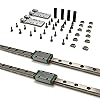
3D Printer Z-Axis Linear Guide Upgrade Kit, Mgn9 Linear Guide for Ender 3, Ender 3 Pro, Ender 3 V2, Ender 3 S1(Including Guide Rails) (3D Printer Z-Axis Linear Guide Upgrade Kit)

  • Based on 75 reviews
Condition: New
Checking for the best price...
$59.90 Why this price?
Save $400.09 was $459.99

Buy Now, Pay Later


As low as $9.98 / mo
  • – 6-month term
  • – No impact on credit to apply
  • – Instant approval decision
  • – Secure and straightforward checkout

Ready to go? Add this product to your cart and select a plan during checkout.

Payment plans are offered through our trusted finance partners Klarna, Affirm, Afterpay, Apple Pay, and PayTomorrow. No-credit-needed leasing options through Acima may also be available at checkout.

Learn more about financing & leasing here.

Selected Option

Free shipping on this product

FREE 30-day refund/replacement

To qualify for a full refund, items must be returned in their original, unused condition. If an item is returned in a used, damaged, or materially different state, you may be granted a partial refund.

To initiate a return, please visit our Returns Center.

View our full returns policy here.


Availability: In Stock.
Fulfilled by Amazon

Arrives Friday, May 22
Order within 5 hours and 30 minutes
Available payment plans shown during checkout

Protection Plan Protect Your Purchase
Checking for protection plans...

Style: 3D Printer Z-Axis Linear Guide Upgrade Kit


Features

  • ApplicationApplicable to Ender 3, Ender 3 v2, Ender 3 pro, Ender 3 s1, Voxelab Aquila X-axis linear guide upgrade kit.
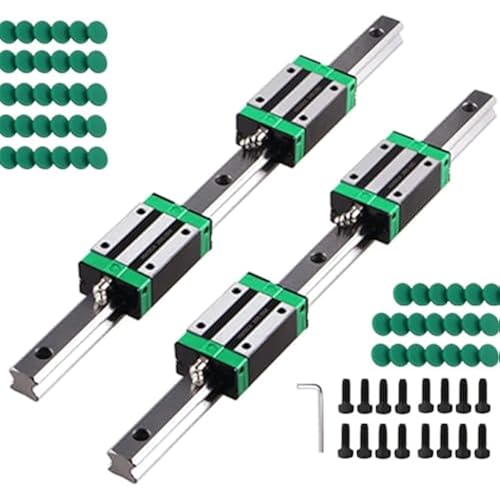
  • InstallationIt is easy to install and does not affect the print size of the printer. The MGN 9H linear guide rail is lighter and reduces the Z-axis load.
  • Advantages of linear guideimprove printing accuracy, increase service life.
  • Material Aluminum alloy bracket, MGN 9H linear guide rail with oxidized surface.
  • Friendly reminder: Watching the installation video will help you smoothly complete the linear guide upgrade. Fixture model file available at Thingiverse: 5794235.If there is any quality problem with the product, please contact us, and we will solve it for you.

Description

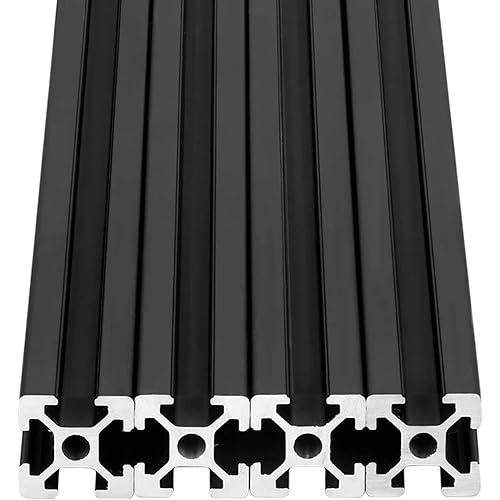
Clever design that doesn't compromise print dimensions and offers quick and convenient installation. Friendly reminder:Upgrade the Z-axis linear guide on your Ender 3 S1 3D printer by elevating the 2040 aluminum profile for a smooth installation of the linear guide. Watching the installation video will assist you in successfully completing the linear guide upgrade. Download the model file at Thingiverse: 5794235.

Package Dimensions: ‎13.86 x 2.09 x 1.14 inches


Item Weight: ‎15.2 ounces


Manufacturer: ‎BOX3D


Item model number: ‎BOX3D009


Date First Available: ‎November 17, 2022


Frequently asked questions

If you place your order now, the estimated arrival date for this product is: Friday, May 22

Yes, absolutely! You may return this product for a full refund within 30 days of receiving it.

To initiate a return, please visit our Returns Center.

View our full returns policy here.

  • Klarna Financing
  • Affirm Pay in 4
  • Affirm Financing
  • Afterpay Financing
  • PayTomorrow Financing
  • Financing through Apple Pay
Leasing options through Acima may also be available during checkout.

Learn more about financing & leasing here.

Top Amazon Reviews


  • Stable Printing
Style: 3D Printer X-Axis Linear Guide Upgrade Kit
This thing saved my first ever printer. I bought an Ender 3 Neo V2 last summer and got some prints off of it but had a constant problem from the start. The carriage wheels were not tight enough allowing wobble when the boudin tube pulled on the whole thing (hot end an all) if it went to far to the left or right X axis. The printer was basically useless for good prints and the first layer was always a disaster. I was lucky if an easy taller print actually came out ok. I ended up buying an E5S1 to make up for it for the time being. I randomly found this while looking for a new hot end for the S1 and got it. Took maybe 20 min to install, and it works like a dream. My Neo v2 prints how I thought it would when I first got it. If you have any carriage sag or no matter what you do you can't get you gantry carriage to tighten to prevent wobble, this is literally a machine saver. Don't do what I did and just leave your old boudin printer collecting dust. Get this thing and install it. It can be a bit tricky depending on the printer but its well worth it and if you don't already, you will learn more about how to maintenance your machine and become better acquainted with it. ... show more
Reviewed in the United States on July 2, 2023 by BigNCountry

  • Does NOT fit an Ender 3
Style: 3D Printer Y-Axis Linear Guide Upgrade Kit
Got this and was excited to put it on. First red flag that this was horrible was after getting it out of the box I noticed the carriages did not slide smoothly. I figured they would ease up with use so continued installing. Second red flag, I got to mounting the rails and neither fit. I had to move my belt adjuster as far back as possible and it still would not fit on the right side due to the y end stop. I moved back the end stop as far as possible and it BARELY fit. I was also missing screws for the rails to mount. After getting the rails mounted and feeling worse about the purchase, I attached the mounts for the bed carriage and then noticed that the holes on the mounts didn't come close at all to matching up with the stock bed carriage. This item should be taken down for falsely stating that this is for an Ender 3 when it clearly is not. ... show more
Reviewed in the United States on June 10, 2024 by Steven Eaves

  • Works great out of the box
Style: 3D Printer X-Axis Linear Guide Upgrade Kit
The media could not be loaded. I have a Ender 3 v2 with the Sprite Extruder Pro upgrade. I also upgraded the linear motion from rollers to linear rails on X, Y, and Z. The linear rail I originally had for the Z axis mounted on top but did not have a suitible way to mount the Sprite extruder. I ended up printing adapters which worked but I lost build volume and the belts did not sit right. I switched to a front mounted rail which sat right with the belts but I still had an offset Y by 15mm and lost volume. When I saw this upgrade with the MGN9 rail and top mount, I was instantly excited and bought it with out hesitation. When the package came I was able to install it with no issues. The video is showing the install for a Ender 3 S1, but was able to figure out the install pretty easy. The only confusing part was the two sets of holes on top of the mount for screwing on the rails. I got it by trial and error. Once the rail was mounted the rest was easy. Put the belts on, screw your hotend mounting plate and reinstall the hotend/extruder. I'm so happy to get back my build volume and no more Y offset. See my pic and video of my first print with the new X rail. Everything was however not perfect. The metal color for the mount to the MGN block was different for some reason. I got a gray one and a dark gray one. Notable mention that the MGN9 rail and block were butter smooth. I've bought quite a few of these that were cheap and have gotten lucky and not so lucky at times with the quality. I generally had to clean and grease them to make them work well. These were smooth out of the box. Overall I'm happy with this upgrade. I wish I didn't waste my time with the other ones. Don't let the price scare you away. These will save you time and effort. ... show more
Reviewed in the United States on February 17, 2023 by William Ly

  • Not A Fit Out of the Box for Ender 3 S1 Pro (For Me, Anyway)
Style: 3D Printer X-Axis Linear Guide Upgrade Kit
TL;DR - Well packaged; came pre-lubed; extra parts too! The instructions are the Amazon video, and the fit wasn't fabulous for an Ender 3 S1 Pro. I'm new to 3D printing and was given a friend's no-longer-needed Ender 3 S1 Pro. He told me the first thing I should look at is upgrading the X Axis to a Linear Rail as his wheels were nearing the end of their life. I found this add-on, the reviews seemed okay, and I assumed any problem I could figure out. I was wrong. The installation video was pretty good, but as a quick video it didn't cover everything needed to know. I put everything together as best I could, and then the carriage wouldn't move -- I had it on the back set of screws instead of the front. Re-did that, got the carriage moving, and drank from the keg of glory. I then started the calibration (Z, four corners, and bed level mesh) but kept having issues. The CR Touch probe was hitting the bed and pushing it down before the extruder got within 1-2mm of the bed. Not knowing what the fork I was doing, I figured some way to make it work, and was able to get a benchy printed and then requested the finest muffins and bagels in all the land, as victory clearly was mine. From that point on, every print I made got knocked off the bed at some point. Eventually I figured out that the CR Touch probe was hitting the the print and breaking it loose. I reached out to the guy who gave me the printer and he was flummoxed. Google had no answer. Reddit had no answer. I was lost in an information desert, with only my own wits and intelligence to save me. I was forked. Then, for some bizarre reason, my old days fixing computers came back to me. I realized the last time the printer was working, the upgraded rail wasn't there, so maybe that's the problem. I removed the rail, put the old wheels back on, and started the bed leveling procedure again. Problem found. Something with the new X Rail was causing the print head to lean forward a touch, but it was enough for the touch probe to touch the bed before the nozzle touched the bed. I then went through all the leveling bits again, and have not had a failed print since. In summary -- this may well work for you and your printer, but be warned that it also may not. Rather than trial and error futzing with the fitting to get it to work, I opted to return it. ... show more
Reviewed in the United States on January 10, 2025 by Mike Pittman

  • Not for Ender 3 sv1 Pro..PLUS
Style: 3D Printer X-Axis Linear Guide Upgrade Kit
Gave it 5 stars because it's well made. I have the Ender sv1 pro...PLUS model. And they are 80mm short. Really smooth operation and I'm hoping to find ones for the plus model.
Reviewed in the United States on September 7, 2025 by Amazon Customer

Can't find a product?

Find it on Amazon first, then paste the link below.
Checking for best price...