Search  for anything...

WOWNOVA English Version Computer Temp Monitor, ARGB PC Case Display, IPS USB Mini Screen, CPU RAM HDD Data Monitor

  • Based on 559 reviews
Condition: New
Checking for the best price...
$35.99 Why this price?
Save $2.00 was $37.99

Buy Now, Pay Later


As low as $8 / mo
  • – 4-month term
  • – No impact on credit to apply
  • – Instant approval decision
  • – Secure and straightforward checkout

Ready to go? Add this product to your cart and select a plan during checkout.

Payment plans are offered through our trusted finance partners Klarna, Affirm, Afterpay, Zip, Apple Pay, and Google Pay. No-credit-needed leasing options through Acima may also be available at checkout.

Learn more about financing & leasing here.

Free shipping on this product

FREE 30-day refund/replacement

To qualify for a full refund, items must be returned in their original, unused condition. If an item is returned in a used, damaged, or materially different state, you may be granted a partial refund.

To initiate a return, please visit our Returns Center.

View our full returns policy here.


Availability: In Stock.
Fulfilled by Amazon

Arrives Sunday, Aug 9
Order within 1 hour and 19 minutes
Available payment plans shown during checkout

Protection Plan Protect Your Purchase
Checking for protection plans...

Features

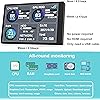
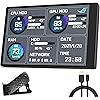
  • With software in English The PC Temperature Display works creat with our English version software. You can use this with our software as a "second monitor" to view computer's Temperature and usage of CPU, GPU ,RAM and HDD Data etc.
  • Only Use with single USB-C cableOur Computer Temp Monitor only needs the single USB-C cable so it can be mounted completely internally off a usb header without the need of a port on the GPU which is a huge plus to you. No HDMI required, no power required.
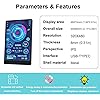
  • Great Viewing Angles & Accurate Information IPS full view. 3.5inch mini screen. Display area: 1.93*2.91". Overall size: 2.17*3.35". Resolution: 320*480. Thickness: 0.31". Shell material: metal
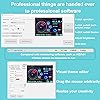
  • Simple and Feature-richCustomizable screen layout. Horizontal and vertial screen switching. Visual theme editor: drag the mouse arbitarily to realize your creativity. Energy saving & environmental protection. Turn off the screen automatically and Comfortable eye protection Brightness adjustment.
  • Great Customer ServiceWe respect and value each customer's product and service satisfaction. We want to offer you premium products for a Long-Lasting Experience. If any issue, please kindly contact us for a solution.

Description

Some customers compare the data of our pc temps monitor with data of task manager or other software. Found that the data is inconsistent, so question whether our data is accurate. The explanation is shown on the picture. Offcial software shows a CPU utilization rate of 7%. Our screen shows a CPU utilization rate of 7%. The task manager shows 23%, which is higher and different from the Offcial. Therefore, if there is a data discrepancy. Please use WOWNOVA screen as standard data!! Q&A 1.How to start: (No need for AIDA64) A. Please unzip our software zip file to a folder B. Connect to computer via data cable → Right-click “Usb Monitor.exe” → and click “run as administrator" C. Select Theme → Click “Run" 2. Why does the graphics card data not move? Usually notebook users, the independent display is usually on standby, and only the core display is used to save energy, while the secondary screen monitors the more important independent display, so of course the graphics card monitoring data does not move. 3. Can other content be displayed? No, only the content set by the custom software can be displayed 4.USB interface version? USB1.0, USB2.0, USB3.0 are not limited, as long as it is USB 5. HOW TO AUTO START? Please note that it can auto-start: click “Normal Setting” → Click “Auto Start” → Click “Save” 6.Detailed reading of the manual and operation video can help you solve most of the issues. Any issues cannot be solved, please contact WOWNOVA directly. OTHER SIZES 2.1/5/7/8.8/12.6-inch WOWNOVA Computer temp monitor sensor panel please refer below ↓↓↓ ↓↓↓

Brand: WOWNOVA


Screen Size: 3.5 inches


Resolution: 320 x 480


Aspect Ratio: 169


Screen Surface Description: Glossy


Aspect Ratio: 169


Screen Finish: Glossy


Contrast Ratio: 10001


Display Type: LCD


Display Technology: LCD


Viewing Angle: 170 degrees


Brightness: 250 candela_per_square_meter


Picture Quality Enhancement Technology: adaptive sync


Screen Size: 3.5 inches


Item Dimensions D x W x H: 0.31"D x 3.35"W x 2.17"H


Item Weight: 0.11 kg


Resolution: 320 x 480


Display Resolution Maximum: The maximum resolution is not explicitly stated, but based on the native resolution of '320 x 480', a possible maximum resolution could be '1920 x 1080' as this is a common maximum resolution for many displays.


Native Resolution: 320 x 480


Processor Count: 1


Total Usb Ports: 1


Total USB 2.0 Ports: 1


Total USB 3.0 Ports: 1


Additional Features: Flicker-Free


Specific Uses For Product: Business


Color: black


Mounting Type: Panel Mount


Compatible Devices: [INF] Based on connectivity technologies, potential compatible devices could include systems with USB, HDMI, or USB-C ports such as laptops, desktops, and gaming consoles.


Brand: WOWNOVA


Model Number: 68ee4603-bd1c-44b6-96a6-2f49d3d5aace


Model Name: 68ee4603-bd1c-44b6-96a6-2f49d3d5aace


Manufacturer: WOWNOVA


Included Components: USB-C cable


Voltage: 5 volts_of_direct_current


Connectivity Technology: USB


Hardware Connectivity: USB Type C


Adaptive Sync: FreeSync


Frequently asked questions

If you place your order now, the estimated arrival date for this product is: Sunday, Aug 9

Yes, absolutely! You may return this product for a full refund within 30 days of receiving it.

To initiate a return, please visit our Returns Center.

View our full returns policy here.

  • Klarna Financing
  • Affirm Pay in 4
  • Affirm Financing
  • Afterpay Financing
  • Zip Pay in 4
  • Financing through Apple Pay
  • Financing through Google Pay
Leasing options through Acima may also be available during checkout.

Learn more about financing & leasing here.

Top Amazon Reviews


  • Great value
Color: black
Super easy to setup if you read the instructions. Love the variety of layouts. Looks great, easy to read even though it's small. Seems to be accurate. Don't change your city though, it'll break and you'll have to delete and restart. The errors don't make alot of sense but a quick reinstall had it working how i wanted with the layout I wanted in 5 minutes from unboxing. ... show more
Reviewed in the United States on April 13, 2025 by JRC

  • App is a little weird but it’s great
Color: black
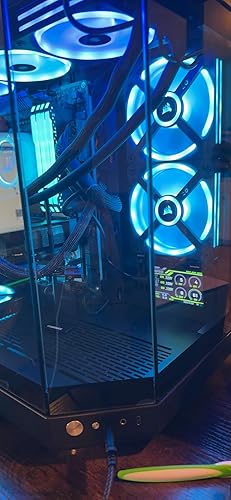
I figured that 35$ wasn’t too bad for a cool little display. I use it to monitor my temps and percentages of my GPU and pc. The app is a little weird with how to load the various backgrounds and the themes but once i watched a YouTube video, it worked great! Now I’m not smart enough to completely customize it but it works well as it is. I had an open void in my case and i used the WOWNOVA to cover it while adding some functional flair. For the price you really can’t beat it at all. I’ve seen the touch screen ones that are 5x the price but this does everything you need. It does take a USBC cable that has to run out of the external portion of your case. So i was able to tuck the wire and go out to the rear by my power supply. You can’t see it. I kinda assumed it would go into a USB slot on the motherboard. Its temps aren’t completely accurate but the % line up with my task manager. Overall a great cheap and fun product ... show more
Reviewed in the United States on July 23, 2024 by adam

  • Software doesn't work
Color: black
provided Website doesn't let me download software in order to make this work, and screen will not work with any other software. i was unable to find a workaround. terribly disappointed.
Reviewed in the United States on July 25, 2026 by Nicholas Vernice

  • Smaller than I expected (despite reading the description), but I still like it a lot
Color: black
I should have measured out the screen dimensions on a piece of paper before ordering, but I was too impatient. I was looking for something a little bigger, but I'm satisfied with what I received. As you can see from the photo, the screen isn't that much bigger than an air pods case. Two reasons I was hoping for something bigger - 1 is that I don't usually wear my glasses at the computer, so I need to bend down a bit to see it clearly; 2 - it's too lightweight to sit on my desktop - its cable is pretty short and due to its stiffness, it limits the options where I can place this. I'm sure I could secure the cable to the desktop but it's not worth the effort to me. Despite the size (which is my fault), I'm really impressed with the brightness and clarity of the monitor. The device was relatively easy to set up, and it has a surprisingly large variety of display faces and information options. Overall, for the money spent I'm happy with my purchase. ... show more
Reviewed in the United States on July 29, 2025 by DW

  • Software issues
Color: black
The software sucks, downloaded the driver but the app to control it is hiding somewhere on my pc and i cant find it to change the screen. The actual unit it metal and sturdy
Reviewed in the United States on January 11, 2026 by Nick D

  • Memory Leak - Windows 11
Color: black
So it was a nice little screen and easy to setup. One thing, having to administrator run the program to boot it up each time was a little strange. Wish I could have kept using it. Ever since running on my new computer, I would continually run out of DDR5 memory when playing high performance games. It would burn through 64GB in a rather small period and the system would continually created virtual Ram until the system would crash for instability. After troubleshooting for a period of time, I realized this software was causing the memory leak via Process Explorer. I would return the item, but I no longer have the packaging. ... show more
Reviewed in the United States on May 24, 2022 by Craig

  • I freakin love it
Color: black
For the price, I honestly wasn't expecting much but I thought it would be a neat touch for my new build. The software is a bit confusing at first but there's PLENTY of yt videos explaining how to use this device properly. I reckon the readings would be slightly off (since again it's pretty cheap cost wise) but compared side by side with Open Hardware Moniter, the readings are spot on! The background is also customizable to your own pictures but I was happy with this stock MSI screen that came with the software file since my MOBO is MSI (It comes with roughly 20 different background choices already) 10/10 happy with this purchase, and I would suggest it to anyone who want's a neat addition to their custom builds. For common bought pc's, there are many alternate ways and programs that are free that will show you your computer's stats on screen whenever you'd want if need be. To all the negative reviews saying it's too hard to figure out, you're just not trying hard enough to understand. There are many yt videos explaining how to set this up. There are no sort of just "plug and play" devices like this without software setup. ... show more
Reviewed in the United States on January 31, 2023 by ryker scott

  • Awesome little screen for monitoring system stats
Color: black
I render on a second machine at my desk, and share a monitor between primary machine and my render machine. Render machine is on and rendering for hours/days at a time, and instead of switching my monitor input to check on it, or getting another monitor for the render machine, I started using this little guy. This way I can see the CPU usage and temperatures quickly and it takes up such little space on my desk. Plugs into USB, run the software that you download and pretty soon you have a little display showing you the system stats from CPU usage to temps, GPU usage and temps, RAM usage, HDD, etc. The display is customizable to display many different system stats, and you can set fonts, color, size, position, background, etc. The editing process could be a little more elegant, but it's fine, and there are plent of templates included to appeal to a wide range of uses and tastes. Highyl recommend. You do NOT need to have HWInfo or 3rd party app running like with other screens of this type, the included software does it all for you. ... show more
Reviewed in the United States on March 13, 2023 by Dariushd

Can't find a product?

Find it on Amazon first, then paste the link below.
Checking for best price...