Search  for anything...

WOWNOVA 8 Inch LCD Screen Inside PC Case Screen (Desktop Mode Added), 1 Click 1 Cable to Get Started Computer Temperature Display Monitor, Sensor Panel for Inside PC Case with Screen (Black)

  • Based on 33 reviews
Condition: New
Checking for the best price...
$89.99 Why this price?
Save $69.98 was $159.97

Buy Now, Pay Later


As low as $15.00 / mo
  • – 6-month term
  • – No impact on credit to apply
  • – Instant approval decision
  • – Secure and straightforward checkout

Ready to go? Add this product to your cart and select a plan during checkout.

Payment plans are offered through our trusted finance partners Klarna, Affirm, Afterpay, Zip, Apple Pay, and Google Pay. No-credit-needed leasing options through Acima may also be available at checkout.

Learn more about financing & leasing here.

Selected Option

Free shipping on this product

FREE 30-day refund/replacement

To qualify for a full refund, items must be returned in their original, unused condition. If an item is returned in a used, damaged, or materially different state, you may be granted a partial refund.

To initiate a return, please visit our Returns Center.

View our full returns policy here.


Availability: In Stock.
Fulfilled by Amazon

Arrives Friday, Aug 7
Order within 21 hours and 48 minutes
Available payment plans shown during checkout

Protection Plan Protect Your Purchase
Checking for protection plans...

Color: Black


Features

  • Upgraded 8" Smart PC Sensor Panel with 1 Click to Get Started Quickly Self-Developed SoftwareEasy Setup and Get Started Fast. The 8 inch pc case screen works great with our English version software. You can use this with our software as a "second monitor" to view computer's Temperature and usage of CPU, GPU ,RAM, FPS and HDD Data etc. More professional and occupy less resources. COMPATIBLE WITH WINDOWS 10/11
  • NEW DESKTOP DISPLAY MODE ADDED !! Our screen support switching to desktop mode as a EXTENDED SCREEN.
  • Dynamic Video Theme Supported & Cool!! There are a lot of cool and cute dynamic videos preset in our lcd screen inside pc case, and the pc case screen supports customizing your own dynamic video theme.
  • Just One Cable Connection & Great Viewing AnglesOur 8inch computer temp monitor only needs one single USB-C cable or one 9pin cable. So it can be mounted completely internally off a USB header without the need of a port on the GPU which is a huge plus to you. No HDMI required, No power required. IPS full view. 8 inch panel screen. Display area: 6.77*4.21". Overall size: 7.52*4.59". Resolution: 1280*800. Thickness: 0.39". Shell material: Aluminum Housing
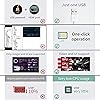
  • Simple & Feature-richIMAGE & VIDEO UI support & EXTENDED DESKTOP DISPLAY Mode. Customizable screen layout. Horizontal and vertical screen switching. Visual theme editor: drag the mouse arbitrarily to realize your creativity. Energy saving & environmental protection. Solve the problem of broken mouse contact. One-click operation. Auto-Start, turn off the screen automatically and Comfortable eye protection Brightness adjustment. Share your beautiful creations.
  • Continuously Updated Theme & Great Customer ServiceWe have professional artists and techie who continuously updated the images and videos theme. We respect and value each customer's product and service satisfaction. We want to offer you premium products for a Long-Lasting Experience. If any issue, please kindly contact WOWNOVA for a solution.

Description

Detailed reading of the manual and operation video can help you solve most of the issues. Any issues cannot be solved, please contact WOWNOVA directly

Brand: WOWNOVA


Screen Size: 8 Inches


Resolution: 1280x800


Aspect Ratio: 1.631


Screen Surface Description: Glossy


Aspect Ratio: 1.631


Screen Finish: Glossy


Contrast Ratio: 20001


Refresh Rate: 60 Hz


Display Type: LCD


Display Technology: IPS


Has Color Screen: Yes


Picture Quality Enhancement Technology: IPS, Eye Care Technologies, Glossy Screen Surface, 20001 Contrast Ratio


Screen Size: 8 Inches


Item Dimensions D x W x H: 0.39"D x 7.52"W x 4.59"H


Item Weight: 0.85 Pounds


Response Time: 10 Milliseconds


Connectivity Technology: USB-C, 9-pin (VESA Local Bus)


Hardware Connectivity: USB Type C


Additional Features: Portable


Color: Black


Brand: WOWNOVA


Model Number: pc case screen


Manufacturer: WOWNOVA


Resolution: 1280x800


Display Resolution Maximum: 1280 x 800 Pixels


Native Resolution: 1280x800


Total USB 3.0 Ports: 1


Frequently asked questions

If you place your order now, the estimated arrival date for this product is: Friday, Aug 7

Yes, absolutely! You may return this product for a full refund within 30 days of receiving it.

To initiate a return, please visit our Returns Center.

View our full returns policy here.

  • Klarna Financing
  • Affirm Pay in 4
  • Affirm Financing
  • Afterpay Financing
  • Zip Pay in 4
  • Financing through Apple Pay
  • Financing through Google Pay
Leasing options through Acima may also be available during checkout.

Learn more about financing & leasing here.

Top Amazon Reviews


  • Cool display screen!
Color: White
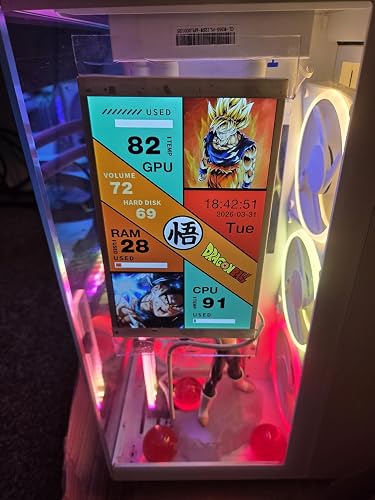
Great product, easy to setup, and had a built in theme (you can tell I am a Dragonball fan) that was awesome! Mounted the screen with some double sided mounting tape.
Reviewed in the United States on April 1, 2026 by Amazon Customer

  • Easy to use
Color: Black
Just got this up and running. Looks great in my build.
Reviewed in the United States on April 18, 2026 by MH

  • A great display for the money!
Color: Black
A big win so far! I opted to go with the WOWNOVA 8 inch screen over the 5 inch and I am so glad I did. I have the room in my MSI PANO 120 for this awesome display. Installation was very straight forward with the included mounting pack. It comes with fan brackets, double sided tape and a magnetic mounting option. For the hookup you have two choices, a USB cable for desktop viewing or a USB cable that plugs directly into the second USB on the motherboard. I opted for the second option. The software was a breeze and after installation the picking of various themes makes it so easy. This is a great value for your dollar if you have room for the 8 inch. I have it angled just a bit to where I can glance down and see my temps at a glance. I highly recommend this display! ... show more
Reviewed in the United States on September 24, 2025 by Alan P.

  • Well worth the $90
Color: Black
Instructions are a bit vague and confusing, but after figuring it out this thing is amazing, looks get, mounted super easy. And program is user friendly once installed!
Reviewed in the United States on March 5, 2026 by The feel is nice, but trying to use tje buttons suck, also, had the case a week barely droped it on the counter and the case already broke, dont waste your money on this case

  • Very nice!
Color: Black
Easy to setup, monitor big bright, campatibility with my new pc build. Just do you downloads and install what you want to use. I like it I like it a lot!
Reviewed in the United States on February 1, 2026 by Twinkie

  • 8” inside pc case screen
Color: Black
Very nice screen for the cost. The software was a bit tricky to figure out,( I had no idea what I was looking for) but now I can change the screen on the fly when I want. I am very happy with this screen and would buy it again!
Reviewed in the United States on April 9, 2026 by Brent Johnson

  • Good but not perfect
Color: Black
This a a solid monitoring screen for your temps and power usage. The biggest hang up it the customization part of the software. It's not very user friendly and takes a bit of time to figure out. There's also no convenient way to edit the files if you want to change your logos to match the brands of your hardware. That's not done in the software you gotta use something like Photoshop or GIMP. You also need to do a bit of work to make sure everything is in the proper place for the logos or data shown and it take a bit of time to learn that and the scaling options for it. But once you get past that it is a good system, pretty accurate, and does draw a lot of power. I used one of the 2 sided tape options to mount to the underside of my GPU support and then attached one of the included angled mounting arms to the unit with a screw and then to the 2 sided tape to get it mounted where I needed it. I also used the PH 9 pin cable that plugs into the motherboard vs USB C. The only other hang up it has is while the screen will start on boot it won't start the actual monitoring process without the software being manually started even though I have it set to start up with windows. I have yet to figure that out. It's a nice system though and definitely worth the money. ... show more
Reviewed in the United States on March 1, 2026 by Jouros

  • very good display
Color: Black
looks good!!!
Reviewed in the United States on March 1, 2026 by Armen Azizbekyan

Can't find a product?

Find it on Amazon first, then paste the link below.
Checking for best price...