Search  for anything...

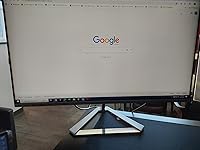
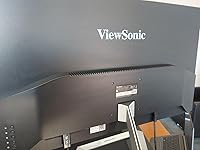
ViewSonic VX3276-2K-MHD 32 Inch Widescreen IPS 1440p Monitor with Ultra-Thin Bezels, HDMI DisplayPort and Mini DisplayPort

  • Based on 8,082 reviews
Condition: New
Checking for the best price...
$249.95 Why this price?
Holiday Deal · 62% off was $659.99

Buy Now, Pay Later


As low as $41.66 / mo
  • – 6-month term
  • – No impact on credit
  • – Instant approval decision
  • – Secure and straightforward checkout

Ready to go? Add this product to your cart and select a plan during checkout.

Payment plans are offered through our trusted finance partners Klarna, Affirm, Afterpay, Apple Pay, and PayTomorrow. No-credit-needed leasing options through Acima may also be available at checkout.

Learn more about financing & leasing here.

Selected Option

Free shipping on this product
This item's return window has been extended for the holiday season: FREE refund/replacement until Jan 31, 2026

To qualify for a full refund, items must be returned in their original, unused condition. If an item is returned in a used, damaged, or materially different state, you may be granted a partial refund.

To initiate a return, please visit our Returns Center.

View our full returns policy here.


Availability: Only 10 left in stock, order soon!
Fulfilled by Amazon

Arrives Wednesday, Dec 24
Order within 21 hours and 52 minutes
Available payment plans shown during checkout

Protection Plan Protect Your Purchase
Checking for protection plans...

Style: 32-Inch 1440p


Features

  • VERSATILE MONITOR: 32 Inch QHD (2560x1440p) IPS monitor with thin bezels and 75Hz refresh rate
  • ENHANCED VIEWING COMFORT: Flicker-Free technology and Blue Light Filter for reduced eye fatigue
  • OPTIMIZED VIEW SETTINGS: Offers Game, Movie, Web, Text, and Mono presets
  • FLEXIBLE CONNECTIVITY: The VX3276-2K-MHD supports laptops, PCs, and Macs with HDMI, DisplayPort, and Mini DisplayPort inputs

Description

The ViewSonic VX3276-2K-mhd is a sleek 32” (31. 5" viewable) WQHD monitor with a modern and minimalist style perfect for home use. With IPS Panel technology, this monitor offers best-in-class screen performance with ultra-wide viewing angles. A premium ID includes an ultra-slim profile and unique desktop stand. A sleek edge-to-edge frameless design combined with a stunning 2560 x 1440 resolution provides 70% more on-screen content than Full HD monitors, making project management and multitasking easier than before. Versatile HDMI, DisplayPort, and Mini DisplayPort inputs offer flexible connectivity options for both computing and gaming, while an exclusive ViewMode feature provides intuitive presets for optimized screen performance in different applications. With ViewSonic's industry-leading 3-year limited , this monitor is a solid long-term investment that combines style and high performance for the home. The brightness is 250 cd/m2.

Brand: ViewSonic


Screen Size: 32 Inches


Resolution: QHD Wide 1440p


Aspect Ratio: 169


Screen Surface Description: Matte


Standing screen display size: ‎32 Inches


Screen Resolution: ‎WQHD (2560x1440)


Max Screen Resolution: ‎2560 x 1440 Pixels


Brand: ‎ViewSonic


Series: ‎VX3276-2K-mhd


Item Weight: ‎13.64 pounds


Product Dimensions: ‎19.8 x 9.1 x 28.1 inches


Item Dimensions LxWxH: ‎19.8 x 9.1 x 28.1 inches


Color: ‎Black/Silver


Number of Processors: ‎1


Power Source: ‎10


Voltage: ‎100240 Volts


Manufacturer: ‎ViewSonic


Is Discontinued By Manufacturer: ‎No


Date First Available: ‎December 15, 2017


Frequently asked questions

If you place your order now, the estimated arrival date for this product is: Wednesday, Dec 24

Yes, absolutely! You may return this product for a full refund within 30 days of receiving it.

To initiate a return, please visit our Returns Center.

View our full returns policy here.

  • Klarna Financing
  • Affirm Pay in 4
  • Affirm Financing
  • Afterpay Financing
  • PayTomorrow Financing
  • Financing through Apple Pay
Leasing options through Acima may also be available during checkout.

Learn more about financing & leasing here.

Top Amazon Reviews


  • Excellent home or office use "IPS 2K" monitor ... consider this alternative to "4K VA"
Style: 32-Inch 1440p
This is a nice quality monitor from Viewsonic. First off, I do not play video games, so my review pertains to home and office type use (MS Office, Web browsing, light duty photo editing, etc.). Having a 4K VA panel 32" monitor in the office, I can honestly say that this 2K IPS 32" monitor is a better value for the money. While I can still read text at the full 4K resolution, it is simply uncomfortable for a long time. A more pleasant resolution setting I use in the office is somewhere between 2K and 4K (more towards the 2K mark). Given that experience, I went for the 2K IPS monitor of the same 32" size at home. The IPS panel vs. VA is a whole lot better, esp. with text on the screen; the VA has some slight but noticeable artifacts with text where the IPS is simply clear. The resolution is comfortable and at this 32" size there is plenty of "real estate". So, if you are looking inside the $400 price range for a 32" monitor don't get fooled by 4K unless you are planning to watch 4K TV on it perhaps? For home/office use, the 2K IPS is not only cheaper (less than $300) but fits the bill much better. I did a lot of researching and then, at work, I was able to get the 32" 4K VA panel monitor and, to be honest, it is a disappointing experience for office use; I do not run the full 4K resolution and the VA quality just is not as good as the IPS panel. Having the 32" 2K IPS (this Viewsonic) at home and given my experience with it, I would have requested the same for the office if I had to do it again. So, while 4K is good for some things for others 2K is preferable in my experience. If you get a chance to compare monitors in this price range for home/office use, you may find the same. Viewsonic is also a top notch brand with a 3 yr warranty. This particular model also has the frameless edge. Not only is the picture quality excellent but the monitor has a nice high quality look. ... show more
Reviewed in the United States on November 29, 2020 by The Moose

  • Excellent monitor, even for streaming
Style: 32-Inch 1440p
Bought it 2 years ago and it's great. Zero issues, great picture. Initially used for computer work but now used for streaming movies. Excellent. ViewSonic tends to cost more than others, but they've never disappointed me. Specifically, I've never had pixel problems or any other problems.
Reviewed in the United States on October 10, 2025 by A reviewer in FL

  • Excellent quality for the price, great for work, media and gaming
Style: 32-Inch 1080p
The media could not be loaded. Build & Visual Quality: Very good build quality and an ultra-thin bezel design that looks sleek and modern. For a 1080p 32-inch monitor, the image is sharp and vibrant. Color Accuracy: Colors are surprisingly accurate for a monitor in this price range. Great for general use, content consumption, and even some basic editing. Response Time & Flickering: No noticeable flickering. The response time is solid for casual gaming and general productivity. Not a high-end gaming monitor, but more than enough for most users. Ease of Setup: Super easy to set up. Plug and play through HDMI or DisplayPort. The screen split feature is also very handy for multitasking. Value for Money: 100% worth it. For what I paid, this monitor offers excellent quality and performance. It definitely feels like a premium product at a budget-friendly price. Conclusion: Highly recommended if you want a large IPS screen with solid performance, reliable color, and a stylish design all at a very fair price. ... show more
Reviewed in the United States on June 14, 2025 by Danny TR Danny TR

  • Good value
Style: 32-Inch 4K
This is a review of the 32” 4K monitor with an “MVA” panel. This is a good monitor considering how little it costs (for a 32” 4K monitor that is). It has no obvious quality control issues I’ve been able to discern. If you get something for a low price like this, and it works exactly the way it’s intended to work, then you should consider yourself lucky that you got a good deal. Before I bought this monitor, I imagined that a 32” 4K monitor would make my computer life so much better. But I now feel that 32” is just TOO BIG for typical desktop usage. A 27” 1440p (aka QHD) monitor is the sweet spot for a desktop monitor. Most people buying this monitor would be better off with that and you’d save yourself some money or, for the same price, get a monitor that has better features and maybe better color quality and accuracy. However, I am not holding its size against the monitor, it is what you’re buying. Just advice for anyone reading this. As an MVA panel, I had high hopes that the blacks would be jet black and not have the “glow” of IPS monitors. I was wrong about that, this panel definitely has an MVA glow, I guess you would call it. Are the blacks a little bit darker than a typical IPS panel? I don’t know for sure, I only have one other monitor to judge it against, a Samsung “PLS” monitor that I bought 8 years ago for $800. That much more expensive monitor annoyed me for 8 years with its corner glow that ruined the experience of watching fullscreen movies or videos. I am happy to say that this Viewsonic monitor does not have any corner glow and it’s much better for watching movies. Yay! But still not jet-black blacks. The downside of this monitor having an MVA panel is that there’s a loss of contrast when viewing the corners or edges of the monitor. I would not recommend this as an office monitor (where IPS glow doesn't matter), or for color-critical photo/video editing. But for a home monitor where you would use it in a dimly lit room and use it a lot for watching movies/TV/YouTube/Netflix etc., I think a VA type of panel makes sense. The viewing angle issue is barely noticeable most of the time, and this monitor certainly has a much better viewing angle than a TN monitor, but the issue is there. There’s nothing horribly wrong with the panel, but the colors seem to lack punch. Also, the monitor has a really weird gamma curve that I don’t like. It seems to work better with a Mac, but when I hook a PC up to it, it looks all wrong. Hint: there’s a setting in the menu system called “black stabilization” that’s by default set to 50. Lowering it may improve the look on a PC and give you darker darks and less of a washed-out look. Other than this “black stabilization” setting, I don’t see any other way to adjust the gamma in the monitor’s menu system. Before I bash the monitor, let me tell you what’s good about it: It has a lot of input ports, two HDMI and two DisplayPort (but I have no idea why one of the DP inputs is MDP; if you happen to have an old MacBook with an MDP port, you can just buy an MDP to DP cable which you probably already have anyway), it has an output for sound, it even has built in speakers, but the built-in speakers are pretty bad so they are mostly useless. The monitor also looks really nice. It’s very slim and has hardly any bezel at all. OK, let’s get to the bad. The monitor has no height adjustment, and this monitor definitely needs a height adjustment because it’s so huge; the default height is too high, I wish I could lower it as much as possible so I don’t have to strain my neck to see the topmost part of the monitor. The control system for this monitor is awful. The control buttons are on the back, and even basic tasks like changing the brightness or changing the input requires fumbling with a bunch of different buttons. In the future, I will definitely favor any monitor that has a remote control, or at least a d-pad on the front. There’s very little documentation about what all the functions do or how to use them. I downloaded the user manual from the web in PDF format, but it doesn’t tell you that much about what all of the mysterious functions do. What you can’t do in the menus is change the gamma or set an exact color temperature that you specify with a K value or change the color saturation. But the bottom line is that, despite the bad and the mediocre, there are no defects and it cost very little money. You can easily spend three times as much money for a 4K 32" monitor that, at the end of the day, is still just a big high resolution monitor. UPDATE A FEW MONTHS LATER The image quality on this monitor is very good. I realize now that when I wrote the original review, I was getting washed out colors with PC because the settings were wrong in Nvida control app. It was set to "RGB Limited" when it should have been "RGB Full". Maybe this happened because I was using an HDMI cable instead of a DisplayPort cable to connect the monitor? I stand by in hating the controls for the monitor on the back/right. It takes forever and is a real pain in the ass to adjust even something simple like the brightness. I also stand by not liking the cheap stand that can't be vertically adjusted. I also stand by 32" being too big, but that's not the fault of ViewSonic, it's what I bought. Everything else about this monitor is great for the price. Especially great for watching movies or TV if you push your chair back about 3 feet form the monitor. ... show more
Reviewed in the United States on August 20, 2020 by Bob

  • View Sonic 32" PC Monitor
Style: 32-Inch 1080p
I purchased two of these screens for my office and I absolutely love them. Elegant designed, great size and the resolution is perfect. Setup was pretty easy and very stable. The response time is really good and it is a great value for what you are getting. The speakers on the sreen are pretty loud. There are times I use the sound for virtual meetings. I have not tried them for gaming however for work purposes they are fantastic. ... show more
Reviewed in the United States on October 1, 2025 by Francisco Medina Francisco Medina

Can't find a product?

Find it on Amazon first, then paste the link below.
Checking for best price...