Search  for anything...

StarTech.com 3-Port DisplayPort 1.2 Splitter, DisplayPort to 3x DP Multi-Monitor Adapter, Dual 4K 30Hz and 1080p 60Hz Computer MST Hub, Windows Only (MSTDP123DP)

  • Based on 1,232 reviews
Condition: New
Checking for the best price...
$79.35 Why this price?
Save $63.64 was $142.99

Buy Now, Pay Later


As low as $13.23 / mo
  • – 6-month term
  • – No impact on credit
  • – Instant approval decision
  • – Secure and straightforward checkout

Ready to go? Add this product to your cart and select a plan during checkout.

Payment plans are offered through our trusted finance partners Klarna, Affirm, Afterpay, Apple Pay, and PayTomorrow. No-credit-needed leasing options through Acima may also be available at checkout.

Learn more about financing & leasing here.

Selected Option

Free shipping on this product

30-day refund/replacement

To qualify for a full refund, items must be returned in their original, unused condition. If an item is returned in a used, damaged, or materially different state, you may be granted a partial refund.

To initiate a return, please visit our Returns Center.

View our full returns policy here.


Availability: In Stock.
Fulfilled by Amazon

Arrives Thursday, Mar 12
Order within 6 hours and 21 minutes
Available payment plans shown during checkout

Protection Plan Protect Your Purchase
Checking for protection plans...

Size: 3x DP 1.2


Features

  • MULTI-MONITOR CONFIGURATION: Triple-Monitor DisplayPort 1.2 MST Hub drives up to 2x 4K 30Hz (UHD) + 1x 1080p 60Hz DisplayPort monitors using a DP video port on a Windows desktop PC or laptop; Not compatible with macOS
  • NO DRIVERS OR SOFTWARE: Increase productivity by adding three extended or mirrored displays to a Windows computer; Utilize integrated or discrete GPU (Intel/AMD/Nvidia) capabilities enabling high performance graphics with minimal CPU usage
  • HARDWARE COMPATIBILITY: Host system must support DP 1.2 / HBR2 / MST; Please verify maximum number of displays supported by your GPU; Some GPU chips (such as Intel HD Graphics) are only capable of supporting a maximum of three displays;
  • EASY TO USE: Extend your desktop at your workstation in the office/home office; Latching DisplayPort connector ensures a reliable connection and prevents accidental disconnection; Not compatible with HDMI output ports; Universal Power Adapter included
  • OUR ADVANTAGE: Included connectivity tools for IT Pro's and IT help-desk support teams with Windows Layout Utility which restores windows app locations when re-connecting the 3-Port DisplayPort Multi-Monitor Adapter
  • Refer user manual for better product understanding

Description

Multi Tasking Made Easy This 3 port DisplayPort MST hub lets you daisy chain triple DP monitors to your DisplayPort Windows device, conveniently helping you to increase and maximize your productivity. With devices becoming more portable than ever, you are limited to fewer video outputs and confined to your small integrated screen. This multi monitor MST hub solves that problem by enabling you to connect three separate displays to your DisplayPort equipped computer, making multi-tasking much easier. Using this DisplayPort to DisplayPort MST splitter, you can mirror your display onto additional monitors or stream independent content to each display, which makes it the ideal accessory for travel or hot-Desking environments. Astonishing Picture Quality MST technology uses your existing video card to minimize the use of system resources while delivering UHD 4K resolutions for two monitors or displays simultaneously. Plus, because the DP hub can output high-definition 1080p, it’s perfect for all high-resolution applications such as graphic design and CAD drawing. Connect to Any Display With this DisplayPort multi monitor splitter, you can use DisplayPort video adapters and cable adapters that enable you to connect HDMI, VGA or DVI monitors. This ensures your DP MST hub will be compatible with virtually any television, monitor or projector. The splitter hub is VESA and DisplayPort certified to support DP 1.2 enabled systems, for seamless integration with your existing video equipment. This DisplayPort to DisplayPort MST Hub is backed by a 3-year warranty, and free lifetime technical support.

Brand:


Color: Black


Hardware Interface: VGA, DisplayPort, HDMI


Special Feature: Portable


Compatible Devices: PC


Brand: ‎StarTech.com


Series: ‎MST hub - DisplayPort to 3x DisplayPort


Item model number: ‎MSTDP123DP


Hardware Platform: ‎PC


Operating System: ‎Windows 7, Windows 10


Item Weight: ‎3.52 ounces


Product Dimensions: ‎15.2 x 3.1 x 0.8 inches


Item Dimensions LxWxH: ‎15.2 x 3.1 x 0.8 inches


Color: ‎Black


Manufacturer: ‎StarTech.com


Is Discontinued By Manufacturer: ‎No


Date First Available: ‎April 10, 2014


Frequently asked questions

If you place your order now, the estimated arrival date for this product is: Thursday, Mar 12

Yes, absolutely! You may return this product for a full refund within 30 days of receiving it.

To initiate a return, please visit our Returns Center.

View our full returns policy here.

  • Klarna Financing
  • Affirm Pay in 4
  • Affirm Financing
  • Afterpay Financing
  • PayTomorrow Financing
  • Financing through Apple Pay
Leasing options through Acima may also be available during checkout.

Learn more about financing & leasing here.

Top Amazon Reviews


  • True dual monitor output from one connection
Size: 2x DP 1.2
Setup was a snap. Works very well.
Reviewed in the United States on December 7, 2024 by Chance

  • Great device and idea, will your desktop support it?
Size: 4x DP 1.2
Loved the idea behind this and what it brought to the table after I had already bought two monitors with displayport/VGA inputs only and a new desktop computer with one displayport output. I was able to connect both my monitors. This is a "dumb" device and my desktop didn't deal with it well sometimes switching one of my monitors resolution to 640x480. After my desktop went to sleep during the night I found I needed to unplug this and plug it back it so I'd have monitors. StarTech's technical staff was amazing at helping me and I wound up buying another adapter for HDMI to displayport and everything is working as I expect. Ask that being said I liked the product and the idea behind it. My Dell desktop just didn't play well. I have this device in its box, need one? ... show more
Reviewed in the United States on August 10, 2020 by Rix1

  • Doesn't spilt the monitors
Size: 2x DP 1.2
I switched out computers the old one had three displayports. The new one only has two. So I bought this splitter to run all three monitors follow the instructions exactly. Shut down the computer unplug the power cord install the splitter, hug the two display ports chords into the splitter. booted backup. It does not work! All three monitors have images on them, but the two monitors plugged into the splitter only shows one display. Display settings does not show all three monitors, just two. I'm returning this because it does not work ... show more
Reviewed in the United States on September 22, 2023 by Jeff

  • It's exactly what you think.
Size: 2x DP 1.2
Worked like a charm. Two DP's plug in to it (and each monitor), it in to the single DP on your PC, they separate in to 1 and 2 monitor formats 1440 @ 60hz+. I wouldn't use a PC USB to power it so 3-4' USB type A extension will come in handy so it can reach a not-included USB power brick for power. Excellent. StarTech has been around a while, and always seems to have the useful gadgets. If they don't make a workaround piece of hardware, no one else probably does either. Good value. ... show more
Reviewed in the United States on April 21, 2024 by Matt [Eight-Six]

  • A little finicky, but it works
Size: 3x DP 1.2
I have been using this adapter for a year and a half now. I have a solid state drive with two Acer and one MSI monitors. All equipment is at least 6 years old. This is my workstation, and is turned on everyday. The two Acer monitors are connected to the adapter. The MSI is directly connected to the solid state drive. The adapter works well on a daily basis. Often one or both monitors in the adapter will not activate. If this happens, I disconnect and reconnect the adapter (not the monitors), and they light up again. Over the 18 months or so, I have had to reset the adapter 3 times. If you adapter just seems to stop working, I recommend a reset. It's always worked for me. To reset the adapter: 1) Make sure your computer is on and the adapter is plugged in, as normal 2) Unplug the adapter 3) Unplug all attached devices to the adapter, including the power cord 4) Plug the adapter into your computer 5) Plug the power cord into your adapter 6) Plug in the monitors to the adapter At this point, the monitors might activate. Don't let this stop you from the final step. 7) There is a little SCAN button on the front of the adapter beside the power cable plugin. Click the SCAN button. All monitors will flash and might go dark for a moment, but they reactivate soon enough. Hope this helps. It's been a great little adapter for me. If it did not require me to unplug/replug it so often, I would give it 5 stars. ... show more
Reviewed in the United States on April 10, 2023 by Tae Tae

  • Doesn't quite live up to the manufacture's claims. Usable with workarounds.
Size: 3x DP 1.2
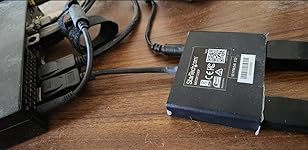
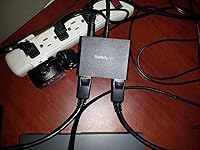
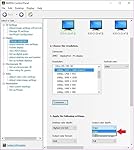
UPDATE: I finally found a solution to the issues I was having. This MST hub has a limited amount of bandwidth for all connected monitors. Their website says that 1920x1080@60Hz = 22% of the bandwidth. I think 22% is actually 1920x1080@60Hz at 24bit color. Windows 8 and above only support 32bit color depths. The increased color depth results in a 33% increase in bandwidth to the MST hub, which means with 3x 1080p@60hz monitors connected it uses approximately 90% of the bandwidth. This should work but doesn't. The solution I found was to use the NVidia Control Panel to set the output color to 6 bits per channel (aka 24bit color). The 'Desktop color depth' can't be changed from 32bit, but 'Output color depth' can set to 6bpc. At 6bpc the bandwidth to the hub is reduced to a level that it can actually handle. I attached a picture for reference. I'm not sure if this is exclusive to NVidia cards, so I suggest you check your video card settings prior to purchasing this item. I'm raising the rating of this item back to 3 stars because it does actually drive 3 monitors at 1080p@60Hz. -2 stars for the poor documentation and frustration. --------------------- UPDATE: I initially gave this product 3 stars, but after a month of using the device on a daily basis I'm downgrading it to 1 start. Over the past month I've run into the following issues. When I turn off my monitors at lunch or the end of the day, randomly I lose one monitor. Generally unplugging the MST Hub fixes it, but sometimes I have to power down everything for it to come back up. This is not a graphics card issue or monitor issue. I've tested with a cable connected directly to the laptop and have no issues. Today the same thing happened, but this time I couldn't get one of the monitors to come on. I pressed the scan button, power cycled, but nothing. I had to move the monitor to the unused port on the MST Hub. So in addition to all the other trouble, now I have a 3 port MST Hub with a dead port (yes I tried connecting other devices to the dead port and none of them get signal). This product is garbage. I highly suggest you look for another product, or plan to pull your hair out. --------------------- I bought this for a 3 monitor configuration. My docking station has 2 DP ports, but with MST hubs can support up to 6 monitors. The video card in the laptop is an nVidia Quadro K1100m. I bought the 3 port hub in hopes of cleaning up some of the cable clutter on my desk. So the plan was to place the hub behind the 3 monitors and run a DP extension between the hub and the docking station. This didn't work out. The hub only supports 3x 1080p monitors at 24hz. This configuration had way too much flicker. I was able to run 2 monitors a 1080p@60hz and 1 at 800x600@60hz, but this is less than idea. It seems that the hub doesn't have enough bandwidth to support 3x 1080p@60hz. In the end I ran 2 monitors (1080p@60hz) off of the hub, and ran the third by connecting it directly to my docking stations 2nd DP port. I also tested this using the integrated Intel graphics card but got the same results. I also verified that the laptop/docking station is DisplayPort v1.2 compliant. The laptop is a HP ZBook 17 Gen1. I'm giving it 3 start because the manufactures website clearly says that 1920x1080 @60hz = 22% bandwidth, so 3 should only consume 66% meaning it should support this configuration. But unfortunately this is not the case. Other than this specific issue I find this to be a good product. If I were to purchase again I would probably try the 2 port version and save a few dollars. Manufacture's product page: [...] ... show more
Reviewed in the United States on April 1, 2016 by Jeff H. Jeff H.

Can't find a product?

Find it on Amazon first, then paste the link below.
Checking for best price...