Search  for anything...

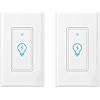
Smart Light Switch, Compatible with Alexa, Google Assistant, IFTTT, WiFi Light, Neutral Wire Required, Schedule Setting APP Remote Control, ETL, No Hub Required (Smart Switch 2pack)
Based on 548 reviews
Condition: New
Checking for the best price...
$27.99

Buy Now, Pay Later


As low as $6 / mo
  • – 4-month term
  • – No impact on credit to apply
  • – Instant approval decision
  • – Secure and straightforward checkout

Ready to go? Add this product to your cart and select a plan during checkout.

Payment plans are offered through our trusted finance partners Klarna, Affirm, Afterpay, Zip, Apple Pay, and Google Pay. No-credit-needed leasing options through Acima may also be available at checkout.

Learn more about financing & leasing here.

Selected Option

Free shipping on this product

FREE 30-day refund/replacement

To qualify for a full refund, items must be returned in their original, unused condition. If an item is returned in a used, damaged, or materially different state, you may be granted a partial refund.

To initiate a return, please visit our Returns Center.

View our full returns policy here.


Availability: In Stock.
Fulfilled by Amazon

Arrives Wednesday, Nov 4
Order within 20 hours and 38 minutes

Available payment plans shown during checkout

Protect Your Purchase

Easy claims online, fast replacements, no fees

Checking for protection plans...

At a glance

Condition
New
Style
Smart switch 2pack
Model
K38
Dimensions
3 x 1 x 2 in
Color
white
Material
Polycarbonate
Operation Mode
ON-OFF
In the box
smart switch body
Works with
Outlet

Features 4

  • REMOTE ACCESS: Control devices connected to the Smart Switch wherever you have Internet using the free "Smart Life" app on your tablet or smartphone (Compatible w/ Android 4.1 or higher & iOS8 or higher). No hub or subscription required.
  • SAFETY SCHEDULE TIMER: Take full control of your home or office lights thanks to the schedule timer that will allow you to plan the exact time lights and appliances are turned off. Save energy and money on bills by planning your electricity consumption every single day.
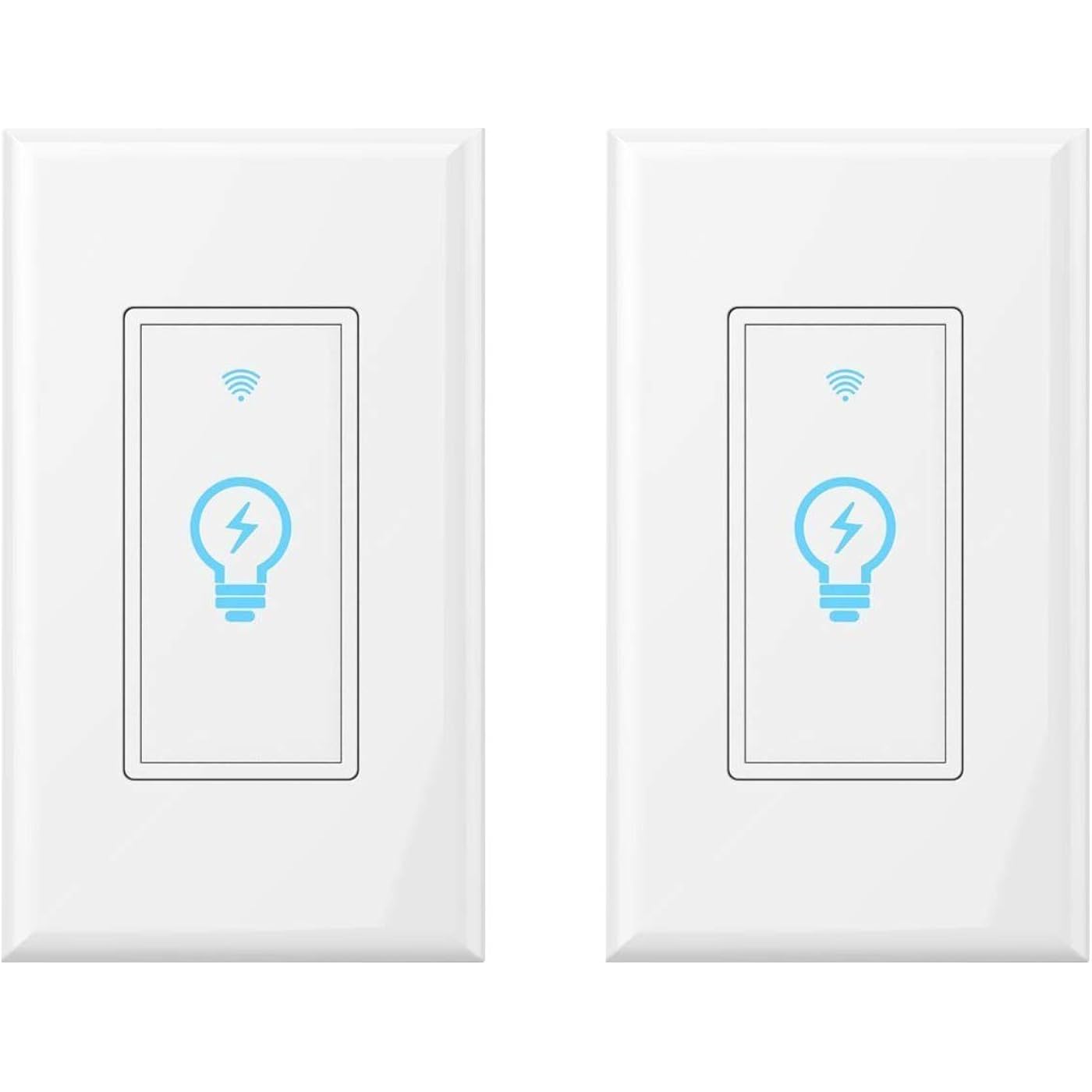
  • NOVELTY SENSITIVE TOUCH CONTROL: Unlike most similar products, Micmi light switch features a smart TOUCH CONTROL button. Chic, elegant flat surface, safely lit in the dark due to the LED light, it will definitely make a stylish addition to your room decor. NOTE: NOT COMPATIBLE WITH ELECTRICAL BOX WHICH HAVE AN OPENING less than 3-1/8" (79mm).
  • MONEY BACK Support: Use the Micmi Smart wifi Light Switch risk free for 60 days. If our WIFI Smart Light Switch In-Wall does not help you, we will refund 100% of your purchase. No questions asked.

Description

Micmi home improving products are ideal option for residential and commercial applications, providing quick and easy access for inspections. Made of high-quality material and built to last. We dedicate ourselves to providing smart home and commercial solutions to our customers . Micmi smart wall light switch wireless remote control With with google home and alexa, no hub required, Schedule timer save energy, protects your home, light will be turned on timely when not at home as desired .Help to make your home smarter,never again will you have to stumble on furniture upon returning home, as this smart light switch will turn the lights ON. It connects to your home WiFi through your smart phone or tablet (no hub required) to ensure a safer, brightly lit, welcoming environment. Specification: Shell Material: 94V0 fire retardant PC(Professional level) Rated Current:15A(Max) Rated Voltage:AC110V~125V/50-60Hz Rated Power:1800W Wireless Standard:IEEE802.11b/g/n Working Frequency:2.412~2.484MHz Static Power Loss:≤0.5W Working Temp:-20゜C~75゜C Humidity:<95% Dimensions:104x44x35.5MM Unit weight: 170g What’s in the package 1* Micmi Smart Light Switch 1* Detail Instruction Manual 2* Thumb Screws 1* Panel 7. Choose the Wi-Fi network you want to connect to your Google Home. To automatically fetch the password for this network on this device, tap OK, then the password will populate in the password field. You can also manually enter your password. Then tap CONTINUE. 8. In order for the Google assistant to answer your questions and to enjoy a personalized experience, you must sign into your Google account, then tap 9. Google Home will now attempt to connect to the installed, then tap SET LOCATION.provided Wi-Fi network. When Google Home issuccessfully connected to your Wi-Fi network, tap CONTINUE. Control devices connected to the smart plug wherever you have internet using the free App on your smartphone Schedule the smart plug to automatically power Electronics on and off as needed, like setting lights to come on at dusk or turn off at Sunrise Connect to an existing Wi-Fi network with a simple push of the Wi-Fi Protected Setup (WPS) button on the Smart Plug and on the router. It's hassle-free and gets you connected in minutes.

Specs 32

Operation Mode ON-OFF
Current Rating 15 A
Operating Voltage 120 volts
Contact Type Normally Open
Connector Type Clamp
Brand micmi
Switch Type Push Button
Terminal Screw

Frequently asked questions

If you place your order now, the estimated arrival date for this product is: Wednesday, Nov 4

Yes, absolutely! You may return this product for a full refund within 30 days of receiving it.

To initiate a return, please visit our Returns Center.

View our full returns policy here.

  • Klarna Financing
  • Affirm Pay in 4
  • Affirm Financing
  • Afterpay Financing
  • Zip Pay in 4
  • Financing through Apple Pay
  • Financing through Google Pay
Leasing options through Acima may also be available during checkout.

Learn more about financing & leasing here.

Top Amazon Reviews


Until smart witfi true rocker-style switches are available, these are a good choice.
Style: Smart switch 2pack
These have been so reliable and work so good, I have installed them all over the house. I must have about 20. The only thing we don't love about them is that the way to use them is not very intuitive. You'll get the hang of it. We've learned to sort of fist bump them with your knuckles on the way out the door and it works reliably. But what are the people that visit your home going to do? Probably stare at it. Or push it and it won't work the first time until they press a bit harder. That is not a great experience. It drove my wife nuts for a while, but she got over it. That being said. These are $15 per switch or less when on sale and they are reliable and other than the nit I just explained, they work great. I say buy these until somebody makes true rocker-style smart wifi switches. I think that is what we all want, it's just nobody has it ..... yet. Finally, save yourself the long term risk and near term hassle and hire yourself a real electrician to install these and forget about installing these yourselves or a handyman. Did you know if you leave some of the copper exposed and not pushed all the way into the wiring hole, your switch could be arcing and overheating inside your wall and you'll have no idea? That has happened to me and that isn't the product's fault, it's poor installation and if I could given one nugget of wisdom to the guy that comes after me, it would be, forget about trying to save a buck on installation by hiring handymen or by doing it yourself. Get yourself an experienced electrician that will give you a good price by doing work on the side or use Amazon installation services and just be prepared for that cost. It seems like the market is about $30/switch (notice that is double your product cost .... you don't want to have to pay this twice and three times). If you can find an actual experienced and conscientious electrician (the kind that will re-wire the other switches (the entire box) when he was not asked to when he finds your other switches weren't wired well at risk of not being paid for it), hire that guy and keep hiring that guy for all your switches and when he gives you his low price take care of him and pay him what he really deserves. IMHO, unless you really are already some electrical genius, that's the moral of my story and that's what you want to do. ... show more
Reviewed in the United States on August 15, 2019 by Ted H

Very Nice Switch!
Style: Smart switch 2pack
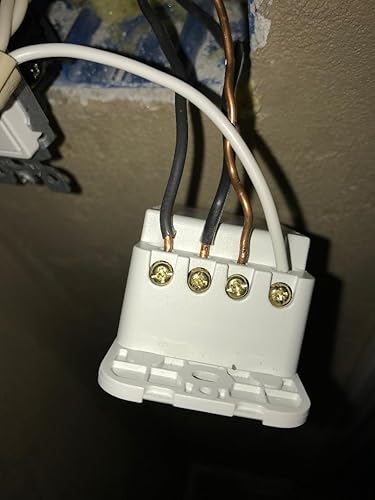
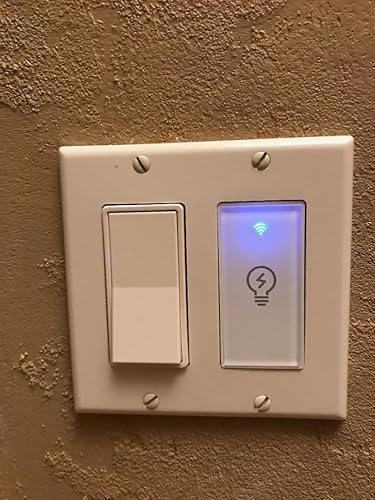
Overview: I really like this switch. It's inexpensive, easy to use, fast, doesn't lose WIFI connection, not harder to install than any other wall switch, matches my other white switches, and the app has lots of features (dusk to dawn, random, timer, scenes, rooms, schedules). Installation: I have installed many electrical switches and this one is no different. It is the size of a GFCI outlet so it is a little larger than normal. You will need a ground and neutral wire (see the pics that I uploaded). Older homes may not have the ground wire or the neutral wires available in the electrical switch box. Note the screw down terminals on the switch are not very deep. You'll need to trim the wires so no copper is showing (see pics for bad insulation example). Some have mentioned that this switch is not pure white. I disagree. I installed this WIFI switch next to an existing decora switch and the whites are identical (see pics of finished install). Others have mentioned that they couldn't get this WIFI switch to fit snugly with the wallplate. This can easily be fixed by bending the four metal ears on the other switches in your switch box (see my finger in the pics). This WIFI switch uses the Smart Life life app and is very easy to pair with the app. It works the same way as the WIFI electrical outlet pucks that Amazon sells. Pairing Instructions: 1) Press the WIFI switch for 5-10 seconds until it starts blinking rapidly at you. 2) Hit the + sign in the Smart Life App and choose Wall Switch in the app. 3) Put your phone about an inch away from the WIFI switch so that it can pair. Note: These WIFI switches like to use a 802.11n on 2.4ghz wireless network. Your phone will need to be on that network in order to pair this WIFI switch to the Smart Life App. After you're done pairing you can go back to using your 5ghz wireless network on your phone. I have a Netgear Nighthawk that has both 2.4ghz and 5ghz. Usage: I am using this WIFI switch outdoors in a weatherproof electrical switch box to control my landscape lighting. I'm using the second switch to control my porch lights. ... show more
Reviewed in the United States on November 26, 2018 by Aaron McLean

Was able to set them up pretty easily
Style: Smart switch 2pack
I received them and installed them myself. If you have familiarity with installing a light switch you shouldn't have a problem installing these. Installing them in the wall was easy except for... 1 of my sockets had no neutral wire so i just couldn't do that switch. 1 of my sockets was too shallow to fit the unit so i had to buy a standoff which resolved that, and the others just needed to be finessed into my smaller than average wall boxes. Figuring out which wire was load and hot was a guess, but if you get it wrong just switch them so no big deal. The neutrals were white so that was easy and the ground is green or bare wire or not existent (it's not necessary to get the thing to work). Once you get it to turn on the light, screw it down tight and fidget with the cover until it clicks back on. I used the Smart Home app on my android phone to add the device - click add switch and hold my phone next to the switch for a minute and it connected. Then in Google Home the device is listed and i can add it to rooms and such (i am using it with Google Home). From install to setup on the first one took me about 30 minutes. The last one took me less than 5 minutes since i had it figured out. The switches look nice in the wall with a very dim fancy blue glow on the button. It is a click to turn on and a click to turn off and feels satisfying and solid. I would have preferred if you connected the wires to the device using standard screw on connectors instead of wires with wire-nuts. The butt of these switches is really big and takes up more space than a standard switch so the added wire takes more room and i ended up trimming wire to make them fit in 2 of my sockets. Other than that, they are pretty great. ... show more
Reviewed in the United States on March 13, 2019 by Peter Milford

One of THE best Smart Switches out there.
Style: Smart switch 2pack
With the growing trend of smart homes and smart home switches one can easily lose their mind when it comes to what to buy. When it comes to smart home light switches there are many options out there and many brands. As someone who's very deep into technology let me help you in this area by telling you this is one of THE best if not THE best light switch money can buy. It's a small non known major brand that many people will write off right from the back but let me assure you this this is awesome. I have at this point installed 4 of these and have yet had 1 glitch, issue, or concern. I use them all with our Alexa systems so can't and wont comment on Google side but with Alexa these will all work flawlessly. The wiring may take another 5 minutes or more as it does require you to splice into the neutral but the rest is self explanatory. All in all the entire install process should take about 10 minutes or less. But, as I noted once it's installed the rest is flawless. The design is beautiful, the build is perfect, and functionality is on the spot. My only wish would be to have this for a 3 way or a 2 way as it's only available for a single pole switch only. If none of those terms make sense to you go ahead and Google them and make sure you are installing this for single pole only. Any other questions let me know I will be glad to help. I have now 4 of these and 2 have been up and running year + so know all about it inside and out. I am in no way associated with company and my reviews are all honest as the rest. ... show more
Reviewed in the United States on October 2, 2020 by HC_Honest_Reviews

Easy install. Integrate easily and works great with both Alexa and Google Assistant!
Style: Smart switch 2pack
After I figured out the crew that did the wiring for my custom home did a really crappy job, installation of these Smart Life smart switches were super easy! I have both Alexa and Google Assistant in my house. Integration to both of those were super easy after I created an account on the Smart Life app. I can control my lights from the Smart Life app, the Alexa app or the Google app. Also obviously can control the switches via voice command through both Alexa and Google Assistant. I like the timer/schedule. One of the switches I installed it for the flood lights in front of my house. I set up a schedule (the Smart Life app calls it a timer) for when the lights will come on and turn off each day. An important note is that when you initially connect the wires and then turn on the circuit breaker, the smart switch will not come on. You will need to touch the lightbulb for it to come on and thus turning on the light. You will need to set up the switch through the app before you can add the device through the Google Assistant app or the Alexa app. One strange thing happened...when I changed the name of the switch in the Smart Life app, the name change picked up ok on Alexa but did not on Google Assistant. Strange because it usually does. I had to manually change the name of the device again in the Google Assistant app. Overall definitely satisfied. I will be purchasing additional units through Amazon soon! Definitely recommend these! ... show more
Reviewed in the United States on March 10, 2019 by D. Le

Works as advertised. Easy to install.
Style: Smart switch 2pack
I have three of these switches in my home. I've had the oldest one for about a year without any issues. Would definitely recommend! Install time is about 15 minutes. Pros: * Easy integration with Google Home * Blue LED clearly shows when switch is on and off and doubles as a nightlight because it's relatively bright. * Easy to install as long as you are comfortable working on home wiring. * Great value. Price at the time of my purchase was less than $15/switch. * Sturdy construction. * Reliable operation. Cons: * You may not feel comfortable using a Chinese-developed app in your smart home. * You may need to purchase a different face plate if you have a ganged electrical box on your wall (i.e. more than one switch). ... show more
Reviewed in the United States on July 8, 2019 by Concorde

Instructions seem to be about a different product, NOT WORKING
Style: Smart switch 2pack
Not working. Instructions are confusing and make no sense. I am putting a one-star review until I get some support on this product and I can make it work. The instructions talk about using a reset button and show a picture of the same, which is supposed to use to put the switch in pairing mode. Well, this product DOES NOT have a reset button. Then accidentally, the switch did go into reset mode (I think), because the light bulb is blinking. But then it fails to pair, repeatedly. Subsequently, I cannot make this switch (or the second one) go into pairing mode. After it fails, you can click for help and there you can finally learn the truth about how to reset this switch; it says "TO PUT THE SWITCH IN PAIRING MODE, FLIP IT ON AND OFF 3 TIMES". But, alas, THIS DOESN'T WORK EITHER. ... show more
Reviewed in the United States on May 27, 2018 by Curious George

Don't follow the instructions
Style: Smart switch 2pack
Thank god for You tube... The instructions are so bad that I couldn't figure it out, but with the help of trusty ol youtube, a person can do anything. It made so much sense when looking up instructions for other brands. Than it became super easy. Once its installed it works super easy.... Just press the switch until the wifi light comes on, then you can pair it with your app. I don't use the suggested app... But it does work with it. Pairs super easy. It's nice having my lights hooked up to Alexa. It makes getting up in the middle of the night for a midnight snack easier. Over all. they work perfect other than the instructions, it works great. ... show more
Reviewed in the United States on May 10, 2019 by C. Turner
Checking for best price...