Search  for anything...

Samsung 27” Odyssey G6 G60F QHD Gaming Monitor

Based on 34 reviews
Condition: New
Checking for the best price...
$299.99
Holiday Deal · 40% off was $499.99

Buy Now, Pay Later


As low as $50.00 / mo
  • – 6-month term
  • – No impact on credit to apply
  • – Instant approval decision
  • – Secure and straightforward checkout

Ready to go? Add this product to your cart and select a plan during checkout.

Payment plans are offered through our trusted finance partners Klarna, Affirm, Afterpay, Zip, Apple Pay, and Google Pay. No-credit-needed leasing options through Acima may also be available at checkout.

Learn more about financing & leasing here.

Free shipping on this product

FREE 30-day refund/replacement

To qualify for a full refund, items must be returned in their original, unused condition. If an item is returned in a used, damaged, or materially different state, you may be granted a partial refund.

To initiate a return, please visit our Returns Center.

View our full returns policy here.


Availability: In Stock.
Fulfilled by Amazon

Arrives Saturday, Nov 21
Order within 19 hours and 16 minutes

Available payment plans shown during checkout

Protect Your Purchase

Easy claims online, fast replacements, no fees

Checking for protection plans...

At a glance

Condition
New
Model
LS27FG60DENXZA
Screen size
27 in
Dimensions
10.37"D x 24.13"W x 21.73"H
Weight
14.1 lb
Color
Black
Resolution
QHD 1440p
In the box
1x HDMI1x DP1x PC
Warranty
1 Year Manufacturer

Features 7

  • Samsungs 27 Odyssey G6 QHD Gaming Monitor delivers lifelike visuals for epic, immersive gameplay.
  • QHD resolution (2560 x 1440) boasts incredibly detailed razor-sharp images with 1.7 times the pixel density of Full HD.
  • Fast IPS panel accurately delivers clear, crisp hues that stay consistent across the whole screen.
  • VESA DisplayHDR 400 improves brightness and refines contrast in both bright and shadowed areas.

Description

Samsung’s 27" Odyssey G6 QHD Gaming Monitor delivers lifelike visuals that are more vivid and immersive than ever before. QHD resolution (2560 x 1440) boasts incredibly detailed razor-sharp images with 1.7 times the pixel density of Full HD. The Fast IPS panel accurately delivers clear, crisp hues that stay consistent across the whole screen. Visuals are brought to life with VESA DisplayHDR™ 400 which improves brightness and refines contrast in both bright and shadowed areas. The 350Hz Refresh Rate and near-instant 1ms response time (GtG) minimize lag for precise split-second reactions, ensuring that moves are captured in real-time. G-Sync compatibility along with AMD FreeSync™ Premium reduce choppiness, screen lag and image tearing for ultra-smooth scenes that seamlessly flow one into the next. Auto Source Switch+ allows instantaneous switching between connected devices, while the Ergonomic Stand enables the monitor to be tilted, height adjusted, and pivoted for total gaming comfort.

Specs 36

Brand Samsung
Screen Size 27 inches
Resolution QHD 1440p
Aspect Ratio 169
Screen Surface Description Matte
Screen Finish Matte
Contrast Ratio 10001
Refresh Rate 350 hertz

Frequently asked questions

If you place your order now, the estimated arrival date for this product is: Saturday, Nov 21

Yes, absolutely! You may return this product for a full refund within 30 days of receiving it.

To initiate a return, please visit our Returns Center.

View our full returns policy here.

  • Klarna Financing
  • Affirm Pay in 4
  • Affirm Financing
  • Afterpay Financing
  • Zip Pay in 4
  • Financing through Apple Pay
  • Financing through Google Pay
Leasing options through Acima may also be available during checkout.

Learn more about financing & leasing here.

Top Amazon Reviews


One of the best monitors I've bought
Great monitor great visuals while gaming with the high refresh rate and adjustable stand on it is one of the best being able to adjust height and angle of monitor for dual monitor setup but it's Samsung so brand is top tier
Reviewed in the United States on August 19, 2026 by Lane B.

High quality gaming monitor
Okay, I have to say that I do not own a traditional gaming PC. What I game with is a handheld PC, specifically an Ayaneo Air 1s with an AMD Ryzen 7 8840U, 32GB of RAM, and 2 TB of storage; the screen is OLED. With that in mind, I won't be able to talk about the max performance of this gaming monitor, but I can still talk about its features and how it performs with my Ayaneo in the docking station. The first thing I have to say is that installing the monitor and the base is so easy. And the monitor is perfectly secure in it. You won't have to worry about it falling. When it is attached to the stand, it allows you to tilt, swivel, or adjust its height of it, which is great. The monitor comes with two cables, an ultra-high-speed HDMI cable and an 8 K DisplayPort cable. I didn't even know because after moving the monitor with me to test it with my Ayaneo, I forgot to bring the HDMI cable that was in my TV. Thankfully, it brings both cables, and I was able to test the monitor. How does it work with my Ayaneo? Well, at first I was struggling because, for some reason, what was being projected on the monitor was a very low-resolution screen, and it was locked at that resolution. After experimenting with it for a couple of hours, I was able to put it to the same resolution as my Ayaneo. Unfortunately, the next day I forgot what I did to be able to put it in a high resolution. But then I discovered that if I connect my Ayaneo to the monitor before turning it on, then everything will turn on in the high-quality display I wanted, and the Ayaneo screen is basically sleeping while everything is projected into the gaming monitor (see attached pictures for reference). Even though this is not an OLED monitor, the image that is projected is beautiful, just like in my Ayaneo. The color quality is perfect, and I really love it a lot, much better than when I use dock mode on my 55" TV. So far, I've only used this for Fortnite, which is the game I've been playing more regularly. I also like the fact that I was able to use the Crosshair feature of the monitor, which is great. You get 6 options, 2 different crosshairs in 3 different colors (blue, red, and white). The Crosshair goes automatically to the center of the screen and lines up perfectly with a shooter game like Fortnite. You can still move the Crosshair, but since it is perfectly centered in its default setting, you don't have to worry about adjusting it. My experience with it so far is just perfect. I can't ask for anything better. I want to test this with my Monster Hunter: Wilds game and other games to see how good it looks. I will upload pictures of those games as soon as I have time to play them. If you are looking for a great gaming monitor, this is an amazing option. I highly recommend it. ... show more
Reviewed in the United States on July 8, 2026 by Ramon Ocasio

Best 1440p gaming experience period
Some tools are multipurpose, they do a good job at everything but a great job at nothing, while others are ruthlessly dedicated to a single usage at which they excel above all others. The Odyssey G6 falls squarely into the latter category. It exists for one reason and one reason only - to whip pixels past your pupils faster than even the most perceptive human eye can detect. This is the ultimate weapon for gamers, the final boss of monitors (at least for now), the world champion of refresh rate. 350Hz refresh is more than twice as fast as serious gaming monitors from just a few years ago, and it doesn’t require special drivers or a new video card - I plugged in this monitor, Windows 11 auto detected it (already an improvement over its G5 predecessor, which I also own) and it set the refresh rate to 350Hz without so much as a reboot. That is crazy easy. This monitor is designed to be your interface to the game you’re playing and it makes compromises to be the best. The color accuracy on this monitor is best described as “sorta”, it does not support HDR, and it has two measly inputs - one HDMI and one DisplayPort. This is not a productivity monitor, it is a weapon in the hands of a serious gamer. At $499.99 at time of ordering, this is not a value leader, but at $359.99 at time of review, the value proposition is more in line with what you want for a super high refresh rate 1440p monitor of this size. If you are a competitive gamer, you already know the benefit of a higher refresh rate on your monitor and you’re familiar with the tradeoffs that entails. If gaming is a sideline for you, then you should think long and hard about what you give up to get that refresh rate - no 4K desktop, colors that aren’t up to snuff, and no HDR. This might not be the monitor for you. For the right person, though, this is the difference between winning and losing, and that gets 5 stars ... show more
Reviewed in the United States on March 24, 2026 by Writing Reviews in Atlanta

This is a nice monitor
This is a bit weird, but . . . I actually ordered this monitor for use in my boy's room, as a birthday surprise. It was delivered while I was out of town, and the boy opened the box and saw it and set out on a campaign to get it for himself. I was so put off by his "you don't need a nice monitor like this, so it only makes sense that I have it" and subsequent bullying attempts that I vowed he'd never use it. When I arrived back home a few weeks later, emotions had calmed, but I knew I did not want to reward a sense of entitlement, so I stuck to what I'd said. I was (and still am) in the process of moving my office from an upstairs room to a downstairs room, so it has taken me a while to actually unbox and use the monitor... Set up took minimal effort. The monitor does have VESA mount capability, but I'm using the stand right on my desktop. The stand is sturdy, and the monitor doesn't wiggle around if my desk is moved a bit. The stand doesn't take up much room, and it is the same color as the monitor (strangely, my old monitor's body is black, while the stand is white. Annoying.). Let me say, I am no monitor afficionado. I am not a gamer. I don't immediately notice a change in refresh rate, nor do I require the most vivid, saturated colors. I will say, though, that the screen is brighter and yet somehow less washed-out looking than my old monitor. A couple things surprised me. There's no camera, which keeps me from having to remember to slide the camera cover closed (or, as in the olden days, place a post-it note over the camera), but if you need one for your work or play, you'll need to provide an external one. And there are no speakers. I don't need them myself, but I would think a gamer would want them. Perhaps the best I can say about the monitor is that my boy still covets it. ... show more
Reviewed in the United States on February 13, 2026 by Merideth Baker

Butter-Smooth Speed That Feels Wired to Your Hands
I’ve been using the Samsung 27” Odyssey G6 as my secondary monitor for everyday work and light gaming, and the first thing that stood out was the overall monitor quality right out of the box. Setup was quick, painless, and had the attention to detail that you expect from a AAA brand like Samsung. The stand certainly looks sturdy, but this went right on to me monitor arms. The VESA connection was totally drama free and came with large thumbscrews for ease of installation. Cabling was thoughtfully packaged, labeled well, and with modest cable management so you can get set up quickly. The QHD resolution looks sharp at this size, with text staying crisp and images looking clean without needing any adjustment. Color accuracy was better than I expected for a refresh rate-focused monitor. Everything looked natural with default settings and didn't feel that I needed to go through any settings; I did anyway. There are some handy features that are aimed right at FPS gamers and would appreciate, (pun fully intended). I appreciate the ability to calibrate power-saving modes and being able to swap in a custom setting on the quick menu; I use the eye saver mode for night work. Let's be totally honest: you're getting this monitor for the gaming performance. Only the more intense competitive esports players are going to take full advantage of the 350Hz refresh rate is the kind of thing you don’t fully appreciate until you try it. gameplay feels immediately responsive and unusually “connected” in a way that’s hard to appreciate until you’ve spent some time with it. The most noticeable change isn’t that everything suddenly looks faster, but that motion looks cleaner. When you pan the camera or track a moving target, edges stay more defined instead of smearing or blurring together. Functionality has been reliable so far, with quick wake times (love this) and no weird connection issues when switching inputs. It’s definitely not a cheap monitor, but in terms of value for money, it's justified if you actually take advantage of the high refresh rate and smooth performance. Overall, it’s a polished, high-end display that works just as well for daily use as it does for competitive gaming. ... show more
Reviewed in the United States on February 3, 2026 by Prefectionist

Wow… This Monitor Completely Blew Me Away
SAMSUNG 27” Odyssey G6 G60F QHD Resolution Gaming Monitor, 350Hz Refresh Rate. I wasn’t expecting to be this impressed, but the Samsung 27” Odyssey G6 G60F delivered on every level, from gaming performance to photo editing to overall visual quality. I’m genuinely blown away by how sharp, smooth, and accurate everything looks on this display. First, I’ll admit I hesitated when I realized this monitor doesn’t have built-in speakers. My old monitor did, and I assumed I’d miss that convenience. But then I thought about it, we have several TVs in our home, and we don’t use the internal speakers on any of them. They’re all hooked up to surround sound systems. So why worry about monitor speakers? I connected a Bluetooth speaker I already owned, and honestly, the sound was better than what my old monitor ever provided. So don’t let the lack of built-ins deter you. You’ll likely get better audio this way anyway. Now on to the visuals and this is where the Odyssey G6 really shines. The QHD resolution at 2560x1440 is incredibly crisp. The image quality is outstanding, truly impressive in a way that makes you notice details you never saw before. I also use my PC for editing photos, and the clarity and sharpness were immediately noticeable. Colors came perfectly calibrated right out of the box, no adjustments needed. Skin tones, shadows, highlights… everything looked natural and accurate, which is huge for photo work. Gaming on this monitor is on a completely different level. The 350Hz refresh rate isn’t just a big number, it truly makes a real difference. Movements are unbelievably smooth, and fast-paced action feels almost surreal. If you play competitive games where every millisecond counts, the combination of 350Hz with a 1ms response time gives you a noticeably more responsive experience. No motion blur, no smearing just clean, ultra-fluid gameplay. Pair that with G-Sync/FreeSync Premium, and the result is zero tearing and incredibly stable frames. The HDR support (VESA DisplayHDR 400) gives games and photos extra depth with better brightness and contrast, especially in scenes with both dark shadows and bright highlights. The Fast IPS panel keeps colors consistent across the entire screen, which is something that's really important when editing. Even the ergonomics are a win. Height adjustment, tilt, pivot it’s all there and easy to fine-tune. Auto Source Switch+ is a nice touch too when swapping between devices. In short, this monitor exceeded every expectation I had. Between the stunning picture quality, competitive gaming performance, accurate color calibration, and overall usability, the Odyssey G6 is worth every penny. Highly recommended for gamers, creators, and anyone who simply wants a top-tier display experience. ... show more
Reviewed in the United States on November 23, 2025 by sholmes

A Premium 27" 350Hz 1ms Gaming Experience
Ordered Samsung's Odyssey G6 G60F to evaluate and setup at one of the workstations. At first glance the monitor unit itself looks flat and generic from the front but it looks quite different from behind. The included adjustable stand allows the monitor to be raised, angled, and rotated to preference up to 90 degrees for a full portrait mode. Functionally the IPS panel displays at 10-bit colors HDR capable at a native resolution of 2560x1440 pixels which at a 27" size allows for vibrant and color accurate images making it ideal for graphic design besides gaming. On performance when connected to a high end gaming card the panel is capable of an effective maximum 350hz refresh rate and a 1ms response rate which is more than adequate for competitive gaming or e-sports. For connectivity the monitor offers both HDMI and DisplayPort inputs at the back — one male-to-male cable is included for each. While the monitor lacks built-in speakers an 3.5mm output jack can output analog stereo either to headphones or external speakers if sound is digitally routed through the monitor as an output device. For manual adjustments an all-in-one button-control stick is located at the bottom center of the panel. While it is a bit pricey for a 27" IPS the imaging quality and performance is definitely in line with MSRP — furthermore it is backed by Samsung's industry standard reliability and warranty. Overall a fair deal for top of the line visual gaming experience. Highly recommend! ... show more
Reviewed in the United States on February 21, 2026 by Mr. Price

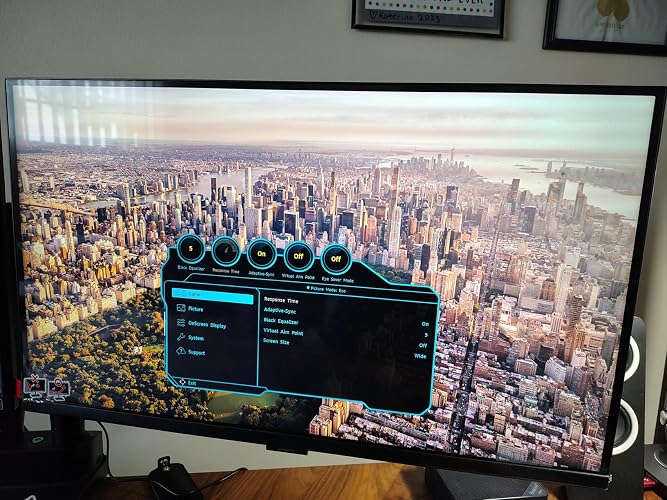
Great Budget Monitor, But Poor Value
Since I will be talking about value and the prices of things often change, I will start by saying that as I write this, this monitor is $499.99. A quick search on this website shows a nice leading brand competitor 27" OLED monitor for $499.99 (27GS93QE). I was excited to try out this IPS monitor with a 350Hz refresh rate. I have a very budget high refresh rate monitor that is also 1440p, but the colors are so washed out that I have gone back to my 60 Hz monitor with accurate colors and local dimming for gaming as well as my graphics and music editing. I hoped this monitor sold at a premium price would be good enough for both, since I do prefer higher framerate for gaming. My first impression was not good. The brightness was cranked up and the colors looked washed out and garish. Black levels were very grey. I checked out the 350 Hz motion with some tests as well as just the general impression it gave me and I was more impressed. Even at 350 Hz, each refresh is distinct and responsiveness in games is excellent. It even does well with simulated black frame insertion, which makes me wish it was an option. This would make a great gaming monitor for twitch shooters, particularly if you can hit the 350 fps without frame generation. That is much more practical in 1440p than in 4K. However, the colors and contrast still looked so bad that I wouldn't want to actually use the monitor with the default settings. I first scrolled through the menus to see what I could change. It was set on an eco mode and looked better when I turned that off. I also found a more accurate standard color setting. Even so, it looked off, so I used a Spyder color calibration tool. This made a huge difference. One thing it does is recommend a backlight setting, and turning the backlight down helped tremendously with black levels and the general washed out look. It also corrected the colors, which showed how off they were from the factory. It has been a long time since I have used a monitor with colors that were so out of the proper range before calibration. Not a big deal if you have a calibration tool, but most people do not and the calibration will not carry over to other devices such as game consoles. The HDR here is DISPLAYHDR 400, which should not be confused with the OLED version of DISPLAYHDR 400. It is at the absolute bottom of the range and means that the primary function is just that it can take HDR signals, but not truly show the HDR range (from deep blacks to blinding highlights). I found the difference in HDR and SDR content minimal. It is an IPS monitor without proper local dimming for true HDR and looks like one despite having some tricks that are turned on by default to try to simulate HDR by forcing dark and light areas to be more different. Speaking of IPS, there are some positives to an IPS screen. The pixel grid is sharp and pleasant to look at for text uses, such as programming, schoolwork, and web scrolling. The eye saver function also really does feel great for long programming sessions. The biggest issue with this screen is simply that it costs far too much for what is more suited to the budget gaming monitor space. When competing directly with OLED monitors at the same price, it can't come close. I would never choose this over one of those, even if I like IPS screens for basic uses. It does work well for gaming where picture quality is not so much a priority as performance, but that is also true for inexpensive gaming monitors that focus on high framerate above all else. I would suggest either going for one of those and saving money or going with a nice OLED gaming monitor instead. ... show more
Reviewed in the United States on November 18, 2025 by Amazon Customer
Checking for best price...