


Search  for anything...

Rocketbook Smart Reusable Notebook, Mini Spiral Notebook, Infinity Black, (3.5" x 5.5")

Based on 11,064 reviews
Condition: New
Checking for the best price...
$19.98
Holiday Deal · 33% off was $29.99

Buy Now, Pay Later


As low as $4 / mo
  • – 4-month term
  • – No impact on credit to apply
  • – Instant approval decision
  • – Secure and straightforward checkout

Ready to go? Add this product to your cart and select a plan during checkout.

Payment plans are offered through our trusted finance partners Klarna, Affirm, Afterpay, Zip, Apple Pay, and Google Pay. No-credit-needed leasing options through Acima may also be available at checkout.

Learn more about financing & leasing here.

Selected Option

Free shipping on this product

FREE 30-day refund/replacement

To qualify for a full refund, items must be returned in their original, unused condition. If an item is returned in a used, damaged, or materially different state, you may be granted a partial refund.

To initiate a return, please visit our Returns Center.

View our full returns policy here.


Availability: Only 1 left in stock, order soon!
Fulfilled by Amazon

Arrives Sunday, Nov 22
Order within 3 hours and 23 minutes

Available payment plans shown during checkout

Protect Your Purchase

Easy claims online, fast replacements, no fees

Checking for protection plans...

At a glance

Condition
New
Color
Black
Style
Classic
Dimensions
3.5"L x 5.5"W x 0.4"Th
Weight
1.44 oz
Theme
Book
Sheet Size
3.5 x 5.5 in
In the box
microfiber clothnotebookpen

Features 4

  • CLOUD COMPATIBLE - All handwritten notes can be saved to the free Rocketbook app and easily transfered to your cloud service of choice including Google Drive, Dropbox, Evernote, OneNote, Slack, iCloud, and more
  • SAVE TIME FINDING NOTES - Sophisitcated AI technology allows you to use Rocketbook smart titles, smart search, and email transcription to easily name, search, and send your notes, no more flipping through pages
  • GIFTS FOR EVERYONE - Rocketbook Mini's compact size makes it the perfect gift for everyone this holiday season. It's easy-to-store size is ideal for travelers, on-the-go students, creatives, and professionals of all types
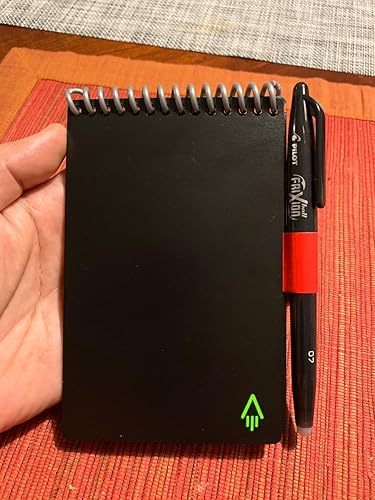
  • PACKAGING INCLUDES - 1 Rocketbook Mini Notebook (3.5" x 5.5"), 1 Pilot Frixion Pen, and 1 Microfiber Cloth

Description

The Everlast notebook provides a classic pen and paper experience, yet is built for the digital age. Although it feels like a traditional notebook, the Everlast is endlessly reusable and connected to all of your favorite cloud services. When you write using any pen from the Pilot Frixion line, your writing sticks to Everlast pages like regular paper. But add a drop of water… and the notebook erases like magic. We designed the Everlast for those who want an endlessly reusable notebook to last for years, if not a lifetime. The Everlast has pages made with synthetic materials that provide an extremely smooth writing experience. Blast your handwritten notes to popular cloud services like Google drive, Dropbox, Evernote, box, OneNote, Slack, iCloud, email and more using the free Rocketbook application for iOS and Android. From the Manufacturer

Specs 22

Brand Rocketbook
Color Black
Theme Book
Sheet Size 3.5 x 5.5 inches
Pages 48
Style Classic
Ruling Type Dotted
Special Feature Soft Cover

Frequently asked questions

If you place your order now, the estimated arrival date for this product is: Sunday, Nov 22

Yes, absolutely! You may return this product for a full refund within 30 days of receiving it.

To initiate a return, please visit our Returns Center.

View our full returns policy here.

  • Klarna Financing
  • Affirm Pay in 4
  • Affirm Financing
  • Afterpay Financing
  • Zip Pay in 4
  • Financing through Apple Pay
  • Financing through Google Pay
Leasing options through Acima may also be available during checkout.

Learn more about financing & leasing here.

Top Amazon Reviews

Note Taking to a Whole New Dimension!
Color: Black Style: Classic
For starters, if I were in a role playing game I'd be a Scribe-Wanna-be-Warrior. I kinda document stuff like a hoarder keeps anything they might run across. I don't remember details well past a few days, but my job relies on details. I've learned to thrive by writing/sketching down a lot of stuff that most people wouldn't even think to keep. The Everlast Mini is my newest attempt and I'm very happy with it! Initially, I was looking for what is apparently the older version – the one you throw into the microwave, but it sounded like the Everlast model is the newest approach Rocketbook is going with. Before this, I've used Notability, Livescribe, and of course pencil/pen & paper. I've been using the Mini for a month or so now. I chose this size because I wanted to have something super-portable. The size is perfect. I can still get a full-page sketch scribbled out or a decent amount of text before switching pages. Given the relatively short time, I wonder how durable these notebooks are. I don't think the pages will tear easy or the binding will break so that is good. There is some slight etching on the page that is left over, but that doesn't really limit future writing/drawing. I have a sense that the page will eventually take on a new "finish" because the etchings will cover almost the entire surface. You can only see them when you hold the page at a certain angle, so it doesn't affect the function at all. Anyhow, I gave a four star rating because I just don't know how durable the notebook will be. The pages erase quickly with water and a paper towel. I keep forgetting, but I want to pack a small water atomizer that I have left over from my Skinomi smartphone class protector kit. They send you one to wet the protector before installing over your iPhone. Anyhow that would perfect to be able to spray the page with water and then wipe it clean. After relying on digital-inputted notes for so long, it is great to go back to analog! There's something so much more personal about writing something out. It's also better in a consulting role to scribble out notes than separate yourself from the other person with a screen and keyboard. I've found this notebook encourages even more creativity because unlike pencil & paper, the only consumable is the ink, so I end up writing/sketching way more than I used to because I can just keep going and going. It reminds me of the transition from film to digital photography. I could take tons of pictures and not be worried about the developing and printing costs and I used to have my own darkroom. I'm interested in trying out the other pen types that Pilot makes for their Frixion line. Rocketbook makes it sound like any of these pens will work with their notebook. I want to try out some thin markers next. It would be great to have some kind of pencil-like experience too! Pilot, please invent the Frixion "pencil" - erasable with only water! There is an odd feel when writing though that you'll get used to. It does feel a little like you are writing on plastic at first, but I've gotten a hang of it. On a related note, the ink can be inconsistent at first because it doesn't always take to the surface of the page consistently. Once the pen gets going though, it's no problem. It's only the first character or two of your first word though, and not all the time. That might be more the pen than the notebook, but they are used together as a system. The ink also may take significantly longer than just 15 seconds to dry. I've noticed that some of my sketches take up to 90 seconds to dry before I can flip a page or close the notebook. The software doesn't pickup "edge bleeds" well. I wouldn't recommend writing/drawing to the black edge of the page. The software has a difficult time scanning these pages. The software doesn't always properly auto rotate the page. When it doesn't, it leaves the QR code and then it actually deletes part of your page. Caution, you can lose important information if you have it in the opposite corner. What is the QR code for if not to detect rotation? They all appear to be identical. Normally, it is deleted by the software so it's not an issue with your scans. One other minor thing is that sharing a scan via some other pre-programmed action takes a few extra buttons. It'd be nice if it were as easy to send to a different email ad hoc. Those minor things aside, I love the app. It is well designed and looks great. It didn't take any time at all to get up and running. Rocketbook may not like this because I have a cheap and super-effective way to keep your pen with your notepad... wait for it... Duct tape! I know their pen keeper doesn't get the best reviews – I haven't tried it. I found this way is perfect for me. Just cut a piece of duct tape that is the length of the circumference of the pen, then stick it to a longer piece of duct tape so that the sticky sides adhere to one another. Then tape it to the back edge of your notepad and you have a 3-min, half-cent, flexible, durable, and even colorful pen holder! By the way, I've started to use their Beacons as well and absolutely love them! I need another set because I lost them :-( ... show more
Reviewed in the United States on November 15, 2019 by K Matsueda

Useful and durable.
Color: Black Style: Classic
I have had my Rocketbook for a month now and I use it a couple times a week. I got the Mini for taking notes on the job and I carry it in my bag, or in my back pocket when I expect to need it. I have driven around with it in my back pocket on multiple occasions and it shows no signs of wearing out. Doing this with a traditional spiral-bound notebook usually resulted in a beaten up notebook after a few days. The notebook erases easily using either the pen eraser or the cloth, and I have had no issues with the paper getting etched. I have not experienced any issues with the app failing to scan the image either. In fact, I am amazed by how well the OCR handwriting to text function works. If you were to ask my second-grade teacher she would tell you I have abominable handwriting, but the app is able to turn my chicken scratch into text with about 95% accuracy. If I am writing down something important I will slow my scrawling a bit and then the app picks it up with 100% accuracy. Either way, you get the scanned image AND the text sent via email, so it's not like you will lose part of your notes. I have the app configured to send notes to my email, my google drive, and to coworkers who need information on the job. It was a piece of cake to set up and I was firing off futuristic memos in less than 5 minutes. ... show more
Reviewed in the United States on October 5, 2019 by Rocksteady

Pocket Rocket Notebook!
I use this every day at work when I’m taking down notes for my clients. It’s perfect and compact so I can slip it into just about any pocket or bag. I love that I can just erase it when I’m done with that client and I don’t have to waist a million little pieces of paper or sticky notes that get lost! ... show more
Reviewed in the United States on July 22, 2026 by Jenn Chase

It Does What It Says
I just got this in the mail today. I had a few Frixion pens in my collection, so I gave them a try as well. I got this because I found myself needing a pocket notepad to jot things down. But, I hated the idea of having to write information down and wasting a page/paper (eventually throwing away the notepad). Having something like this, is ideal because the information I am jotting is not really meant for me to keep for a long period of time. &if what I am writing is something I wanted to keep, I have the option of uploading it. This suits my style of note taking as I have been paperless since 2020. I like the idea of being able to move pages/information around. I have a few (not quite) dislikes: - The ink skipping - The paper is too smooth - Ink take a long time to dry DO NOT USE OTHER PENS. I tried using a Pilot V5 RT on it, it stains the page. I was able to remove it with isopropyl alcohol, but it also took away some dots. I was thinking of making something similar by laminating index cards and binding them together. While that would have worked for me, it might have been bulky as I’d need about 10-15 pages. I would recommend this to anyone needing a pocket notebook. I’m happy I gave this a try. I having a feeling I will get a lot of use out of it. ... show more
Reviewed in the United States on September 27, 2024 by an.GEL.ica

Great addition to my daily arsenal of supplies
My manager gave me a Rocket Book hybrid planner/ notebook for Christmas. I love planners and I take detailed notes during every meeting so this was a great gift. I enjoyed it so much and found so much value in it that I ordered this pocket notebook for use in the field. But, I am using it in my personal life as well; it's the perfect size for grocery lists and fits perfectly in my small purse. I love the fact I can use the app to send a copy of whatever I write to my email addresses. This is highly useful for meeting notes. The frixion pen ink truly wipes clean off the page, allowing the book to be used over and over again. This saves on unnecessary trash in landfills. The frixion pens glide effortlessly across the page with a smoothness unmatched by ballpoint or gel pens on regular paper. Is Rocket Book an initial small/medium investment? Yes, it is seeing as one can buy a pocket notebook for a buck. Do I think Rocket Book is worth the money? Yes! I will end up saving money overall and not have used notebooks laying around or being thrown away and meeting notes don't have to be scanned into the computer. I highly recommend Rocket Book. In my opinion the binding and covers are very durable and I believe I'll get years of use from them. ... show more
Reviewed in the United States on January 25, 2024 by Heather W

Another tool for my ADHD toolkit that I actually use
I get it. The ADHD joke. There are piles of notebooks in my house that I've bought to help tame my ADHD, and my Amazon account holds the proof. But this little wonder, this little gem, holds the key that unlocks the secret to the Great Notebook Destash of 2023! I have a couple of Rocketbooks. A larger one, and this small one. This is my sidekick. I like the ability to quickly and easily write notes and then destroy them with a spray of water and a wipe with a microfiber cloth. I'm sure there is value in the cloud storage, but I haven't got as far as exploring that yet, as I use Notion and I understand that it's not yet possible to save my notes to Notion without some great finagling of APIs. The Rocketbook is durable. You write on the vinyl-like "paper" and don't have to be concerned that your vigorous wiping (with the abovementioned microfiber cloth) will somehow pull the pages away from the spiral binding because it can be tempting to wipe hard to get the black ink off the page. Leaving the ink there for a while can cause it to leave a more permanent imprint on the page, I'm told, though I haven't run into this problem yet. The Frixion pen that comes with the notebook writes nicely. It glides on the page smoothly and doesn't seem to smudge. I did buy the pen holder because my desk is a mess and I'm notorious for losing pens, even though I have 2 pen cups on my desk. I wanted to make sure the pen I need to write with didn't get swapped out for a regular pen, a permanent marker, or some other incompatible pen. Safety first! The pen holder was a breeze to apply and has kept my Frixion pen safely attached to my Rocketbook since day 1. The microfiber cleaning cloth is just slightly smaller in size than the notebook, and so it sits unobtrusively in the back of the notebook and is always there when I need it. My main use for this smaller Rocketbook is to take notes of things I need to remember temporarily - things I would normally write on sticky notes, scrap paper, or old envelopes. It sits beside my work computer so I can remember what I need to report on in our Agile stand-up meeting, and then erase the notes as soon as the meeting is over. I can note down action items during meetings, then erase them as soon as I've completed the tasks, or moved the note to my calendar. Prior to Rocketbook, I'd have piles of sticky notes and other paper scraps, and not remember what I'd completed, or where I left the note I had just taken. I think the Rocketbook works well for me because I know there are limited pages, so if I'm only writing in the Rocketbook I have to keep it updated (by erasing notes I no longer need) to have room for more notes. There isn't really a downside to using a Rocketbook. You do need to only use Frixion pens, but you can get them in so many pretty colors that it's really no hassle at all! Now I need to go through and cull my Amazon wishlist, removing all the sticky notes and notebooks that I've amassed over the years. Then I can get rid of all the small notebooks and piles and piles of sticky note pads - I just don't need them anymore. Thank you, Rocketbook! ... show more
Reviewed in the United States on December 12, 2022 by NeurospicyBuilder

This is great if you don’t use the app and don’t use markers or highlighters
Color: Black Style: Classic
This thing is like having a 15 page mini-whiteboard in your pocket. It’s great! You just have to have the right Frixion erasable gel pens for it to work. Unfortunately, though, I find there are some things about it that are a complete waste of money and materials that unnecessarily reduce its value: 1) Don’t use the app, it’s a privacy/security problem regardless of what the “privacy policy” says. Just scan the pages with your own “scan” app that doesn’t collect tracking information. There’s no legitimate reason why anyone needs to collect tracking information of any sort about your note taking and it doesn’t matter if they claim you aren’t identified. None of the features they offer for organization etc are unique to their software. 2) Don’t use the app’s handwriting recognition. There’s no reason why this has to be done on a remote server or why any tracking data needs to be collected on it. If you need this then use other OCR software that does everything on the local device. 3) The QR code is a waste of space and is completely unnecessary. It seems to contain very few bits of information but the company isn’t very upfront about telling you what it’s for. The same exact code is on all pages, so it doesn’t help with page numbering. If the page dimensions are encoded then it’s a very wasteful way of doing it. If it’s for tracking then that’s not only a waste of space but also a privacy violation. The code is useless and it’s a serious waste of space on such a small pad, reducing the value of what you’re getting. 4) The polymer material they are using really only seems to be suitable for the frixion “gel pens”. (0.7mm work best, even though it came with an 0.5mm). Even though they claim other things like markers will work, they put down too much ink of a less suitable formulation and make too much of a mess trying to remove. Some colors of marker are especially resistant to cleaning and won’t even wash off completely under running water. Basically they’ll turn into a messy oily smear that may still leave a slight tint on the page even with a lot of wiping. Yellow seems to be the worst. So I’d just forget about using anything other than the “gel” type mini rollerball frixion pens. (And yes I used actual Pilot Frixion brand markers and highlighters.) 5) The small pad comes with a 0.5mm pen but this is a bit too thin on the hard polymer surface of the pages. This makes the lines too thin to see well and would only make sense if you’re going to write very tiny. I think 0.7mm is much better for most people so I’d recommend getting one of those thicker point pens. 6) I haven’t tried every color but so far every “gel” type ink color I have tried (black, red, blue) seems to erase equally well. 7) The need to let the ink have some time to dry can be more of an issue on the small notepad where you may need to flip the page before it’s dry so you can continue writing. Might want to keep a blotter sheet in there or something. ... show more
Reviewed in the United States on December 11, 2024 by Omega Man

It is reusable
I depend on this notebook for all my quality notes. This is very durable and the color is excellent.Great value for the money
Reviewed in the United States on July 21, 2026 by stephen k
Checking for best price...