Search  for anything...

Razer Stream Controller: All-In-One Keypad for Streaming - 12 Haptic Switchblade Keys - 6 Tactile Analog Dials - 8 Programmable Buttons - Designed for PC & Mac Compatibility

  • Based on 321 reviews
Condition: New
Checking for the best price...
$144.95 Why this price?

Buy Now, Pay Later


As low as $24.16 / mo
  • – 6-month term
  • – No impact on credit
  • – Instant approval decision
  • – Secure and straightforward checkout

Ready to go? Add this product to your cart and select a plan during checkout.

Payment plans are offered through our trusted finance partners Klarna, Affirm, Afterpay, Apple Pay, and PayTomorrow. No-credit-needed leasing options through Acima may also be available at checkout.

Learn more about financing & leasing here.

Selected Option

Free shipping on this product

30-day refund/replacement

To qualify for a full refund, items must be returned in their original, unused condition. If an item is returned in a used, damaged, or materially different state, you may be granted a partial refund.

To initiate a return, please visit our Returns Center.

View our full returns policy here.


Availability: In Stock.
Fulfilled by Amazon

Arrives Saturday, Dec 13
Order within 5 hours and 5 minutes
Available payment plans shown during checkout

Protection Plan Protect Your Purchase
Checking for protection plans...

Style: Stream Controller


Features

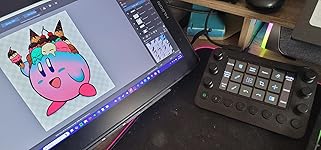
  • All-in-one Stream Controller: Effortlessly manage your stream with shortcuts for multiple programsorganized through custom layouts and icons for intuitive use
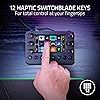
  • 12 Haptic Switchblade Keys: Bind an infinite variety of commands and macros. Customize their icons for easy visual navigation and adjust their haptic feedback for the ideal level of tactile response
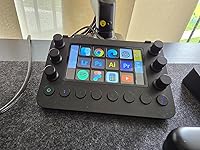
  • 6 Tactile Analog Dials: Conveniently tweak the levels of your audio, media, and other channels, as you manage it all at a glance using the controllers dynamic LCD touchscreen
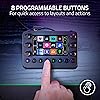
  • 8 Programmable Buttons: Program them to instantly toggle between up to 8 different haptic key layouts, or simply used as a faster way to perform commonly used actions
  • Designed for Efficient Multi-Tasking: Group commands into dedicated layouts and Dynamic Mode to automatically switch profiles based on the detected app
  • Compatible with PC, Mac, & Leading Software: Integrated support for OBS Studio, Streamlabs, Twitch, Discord, Spotify, Adobe Lightroom Classic, Photoshop, Premiere Pro, After Effects, Illustrator, and Final Cut Pro

Description

Whether you’re a streamer or content creator, let your creativity flow with the Razer Stream Controller. Instantly access any function through its customizable touchscreen, buttons, and dials. Create shortcuts and multi-task with ease so you can focus on engaging the fans and growing your following.

Brand: Razer


Number of Keys: 12


Connectivity Technology: USB


Special Feature: 12 Haptic Switchblade Keys, All-in-one Keypad for Streaming, Designed for Efficient Multi-Tasking, 8 Programmable Buttons, 6 Tactile Analog Dials See more


Model Name: Stream Controller


Brand: ‎Razer


Series: ‎Stream Controller


Item model number: ‎RZ20-04350100-R3U1


Hardware Platform: ‎PC


Operating System: ‎Mac OS X 10.14, Windows 10


Item Weight: ‎8.2 ounces


Product Dimensions: ‎5.91 x 4.33 x 1.18 inches


Item Dimensions LxWxH: ‎5.91 x 4.33 x 1.18 inches


Color: ‎Stream Controller


Power Source: ‎Corded Electric


Manufacturer: ‎Razer


Language: ‎English


Date First Available: ‎August 4, 2022


Frequently asked questions

If you place your order now, the estimated arrival date for this product is: Saturday, Dec 13

Yes, absolutely! You may return this product for a full refund within 30 days of receiving it.

To initiate a return, please visit our Returns Center.

View our full returns policy here.

  • Klarna Financing
  • Affirm Pay in 4
  • Affirm Financing
  • Afterpay Financing
  • PayTomorrow Financing
  • Financing through Apple Pay
Leasing options through Acima may also be available during checkout.

Learn more about financing & leasing here.

Top Amazon Reviews


  • GREAT PRODUCT OVERALL
Style: Stream Controller
Great Product: Learning i will be... 🌟
Reviewed in the United States on June 1, 2025 by @id10t_GG

  • Great product, but it takes effort to make it work
Style: Stream Controller
This is a great visual/tactile macro pad that is marketed to streamers but can be used to control many applications through custom shortcuts and commands. It vibrates when you press the buttons, the dials are responsive and respond to presses. The screen is full color and shows custom images set up in the app. And it is highly customizable - see below. Couple of warnings: It doesn't ship with all of the capabilities shown in the product image for this page, but you can customize it to add them after the fact. Note that after installing the software, it will prompt you to download the 6.0.1 update, but DO NOT UPGRADE. The latest software has lots of problems, including being unable to install plugins, which really renders it useless. I had to uninstall it, go to the loupedeck website, click Downloads, and select the 5.9.1 version. It'll seem a bit sparse at first, but you can work to make it yours. As far as capabilities, you can download plugins for many programs like PowerTools or SoundController. But for situations not already covered by plugins, the customization piece really helps. You can add custom "Dial Adjustments" for things like switching desktops and browser tabs. You can add an entire panel to run custom "Keyboard Shortcuts" for your favorite text/art/code editor or game. The icons can come from their icon pack downloads or pick from images you have downloaded or taken from screenshots from your app. It can open whatever application you want, pull up a webpage, and even run macros. It's great if you want to tinker with it, but expect to spend an afternoon or two getting it all set up. You'll be rewarded for the effort. ... show more
Reviewed in the United States on November 9, 2024 by Robert Dillon

  • Love this product but it not perfect on Mac.
Style: Stream Controller
I love the look and feel of this product. It’s made of premium materials like metal and glass. And there is so much that this product can do. There will be a learning curve but the software is as easy as it can be. They put a lot of thought into this product. I loved this product initially but then I got some strange issues with it disconnecting on my M4 Mac Mini. It would disconnect, mostly when the computer went to sleep but sometimes at random. Then it would not reconnect unless I restarted the computer. I have a feeling that it would have not been an issue on a Windows device but I don’t use PC so I wouldn’t know. Sad because I really loved the product and it is such a great price compared to the original Loupedeck Live. This is just a rebranded version but still made by Loupedeck. ... show more
Reviewed in the United States on May 12, 2025 by Joel C

  • Good build, Bad Software
Style: Stream Controller
I have mixed feelings about this product honestly. I currently have a few Razer products including a key light. This product states it works with the key light. The Controller also says it works with MacOSx. The assumption would be that if the controller works with the light and the controller works with Mac, then Razer would have integration with all its products seemlessly. NOPE. After working with support and doing my own investigation, it turns out that while the light works with the Controller, it ONLY works if you have windows via the TERRIBLE synapse application.... and the Synapse application is NOT supported on Mac now. I dont understand why youd design your products to work in such a way that they dont together anymore. And then market it as a cross compatible OS option which it clearly is NOT. Content creation... lighting is SUPER important in that. The build quality is very nice and it feels great to use but man the design/software is a HUGE failure. I cant justify a controller that out of the box barely has the ability to work with its own products. ... show more
Reviewed in the United States on March 12, 2025 by Amazon Customer

  • Buen producto pero difícil configuración.
Style: Stream Controller
General: Actualmente lo uso principalmente para Lightroom, esperaba aumentar la productividad en la edición de fotos, sin embargo no le he sacado todo el provecho ya que la configuración de cada atajo es algo larga y toma mucho tiempo (a pesar que ya hay perfiles precargados creo que son muy complejos de usar y no tan óptimos), por lo que no me he acostumbrado totalmente. Por ese tiempo que toma no he configurado el resto de programas que uso como Figma y los programas de diseño de Adobe. Los knobs son ganadores, facilitan el uso de los sliders de los programas. Fallas: El software a pesar de las continuas actualizaciones sigue presentando errores como que no cargan los iconos que yo personalice adecuadamente. No me gustó que no hay forma de cambiar entre espacios de trabajo con un botón a pesar de que estuve viendo por todo lado como reddit, youtube, chatgpt, etc así que de todas formas tienes que usar el mouse o el teclado para cambiar de programa, por ejemplo yo esperaba que pudiera manejar spotify desde el controlador sin tener que cambiar de aplicación en primer plano en mi computador. Me gustaría un híbrido en que mantenga la aplicación encendida pero que con un botón pueda cambiar de espacio de trabajo. También hay programas que no se encuentran en la lista, por ejemplo la calculadora o el calendario y se tiene que revisar en Internet la forma de configurar lo, no es tan intuitivo, deberían aparecer todos los programas instalados en la lista. También veo que el software se demora un poco en arrancar, tal vez sea mi computador (M1 2020). Con MacOS no tuve algún otro inconveniente con el software de Loupedeck. ... show more
Reviewed in the United States on June 11, 2025 by Félix M. Félix M.

  • Great product
Style: Stream Controller
Great quality and is pretty compact in size, I'm not a streamer but it's great for way more than just that, I use it for custom buttons for my art programs and even programed it to do different things on pc games so it works for gaming too, the price at least for me was a little price however I got a refurbished one for a bit cheaper and it was well worth it, works and looks like it was never used before. ... show more
Reviewed in the United States on April 13, 2025 by Gonteysetter Gonteysetter

Can't find a product?

Find it on Amazon first, then paste the link below.
Checking for best price...