Search  for anything...
msi

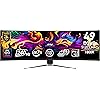
MSI MPG 491CQPX QD-OLED 49-inch QD-OLED 5120 x 1440 (DQHD) Computer Monitor, 240Hz, Adaptive-Sync, HDMI, Display Port, VGA Port, VESA Mountable, Tilt, Height Adjustable, Speaker, 0.03ms, Black

  • Based on 171 reviews
Condition: Used - Very Good
Checking for the best price...
$1,139.99 Why this price?
Holiday Deal · 5% off was $1,199.99

Buy Now, Pay Later


As low as / mo
  • – Up to 36-month term if approved
  • – No impact on credit
  • – Instant approval decision
  • – Secure and straightforward checkout

Ready to go? Add this product to your cart and select a plan during checkout.

Payment plans are offered through our trusted finance partners Klarna, Affirm, Afterpay, Apple Pay, and PayTomorrow. No-credit-needed leasing options through Acima may also be available at checkout.

Learn more about financing & leasing here.

Selected Option

Free shipping on this product
This item's return window has been extended for the holiday season: FREE refund/replacement until Jan 31, 2026

To qualify for a full refund, items must be returned in their original, unused condition. If an item is returned in a used, damaged, or materially different state, you may be granted a partial refund.

To initiate a return, please visit our Returns Center.

View our full returns policy here.


Availability: Only 1 left in stock, order soon!
Fulfilled by Lagoom Sales

Arrives Sunday, Jan 4
Order within 8 hours and 57 minutes
Available payment plans shown during checkout

Protection Plan Protect Your Purchase
Checking for protection plans...

Style: MPG 491CQPX QD-OLED 49 Inch 5120 x 1440 240Hz


Features

  • Next-Gen QD-OLED Panel With stunning image quality and fast response time
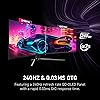
  • Fastest 0.03ms GtG response time and 240Hz refresh rate
  • Incredible HDR visual VESA DisplayHDR True Black 400
  • QD Premium Color Ensures the color meets the market standard
  • MSI OLED Care 2.0 Reduced the risk of OLED image sticking / burn-in

Description

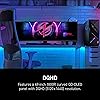
Visualize your victory with the MPG 491CQPX QD-OLED gaming monitor. It boasts a 5120x1440 (DQHD) 1800R curved next-gen QD-OLED panel, 240Hz refresh rate, and rapid 0.03ms(GtG) response time. VESA certification for ClearMR 13000 and DisplayHDR True Black 400 ensures exceptionally vivid images and mitigates motion blur. OLED Care 2.0 reduces OLED burn-in risks. For console gamers, the MPG 491CQPX QD-OLED provide HDMI 2.1 ports with 48Gbps bandwidth, 120Hz support, VRR, and ALLM.

Brand: msi


Screen Size: 49 Inches


Resolution: 5K QHD 1440p


Aspect Ratio: 329


Screen Surface Description: Glossy


Standing screen display size: ‎49 Inches


Screen Resolution: ‎5120x1440


Max Screen Resolution: ‎5120x1440


Brand: ‎msi


Series: ‎MPG491CQPXQDOLED


Item model number: ‎MPG 491CQPX QD-OLED


Item Weight: ‎22.2 pounds


Product Dimensions: ‎12.92 x 47.05 x 16.15 inches


Item Dimensions LxWxH: ‎12.92 x 47.05 x 16.15 inches


Color: ‎Black


Manufacturer: ‎MSI


Date First Available: ‎November 6, 2024


Frequently asked questions

If you place your order now, the estimated arrival date for this product is: Sunday, Jan 4

Yes, absolutely! You may return this product for a full refund within 30 days of receiving it.

To initiate a return, please visit our Returns Center.

View our full returns policy here.

  • Klarna Financing
  • Affirm Pay in 4
  • Affirm Financing
  • Afterpay Financing
  • PayTomorrow Financing
  • Financing through Apple Pay
Leasing options through Acima may also be available during checkout.

Learn more about financing & leasing here.

Top Amazon Reviews


  • Best ultrawide on the market
Style: MPG 491CQPX QD-OLED 49 Inch 5120 x 1440 ...
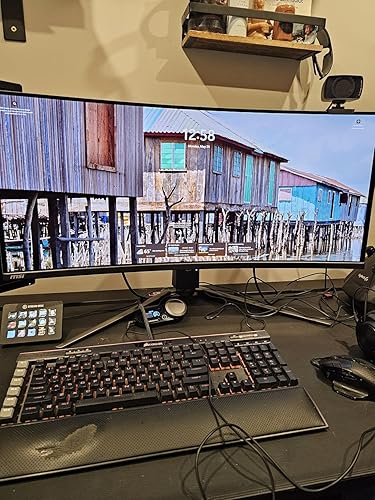
Huge fan of the monitor. The thing is a beast and gives off very little in the way of heat, so unlike competitors, it doesn't make your office a furnace. Another thing it does well is the color palette. The deep blacks of the OLED are impossible to beat, and the HDR is miraculous. The high refresh rate is another big bonus. Lastly, the burn-in protection functions are mostly unobtrusive and protect the screen after a long day of gaming. I would definitely recommend this screen to anyone looking for an ultrawide monitor, especially when compared to the G9 series. The value that is offered here cannot be beat. ... show more
Reviewed in the United States on November 12, 2025 by Paul

  • An amazing monitor for its value.
Style: MPG 491CQPX QD-OLED 49 Inch 5120 x 1440 ...
I bought this monitor to replace my dying Samsung Odyssey G9 (non-oled) because the OLED version would've set me back double what this monitor costs. For the price, this monitor is amazing. It's bright, the colors are fantastic, and the OSD does not suck. I run this on a 4090 so I can make use of the high refresh rate and resolution, and games look amazing on it. The panel care is great, non-intrusive since it runs when I'm asleep. The monitor is lightweight enough to put on a monitor arm that doesn't cost 300 dollars. Overall, I'm really happy with it. ... show more
Reviewed in the United States on August 13, 2025 by Dylan Roberson

  • Best purchase made this year
Style: MPG 491CQPX QD-OLED 49 Inch 5120 x 1440 ...
Thanks to Black Friday. Was able to get a good deal. Best purchase I made this year. Had to make a few adjustments for my work computer. I’ll post it here if anyone could use it. Open the OSD (the joystick under the monitor) 1. Press the joystick IN to open the menu. ⸻ 2. Go to: Image This is where the color controls live. ⸻ 3. Change “Pro Mode” (the top bar setting) Look at the TOP of the OSD. You’ll see something like: • Pro Mode: sRGB (THIS is why the text is blue) Use the joystick left/right until “Pro Mode” is highlighted → press IN → change it to: User (This instantly unlocks the full color profile and stops the sRGB blue tint.) ⸻ 4. Set Color Temperature to 6500K (Warm) Still in the Image tab: Color Temperature → Warm On MSI QD-OLEDs, Warm = actual D65 / neutral white point. • Cool = very blue • Normal = slightly blue • Warm = correct and neutral This fixes the blue-shifted text and cold whites. ⸻ 5. Check your Windows settings Settings → System → Display • Resolution: 5120 × 1440 • Scaling: 100% • Refresh rate: 240 Hz Wrong scaling = worse text clarity on QD-OLED. ⸻ OPTIONAL but recommended Run ClearType in Windows Search “Adjust ClearType Text” → click through and pick the clearest options. Chrome users chrome://flags → disable LCD Text Antialiasing for cleaner QD-OLED text. ⸻ RESULT: After these two main changes: • Pro Mode → User • Color Temp → Warm (6500K) You get: neutral whites no blue text no blue glow clean, sharp text correct color for movies/games proper QD-OLED rendering ... show more
Reviewed in the United States on November 26, 2025 by Seth Wingate Seth Wingate

  • Panel Protect was designed by sadistic engineers intent on ruining your life
Style: MPG 491CQP QD-OLED 49 Inch 5120 x 1440 1...
I loved this monitor. And then I hated it. It's beautiful, colors and contrast are amazing, the size is amazing, the fact that the same display port/cable can be used for display and charging, awesome. The multiple monitor/split setup, really cool. And then came "Panel Protect." A feature that forcibly runs maintenance on your monitor, without any ability to postpone, right in the middle of you using it - for roughly 10 minutes, during which time you can't use the monitor. In the middle of an intense game? Too bad. Important meeting? Sucks to be you. With the number of meetings I've been in where the monitor shuts down at the most inopportune time, I'd send this thing back in a heartbeat if still in the return period. I get it. OLED needs maintenance. MSI is trying to help you protect your monitor. But their implementation of this feature is atrocious. Believe me, I've tried every possible setting on this to get it to do it when I'm NOT using the monitor. Run your stupid Panel Protect every single day at 2am for all I care, I'll leave it on for you! Or let me postpone it at least for a few hours when I can run it when it's convenient. Nope. You get "Auto" or "Every 16 hours." And as much as it seems like "Auto" would be intelligent enough to say, "Looks like the user has stepped away for a bit, the monitor's gone into standby mode, maybe now I'll run my 10 minute panel protect process" it doesn't do that. It seems that "auto" means, I'll detect when you are actively using this and shove the panel protect warning in your face for 10 seconds then start my 10 minute maintenance process. The other issue I keep seeing that the "auto" setting resets back to "Every 16 hours" at random. And every 16 hours is just that. Doesn't matter what you are doing. At 16 hours since last run, it's going to run. It's a nightmare. I can't remember the last time I've had as much loathing for a piece of technology. I see the positive reviews here and assume there's just something I'm missing. And I've scoured the Internet for solutions but have only found angry people like me ranting about this monitor, with proposed solutions from the community that don't seem to work. After having this go into its maintenance schedule for the umpteenth time during an important meeting, I'm done with this thing. The problem is, I can't in good conscience even sell this to someone. I would hate to inflict that punishment on a fellow human being. ... show more
Reviewed in the United States on August 4, 2025 by J. Rolfe

Can't find a product?

Find it on Amazon first, then paste the link below.
Checking for best price...