Search  for anything...
LG

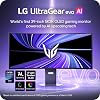
LG 39GX950B-B 39-inch Ultragear evo 5K2K WUHD (5120 x 2160) OLED Curved Gaming Monitor, Dual-Mode,165Hz, 0.03ms, NVIDIA G-Sync, FreeSync Premium Pro, DisplayHDR True Black 500, HDMI, DP, USB-C, Black

  • Based on 43 reviews
Condition: New
Checking for the best price...
$1,729.99 Why this price?

Buy Now, Pay Later


As low as / mo
  • – Up to 36-month term if approved
  • – No impact on credit to apply
  • – Instant approval decision
  • – Secure and straightforward checkout

Ready to go? Add this product to your cart and select a plan during checkout.

Payment plans are offered through our trusted finance partners Klarna, Affirm, Afterpay, Zip, Apple Pay, and Google Pay. No-credit-needed leasing options through Acima may also be available at checkout.

Learn more about financing & leasing here.

Free shipping on this product

FREE 30-day refund/replacement

To qualify for a full refund, items must be returned in their original, unused condition. If an item is returned in a used, damaged, or materially different state, you may be granted a partial refund.

To initiate a return, please visit our Returns Center.

View our full returns policy here.


Availability: Only 10 left in stock, order soon!
Fulfilled by Amazon

Arrives Tuesday, Sep 1
Order within 17 hours and 6 minutes
Available payment plans shown during checkout

Protection Plan Protect Your Purchase
Checking for protection plans...

Features

  • The Worlds First 39" 5K2K OLED Gaming Monitor - This 39-inch 5K2K (51202160) UltraGear hits the sweet spot of size, resolution, and speed. The wide 21:9 format and 1500R curve expand your field of view, while the dense pixel count delivers crisp detail across every scene in the games you love.
  • AI Upscaling to 5K2KNo GPU Upgrade Required - UltraGear evos built-in processor uses AI Upscaling to enhance content toward the displays 5K2K resolution. It analyzes the source signal to improve detail and clarityhelping games and video look sharper without requiring a GPU upgrade.
  • Next-Gen Brilliance with 4th Gen RGB Tandem OLED - 4th Gen Primary RGB Tandem OLED delivers up to 335 nits typical brightness with improved power efficiency. Its advanced 4-stack RGB structure enhances contrast, sharpens detail, and keeps color precise across every frame.
  • UL-Verified for a "Perfect" Visual Experience - Perfect Black: UL-verified Perfect Black delivers true black levels to enhance perceived brightness and contrast, whether it's bright or dark around you. Perfect Color and 100% Color Fidelity- UL verified to deliver accurate color expression even under varying lighting conditions, from low light to bright ambient environments. UL-verified Perfect Reproduction ensures game content is faithfully rendered on screen, preserving intended color and detail. This certification reflects real-world content accuracy.
  • Deeper Detail with VESA DisplayHDR True Black 500 - VESA DisplayHDR True Black 500 reveals rich blacks and nuanced shadow detaileven in dark scenes. Combined with a 1.85M:1 contrast ratio, up to 99.5% (typical) DCI-P3 color, and Delta E2 accuracy, visuals appear vivid, precise, and true to the creators intent.
  • High 143 PPI for Sharp, Detailed Visuals - With a sharp 143 PPI pixel density, in-game text, HUD elements, and fine visual details appear crisp and easy to read. The added clarity also improves everyday tasks like writing, web browsing, and working with text-heavy documents.
  • More Room to Create with 5K2K Ultrawide - The expansive 21:9 5K2K display with 143 PPI delivers sharp detail across a wide creative workspace. Edit video, retouch photos, and manage timelines on one seamless screenwhile keeping documents, research, and multiple windows visible at the same time.
  • Dual Mode: 5K2K 165Hz for Detail or WFHD 330Hz for Speed - Switch between 5K2K resolution at 165Hz for cinematic AAA titles and Wide Full HD at 330Hz for ultra-responsive competitive gaming. VESA Certified Dual-Mode lets you optimize resolution and refresh rate to match the way you play.
  • Near-Instant 0.03ms (GtG) Response Time - With a near-instant 0.03ms (GtG) response time, pixels transition incredibly fasthelping reduce ghosting and keep fast-moving gameplay clear and responsive.
  • NVIDIA G-SYNC Compatible & AMD FreeSync Premium Pro - Minimize screen tearing and stuttering with NVIDIA G-SYNC compatibility and AMD FreeSync Premium Pro. These adaptive sync technologies help keep gameplay smooth and responsive by matching the monitors refresh rate to your GPUso fast action stays clear with reduced blur and ghosting.

Description

With UltraGear evo, experience the sweet spot of ultrawide OLED gaming with this 39-inch 5K2K (5120×2160) curved display. Designed in a wide 21:9 format with a 1500R curve, it expands your field of view while delivering crisp detail across a dense 143 PPI pixel canvas—more than 30% more pixels than a 32-inch 4K screen. 4th Gen Primary RGB Tandem OLED technology reaches up to 335 nits typical brightness and enhances contrast, color precision, and visual depth, supported by VESA DisplayHDR True Black 500. With Dual-Mode, switch between 5K2K at 165Hz for cinematic AAA gameplay or Wide Full HD at 330Hz² for ultra-responsive competitive play. A near-instant 0.03ms (GtG) response time with NVIDIA G-SYNC compatibility³ and AMD FreeSync Premium Pro keeps motion smooth and clear.UltraGear evo’s built-in processor powers AI Upscaling⁴ to enhance content toward the display’s 5K2K resolution—helping games and video look sharper without requiring a GPU upgrade.Modern connectivity—including DisplayPort 2.1⁵ (UHBR20), USB-C with 90W power delivery, and HDMI 2.1—supports high-bandwidth gaming setups and next-gen consoles, making this curved OLED gaming monitor the ideal intersection of size, speed, and visual precision.²Requires graphics card that supports up to 330Hz refresh rate support. Actual refresh rates may vary depending on computer graphics specifications and configurations.³NVIDIA G-SYNC Compatible supports variable refresh rate on GeForce GTX 10 Series and higher GPUs on Display Port, and GeForce RTX 30 Series and higher GPUs on HDMI 2.1.⁴Requires graphics card that supports DisplayPort 2.1 to achieve up to 330Hz refresh rate support. Actual refresh rates may vary depending on computer graphics specifications and configurations.⁵AI Upscaling requires an input source of at least Wide Full HD resolution. Sources below Wide Full HD are not supported. Upscaling performance may vary depending on source quality.⁶Based on published specifications of OLED gaming monitors as of March 2026.⁷LG OLED panels have been certified as Flicker-Free, Discomfort Glare Free, Low Blue Light, Verified Reduced Blue Light and Verified Reduced Circadian Stimulating Blue Light by UL. Certificate Number: Flicker Free Display (OLED)- A196009, Discomfort Glare Free - V563481 (conditions of UGR less than 22), Low Blue Light Hardware Solution Platinum - V745051. Verified for reduced circadian stimulating blue light (V745354). Verified for reduced blue light (V275741).

Brand: LG


Screen Size: 39 inches


Resolution: 5K UHD 2160p Ultra Wide


Aspect Ratio: 219


Screen Surface Description: Matte


Aspect Ratio: 219


Screen Finish: Matte


Contrast Ratio: 15000001


Refresh Rate: 330 hertz


Display Type: OLED


Display Technology: OLED


Viewing Angle: 178 degrees


Brightness: 335 candela_per_square_meter


Pixel Pitch: 0.18


Color Gamut: 99.5


Picture Quality Enhancement Technology: DisplayHDR500 TRUE BLACK, HDR10


Screen Size: 39 inches


Item Dimensions D x W x H: 12.7"D x 36.3"W x 23.8"H


Item Weight: 23.6 pounds


Resolution: 5K UHD 2160p Ultra Wide


Display Resolution Maximum: 5120 x 2160 pixels


Native Resolution: 5120x2160


Power Consumption: 54 watts


Connectivity Technology: DisplayPort, HDMI, USB Type A, USB Type C


Hardware Connectivity: DisplayPort, HDMI, USB Type C


Adaptive Sync: FreeSync Premium Pro, G-Sync Compatible


Additional Features: Built-In Speakers, Curved, Dynamic Action Sync, High Dynamic Range, Ultrawide Screen


Specific Uses For Product: Desktop, Entertainment, Gaming


Color: Black


Mounting Type: Wall Mount


Warranty Type: 2 Years Manufacturer Warranty


Shape: Curved


Brand: LG


Model Number: 39GX950B-B.AUS


Model Name: 39GX950B-B.AUS


Warranty Description: 2 Year Manufacturer


UPC: 195174146491


Manufacturer: LG


Unit Count: 1 Count


Included Components: DisplayPort Cable, HDMI Cable 2.1, Monitor, Power Cable, USB-C Cable


Response Time: 0.03 milliseconds


Total Number of HDMI Ports: 2


Total Usb Ports: 3


Number of Component Outputs: 4


Total USB 2.0 Ports: 2


Frequently asked questions

If you place your order now, the estimated arrival date for this product is: Tuesday, Sep 1

Yes, absolutely! You may return this product for a full refund within 30 days of receiving it.

To initiate a return, please visit our Returns Center.

View our full returns policy here.

  • Klarna Financing
  • Affirm Pay in 4
  • Affirm Financing
  • Afterpay Financing
  • Zip Pay in 4
  • Financing through Apple Pay
  • Financing through Google Pay
Leasing options through Acima may also be available during checkout.

Learn more about financing & leasing here.

Top Amazon Reviews


  • 4.5/5 stars (rounded up)
One week in, a phenomenal monitor so far. Gorgeous OLED panel. 4.5/5 stars. Some quirks and things to note... - The screen is billed as having a matte finish, but I'd say there is actually a slight sheen present. It's hard to quantify, but I'll try anyway. On a scale from 1 as truly matte to 10 as truly glossy, and I'd give it a 2 or a 3. - Grays are quite uniform for a tandem OLED. If I put on a dark gray fullscreen test page, then I can indeed see some structure, but calling it banding feels unfair bordering on inaccurate. It looks like there is a speckle noise distributed across the panel only straying from the base gray by one brightness step, and there is a grid-like pattern to the areas lacking this speckle. It's too subtle to photograph or even see from an ergonomic viewing distance. Blender, a notoriously gray app, looks immaculate on this panel. (You can test grays without apps or third-party sites by opening "about:blank" in a browser and using dev tools to run, e.g. "document.body.bgColor='#0d0d0d'" for 5% gray.) - Text is very clear. It's great by default on both GNOME and Plasma on Linux with Wayland. I have not tried Windows. It's an OLED, so there is fringing, but with 11 million pixels it's just not noticeable to me from a normal distance. In my opinion, if you see fringing on this panel, you are too close. I attached a photo of the subpixel layout (closest I could get without a macro lens, and a bit oversaturated by my Pixel phone). - I had to turn off AI Scene "Optimization", which is on by default, as it was fiddling with the white balance too often. Sometimes it felt very arbitrary, and it was very distracting overall. Honestly, I thought the panel was defective at first until I learned it is a "feature" you can turn off! Also, certain color-calibrated presets like sRGB and DCI-P3 are only available when you turn it off...they're not even greyed out, you simply just don't see these presets in the menu until you disable AI Scene Optimization. - The display only weighs 15 lbs without the stock stand. I bought an Ergotron HX arm for it because I looked at the stand-inclusive weight (~24 lbs). Might look into mounting a weight on the arm, as downward movement is noticeably stiffer than upward movement as a result. That's my bad. At least it doesn't float upwards, though. - I haven't heard any coil or fan whine, but I'm usually wearing earbuds or closed-back headphones. I may not be sensitive to it, either, if it actually is there in my unit. YMMV. ... show more
Reviewed in the United States on May 17, 2026 by tyfi

  • A worthwhile wait and upgrade for sure!
Amazing monitor for work and play. I did buy the 8K HDMI cables, but ended up sending them back. For Windows, I use USB-C to DisplayPort. In the Windows Search bar, type “Change the resolution of display,” click the Advanced tab for the display, and set it to 5120 × 2160. For my Mac Mini, I use a Thunderbolt adapter from the Mac to the LG’s USB-C port. Go to Display settings and click the Option key if you can’t see the 5120 × 2160 resolution. For my Nintendo Switch 2, I just use the HDMI cable that comes with the unit. I work a lot, so this monitor is definitely a major upgrade from my 2019 LG monitor. They are so easy on my eyes. One thing that surprised me is that the monitor doesn’t look humongous on my desk, probably because of the curved design. I probably could have gotten away with the 45-inch version. But… I’m happy with it and plan to use this one for the next 5+ years or so. ... show more
Reviewed in the United States on August 10, 2026 by max power

  • Make sure you know the difference between DP2.1
From what I’ve seen, this is a great monitor! Unfortunately, I had an awful experience with LG’s customer & technical support. Like the worst I’ve ever experienced. If you are deciding between this monitor and any of the “950A-B” versions - Quick lesson: DP2.1 comes in three flavors: UHBR10, 13.5, and 20. To consumers like me (who purchased the 45in 950A-B right before this 39in came out) that may sound silly and possibly deceptive. Well, it is. The “DP2.1” that is advertised and printed on the box of the 45GX950A-B and other A-B versions uses UHBR13.5, NOT 20. UHBR13.5 caps at about a 54Gb signal. UHBR20 receives the full, untarnished 80Gb signal. What does this actually mean: The LG monitors released prior to this one use the cheaper UHBR 13.5 uplinks. If you are blessed enough to own a GPU capable of sending full, true 80Gbps DP2.1 (like the 50 series NVIDIA cards); the LG monitors will have to rely on ‘Display Stream Compression’ or “DSC” to fake a full DP2.1 to your hardware/software. DSC is “visually lossless”, which is another deceptive marketing term. In a sterile, theoretical environment, four frames will look the same-ish. Between those four supposedly “lossless” frames, the monitor will: 1) Black Screen Flicker - Whenever you tab out of a game, or your NVIDIA card switches resolutions; your screen will randomly go black for a few seconds. It sucks when you tab out to open discord or check info for a quest, only to tab in dead from the blacked frames 2) Inability to use DSR / DLDSR: Dynamic Super Resolution & Deep Learning Dynamic Super Resolution are two options on the NVIDIA cards that use those expensive “AI” tensor cores you paid for to scale your resolution up, then bring that crisper res image back down to your native resolution. The tech results in a sharper, better image. Unfortunately they are COMPLETELY UNUSABLE WITHOUT UHBR20. 3) Multiple Monitor Woes: If you want to use multiple high-res monitors, think again! DSC causes some funkiness when using anything but a single monitor. Freezes, more of the random screen black outs, and stuttering will plague you. What does this have to do with customer service? When this 39GX950B-B monitor came out 12 days after my 45GX950A-B 30day return window expired, I knew nothing about everything I just explained. While frantically checking out reviews, looking up my ability to return, and reading the LG warranty - I found out about this, in my opinion, extremely deceptive marketing BS. I thought, “Hey. Maybe I could get some help here. My monitor is barely out of the return window. The whole DP2.1 thing is super confusing, especially for a young dad who doesn’t have the time. Let me see if I can talk to someone.” Nope. Amazon’s automated help service directed me to call LG. After fiddling with the AI help bot on the LG website for 30mins. I found the LG customer service number and dialed them up. It took 2.5hrs on hold at 10am on a Tuesday to reach a very nice woman who clearly didn’t understand my American English to transfer me to a tech department rep that equally did not understand English nuance. I calmly explained my situation, and my dissatisfaction with the deceptive “DP2.1” advertised on my UHBR13.5 model. She clearly had been prepped for this - three words in she went into aggressive panic mode. At first she told me that both monitors had the same DP2.1 “abilities”, whatever that means. I let her know that I understood what the VESA organization lets them print on the box, but that was simply untrue. I calmly and politely told her that I found the marketing deceiving, and that I called LG right outside of my return window. I only wanted to find out if they would let me trade in / get store credit / give me $1.00 USD towards this 39GX950B-B if I sent them back my brand-spankin’ new 45GX950A-B. Contradicting her previous statement: she told me that,” The 39in model was better, of course. It’s newer.”. To which I acknowledged her contradiction. I told the LG representative that, in my opinion; was sold a product via deceptive advertising. That the same, white lettered, “DP2.1” printed on the boxes of both versions did not mean the same thing. She proceeded to raise her voice at me, practically yelling that “There was nothing that [she] could do for me.” and mockingly told me that I needed to “Do better research” and that I could file a formal complaint with the legal department if I wanted to. Without waiting for a response, she asked “if there was anything else [she] could do for me. Other than… (something in a different language).” I was petty, and told the rep that she could “Ask whoever managed her for better ways to dodge the sales departments predatory marketing.” Then we hung up. I neglected to tell anyone at LG that I had purchased this 39GX950B-B anyways, and was going to use the 45in for work if I couldn’t get some human decency from LG. It goes unsaid that I immediately returned this 39in version and will never purchase an LG product again. If my wife comes home with an LG refrigerator, I will happily empty it out and swap it with another brand’s. If you own this monitor, I sincerely hope you have zero technical issues with it. I wish you luck! You will not get help. ... show more
Reviewed in the United States on August 14, 2026 by Shackelford12

  • Awesome Ultrawide
I use this monitor mainly for gaming. I thought it would be too big for a minute but after a few days of using it. Im glad to have decided to keep it. My first OLED. Great blacks, awesome widescreen. The built in speakers are the worst part of this product but if you have good speaker or headset you will be just fine. So far highly recommended. ... show more
Reviewed in the United States on July 4, 2026 by knightowl

  • Good monitor might have gotten one with an issue ...
I dont game that much used mostly for office work. Returning it - I have a 45 inch oled 5K2K from LG. I thought the 45 curve was a bit aggressive vs 39 and wanted a slightly smaller monitor Maybe I have gotten accustomed to the 800R curve on 45inch but versus the 1500 curve on 39inch the difference seemed subtle. I think I got used to the bigger size and comfortable vs 39inch It is a very good monitor slightly sharper than the 45inch and appeared brighter, I think the specs say so but definitely not night and day. Main reason for return is that the screen was blinking on and off when I switched inputs with my KVM and it continued for a few seconds after that not all the time but enough for me to worry if there might be a defect so returning it. The current monitor I have never once exhibited that behavior. ... show more
Reviewed in the United States on May 8, 2026 by Amazon Customer

  • The ultimate ultrawide
Easily one of the best monitors we have seen yet. This will be my monitor for perhaps the next decade, maybe more. The detail and text clarity of 5K2K is gorgeous. Works great in gaming, sim racing, and productivity/code. Refresh rate while decent really should have been kicked up to 240Hz though as they have it on their 52-inch. The only downside of the monitor IMO. Size for me is perfect, I can't imagine having the 45 or 52 inch at my desk. ... show more
Reviewed in the United States on May 7, 2026 by Jake

  • Active fan with audible high pitched whine
I really wanted to love this monitor, but had to return the same day I received it, after spending an evening integrating it into my setup. Reason: it has active cooling fan, and in my case (not sure how typical, but in my case for sure) it is has very annoying quiet but high pitched whine. I tolerated it for first 10 minutes. I've doubted next 10 minutes. And I spent next half hour packing it back. Hope your experience is better. ... show more
Reviewed in the United States on May 16, 2026 by Sergey Ermolenko

  • Great monitor
Excellent monitor especially if you dont want to lose height or resolution coming from 4k.
Reviewed in the United States on July 17, 2026 by Bradleyjb

Can't find a product?

Find it on Amazon first, then paste the link below.
Checking for best price...