Search  for anything...
LG

LG Ultrafine 32-Inch Computer Monitor 32UL500-W, VA with HDR 10 Compatibility and AMD FreeSync, White

  • Based on 1,720 reviews
Condition: New
Checking for the best price...
$391.50 Why this price?
Labor Day Deal · 56% off was $899.99

Buy Now, Pay Later


As low as / mo
  • – Up to 36-month term if approved
  • – No impact on credit to apply
  • – Instant approval decision
  • – Secure and straightforward checkout

Ready to go? Add this product to your cart and select a plan during checkout.

Payment plans are offered through our trusted finance partners Klarna, Affirm, Afterpay, Zip, Apple Pay, and Google Pay. No-credit-needed leasing options through Acima may also be available at checkout.

Learn more about financing & leasing here.

Free shipping on this product

30-day refund/replacement

To qualify for a full refund, items must be returned in their original, unused condition. If an item is returned in a used, damaged, or materially different state, you may be granted a partial refund.

To initiate a return, please visit our Returns Center.

View our full returns policy here.


Availability: Only 1 left in stock, order soon!
Fulfilled by Olympus Sales USA

Arrives Sep 9 – Sep 12
Order within 9 hours and 53 minutes
Available payment plans shown during checkout

Protection Plan Protect Your Purchase
Checking for protection plans...

Features

  • The pinnacle of gaming monitors, this ultra-wide WQHD (3440 x 1440, 21:9 aspect ratio) curved monitor immerses you in the action and increases your field of view, allowing you to see more on-screen.Aspect ratio:16:9.Specific uses for product - Personal, gaming, business
  • An overclocked* 160Hz refresh rate with 1-millisecond Motion Blur Reduction (MBR) keeps you firmly in the action while reducing blur and ghosting, helping you to respond to opponents quickly
  • With VESA DisplayHDR 400 high dynamic range compatibility and 99% sRGB, this monitor brings virtual worlds to life, elevating textures, elements, character movements, and natural light and shadow with highly accurate color
  • With compatible video cards, NVIDIA G-SYNC and AMD FreeSync Premium virtually eliminate screen tearing and minimize stutter in high-resolution and fast-paced games for a fast and fluid gaming experience
  • Dynamic Action Sync helps reduce input lag to help you respond to on-screen action quickly. Black Stabilizer dynamically brightens dark scenes to help you find enemies in the dark. Enhance your accuracy in firefights with the Crosshair feature

Description

Immerse yourself in the action with this ultra-wide, WQHD Nano IPS curved monitor for gaming. See moving objects on the screen more clearly with a high overclocked 160 Hz refresh rate and 1ms Motion Blur Reduction. AMD FreeSync Premium support virtually eliminates screen tearing and minimize stutter in high-resolution and fast-paced games for a fast and fluid gaming experience with supported video cards. Dynamic Action Sync reduces input lag and elevates your gameplay, allowing you to respond to your opponents quickly, while Black Stabilizer allows you to see them more clearly in the dark. Use the Crosshair feature for enhanced vision and precision in first-person shooters. Adjust the tilt, height, and pivot for the best ergonomics, ensuring that you have the most comfortable viewing position to play your games. 144Hz (O/C 160Hz) refresh rate for PC games only. Monitor will support console game's refresh rate when AMD FreeSync is turned off, but only 60 Hz refresh rate only when AMD FreeSync is turned on

Brand: LG


Screen Size: 31.2 inches


Resolution: QHD 1440p


Aspect Ratio: 169


Screen Surface Description: Glossy


Aspect Ratio: 169


Screen Finish: Glossy


Contrast Ratio: 30001 (typ.), 18001 (min.)


Refresh Rate: 160 hertz


Display Type: LCD


Display Technology: LCD


Viewing Angle: 178 degrees


Brightness: 1027.8


Pixel Pitch: 0.18


Picture Quality Enhancement Technology: HDR 10, 4K UHD resolution, Black Stabilizer


Screen Size: 31.2 inches


Item Dimensions D x W x H: 8.2"D x 28.7"W x 20.4"H


Item Weight: 6.2 kg


Resolution: QHD 1440p


Display Resolution Maximum: 3840 x 2160


Native Resolution: 3840x2160


Power Consumption: 39 watts


Voltage: 240 volts


Total Number of HDMI Ports: 2


Number of Component Outputs: 2


Additional Features: Wall Mountable


Specific Uses For Product: Business, Multimedia, Personal


Color: Silve/White


Mounting Type: Wall Mount


Warranty Type: limited warranty


Shape: rectangular prism


Brand: LG


Model Number: 32UL500-W


Model Name: 32UL500-W


Warranty Description: Limited 1 Year Parts & Labor


UPC: 719192641761


Manufacturer: LG Electronics


Item Type Name: UHD Monitor


Response Time: 4 milliseconds


Connectivity Technology: HDMI


Hardware Connectivity: DisplayPort, HDMI, Headphone


Adaptive Sync: FreeSync


Frequently asked questions

If you place your order now, the estimated arrival date for this product is: Sep 9 – Sep 12

Yes, absolutely! You may return this product for a full refund within 30 days of receiving it.

To initiate a return, please visit our Returns Center.

View our full returns policy here.

  • Klarna Financing
  • Affirm Pay in 4
  • Affirm Financing
  • Afterpay Financing
  • Zip Pay in 4
  • Financing through Apple Pay
  • Financing through Google Pay
Leasing options through Acima may also be available during checkout.

Learn more about financing & leasing here.

Top Amazon Reviews


  • Great 4K monitor!
A great 4K monitor. The front bezel measures 33 inches diagonally. Viewing screen measures 31.5 inches diagonally. The front bezel is 0.50 inches in width (top, bottom and sides). The back of the monitor is all white but the front of the monitor (bezel) is black. The front bezel is also black on it's side approximately 0.50 inches in depth...you don't see the white back at all from the front of the monitor. I like that all the parameters can be set by using a mini-joy-stick under the lower side of the front bezel (center-position under the bezel). Click up (in) to start the monitor or select items. Left, right, forward or back. The menu items appear on the monitor. The monitor is anti-glare but I think I would have preferred clear and not anti-glare because image is a bit fuzzy...still checking this out. Text is very clear but some of my videos are a bit fuzzy. Photos are very clear too. I think I've got to work on my video camera settings. There are stereo speakers that are reasonably loud. When I first turned on the monitor I thought there were no speakers at all! Panic started to set in, but I discovered that the initial volume was set low. I added external powered-speakers to the headphone jack. The internal speakers turn off with headphones (and of course with external speakers) connected. There is no SPDIF or USB connectors. There are 2 HDMI connectors. I enjoy this monitor. It is my first 4K monitor. I eventually intend to use it for video editing. The price was great. There is no USB C connector. I'm driving this monitor with a Aorus 2080 Super Graphics Card. The monitor also has smart start, so it powers up when I turn on my computer. I use this monitor in a bright sunny room positioned 90 degrees from a large window (64" wide x 49" high). Brightness is set to 46 out of 100 full-scale. ... show more
Reviewed in the United States on April 14, 2021 by steve s.

  • Great Huge Value Monitor
I bought this to replace a 27" so that, with a single monitor, I could just about have a dual montior experience since I work on multiple documents simultaneously, multiple web pages, etc. Given my age and eyesight, I thought I'd give a great brand's value 32" montior a try. I have always liked LG. I am glad I did. Great size, great brightness, great colors. I am not a profession graphics or video guy, so that stuff doesn matter to me and for the basic graphic and video design which I do, its fine. Tons of real estate on this screen. One knock is that the off axis performance is bad. I have the screen about 3 feet from me and the picture is beautiful, but the colors in the bottom corners is already ever so slightly washed out compared to the center of the screen. I can tell because when I shiftin my seat by 6 inches one way or the other, I can tell the saturation difference. This could probably be remedied by moving the screen another 6 ro 10 inches away from me. I am not returning the montor. It will serve my purposes fabulously. And the price cannot be beat. The colors in my 27" off brand IPS panel maybe a little brighter, but hard to say. It would seems we have a winner. My 5 star review factors in value for price. ... show more
Reviewed in the United States on March 7, 2021 by Amazon Customer

  • Excellent for office work and CAD drawings
Pros: 4K resolution Cost Cons: Brightness is lower when compared to IPS panels. I've used this unit for a few hours now and I am comparing it to the same exact size by LG but with an IPS panel with HD resolution. I bought this one because my wife needed another unit and I needed 4K resolution to match my computer (laptop) screen. That helps with several work programs that require all displays to have the same resolutions. So far I can tell you off the bat that you do lose a bit of brightness and the default colors for this unit are a bit warmer. It does shines when working with documents, especially CAD files were the extra resolution allows to see things better and to see more of the drawing without scrolling. Since that is my main purpose I am quite satisfied with the purchase. I played a 4K movie on and it looks good, meets my expectation for a computer screen. I have not played any games on it yet but I don't expect any issues with it. All the fast moving scenes on the movie looked sharp and there was no lag that I could detect. I'm sure there might be better screens out there for gaming, but that was not my purpose and at the price point, I think most gamers will agree this is an acceptable screen. Overall I give it 4 stars because the IPS brightness of my HD monitor (same screen size, same manufacturer) is more pleasant. However, for the cost, it is an excellent option and highly recommended. I am satisfied with the purchase. ... show more
Reviewed in the United States on December 3, 2020 by Pedro

  • Multimedia Producer review using Mac Mini M2 Pro
I wanted something 32" that was color calibrated for myself producing video shorts (most of which are about 2-5 minutes) in length in various resolutions. I had read reports from a few complaining that the 4K resolution or scaling of down of such was slowing their computers down to a great degree of concern. That hasn't been the case here on this model using a Mac Mini M2 Pro with 16gb. I've been testing it on 4K, QHD, and HD, and it's been effortless on Premiere Pro using HD and 4K footage. I'm wondering if these folks have older/slower models. My picture profile on this LG is using the Rec.709 picture mode as well as the Rec. 709 internally on the Mac display options since I use it for design/video content creation. The stand holds up better than I expected and I like the fact it does have 5W internal speakers although most of the time I use headphones or bluetooth. All in all I found this model to be a good bang for the buck and it even came with a factory calibration certificate from LG which is a nice plus. Not really a gamer so I have no reviews on those factors. ... show more
Reviewed in the United States on June 25, 2023 by John Allen

  • Works well with my 13" M1 MacBook Pro from 2020
For those with M1 MacBook Pro's. I've seen reviews in general about external monitors not working well with the M1 Macs. It worked for me on the first go. I'm colorblind so I can't speak to the colors, but the picture quality otherwise seemed great when streaming a 4k x 60Hz video on YouTube, e.g. the details are crisp and the blacks are very black. I am thrilled I just paid $240 for this one as opposed to way more for other models that I'd barely have noticed a difference with. In case it helps, here are the details: 1. 13-inch M1 2020 MacBook. 2. OS: Sonoma 14.2.1 3. Price paid: $240 via Amazon Prime to Los Angeles (tested / purchased on 12/24/2023) 4. Connector: 6ft USB-C to DisplayPort (brand: Insignia) rated for 4k, purchased from Best Buy for about $25 5. Set the LG as my primary display and my MacBook to mirror it, but it seemed to also work fine when it was briefly (for like 2 mins) set up to extend my desktop space. 6. Used only for a few hours today. Will update if it stops working. Cons: - stand height is not adjustable ... show more
Reviewed in the United States on December 25, 2023 by J

  • Great Picture, Integrated Speakers, and a Great Price! You Can't Go Wrong!
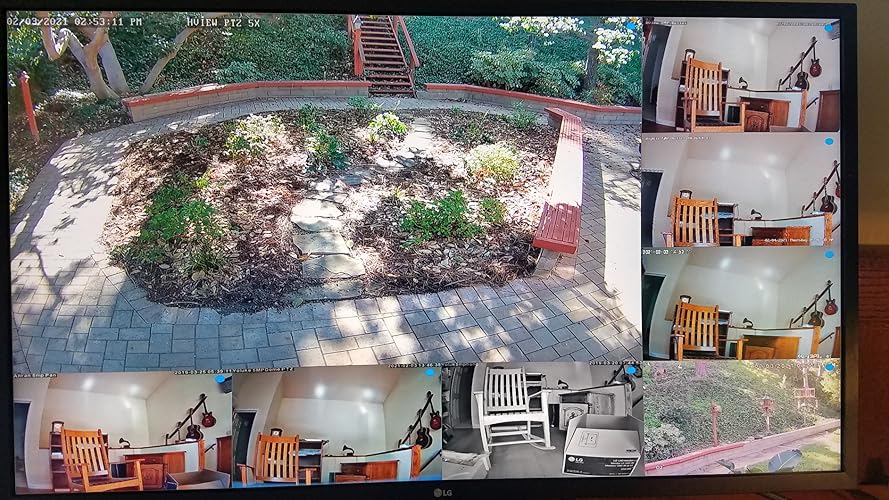
I replaced a similarly sized 1080P (2K) monitor with the LG 4K monitor to view multiple security system Network Video Recorders selected by a 4K HDMI switch. The presentation was better than 1080P but not overwhelmingly so. This somewhat disappointing improvement from 2K to 4K would be the same for any new 4K monitor so this is not a knock on the LG just on the expectation for wonderous video improvement from 2K to 4K. I've had the same opinion going from a 65" 1080P to a 65" 4K OLED TV. Basically put each monitor in a different room and walk between rooms and you would not be overwhelmed that there was a marked improvement. What the LG did really well: -- GREAT PICTURE: Yes the picture is great. Good honest colors and tight resolution. -- EASY ASSEMBLY: The stand just snaps right in and the bottom slides in and is held by a finger tightened screws. Takes all of 5 minutes to unbox and have up and running. -- DISPLAY TILT ADJUST: I was happily surprised to see that I could tilt the display oh about 20 degrees for my most comfortable viewing angle. There is no height or side to side adjustment. -- VERY WIDE VIEWING ANGLE: For all practicality, I would never have more than a 90-degree view angle change and I saw no change in the picture at the extremes. -- GOOD AUTO RESOLUTION SELECT: The display correctly selected the resolution for the input provided. As I said I was using a 4K HDMI switch to select between sources providing, 1080P (1920x1080), 2560x1440, and 4K (UHD) 3840x2160. The monitor automatically selected the correct resolution without any operator involvement. -- EASY MENU: There is a joystick located bottom center and provides a simple and fast method to access and select all the configurations available from the on-board menu to include picture adjustments (see pictures). -- GOOD SOUND: I chose a particular model for the cost and that it had internal speakers. I just wanted to hear any sound coming from the security cameras. It works very well and was loud enough I turned the volume down. -- GREAT VALUE: I shopped quite a bit and this was the best value 32" 4K monitor. Easily in the bottom 5% of costs for similar performing monitors. Conclusion: Great picture, great automatic resolution selection, super easy menu user interface, integrated speakers, and a great price! You can't go wrong! ... show more
Reviewed in the United States on February 3, 2021 by rkruz

  • A good day for computer & graphics design.
I work a bit (pun not intended) on programming, and graphics design. I have owned and used several 1920 by 1080 monitors in my life, I am here to say none of them came even close to this one. If you are a programmer, or a graphics designer, buy this monitor. It will improve your productivity for 2 and 4 window setups for programming, and will reduce eye strain with the proper setup. As for graphics design the 10 bit color depth has had me amazed at the depth and how close to real life color it is compared to other monitors I have used. Color wise this monitor has allowed for one of the first moments I have been amazed at a visual tech improvement in the past 10 years. One note You will want a graphics card that supports 10 bit color, (1660 super or better works fine). Gaming wise, the monitor has good gaming capability at 1080p or 2k (2k requires a very beefy system though), but you may find 60hz reponse and VA panel somewhat lacking for competive 1st person or 3rd person. For everything else though, buy this monitor. Finally: Fantastic job LG on this monitor, keep making monitors this good, and better! ... show more
Reviewed in the United States on December 10, 2020 by Jonathan Langner

  • Not the best for Computer Aided Design (CAD) Work
I purchased this unit as a replacement for a Samsung 27" Syncmaster monitor that I had for about 6 years. That was a very good monitor until the power went out. I primarily use the monitor for CAD design work. In looking for a replacement I was looking for a monitor that was at least as good as the one it was replacing and slightly larger. The research we performed indicated that this LG monitor would provide better visual quality for graphic design with a larger canvas to work with. Accessory features were the higher resolution and UHD quality graphics. The unit physically is impressive and the size is just right. The build quality and features are an improvement. Set up with multiple monitors can be a bit tricky and there is no installation guides available in the box or online that are of much use for this so you just have to wing it. If I were to use the monitor for watching YouTube 4k plus UHD videos the picture is outstanding. Viewing high resolution pictures is also outstanding for the full screen at any angle. The down side for me is that I use this monitor primarily for AutoCAD architectural design purposes the this is where this particular monitor is of lesser quality than the one it replaced. Task bars, icons, text, line work, and every other visual aspects of the program on this particular monitor is of lower resolution so these items are slightly blurry or bloated. You can still use it, but the eye strain is increased so have to keep adjusting your eyes thinking they are the problem. I have two monitors. The second is a 24" Asus VG series 3-d monitor that is about 3 years old. When I use that monitor with the same CAD program the features are very sharp. I also hooked up another monitor, a ViewSonic VA2012wb, and the same program is also very sharp. It is possible that there is some setting in this new LG monitor program that we just have not yet found (we have tried going though all the setting options). Using custom settings has helped, but still not as good as the other monitors. If you use the default settings on the LG the CAD graphics are way bloated so that when you zoom out to see the whole drawing it turns into something that looks like you used color crayons to draw with. I am not supper technical, but I had others that are look at this issue and they just scratch their head. There many variables in the world of computers and programs so it could just be a unique compatibility issue. This is a good monitor for the price and it might serve you well, you just might reconsider if using this one with a CAD program. ... show more
Reviewed in the United States on April 6, 2022 by Kellen

Can't find a product?

Find it on Amazon first, then paste the link below.
Checking for best price...