Search  for anything...
KTC

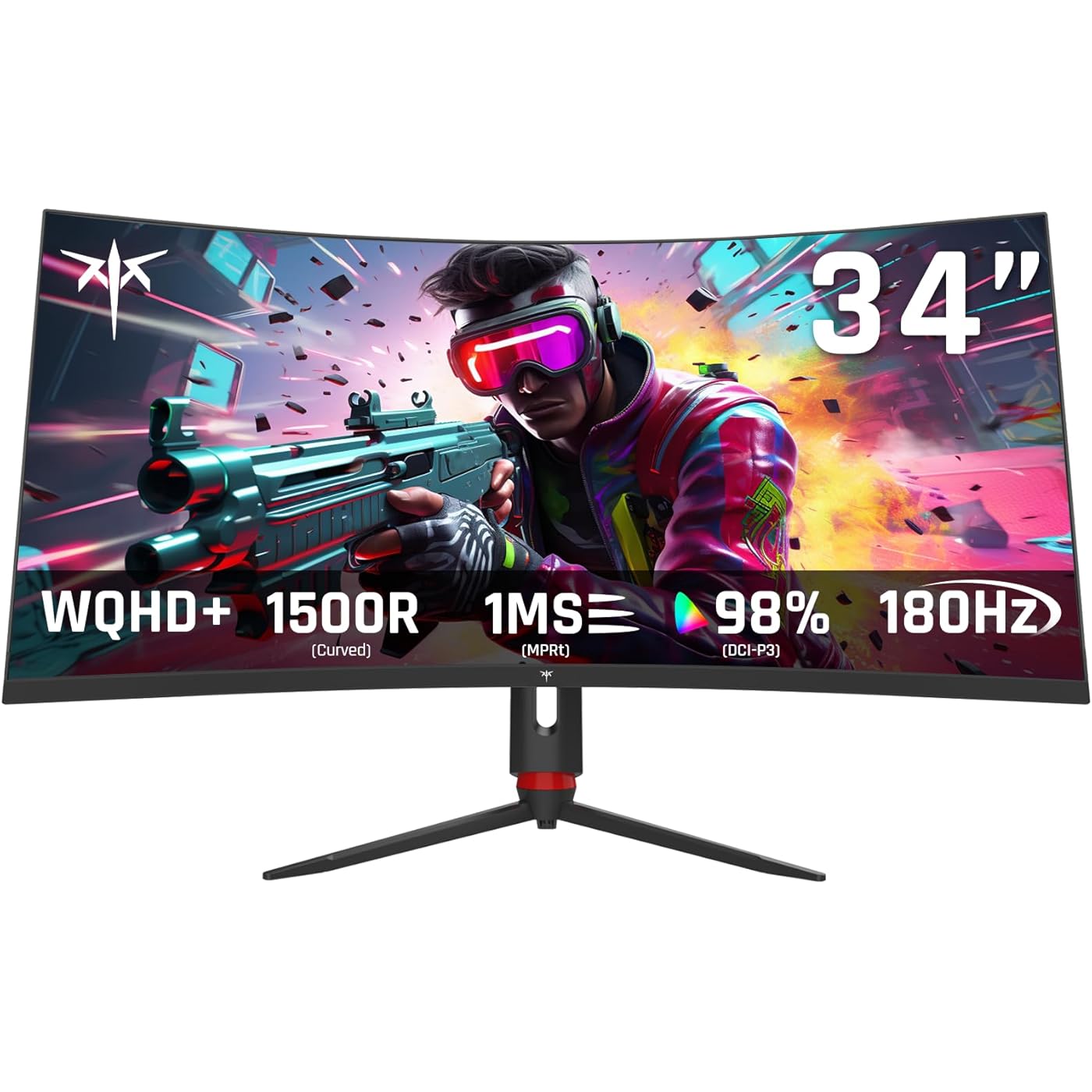
KTC 34 inch Curved Ultrawide Gaming Monitor, 180Hz WQHD 3440x1440 PC Monitor, 21:9, 1ms, 1500R, Adaptive Sync, HDMI Display Port, PBP/PIP, Height/Tilt/Swivel/Pivot Adjustment, VESA Mount, H34S18S

  • Based on 3,067 reviews
Condition: New
Checking for the best price...
$269.99 Why this price?
Save $20.00 was $289.99

Buy Now, Pay Later


As low as $45.00 / mo
  • – 6-month term
  • – No impact on credit to apply
  • – Instant approval decision
  • – Secure and straightforward checkout

Ready to go? Add this product to your cart and select a plan during checkout.

Payment plans are offered through our trusted finance partners Klarna, Affirm, Afterpay, Apple Pay, and PayTomorrow. No-credit-needed leasing options through Acima may also be available at checkout.

Learn more about financing & leasing here.

Selected Option

Free shipping on this product

FREE 30-day refund/replacement

To qualify for a full refund, items must be returned in their original, unused condition. If an item is returned in a used, damaged, or materially different state, you may be granted a partial refund.

To initiate a return, please visit our Returns Center.

View our full returns policy here.


Availability: In Stock.
Fulfilled by Amazon

Arrives Tuesday, Jun 2
Order within 7 minutes
Available payment plans shown during checkout

Protection Plan Protect Your Purchase
Checking for protection plans...

Size: 34 inch


Style: VA WQHD 165Hz 1ms


Features

  • Immersive Gaming Experience, Enjoy a wider field of view and deeper immersion with a 34 inch VA 1500R panel, widescreen monitor perfect for gaming.
  • Fast & Precise Picture, The 1ms MPRT and 165Hz refresh rate ensures smooth and responsive gameplay, with no ghosting or stuttering. What a great ultrawide curved monitor for gaming.
  • Stunning Picture Quality, See every detail with WQHD+ resolution (3440x1440p), 10.7 billion colors, 123%sRGB, and 98%DCI-P3, delivering a superior and realistic picture quality. This 34 inch curved monitor with High contrast ratio 4000:1 can make the color gradient and definition better.
  • Wide Compatibility, Connect to your devices with ease with a range of connectivity options, including HDMI2.0*2(2560*1440@100Hz), DP1.4*2(3440*1440@165Hz), USB2.0(Upgrade only), and an earphone jack.
  • Anti-Glare for Comfortable Viewing, With an anti-glare surface treatment and low reflection, your computer monitor reduces eye strain, allowing you to work or game for longer periods.
  • Comprehensive Adjustability, Feel free to customize your ergonomics with a height adjustable range of 90mm(3.5"), tilt of -5-20, swivel of 20, and pivot of 5, perfect for your viewing pleasure.
  • HDR10 for Deeper Color, Experience a deeper level of color vibrancy with HDR10 hdr gaming monitor, revealing a new level of detail and richness to your content.
  • Freesync & G-sync Compatible, Eliminate screen tearing and syncing issues when pairing with Freesync or G-sync compatible graphics cards.
  • Modern Design Elements, The RGB lighting on the back, combined with a quick-release VESA mounting system 3.9x3.9''(100mm100mm), gives you a unique and modern look for your desktop setup.
  • Diverse User Targeting, The H38S18S 34 inch ultrawide monitor is perfect for gamers, students, and office workers, with its high-performance, stunning picture quality, and comprehensive ergonomics.

Brand: KTC


Screen Size: 34 Inches


Resolution: QHD Ultra Wide 1440p


Aspect Ratio: 219


Screen Surface Description: Matte


Aspect Ratio: 219


Screen Finish: Matte


Contrast Ratio: 40001


Refresh Rate: 165 Hz


Display Type: LCD


Display Technology: LCD


Viewing Angle: 178 Degrees


Brightness: 350 Candela


Pixel Pitch: 0.23


Color Gamut: 123


Has Color Screen: Yes


Picture Quality Enhancement Technology: HDR


Screen Size: 34 Inches


Item Dimensions D x W x H: 11.5"D x 31.9"W x 17.1"H


Resolution: QHD Ultra Wide 1440p


Display Resolution Maximum: 3440 x 1440 Pixels


Native Resolution: 3440x1440


Power Consumption: 65 Watts


Voltage: 19 Volts (DC)


Is Electric: Yes


Total Number of HDMI Ports: 2


Total Usb Ports: 1


Number of Component Outputs: 4


Total USB 2.0 Ports: 1


Additional Features: Adaptive Sync, Anti Glare Screen, Curved, Height Adjustment, Ultrawide Screen


Specific Uses For Product: Business, Gaming, Photo Video Editing


Color: Black


Mounting Type: Wall Mount


Compatible Devices: Desktop, Gaming Console, Laptop


Warranty Type: 3 Year Manufacturer Warranty


Shape: Curved


Brand: KTC


Model Number: H34S18S


Model Name: H34S18S


Warranty Description: 3 Year Manufacturer Warranty


Manufacturer: KTC


Unit Count: 1.0 Count


Built-In Media: 34 inch ultrawide monitor*1, Base*1, Screwdriver*1, Power Cord*1, Adaptor*1, DP Cable*1, HDMI Cable*1, QSG*1, Warranty card*1


Response Time: 1 Milliseconds


Connectivity Technology: DisplayPort, HDMI


Hardware Connectivity: DisplayPort, HDMI, Headphone, USB 2.0


Adaptive Sync: FreeSync, G-Sync


Frequently asked questions

If you place your order now, the estimated arrival date for this product is: Tuesday, Jun 2

Yes, absolutely! You may return this product for a full refund within 30 days of receiving it.

To initiate a return, please visit our Returns Center.

View our full returns policy here.

  • Klarna Financing
  • Affirm Pay in 4
  • Affirm Financing
  • Afterpay Financing
  • PayTomorrow Financing
  • Financing through Apple Pay
Leasing options through Acima may also be available during checkout.

Learn more about financing & leasing here.

Top Amazon Reviews


  • I'm Not A Gamer And I'll NEVER Spend A Lot Of Money On A Monitor
Size: 32 inch Style: IPS QHD 120Hz
I've been using this Viewsonic VX2778-SMHD 27 inch monitor since Jan, 2017, Very nice monitor! But, then I built a dream machine. i7-14700K on an ASRock Z790 Riptide motherboard with lots of SSD's and NVME drives. 48 gigs of very fast RAM and two DVDRW's. I'm pretty good at this and I did my very best not to allow any bottlenecks and not spend money on silly things. It absolutely screams; it gets stuff done fast! I also have an older Intel computer, an AMD computer, and a Raspberry Pi in here. So I have an HDMI KVM switcher and an HDMI audio extractor (audio goes straight to a competent home stereo). So, I don't play any games anymore, but I do want to get stuff done! There came a point where I wanted to make use of this somewhat better video card that's better than anything I've ever used. (Still not for gaming, tho.) I scoured Amazon. I ended up getting an NVidia GeForce GTX 1660 used, that was DIRT cheap! I chewed my nails wondering if it was going to work, but it did and it does! From the first momen, for about 9 or 10 months! I forget how much memory it's got, but it's up there. So, now, I had this video card mostly going to waste (Except for hardware acceleration; that's really nice!) So, I measured how much room I have. If I looked at monitors with really thin frames around the screen and measured and did the math... I decided on 32 inches. I scoured Amazon again and got to this monitor: (KTC H32T13 32 Inch) I had a little trouble. First of all, I'm lazy. I was still building that i7 and I set the monitor aside after unpacking it and went through all my other stuff I had to do first. (The other 2 computers mentioned above both needed some help.) (And the computer room needed some rearranging.) There's also that fact that there was absolutely nothing wrong with the old Viewsoni; there was no pressure... Anyway! From March 22nd until just now - two days ago - it just sat there. I don't even know where the quick start guide or whatever it is, went to, and I didn't want to conduct a lengthy search. Someone wrote that the power button is in a bad place. It's not that bad at all. I spent a little while finding it; reach your hand around the monitor's right side, near the bottom and feel for it. It sticks way out. The only time I have to reach for it is when I'm leaving the computer room to watch TV or go out or whatever. I can't reach it sitting down, but I'm getting up anyway at that point. Then I was totally puzzled, trying to figure out how to set the settings on the monitor. It wasn't bad, but I wanted to tweak the brightness, contrast, hue, gamma, etc. It took me quite a while to figure out that that power button, which is also a menu button (if you just touch it instead of holding it for three seconds) IS ALSO A JOYSTICK! Remember that! You can move it left, right, up, and down. Once I figured that out, it has a VERY logical, easy to use menu, unlike the Viewsonic mentioned about. The next problem I had was that a lot of things were ghosted in the menu and couldn't be selected. Scratching my head, I theorized that probably the video card was running the monitor and I turned to the NVidia Control Panel on the computer. There are at least three different places to set all that on that i7 machine, but it ended up being the screen display settings that did it. I love this monitor now! Plenty bright, fast, 2K, really great picture!! If the power button in the back is even a negative, I don't mind a bit. Everything else about it is outstanding! In about a minute, I had all those settings set. Beautiful bright, colorful screen! Perfect! I also have an older Silicon Dust HDHomeRun dual tuner. I encountered something that's never happened before! Watched "The Rifleman" in black and white. NEVER BEFORE have I had perfect black and white! Always some kind of tinge, usually in the dark places. I mean PERFECT black and white! Then I watched some stuff on Charge! (Streaming) and I adjusted color saturation and hue and got the skin tones right. Absolutely perfect picture, no matter what I do, now!! This is not a cheap budget monitor; this is an inexpensive performance monitor that works extremely well! I completely recommend it and I think it's a super nice deal for the money!! ... show more
Reviewed in the United States on October 11, 2024 by Chris C

  • fantastic value for the price Excellent customer service.! fantastic value for the price Excellent customer service.!
Size: 27 inch Style: Fast IPS QHD 300Hz
Size: 27 inch | Style: Fast IPS QHD 300Hz This monitor is a fantastic value for the price. The colors are vibrant and really stand out, making everything from games to everyday use look great. The high refresh rate is a big plus for gaming, delivering smooth and responsive performance. Overall, it’s a great choice if you want strong visuals and solid performance without spending too much. I had some trouble, but I was able to RMA and get a new monitor. The picture shows my problem originally. All in all, a great monitor and I'd recommend, especially with great customer service. ... show more
Reviewed in the United States on April 11, 2026 Reviewed in the United States on April 11, 2026 by Jason

  • 24 inch 1440p 100hz Monitor 24 inch 1440p 100hz Monitor
Size: 24 Inch Style: QHD 24'' 100Hz
I have been pleasantly surprised with this monitor. It was listed for only $110 and I got it $10 off so paid only $100 + tax. To get a 1440p monitor for so cheap is really incredible. The monitor does kind of have a cheaper feel/weight to it but it preforms well and that's what counts as far as I'm concerned. It came with an HDMI cable which is adequate for a monitor that only does 100hz. If you prefer Display Port than it has an input for that but you will have to provide your own cable. As someone who pretty much exclusively plays single player games 100hz is plenty for me. When I decided to buy the monitor I couldn't find any reviews for this specific version (24" 1440p 100hz). There were plenty of good reviews for other versions but not for this one. I am glad I decided to go ahead and buy it anyway. It really is a nice step up from my previous 1080p 27" 75hz LG monitor which I think was probably meant more for an office than a gamer. I was not sure how noticeable the jump up in resolution would be but it is noticeable and quite nice. The games look better, text is clearer and easier to read, and I noticed that even the UI for Windows and programs I use like Shotcut just look better and seem to be made with higher resolutions (QHD and above) in mind. The jump from 75hz to 100hz has been less noticeable but again I play single player games, also I prefer to play with a controller, and I come from decades of playing on consoles where a solid 30fps is considered pretty good and 60hz a bit of an anomaly. This monitor does accept an HDR signal but I have not been able to test that out much yet. Also I don't believe it has the HDR 400 certification but at this price this is not surprising and from what I hear HDR 400 monitors aren't really all that great for HDR. The cheapest HDR monitor I've scene recommended costs $280, which is quite a jump up from the price of this monitor. Also Windows reports it as a 10 bit monitor. I'm not sure if that was mentioned in the specs but that is nice to see on a budget monitor (instead of only 8 bit). One thing some people might not like about this monitor is it does not have much customization in terms of brightness and colors and things like that. If you are the type of person who really likes to tinker with those kinds of sliders and settings than this is not the monitor for you. It has 7 different presets that you can choose from but that's just about it as far as the choices go. For me there are a few that I like so I have no complaints and if you like to keep things simple than this could be a positive but if you need to tinker than find a different monitor. It does have crosshair and FPS counter choices in the settings but I have not tried them as I do not have a need for them. Before finding this monitor I had never seen a 1440p monitor at 24". They were always 27" and above when I looked. I have to say that initially I kind of missed the extra screen space with the 27 incher but after a couple weeks I got used to it and honestly do think it is a great size. It allows me to be closer to the screen and actually sit at my desk whereas before with the 27" monitor I had to sit a bit back to be able to comfortably take in all the screen real estate. If you are coming from a smaller size monitor than I think this will be a nice upgrade. If your previous monitor was bigger just know that it might take a week or 2 to get used to the smaller size but I think that once you do, you will not miss the bigger screen. Also the pixel density is pretty high at 1440p 24" as most monitors this size are only 1080p. So in conclusion if you are like me and just want an inexpensive but well made 1440p monitor, than I think you will be happy if you choose this one. This KTC H24T27 is very nice for single player gamers like myself or anyone looking for a 24" 1440p monitor. If you are the type of gamer that plays multiplayer games and needs high refresh rates than obviously this is not the monitor for you, I would suggest something with at least 160-180hz. ... show more
Reviewed in the United States on August 24, 2024 Reviewed in the United States on August 24, 2024 by DJ EJ ones

  • GOOD MONITOR IF YOU CAN PUT UP WITH POOR VIEWING ANGLES
Size: 27 inch Style: Fast IPS QHD 300Hz
THE GOOD: The H27E6 supports a wide range of colors with high sRGB and DCI-P3 coverage. It is 8 bit + FRC despite some websites claiming only 8 bit, displaying emulated 10 bit colors. Motion handling is excellent and blur is minimal. I suggest keeping Overdrive disabled, as enabling it even to the lowest setting benefits some very minimal blur but introduces major RGB overshoot. Despite the panel being IPS, contrast is surprisingly quite good and blacks look deep-ish. Not nearly as good as a VA or OLED panel, but noticeably better than the average IPS. THE BAD: Backlight uniformity differs from unit to unit, but my unit was pretty good. However, viewing angles are terrible. When moving your head even slightly, the brightness of the monitor shifts around your changing viewing angle; like a second overlayed IPS glow effect that moves with your head. This creates weird visuals and makes text sometimes hard to read without moving your head over, which may be quite distracting for some users. For those who have used VA panels, think of it like the color shifting effect but rather shifting the brightness instead of color. On Windows at least, the monitor appears to have an issue where it disconnects itself while power saving mode dims the screens in firmware USA-1.0.1. This may cause annoyances with certain apps or games. While dimmed, the screen fails to properly disable the backlighting, leaving an illuminated black screen instead. ALSO: I've read some people have issues with the monitor flickering after a month or so of ownership, however, from my research this may just be an issue with the provided DP cable being low quality. Try switching the cable out and the issue may resolve itself, otherwise, the monitor is covered for 3 years by warranty. ... show more
Reviewed in the United States on September 25, 2025 by Ethan

  • Great lightweight monitor
Size: 24 Inch Style: QHD 24'' 100Hz
Great monitor for the price. I love the combination of 24" with 1440p for the high pixel density, but it is hard to find. I live in Paraguay at the moment and it is impossible to get 1440p monitors under 27" here. And even those are really expensive compared to the US. So I had to import them from the US. The freight forwarder is payed by weight and it is pretty expensive, so I tried to find lightweight options. This monitor was a perfect fit for this requirement. The stand is almost all plastic and therefore a bit flimsy but light weight. The monitor itself is also pretty light. The overall build quality is still pretty decent and more importantly the screen itself is pretty good. Definitely good enough for office work or light color work like web design. I don't have a color calibrator or a really accurate screen to compare, but on it's own they look good. I got three and they all match pretty closely too. The three monitors with an outer Amazon box weight 13.6kg. With the extra shipping I payed around 230$ per monitor. Compared to the alternatives here I'm happy with the purchase. At only 120$ if you are in America they are an absolute steal. ... show more
Reviewed in the United States on March 12, 2026 by Sebastian Salmhofer

  • Very good for the price.
Size: 32 Inch Style: Curved FHD 240Hz 1500R
So far it’s an amazing monitor for my son. It has great graphics and a good clear picture. It definitely improved his kills on apex. He loves it and I enjoy going into his room and watching him play.
Reviewed in the United States on May 2, 2026 by Tricia Peterson

  • UNIQUE Monitor! KTC Made the perfect monitor for people who can't afford OLEDs.
Size: 27 inch Style: Mini LED WQHD 165Hz
I felt like I was taking a huge chance on this monitor - I've never owned a VA panel before, but honestly I can't tell the difference between this and the IPS panel it replaced. This monitor was hard shopping for because there are a number of negative reviews that mentioned issues that were all fixed by a firmware update. I 100% recommend instaling the Firmware Update. You can find it on KTC's page, under Product Support, Specification, Find the M27T20, and select your firmware. Do make sure you install the correct firmware (there is a US version and a UK version), or you risk bricking the monitor. Out of the box, I could see what they were talking about, but when I updated the firmware, it was like a whole new monitor. HDR began behaving as expected, Local Dimming works seamlessly with VRR enabled, and I haven't encountered any display issues. Because of local dimming, there is always a glow around very bright objects when on a black background. For the most part it's hardly ever noticeable, and when it is, I actually think it looks cool. There is a HDR-Auto mode which makes the desktop look great, and you can disable HDR in windows by pressing Win+ALT+B The monitor stand seems pretty good, but I mounted the monitor on my own 2-arm monitor stand with very little difficulty. SDR picture looks AMAZING at 500 nit brightness, it's the best I've ever seen, and HDR gets incredibly bright. This is the closest thing you can get to true HDR without an OLED monitor. Viewing angles are really much better than I expected. I expected there to be color travel if you weren't looking at the screen dead-on, but to my surprise, I can't seem to get that color distortion or travel no matter what angle I'm looking at it. Black levels are incredible, and it's just a great experience all around. The only issue I've found is the built in FPS Counter doesn't seem to work. I haven't tried it with VRR turned off, but with it turned on, it basically says 144 FPS 90% of the time, and will occasionally give you an accurate read. This is obviously not a deal breaker, but I did look forward to having this feature enabled without software. The monitor also powers on a little slowly. This is also not a dealbreaker, but I do wish it would just turn on quicker. One feature that I didn't expect - and I'm not sure if it's a feature or just a glitch - It seems to have 4K emulation. It allows Windows to select 4K resolution, but it's apparently running in 2K. This is useful if you're playing video for Disney Plus, which only gives you HDR with 4K video. I've never heard of KTC before, but apparently they've been making outsourced panels for Samsung, LG, and Viewsonic for a very long time. Maybe this is just the beginning of them making their own end products? This panel absolutely exceeds my expectations, and I may end up becoming brand-loyal to them! ... show more
Reviewed in the United States on December 11, 2023 by gargamel314

  • Good monitor but buyer beware!
Size: 34 inch Style: VA WQHD 165Hz 1ms
I bought the KTC H34S18S, 34". It was well packed and shipped quickly. Even though the outer box had some damage the actual monitor was completely untouched. The monitor is excellent, no dead pixels found yet. I don't game anymore but I needed the higher resolution for both photography and the extra real estate is nice for my music production as well. Plenty bright, with deep blacks. There is some gradient banding but I consider it minimal for the price of this display. The included mount is easy to assemble, sturdy, and has a quite a bit of adjustability without acting wobbly when I'm banging away on my midi keyboard. BUYER BEWARE of possible "bait and switch"! Two stars off, not for the display performance, but because of how the seller has advertised it! There seem to be multiple versions of this specific model. As advertised, mine should have a red section of the mount, for pivot. The model I received has a black section there instead. As advertised, this monitor is supposed to have an RGB accent ring around the mount at the back of the monitor. The one I received does not have that feature. I'm not sure what other features might be missing and these two are not mission critical for what I use it for BUT I would still like to receive what was advertised and what I paid for. Mine states a production date on the shipping box of February 2025. YMMV. ... show more
Reviewed in the United States on April 12, 2026 by MrNice

Can't find a product?

Find it on Amazon first, then paste the link below.
Checking for best price...