Search  for anything...

KEFEYA Laptop Screen Extender, 14.2" Portable Monitor for Laptop with Full HD IPS Display, Monitor Extender Compatible with Mac, Windows, Chrome, Fits 13-17 Inch Laptops

  • Based on 2,556 reviews
Condition: New
Checking for the best price...
$179.99 Why this price?
Save $50.00 was $229.99

Buy Now, Pay Later


As low as $30.00 / mo
  • – 6-month term
  • – No impact on credit to apply
  • – Instant approval decision
  • – Secure and straightforward checkout

Ready to go? Add this product to your cart and select a plan during checkout.

Payment plans are offered through our trusted finance partners Klarna, Affirm, Afterpay, Zip, Apple Pay, and Google Pay. No-credit-needed leasing options through Acima may also be available at checkout.

Learn more about financing & leasing here.

Selected Option

Free shipping on this product

FREE 30-day refund/replacement

To qualify for a full refund, items must be returned in their original, unused condition. If an item is returned in a used, damaged, or materially different state, you may be granted a partial refund.

To initiate a return, please visit our Returns Center.

View our full returns policy here.


Availability: In Stock.
Fulfilled by Amazon

Arrives Tuesday, Aug 4
Order within 3 hours and 6 minutes
Available payment plans shown during checkout

Protection Plan Protect Your Purchase
Checking for protection plans...

Size: Triple-14.2"


Features

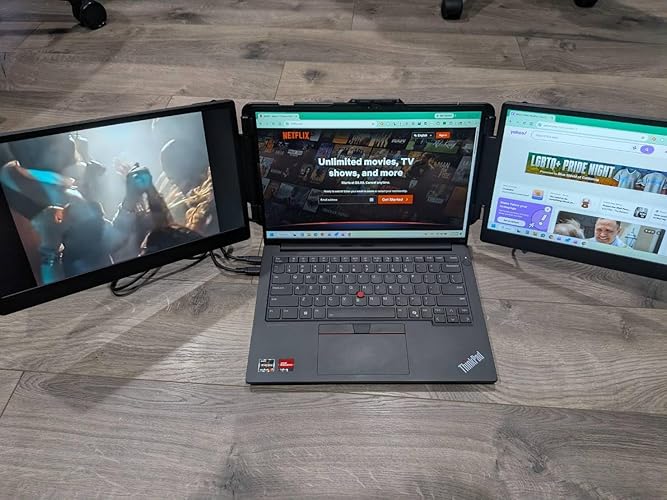
  • Portable & Travel-FriendlyEngineered for the mobile professional, the KEFEYA 14.2" portable monitor transforms any space into an efficient workstation. It features 0-180 rotating screens that fold into a compact size for effortless storage in any laptop bag. The included premium carrying case ensures maximum durability. Perfect for business trips, remote work, online classes, gaming, and video conferences.
  • Easy Setup & Plug-and-PlayKEFEYA Laptop Screen Extender allows you to light up one screen with a single Type-C cable when a full-featured Type-C port is available. The kit includes all necessary cables (Type-C, HDMI, USB-A) and works seamlessly with Windows, Mac, Switch, PS4 and Xbox One. No drivers neededready in seconds. If your device does not have this port, you can use a USB-A + HDMI cable instead (the second screen connects according to the available port).
  • Crisp Full HD IPS DisplayBoost productivity with a vibrant 1920x1080 IPS panel that delivers wide viewing angles and accurate colors, providing stunning clarity for both intricate spreadsheet details and rich multimedia content. Share content seamlessly in meetings or collaborative sessions, and customize brightness, contrast, and color temperature via intuitive controlsall of your settings are automatically saved for future use.
  • Ergonomic ComfortEngineered for productivity and comfort, our laptop monitor extender attaches to your laptop in secondsentirely tool-free, with no magnets or adhesives required. The kickstand offers precise 0-90 tilt adjustment for optimal viewing angles, significantly reducing neck and eye strain during extended work sessions. Its lightweight yet sturdy design adapts to all-day scenarios, effortlessly handling both desk-bound and mobile work environments.
  • Wide Connectivity & SupportWorks with most laptops via Type-C, HDMI, USB-A ports. For connection issues, contact our support team for immediate assistance. Note: For MacBook models equipped with M1/M2/M3/M4/M4 Pro chips, due to chip display limitations, our dedicated H5-T cable (Search forB0DF7CG7MCto obtain this dedicated cable) is required to enable this triple screen extender full functionality.

Description

Kefeya insists on continuous innovation to produce reliable quality laptop screen extenders. Build a user-friendly brand. Allow users to work/study multiple tasks online at the same time and improve efficiency. The expansion of multiple screens facilitates remote work while allowing users to enjoy a more relaxed lifestyle. Bring a more colorful and interesting experience for users who enjoy online entertainment. Why won’t the screen turn on with only an HDMI or USB-A cable? HDMI carries video and USB-A provides power. Both are needed for the display to work. If the display shows “No Signal” after connection, try reconnecting the HDMI cable. Screen shows "No Signal" even with a Type-C cable. Why? This means your laptop’s Type-C port only supports power (not video). Connect an HDMI cable to the extender’s dedicated HDMI port to provide video signal. That screen will now require two cables (Type-C for power + HDMI for video) Why does the screen show "Power Saving Mode," flicker, or stay black? Your laptop may not support powering three screens at once. Fix this by plugging a USB to Type-C cable from the extender's Type-C port into a 5V/2A power adapter for extra power. Is this compatible with MacBook M1/M2/M3/M4/M4 Pro chips? These chips support only two screens (including the laptop display). To add a third, use a compatible dock like the Kefeya H5-T (Search: B0DF7CG7MC).It can also convert a USB-A or non-full-function Type-C port into a video output source. How can I get further help? Find detailed steps in the user manual or click the seller’s name on the product page to message us directly. We’ll respond promptly—if you don’t hear back, you may have contacted the wrong support channel. S2 KX2 S5 P5 S6 S3 G2

Brand: KEFEYA


Screen Size: 14


Resolution: FHD 1080p


Aspect Ratio: 169


Screen Surface Description: Glossy


Aspect Ratio: 169


Screen Finish: Glossy


Contrast Ratio: 15001


Refresh Rate: 60 hertz


Display Type: LCD


Display Technology: LCD


Viewing Angle: 180 degrees


Pixel Pitch: 0.18


Picture Quality Enhancement Technology: Eye-care Mode


Screen Size: 14


Item Dimensions D x W x H: 14"D x 8.2"W x 1.6"H


Item Weight: 2.77 kg


Resolution: FHD 1080p


Display Resolution Maximum: 1920 x 1080 pixels


Native Resolution: 1920x1080


Connectivity Technology: DisplayPort


Hardware Connectivity: USB 2.0, USB 3.0 Type C, USB 3.1 Type C


Additional Features: Portable


Specific Uses For Product: Business


Color: Black


Mounting Type: Desk Mount


Compatible Devices: Devices with Type-C, HDMI, or USB-A connectivity and operating systems including Windows, Mac OS, Switch, PS4, and Xbox One.


Shape: rectangular prism


Brand: KEFEYA


Model Number: S2


Model Name: KEFEYA


UPC: 752692213274


Manufacturer: Shenzhen Baijiayoupu Technology Co., Ltd.


Response Time: 2 milliseconds


Total Number of HDMI Ports: 1


Total Usb Ports: 3


Number of Component Outputs: 2


Total USB 2.0 Ports: 1


Total USB 3.0 Ports: 3


Frequently asked questions

If you place your order now, the estimated arrival date for this product is: Tuesday, Aug 4

Yes, absolutely! You may return this product for a full refund within 30 days of receiving it.

To initiate a return, please visit our Returns Center.

View our full returns policy here.

  • Klarna Financing
  • Affirm Pay in 4
  • Affirm Financing
  • Afterpay Financing
  • Zip Pay in 4
  • Financing through Apple Pay
  • Financing through Google Pay
Leasing options through Acima may also be available during checkout.

Learn more about financing & leasing here.

Top Amazon Reviews

  • Nice screen! Great value!
Size: Triple-14.2"
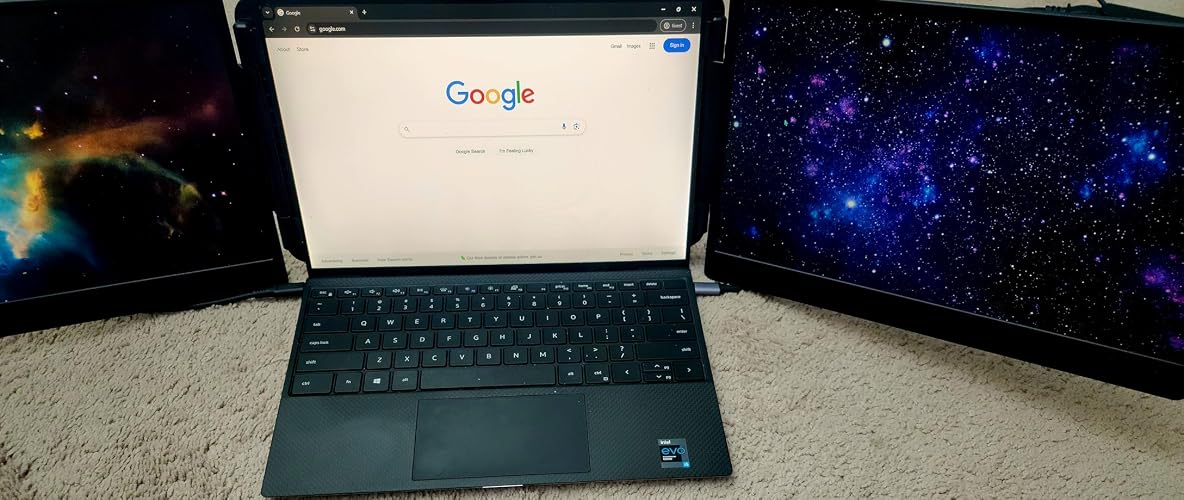
I'm giving it 5 stars because it does exactly what I needed but I'll go into some other details. Things I like very much: - It works as advertised! The screens work with no additional software or cables needed. You can use it straight from the box and start working right away. - I imagine travelling with this is easy since everything is neatly arranged, if you are planning to work for an extended periods of time away from your typical home setup, this will be a great efficiency boost for you. - The customer support was great, they helped me identify the issue and help me setup the screen to accommodate my needs, as I didn't know you could use 2 cables for one screen once you have the ports (check my other summary below). - Product is good quality and well made/thought-out. There are built in speakers on the screen if you need it. Things I don't like as much: - The product is a bit heavy so I'm planning to upgrade my desk setup to accommodate the screens and not have them directly attached to my laptop weighing it down. - My laptop doesn't have 2 USB-C ports, if you do it might be easier for you to do the setup. I had to use a USB-A + the HDMI cable to get the third screen to work. It works fine but cable management makes it a bit cumbersome, a new desk setup will fix this though. - The display is a bit dull to my eyes even after configuration, but overall good enough quality for me to do my job (I don't use it for gaming, watching videos etc.) - My desk is a bit high so the stand at the back doesn't touch the table, it kind of floats back there not providing full stability to my laptop. I'd have liked an additional extension option but that's fine, I can work around it. A great product and a huge boost to my productivity I feel more at ease now that I can focus better without switching tabs and jumping through windows :) if you work from home I'd highly recommend getting an additional screen or 2 ;) to boost your productivity. ... show more
Reviewed in the United States on April 3, 2025 by Rochelle Gordon

  • Excellent and Durable Screens.
Size: Triple-14.2"
It was a blind buy for me over 16 months ago and not a single issue with it, that’s why I’m giving it 5 stars, Connecting it is simple without any software and comes extra set of cables which I don’t need to use it but always kept in my laptop bag, Very practical for work and travel, it makes working on my laptop much easier and fits comfortably in my laptop bag. ... show more
Reviewed in the United States on May 23, 2026 by Dalbir singh

  • Perfect For Travel and WFH...Product Support is GREAT
Size: Triple-15.6"
I purchased these monitors about 18 months ago and, although I've had two issues, they were both resolved quickly. They're not quite the same as using 2 standard monitors, but they work great for my needs and I love that they're portable so I can use them for traveling. I use this for my occasional work from home setup; it works great with my 17" ZBook and 14" HP. Word of caution, I purchased a (non-HP/VBB) dock to have extra ports and to avoid having to connect the monitors directly to my laptop every time I use them (I could leave them connected to the dock); however, I could not get them to work with the dock, no matter which cables I used. The first issue occurred within several weeks of use: one of the tiny screws backed out on one of the arm/mount adapters, and it was in a location where it couldn't be screwed back in. I contacted the Kefeya support and they had me complete a return of the entire product (it would've been more convenient to just get a replacement arm, but that wasn't an option). The 2nd issue was after 13 months of use: one of the USB-C cables was causing the screen to flicker and reset intermittently. I diagnosed this as a cable issue by swapping monitors and laptop ports, and the issue always followed the cable. I contacted support and, after confirming my purchase info, they quickly sent me a replacement cable. Lynn was my support agent and they kept me updated regarding the status of my new cable and followed up to verify the issue was resolved. Overall, the product is very easy to use, the stand configurations are versatile, and the customer support is top-tier. I would purchase again, w/o hesitation. ... show more
Reviewed in the United States on July 15, 2026 by CJ

  • Easy and efficient way to add more screens to your laptop.
Size: Triple-14.2"
I've wanted to build a PC for a while now, but the only spot I could place one would not be ideal for a PC, so I got a souped-up HP Envy in the fall. It has a 4060 on it, and I really only use it for coding and graphic design on Canva. However, I'm always switching between a million screens no matter what I'm doing, so this is great, although I'm still getting used to using the additional screens. My job also just gave me a second screen last week. I have all these new screens coming into my life at once. The quality of the picture is solid. The setup is easy; I set it up and take it down each time I use it, and it takes two minutes max. You can set it up as a portable monitor instead of an extender if you want, and you and your buddy can start a speed stacking competition with opening and closing them without breaking them. It's not bulky, but it doesn't seem fragile or like it will break easily, which I'm happy about. But it also doesn't seem cheap. You have to remember you're opening and closing this thing onto itself. It's not heavy, but it's also not super light. For reference, you could fit a laptop and its charger in a case along with this in its case in the main pouch of a backpack and still fit a few notebooks and a bag of Lay's cheddar sour cream baked potato chips, a 2 lb bag of banana runts, and it's going to weigh less than when you were in high school and had to carry every textbook in it for the day. The difference between then and now? We didn't have laptop screen extenders, and we also couldn't get 2 lbs of banana runts shipped to our house the next day. My only complaints, but really just suggestions, are: - I wish the screens had more range of motion instead of just opening on the y-axis like a book. - I wish I could move them on the x-axis to angle the screens back a bit. I see other brands offer that, along with rotation, for more money, but I don't even want the rotation, just the angling screens, which brings me to my next point. Since the screens can't be tilted back without moving the entire laptop screen, I think the kickstand on the back should be longer. I have to layer the foam pads and the case and place the kickstand on that for how I use it. Additionally, the kickstand could be sturdier; it's pretty much a Fire Stick battery cover with an adjustable bamboo stick you can bring down to hold it. I had my rating at a 4, but after doing this review, I have to give it a 5. I'm over here taking a star away because of a kickstand; what's happening to me? I've only had it for about two weeks, and it's great. I hesitated buying it for a week because of comments saying their HP Envy didn't work with it. It works great for mine. I need to use it more as a portable monitor without mounting it on my laptop. ... show more
Reviewed in the United States on July 31, 2024 by Brendan Hannon

  • Great Product!!!
Size: Triple-14.2"
I work from home 3 days a week and I was using my laptop and a separate monitor, I really needed 3 to be the most productive but my desk wasn’t big enough for that setup. I researched some portable monitors online and came across this one. At first, I was a little skeptical because there were many that were twice the price, but I decided to purchase and see if it was any good. I must say I’m very happy with my purchase, it’s easy to set up and works beautifully. One thing you may need is an HDMI adapter if your laptop only has 1 slot. The screen size is great, and the resolution and brightness are excellent. I highly recommend this for a very affordable price to maximize your workload. It comes with a nice carrying case that I put it back into when done and can be used for travel. I’m extremely happy with his purchase and would 1000% recommend it to anyone searching for screen extenders. ... show more
Reviewed in the United States on September 24, 2024 by Scott Roberts

  • Complete game changer
Size: Triple-15.6"
This screen is an absolute gamechanger for laptop users. I originally wanted this model, but since it was about $150 more at the time, I went with the cheaper version that has two screens that don’t rotate and clip onto the sides of your laptop. I wasn’t sure how well it would work, especially with people saying they had connection issues, even with my HP Envy model. But honestly, I had zero issues—my guess is the multiple ports probably confuse some people. After getting it, I was blown away by how much of a difference these screen extenders make. They're not bulky at all for the screen quality, and they set up and break down super quickly. It’s a perfect solution for anyone—not just laptop users—who needs extra screens without dragging around bulky monitors. This setup could easily fit in a laptop bag, and if you had a backpack, you could toss this in along with like 25 pounds of banana Runts and still have room to spare. Now, about the rotating screens—they're awesome. You can have one vertical and one horizontal, or both the same way. Plus, with this model, you can view both screens without them having to grip the laptop, unlike the cheaper model where if you want s vertical screen you lose the other. You can even stack them or have one facing you and one facing an audience. The screen size is just right, too. With both screens plugged into the Thunderbolt 4 USB-C port, you can still plug in a third screen using USB-A for power and HDMI for video, giving you three extra screens—four in total. Right now, I’m looking for a USB-C dock with four ports that support both power and video, so I can hook up the cheaper model with two additional screens ane snap them onto the side, and with these two id stacked on top of each other. Honestly, the only downside I had with the first cheaper model was it lacked the extra features this one has. But everything else makes this version a 5-star buy. Sure, it drains power fast, but what do you expect when you're running two extra monitors? All in all, this is a 5-star product for me. If the price is too steep, the cheaper model is still a solid choice, but it doesn’t have the same flexibility this one offers ... show more
Reviewed in the United States on September 30, 2024 by Chris

  • Useful
Size: Triple-14.2"
Super useful for work and travel! Setup was quick and the screens are lightweight but still feel sturdy. The display quality is clear and bright, and having triple monitors really improves productivity when multitasking. Works great with my laptop and folds away easily for storage. Definitely worth it! ... show more
Reviewed in the United States on May 13, 2026 by Vicky

  • Neat product with a few caviats
Size: Triple-14.2"
Here’s a clean, usable review you can post: ⸻ The Kefeya S3 Portable Triple Monitor is a genuinely clever concept and a strong productivity tool for anyone working on the go. It’s one of those products that immediately catches your eye. I first noticed it in a coffee shop and within seconds thought, “I want that.” It solves a real problem for people running a mobile office. A few things to know before buying: The unit is heavier than it looks. Once attached, it adds noticeable weight to your laptop setup, especially if you’re carrying it around frequently. More importantly, hinge strength matters. If your laptop has a soft or flexible hinge, the added weight will cause the screen to tilt back or collapse. This isn’t occasional, it happens repeatedly and can become frustrating fast. Bottom line: great idea, useful in the right setup, but not universally compatible. Works best with sturdy laptops that have strong hinges and good structural rigidity. ... show more
Reviewed in the United States on April 30, 2026 by Luis H. Velasquez

Can't find a product?

Find it on Amazon first, then paste the link below.
Checking for best price...