Search  for anything...

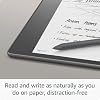
Kindle Scribe (32 GB) the first Kindle for reading, writing, journaling and sketching - with a 10.2” 300 ppi Paperwhite display, includes Premium Pen + 3 months free Kindle Unlimited (with auto-renewal)

  • Based on 8,704 reviews
Condition: New
Checking for the best price...
$389.99 Why this price?

Buy Now, Pay Later


As low as / mo
  • – Up to 36-month term if approved
  • – No impact on credit to apply
  • – Instant approval decision
  • – Secure and straightforward checkout

Ready to go? Add this product to your cart and select a plan during checkout.

Payment plans are offered through our trusted finance partners Klarna, Affirm, Afterpay, Apple Pay, and PayTomorrow. No-credit-needed leasing options through Acima may also be available at checkout.

Learn more about financing & leasing here.

Selected Option

Free shipping on this product

This item is eligible for return within 30 days of receipt

To qualify for a full refund, items must be returned in their original, unused condition. If an item is returned in a used, damaged, or materially different state, you may be granted a partial refund.

To initiate a return, please visit our Returns Center.

View our full returns policy here.


Availability: Only 1 left in stock, order soon!
Fulfilled by Amazon

Arrives within 30 days
Order within 12 hours and 20 minutes
Available payment plans shown during checkout

Protection Plan Protect Your Purchase
Checking for protection plans...

Option: Premium Pen


Setup: 32 GB


Offer Type: With 3 months of Kindle Unlimited


Features

  • EXPLORE KINDLE NOTEBOOKS A digital notebook you can write on. Journal, sketch, take notes, and more.
  • CONVERT HANDWRITTEN NOTES TO TEXT View or share your notes with contacts and browse notes on the go through the Kindle app.
  • READ AND WRITE AS NATURALLY AS YOU DO ON PAPER The worlds first 10.2" 300 ppi glare-free, front-lit display.
  • TAKE HANDWRITTEN NOTES AS YOU READ Write notes within millions of titles in the Kindle Store.
  • IMPORT AND MARK UP DOCUMENTS Review and take notes directly on PDFs, or create sticky notes in Microsoft Word.
  • THE LONGEST BATTERY LIFE OF ANY KINDLE Unlike tablets, Kindle Scribe offers months of reading and weeks of writing on a single charge.

Frequently asked questions

If you place your order now, the estimated arrival date for this product is: within 30 days

Yes, absolutely! You may return this product for a full refund within 30 days of receiving it.

To initiate a return, please visit our Returns Center.

View our full returns policy here.

  • Klarna Financing
  • Affirm Pay in 4
  • Affirm Financing
  • Afterpay Financing
  • PayTomorrow Financing
  • Financing through Apple Pay
Leasing options through Acima may also be available during checkout.

Learn more about financing & leasing here.

Top Amazon Reviews


  • Love it! Did not make me carsick! Helpful for school. Specifics in review for anyone it might help!
Option: Premium Pen Setup: 16 GB Offer Type: Without Kindle Unlimited
I was hesitant at first because of mixed reviews. I have to say- I love it! Addressing Other Reviews I have to say that a lot of the things people are griping about can be solved by having patience. It is a first-generation device and, while better versions may come, this one is far from basic. I haven't charged it in a week, in spite of using it multiple times. I think if you use it heavily for a few days, you will need to charge it more often- but are we really to the point where having to charge a device once a week is a chief complaint? Every single device I have, including a recent phone alleged to be "top of the line," has some loading issues from time to time. It's part of technology and it will never be flawless. There is a learning curve, but once you start to play around with it, it's pretty user-friendly. Simple Google searches answered most of my questions quickly. I encourage you to form your own opinion. Cost I got it on sale and traded in an old device to make it cheaper, then am doing the monthly payments for the rest, so I found it all reasonable. Watch for sales and utilize monthly payments to help with costs. Reading The reading on this is stellar. If you love Kindles, you will enjoy it. It feels more like a book than a regular Kindle. I have several gadgets I use to prop items up. The HUANUO portable lap laptop desk (https://tinyurl.com/HUANUO-Laptop-Desk ) is my favorite. I also like laying it flat, like a paper, when I'm reading and writing on PDFs. This might surpass my paperwhite for reading, which is saying a lot since that thing is awesome. Writing I love writing on this. I got the premium pen and love using the "fountain pen" setting because it looks beautiful. I've found it really simple to create notebooks and lists. I like using it for brainstorming so I can still handwrite things, but not waste a bunch of paper, and love the undo feature for similar reasons. There's also a function to circle and erase a section, which is neat. Book Notes Others have mentioned not being able to write in book margins, but the notes feature is still nothing to scoff at. For most books, I can tap where I want to make a note, then either handwrite or type (with the on-screen keyboard), and it will leave a tiny note icon in that spot (which is easy to access later). This looks cleaner than writing on the book page, while still being functional and simple. A few books still only let you do the old-school Kindle notes, but those aren't bad either. They are creating more books with writing options. PDFs Being able to write on and highlight PDFs is a game-changer for grad school, so this is proving to be one of the more helpful features (and part of why I got one). You can adjust the margins of the PDF, depending upon if you want it more for reading or notes. I took notes on a PDF and sent it back to myself, then later pulled it up on my desktop for my research. Size, Battery, & General Functionality The size is just right, feeling more like a book or paper, while still being condensed. I was able to repurpose an old planner cover for it. As mentioned above, I feel the battery life is impressive, as it tends to be on all Kindles. I've used it for hours on a multi-day road trip without recharging. It's also the first device I can read and write on in a car without getting carsick! As will be the case with most 2-in-1 technology, you might not get every single facet of each one when you combine them- but I do not feel this to be lacking. USE YOUR DESKTOP for set-up/adjustments I emailed some PDFs and that went well. You can also customize your pdf-sending email. Emailing PDFs to your Kindle email will work for most PDFs and is only limited by your email provider's size restrictions. For larger PDFs, I tried a few different things and finally settled on connecting my Surface tablet/desktop with the Kindle Scribe. I used a USB to USB-C cord and was able to drag and drop files from any folder on my desktop right into the Kindle documents folder. This was the fastest and easiest way to send files that were too big for sending via email. I'm glad I bought it and hope others will form their own opinions and get just as much joy out of it. Like any product that is the first of its kind, there is room for growth, but the updates they send through are great and this is still outstanding. ... show more
Reviewed in the United States on October 4, 2023 by MM

  • Short on functionality this early but fantastic device
Option: Premium Pen Setup: 64 GB Offer Type: Without Kindle Unlimited
I ordered this one as soon as it was announced and hadn't really realized how short on functionality it was going to ship with, but I'm still extremely happy with it so far. First up, it's a very nice Kindle device and is amazing for reading my books on. I adore the screen on it, and it's very snappy and responsive to navigate and write on. The screen size is also wonderful for reading on for my nearly 50 year old eyes that have somehow slipped into reminding me of my age by needing multi-focal lenses. One thing on this front that I miss from my Oasis is the buttons on the margin for page flipping. Those are nice on that device, although I don't hate that they're missing from this one, I just kind of wish they were there. Another thing I'm a little annoyed with is no 4G or 5G built in. I'll live without it and tethering isn't hard these days, but it's an annoyance that didn't need to exist on at least the top end models. I love the writing experience on the device, too. It's not smooth as glass like my iPad Pro with an Apple Pencil, it's much more like writing on paper. But it has a similar quick response to writing input that makes it feel pretty natural and not artificial or annoying, so Amazon have worked that part out well. The functionality is very basic at this point, which is probably the most negative aspect of the device. But it's actually SO basic that I have few doubts that this isn't in the pipeline to be addressed in software updates over the next several months. I would suggest not gambling on that if the cost is prohibitive to you because you should always make your purchase decisions on what you actually get when you buy, and not based on future promises or a naive belief that what you want will be delivered at any point. I can afford to live with my device as is, and it'll still meet the needs of why I bought it, just not optimally, if they don't add what I consider the missing functionality to it. That's not going to be true for everyone. The hardware they've used does support everything needed for all the additional features that I suspect Amazon is planning to add, if they've fully implemented it in the hardware, and at this price point, I believe they have, but I don't know it for sure. Things I think it's missing are: Pressure sensitivity for the pen A wider array of writing tools (drawing tools primarily) Stroke based storage instead of converting strokes to pixels Ability to zoom in and out of notes and drawings Handwriting recognition Related to handwriting recognition, the ability to search note contents More organization options for notes Perhaps a second app to segment writing from drawing functions, but this isn't a want, just a speculation on how they may approach some of these features if they add them Better Kindle integration - like having notes automatically sync to other Kindle devices and apps on other devices, more robust sharing options and integrating with other products like Office apps or drawing exports, etc. Ways to mark up a book with the pen beyond just the current sticky notes. This is a complicated ask because of the way ebooks are formatted, but it isn't unsolvable. My hope is that they are responsive to customer feedback and this becomes the premier Kindle e-ink device, and that they add this functionality to the current devices rather than milking them by only adding them to newer models. It seems more likely that they'll add most or all of the functionality to these devices, because otherwise they'd create a massive amount of customer backlash that they'd have to needlessly overcome, and that just isn't logical or necessary, so I think we'll see at least some of these features added over the coming several months to a year or two. ... show more
Reviewed in the United States on December 27, 2022 by Keith D.

Can't find a product?

Find it on Amazon first, then paste the link below.
Checking for best price...