Search  for anything...

InnoView Portable Dual Monitor 15.6" 1920x1080 Dual Stacked Foldable Monitor | 315° Screen Adjustment | USB-C/HDMI Second Monitor for Laptop, Mac, Windows

  • Based on 1,300 reviews
Condition: New
Checking for the best price...
$229.99 Why this price?
Save $30.00 was $259.99

Buy Now, Pay Later


As low as $38.33 / mo
  • – 6-month term
  • – No impact on credit to apply
  • – Instant approval decision
  • – Secure and straightforward checkout

Ready to go? Add this product to your cart and select a plan during checkout.

Payment plans are offered through our trusted finance partners Klarna, Affirm, Afterpay, Apple Pay, and PayTomorrow. No-credit-needed leasing options through Acima may also be available at checkout.

Learn more about financing & leasing here.

Selected Option

Free shipping on this product

FREE 30-day refund/replacement

To qualify for a full refund, items must be returned in their original, unused condition. If an item is returned in a used, damaged, or materially different state, you may be granted a partial refund.

To initiate a return, please visit our Returns Center.

View our full returns policy here.


Availability: In Stock.
Fulfilled by Amazon

Arrives Wednesday, Jun 3
Order within 17 hours and 32 minutes
Available payment plans shown during checkout

Protection Plan Protect Your Purchase
Checking for protection plans...

Size: 15.6 inches


Features

  • Plug and Play, No Driver RequiredThis InnoView portable notebook display extends your screen without the need for drivers when connecting to Windows systems, eliminating complicated installation steps. Simply use one Type-C cable for signal transmission and another for power supply, making it effortless to handle multiple spreadsheets or browse the web on a larger screen. Note: Please be sure to use the original power adapter included in the package for power supply.
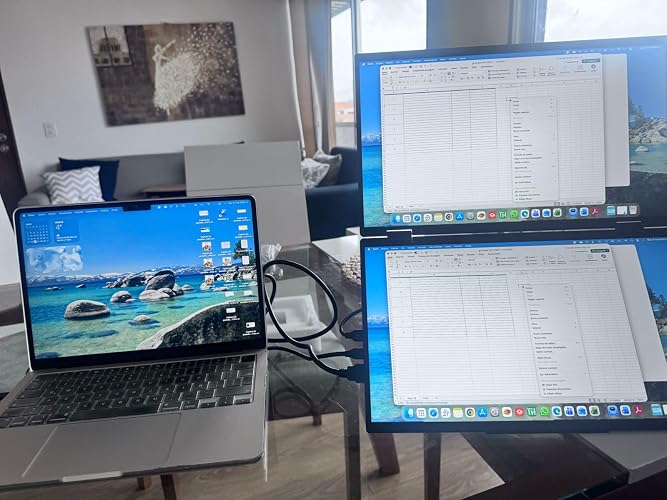
  • Multiple Display ModesThis extended screen supports extended mode, split-screen mode, and duplicate mode. When connected via a full-featured Type-C cable, it enables multi-content display on a single screen, enhancing your work efficiency. Note: For Mac devices, extended mode requires driver installation; otherwise, only split-screen and duplicate modes are supported. Driver installation path: Menu Other Settings Mac Extend On. HDMI connections do not support extended mode on any system; only duplicate and split-screen modes are available.
  • Multi-Purpose Screen, Efficient CollaborationThe InnoView dual-screen display features two 15.6-inch IPS panels, providing ample screen space to seamlessly handle multitasking, work, study, and creative projects. Its foldable design ensures portability and significantly boosts efficiency, making it ideal for remote workers, gamers, travelers, students, and other multitasking users.
  • Foldable Design, Space-SavingBoth screens boast 1080P resolution and can rotate 0-315 with 180 adjustable stands and gravity sensors. When connected to Windows or Mac, the screens automatically rotate for optimal viewing. The crisp image quality, combined with vertical layout and split-screen modes, makes it perfect for business tasks and programming. It is well-suited for home offices, shared workspaces, and professionals requiring flexibility.
  • Shop with Confidence, Reliable SupportThis portable dual-screen display can be quickly set up with a single-cable direct connection. For optimal performance, please connect to a 30W or higher power source. We offer a 30-day return policy and an 18-month warranty, with a dedicated customer support team always ready to assist, ensuring exceptional performance for work, gaming, or entertainment.

Description

The InnoView dual portable monitor for laptop instantly expands your workspace with zero driver setup required for Windows—simply connect via two Type-C cables (one for signal, one for power) using the included adapter. travel monitor offers three versatile modes—extended, split-screen, and duplicate—though Mac users need a quick driver install for extended mode, and HDMI supports only duplicate/split-screen. Featuring two 15.6-inch 1080P IPS displays, dual screen monitor ideal for multitasking, creative work, and on- the-go productivity, with a foldable design and 0-315° rotation that automatically adapts in Windows/Mac. For optimal performance, use a 30W+ power source, and enjoy peace of mind with 30-day returns and 18-month warranty support.

Brand: InnoView


Screen Size: 15.6 Inches


Resolution: FHD 1080p


Aspect Ratio: 169


Screen Surface Description: Matte


Aspect Ratio: 169


Screen Finish: Matte


Contrast Ratio: 10001


Refresh Rate: 60 Hz


Display Type: IPS


Display Technology: LCD


Viewing Angle: 178 Degrees


Brightness: 300 Candela


Color Gamut: 72


Has Color Screen: Yes


Picture Quality Enhancement Technology: Adaptive Sync (FreeSync), Crisp Image Enhancement


Screen Size: 15.6 Inches


Item Dimensions D x W x H: 8.5"D x 14"W x 0.85"H


Item Weight: 3.5 Pounds


Resolution: FHD 1080p


Display Resolution Maximum: 1920 x 1080 Pixels


Native Resolution: 1920x1080


Response Time: 3 Milliseconds


Total Number of HDMI Ports: 1


Total Thunderbolt Ports: 2


Total USB 3.0 Ports: 1


Additional Features: Built-In Speakers, Lightweight, Portable, Swivel Adjustment, Tilt Adjustment


Specific Uses For Product: Business, Entertainment


Color: Black


Compatible Devices: Laptop, MacBook, Mini PC, Windows


Warranty Type: 1 Year Manufacturer Warranty


Shape: Flat


Brand: InnoView


Model Number: INVPM009


Model Name: INVPM009


Warranty Description: Rest easy with our 30-day return policy and 18-month warranty. Our dedicated support team is always ready to assist you.


Manufacturer: InnoView


Unit Count: 1.0 Count


Built-In Media: 30W adapter, Full-featured Type-C cable, HDMI cable, Type-C power cable


Power Consumption: 30 Watts


Connectivity Technology: HDMI, USB Type C


Hardware Connectivity: HDMI, Headphone, USB 3.0 Type C


Adaptive Sync: FreeSync


Frequently asked questions

If you place your order now, the estimated arrival date for this product is: Wednesday, Jun 3

Yes, absolutely! You may return this product for a full refund within 30 days of receiving it.

To initiate a return, please visit our Returns Center.

View our full returns policy here.

  • Klarna Financing
  • Affirm Pay in 4
  • Affirm Financing
  • Afterpay Financing
  • PayTomorrow Financing
  • Financing through Apple Pay
Leasing options through Acima may also be available during checkout.

Learn more about financing & leasing here.

Top Amazon Reviews


  • Fantastic dual monitor for portable and travel productivity
Size: 15.6 in
As someone who works behind a laptop the majority of the day, multiple monitors are a must to staying productive at home or away from home. I have been looking for a solution that would maximize viewable space/resolution in as compact as a package as possible. As a result, I decided to pick up the InnoView 15.6" Portable 4K Dual Monitor for a number of reasons - viewable space (dual 15.6 monitors), resolution (4k) - size/weight (folded, it is comparable to my Macbook Air 15 in in footprint and weight ~3.5 lbs) - build quality (the monitor is feels very solid and well-made) - connectivity (HDMI, usb-c, DP2.0) The monitor came with various cables for connectivity and power (included a power brick). It felt solid all around from the hinges, to the adjustable stand, and to the cable connections. The monitor feels very solid in hand and has good weight. Once the monitor is set-up, it holds form and angles very well. The monitor is best used in landscape mode, although it can be used in portrait if needed. In portrait mode, you won't have as many viewing options. Also, you'll have to consider the connectivity ports and cables connected. I am using with my Macbook M4 air, which will natively support multiple external monitors. I believe an M1 or M2 would need an external dock/adapter to support multiple external monitors, so you would need one with an older Mac to use this monitor in a muti-external monitor set-up. For my set-up, the M4 works very well. Connectivity is straight forward, and I used a usb-c and HDMI (usb-c-HDMI cable) to the InnoView. Luckily, with the Macbook, you will still be able to power via Magasafe connector. The monitor connected perfectly, and I was able to utilize 4k 60hz refresh rates for both monitors. Picture was clear, accurate, and vibrant. From a productivity standpoint, you can use this in multi-monitor or single monitor mode. Single monitor mode allows you to create one single large monitor. You can power this from the provided power supply, an OEM, or if needed a power bank that can output 30W+. The powerbank option is great for working in an airport lounge or coffee shop. The only challenge with my setup has been a clean cable setup, as you are connecting two video sources and a power supply to the monitor and laptop. I've been able to use this with my work and home macbooks without issues as well as phones (android, ios).I do hope to try testing with a windows machine. Overall, great productivity device, well-made, and versatile. The only downside was cable management (which isn't really the monitor's fault). ... show more
Reviewed in the United States on March 6, 2026 by lrvaler

  • Great resolution and the screen size for the $$$
Size: 23.8-inch
Great external monitor for my MacBook Air. Great screen/light quality (no excessive “flickering”) high resolution??? Very sturdy attached kick stand (hasn’t fallen over yet). No wobbling or tipping after a month of daily use. Not difficult to set up, but requires some basic ability to manually manipulate software to get additional windows to fill and fit both screens individually. Lightweight! Works very well for a traveling workplace setup. ... show more
Reviewed in the United States on February 15, 2026 by Alex

  • Incredible value! Incredible value!
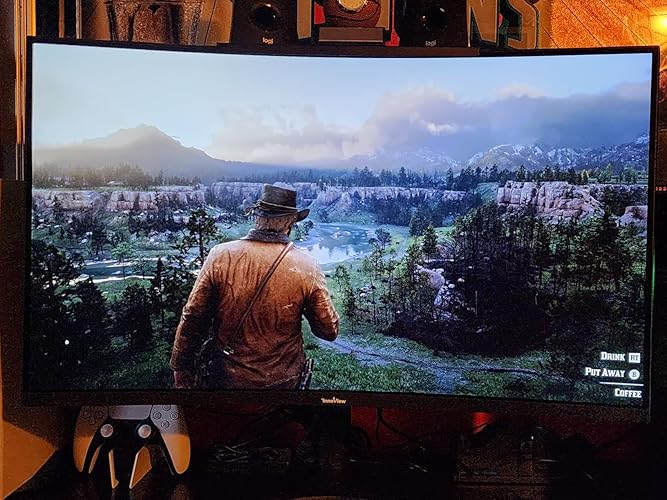
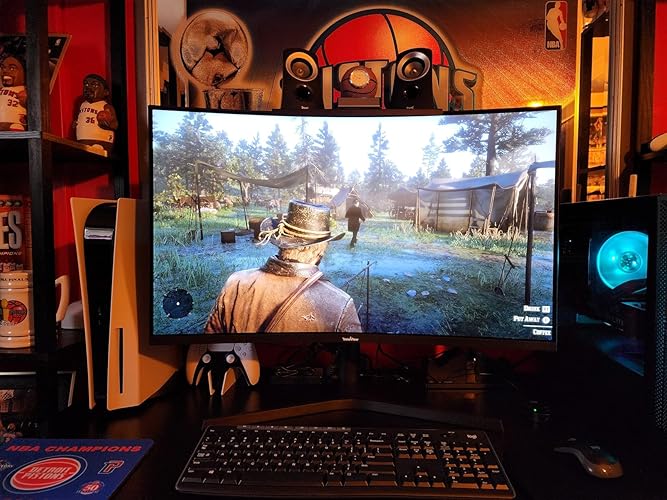
Was a bit hesitant to pick up this monitor only because I've never heard of innoview. Little research showed me they been in the monitor business a little while just mostly in portal monitor market. This is a Chinese brand however, what PC or monitor isn't made in China? For the same price I had just bought a 1080 predator monitor and although I loved it for the same price I wanted to dive into 1440p. This monitor so far has met expectations. Love the size! 32" of curved eye candy! Deep beautiful colors and quality build. Base is made of metal and easy snap into place system for the monitor and a built in screw for attaching the metal legs. Easy peasy. Comes with PC cable not HDMI. And yes the speakers leave alot to be desired but here's a tip. Go into the settings and up the volume. It's factory set at like 40% once you put it at 100% you get enough sound to get by but def will want some speakers. I just bought the Logitech Z313 at Walmart for $59. Pretty good speakers for affordable price. The screen is very responsive and looks sharp as it is should at 1440p. Games look incredible! See attached pics of red dead 2. Mind blown! I'll update the review after some time with the monitor as far as longevity goes. Hoping to get solid years out of this monitor. Only negative is the buttons like most monitors have u guessing what each one does until u get the jist of the order of them. Wish they would add a little joystick like the acer predator monitor had that I replaced this monitor with as the old school buttons for every input design really does suck. Can be frustrating at first until you get the muscle memory of the key functions of each button. Also as usual getting the cables attached to the inputs was not thght out well as they go straight up from the bottom which makes you either hand the monitor on its side or upside down to attach them or u can tilt the monitor over edge of table and look from underneath. A dumb design in my opinion but once connected you don't think about it. Oh and the beautiful 1500r curve is amazing. It truly does immerse you into whatever your doing. I didn't think this would be a big deal but I truly love it. And the monitor is decently lightweight but not a cheap sort of lightweight however. Full disclosure I have had several times a quick flash on the screen but I believe that was when it was switching over. Hasn't been a issue at all and don't seem to be a screen issue but it raised my eyebrow and with this being a "off brand" monitor where I was alrdy hesitant to buy it's something I'll be keeping a eye on. I plan to use this monitor extensively before the return window to be sure I'm 100% happy with this innoview. But so far for the price and what you get I'm 98% pleased! I'd say it's worth it. Ill update the review as time goes on! ... show more
Reviewed in the United States on December 6, 2023 Reviewed in the United States on December 6, 2023 by Blaze_Octane44

  • Awesome Monitor
Size: 23.8-inch
Crystal clear 4K monitors. Both monitors operate with a single usb c connection and my laptop gets power from the monitors once I started using a100W power supply connected to the monitors. Light, thin and easy to transport from home to office when needed. I would have given 5 stars except occasionally in the morning after being in standby all night the monitors will not power back up unless I unplug power for a minute and plug back in. A little annoying but all is okay once they reset and power back up. ... show more
Reviewed in the United States on March 3, 2026 by Amazon Customer

  • Excellent dual monitor, great value Excellent dual monitor, great value
Size: 18.5 inches
Excellent dual monitor for the money! It has two USB C ports, one of which is for power supply (included in package), the other for connecting to your computer. Doesn’t matter which port is for which, but you must supply power. So this means a single C port is used for video connection which further means the two panels are treated as a single monitor by default. This last point has ramifications for Mac users (I’m not sure about the other operating systems). My attached photo shows this InnoView dual monitor (each panel 18.5 inches) connected to my MacBook Pro M3 Max in docking mode, together with a LuckyFive 24-inch WQHD monitor. Out of box when connected to a compatible Mac, the InnoView is in “splicing mode,” which means the two panels are used as a single vertical monitor. You can also, of course, use InnoView in mirror mode, where both panels duplicate the main screen, great for one-on-one sales pitches. To use the two panels as separate monitors, on the Mac you’ll need to install a driver that’s supplied from the monitor itself. The instructions are clearly given, although the steps are a little involved if you’re not used to installing drivers on a Mac. Not too bad if you want this “extend mode” (meaning two separate monitors). I didn’t do this. Instead I simply stay in splicing mode but rely on Mac’s windows arranging functions to place windows on the InnoView as I like. Macs remember windows’ positions as long as you don’t update the system and restart, so it’s pretty straightforward. The InnoView panels are each 1080p in resolution, with refresh rates of 60, 75 and 100. The frame is well made and the stand can stop at different angles and support the monitor securely. Image quality is very good for a 1080p monitor. And in splicing mode, the total resolution is 1920x2160. If you trade or code for a living and your desktop space is limited, I highly recommend this InnoView dual monitor. Just make sure your computer supports external displays, especially if you want to use InnoView in extend mode where the two panels display contents independently. ... show more
Reviewed in the United States on March 29, 2025 Reviewed in the United States on March 29, 2025 by Old-and-Wise

  • Amazing
Size: 23.8-inch
I bought a competing industrial/portable dual display from another OEM last month, it was okay - but plagued with sleep mode issues, not supporting MST USB C on my intel chipset - and was only 1080p This 4K innoview has impressed me within 10 minutes 1. Immediately enabled both independent displays with a single USB cable (and of course separate USB power) to my Intel 275HX integrated graphics, streaming 2x 4k signals over one USB C so seamless means the hardware and firmware guys got this right 2. Screens are sharp with good color settings out of box 3. Built-in menu is solid, gamer crosshairs are cute addition - but this is not a gaming monitor 4. These are solid IPS displays, brightness is great even in a well lit room (power meter on my USB power bank says 60W power draw) 5. sleep mode and waking works great and OST has a black background for its power notification (competitor had a 10 second full screen blue background sleep mode status, which was jarring) I will update this review when I test more of the features, HDR did not impress me immediately - will likely need to try the other HDR modes, not worried as SDR is brilliant here - and HDR is really for OLEDs or other technologies with better backlight control Only negative: Included display cables are short, luckily I have my own - but at this price point, 5-6ft should he standard I also have an innoview 2k 180hz 24in which shares a lot of DNA with this, also very good Someday I hope to learn the origin and story about where these displays come from and how brands package them differently, they are very cool - and Innoview has impressed with their implementations Unrelated feedback: Innoview website needs an update, I know these models change quickly - would be cool to see upcoming model previews, and see more detailed specs ... show more
Reviewed in the United States on August 25, 2025 by JJB

  • External Power Is Required to Use Both Screens
Size: 15.6 in
I like the display quality and the idea behind the dual-screen setup, but one major downside is portability. The monitor seems to require external power to work reliably, especially when trying to use both screens. I expected a USB-C connection to provide both video and enough power from a newer MacBook, but in practice I had to keep it plugged into a power source.For a product marketed as a portable dual monitor, needing a wall outlet significantly reduces convenience for travel, remote work, or using it in places without easy access to power. It would be much better if both screens could run directly from a modern laptop through USB-C alone.Good concept, decent image quality, but portability is more limited than expected. ... show more
Reviewed in the United States on May 18, 2026 by Angelito Consuegra

  • Great monitor(s) - and I solved the Mac double external display issue!
Size: 18"
UPDATE - TO THOSE HAVING TROUBLE GETTING MAC TO SEE THIS AS TWO MONITORS As my original review stated, I had this working with my MacBook Pro as two monitors since I got it. Today, it started doing what others described - could use a USB-C cable to "fill" as a single 2nd monitor but could not get it to show up as 2 external monitors. Turns out that something about the monitor handshaking with the Mac can corrupt the plist (how the Mac "remembers" the monitor, arrangement, and resolution for the next time you use them). This is the procedure that fixed it and brought it back to 2 external monitors: 1. from a Mac terminal window, type, "sudo rm -f /Library/Preferences/com.apple.windowserver.displays.plist rm -f ~/Library/Preferences/ByHost/com.apple.windowserver.displays.*" and press return. You will need to type in your computer admin password. This wipes the cached file of monitor configurations, so it will forget any other monitor configurations you had - so you'll just need to reset resolutions and multi-monitor arrangements if you had any. 2. Make sure that "Fill" mode on the monitor is not on (top side button toggles "Fill On" and "Fill Off" but it takes about several seconds before the change occurs. It needs to be off for this to work. 3. Shut down the computer (not restart). 4. Unplug monitor from computer and from power for 15 seconds. 5. Plug in HDMI cable and plug in power to monitor. 6. Boot the MBP - when it is done booting, go into your display settings and you should see the monitor as a 2nd screen. 7. NOW plug in the USB-C video cable from the lower USB-C port on the monitor (the top one is for power) to the Mac. 8. It shows up as Innoview (2) and renames the other one as Innoview (1) -- two independent external monitors! You can independently set resolutions and arrange them however you like!! The way Mac's do EDID (External Display ID) is a bit different than PC's. That is why this seems to only be a problem on Mac computers. My guess (just a guess) is that the "Fill" mode capability on the dual monitors can confuse the EDID on the Mac and that info is then cached into the plist (memory of the monitor(s)). That is why simply deleting the plist treats it like its brand new monitor connection. BTW, HDMI cannot transmit power, but USB-C tries to negotiate power transfer whenever it is plugged in. That is why I suggested that you start with the HDMI and wait until all is working with that before plugging in the USB-C (and having the USB-C power cord plugged into the monitor before you connect it to the Mac). Original review The hinge is tight - but understandably so - any hinge loosens with age and you would not want this thing closing while using it. The screens are bright and long ago I switched to MacBookPros for color reproduction and these screens look fantastic - They are 18" screens, so they are big in by backpack, but that is not a complaint - it is simple math. If they ever came out with a 17" version that had less of a gap between the two screens, I'd likely buy it - just because my use case doesn't really require the two-sided A-frame capability. I saw some complaints about Apple compatibility - but without any drivers, my M4 MBP works perfectly with these. If I only use a Thunderbolt (USB-C form factor) on my computer, it treats the two screens as one tall screen. But if I use the HDMI and USB-C together, I get 2 external monitors - no problem. I ordered thin HDMI and USB-C Data cables to ensure easy use. Also (and this is physics, not a criticism of the monitors), 2 18" well-lit screens need more power than any laptop USB-C port will provide, so YES, an additional USB power source is required (comes included). I have a small 250W multi-port USB power block I travel with and use 2 of the USB-C ports (1 for the MBP and 1 for these screens). That leaves enough ports and power to charge my iPad, iPhone, and a small multi-device charger for 2nd iPhone, AppleWatch, and AirPodPros - all at the same time. I travel a lot - and now, I have everything I need all together. Setup? there is none - you plug it in. ... show more
Reviewed in the United States on March 31, 2026 by Robert Aldrich

Can't find a product?

Find it on Amazon first, then paste the link below.
Checking for best price...