
Search  for anything...

Elgato Stream Deck Neo – 8 Customizable Keys, 2 Touch Points, Speed Through Tasks & Workflows - Control Word, Excel, PowerPoint, Teams, Zoom, Spotify and more, Drag-’n-Drop Setup - Works with Mac & PC

  • Based on 862 reviews
Condition: New
Checking for the best price...
$79.98 Why this price?
Holiday Deal · 20% off was $99.99

Buy Now, Pay Later


As low as $13.33 / mo
  • – 6-month term
  • – No impact on credit
  • – Instant approval decision
  • – Secure and straightforward checkout

Ready to go? Add this product to your cart and select a plan during checkout.

Payment plans are offered through our trusted finance partners Klarna, Affirm, Afterpay, Apple Pay, and PayTomorrow. No-credit-needed leasing options through Acima may also be available at checkout.

Learn more about financing & leasing here.

Free shipping on this product
This item's return window has been extended for the holiday season: FREE refund/replacement until Jan 31, 2026

To qualify for a full refund, items must be returned in their original, unused condition. If an item is returned in a used, damaged, or materially different state, you may be granted a partial refund.

To initiate a return, please visit our Returns Center.

View our full returns policy here.


Availability: Only 10 left in stock, order soon!
Fulfilled by Amazon

Arrives Monday, Dec 15
Order within 9 hours and 11 minutes
Available payment plans shown during checkout

Protection Plan Protect Your Purchase
Checking for protection plans...

Features

  • Enhanced Efficiency: Customize and automate tasks with eight shortcut keys tailored to fit your workflows, making repetitive daily routines fast and fun.
  • Effortless control: Drag and drop actions for easy setup and manage your favorite tools even when off-screen with the free Stream Deck app.
  • Compatible with your apps: Seamlessly integrate with essential apps including Zoom, Teams, PowerPoint, Excel, Word, GoogleSuite, MS Office, Photoshop, Adobe Creative Apps, Spotify, Music, and many more.
  • Seamless Smart Control: Effortlessly manage your ecosystems with a single button to control smart lights, plugs, audio and more. Or use Stream Deck Neo to control other Neo products the choice is yours.
  • Eco-Friendly Commitment: The Neo Line was crafted sustainably and is packaged with zero plastic, embodying our dedication to environmental sustainability.

Description

Great workflows made easy. Meet Stream Deck Neo, an eight-key controller that makes everyday tasks fast and fun. It automates the little repetitive stuff, like pasting text or browsing folders, so you can focus on bigger things. Customize your keys, connect apps like Spotify or Teams, and get more done with less grind. Tech specs Dimensions (WDH): 107 x 26 x 78 mm / 4.2 x 1.0 x 3.1 in Weight: 210 g | .46 lb Keys: 8 x customizable LCD keys Customizable Infobar Touch sensors: 2 x Touch Points System requirements Windows 10 (64-bit) or later macOS Monterey 12 or later USB 2.0 Type C

Brand: Elgato


Compatible Devices: Laptop, PC


Connectivity Technology: Micro USB


Keyboard Description: Gaming


Recommended Uses For Product: Gaming


Special Feature: Programmable Keys


Color: White


Style: Steam Deck Neo


Product Dimensions: 1.02"L x 4.21"W x 3.07"H


Material: Metal


Product Dimensions: 1.02 x 4.21 x 3.07 inches


Item Weight: 7.4 ounces


Item model number: 20GBJ9901


Date First Available: August 6, 2024


Manufacturer: Corsair


Language: English


Frequently asked questions

If you place your order now, the estimated arrival date for this product is: Monday, Dec 15

Yes, absolutely! You may return this product for a full refund within 30 days of receiving it.

To initiate a return, please visit our Returns Center.

View our full returns policy here.

  • Klarna Financing
  • Affirm Pay in 4
  • Affirm Financing
  • Afterpay Financing
  • PayTomorrow Financing
  • Financing through Apple Pay
Leasing options through Acima may also be available during checkout.

Learn more about financing & leasing here.

Top Amazon Reviews


  • https://www.amazon.com/dp/B0CVY4566H?ref_=ppx_hzsearch_conn_dt_b_fed_asin_title_1
Style: Steam Deck Neo
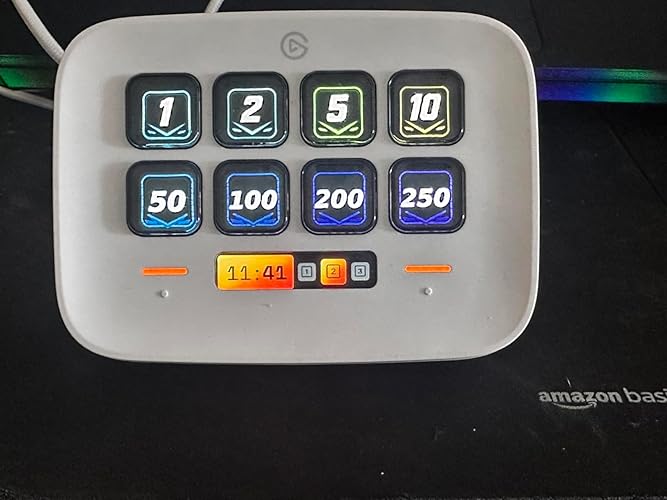
The Elgato Stream Deck Neo is a versatile tool that has significantly enhanced my daily productivity. With its eight customizable LCD keys and two touch points, it offers a seamless experience for automating tasks and managing applications. Design and Build Measuring 107 x 26 x 78 mm and weighing approximately 210 grams, the Stream Deck Neo boasts a compact and sturdy design. The device’s sleek white finish adds a modern touch to any workspace.  Functionality The eight programmable keys are highly responsive and allow for extensive customization. I’ve set them up to control applications like Word, Excel, Teams, and Spotify, which has streamlined my workflow considerably. The two touch points enhance navigation, making multitasking more efficient. User Experience Setting up the Stream Deck Neo is straightforward, thanks to the intuitive drag-and-drop software compatible with both Mac and PC. The ability to personalize each key with custom icons and functions adds a layer of convenience and personalization. Performance Incorporating the Stream Deck Neo into my daily routine has led to a noticeable boost in productivity. Tasks that once required multiple steps are now executed with a single button press, allowing me to focus on more critical aspects of my work. Conclusion The Elgato Stream Deck Neo is an excellent investment for anyone looking to enhance their productivity through automation and customization. Its robust build, user-friendly interface, and versatile functionality make it a standout device in its category. ... show more
Reviewed in the United States on March 17, 2025 by Cheryl Kingsley

  • Great starter or travel Deck!
Style: Steam Deck Neo
The media could not be loaded. I’d been considering buying a Stream Deck for a while and am glad to have found this model on sale, because it’s perfect for my uses, and the $20-off sale price made it even better! I’m a beginner Deck user and my computer skills are only slightly above average, and I managed to set this up in an afternoon without dropping money on paid profiles (which are basically preset toolbar sets). I probably could have done it faster if I’d watched some YouTube tutorials rather than going in cold, but I downloaded a few free profiles as a starting point and for inspiration, found some good searchable icon sets, and then customized a profile that fit my uses. In the weeks since, I’ve optimized further using folders and different profiles for a more seamless experience. I can’t wait to learn more as I go, but from what I can tell so far, any keyboard shortcut, macro, file path, or automation that can make your life easier is fair game. App-specific plugins can expand the functionality further, and it looks like you can even automate tasks using mouse patterns and clicks with a special plugin. **Target users for this Deck model** - I’m not a web designer, content creator, or sound / video editor. I am a scientist who works in an office and who uses Outlook, Word, and Excel on a daily basis. I think this is a great choice for casual office users like me. Not too big, not too small, and you have the flexibility to keep expanding your shortcut library onto multiple pages, folders, and profiles. If you want knobs, the Stream Deck + also has eight buttons plus four knobs instead of page-turning keys, but it’s also twice as expensive, making it less suitable as a starter model. - This model is an awesome starter Deck for those who aren’t sure what size Deck to buy. No need to stress about having too many or too few buttons, because as noted above, you can navigate through multiple pages of shortcuts with the integrated touch points. It’s like an improved Stream Deck Mini, because you have two extra buttons, plus you don’t have to dedicate any buttons to turning pages. - Digital nomads and work travelers — because it folds flat! 😄 The other Deck models snap onto non-folding pyramid bases that take up a ton of luggage space, and you’d need to buy a folding base separately if you wanted to travel with them. This one is perfect for travel right out of the box. - Anyone with limited desk space who wants the best of both worlds between a smaller-footprint Deck and a larger variety of keyboard shortcuts. - That said, anyone who’s already accustomed to a larger Deck and who has integrated a large variety of shortcut buttons into their routine may find it cumbersome to switch between pages, and will probably prefer to keep a larger Deck for their home office setup. Even for those users, the Neo might be good for work travel (because it folds!) - It works with Mac and Windows out of the box. For Linux users, I understand there are some GitHub setups that engineer compatibility. **What it does** You can skip this if you already know how the Deck works (or if you already watched my video demonstration), but I thought I’d highlight a few beginner-friendly features in case you’re a casual user like I was who isn’t convinced this device will be useful for them. - Profiles (basically toolbar sets) can be set to switch automatically if you open a relevant program. That means you can have 10 pages of Excel shortcuts and not worry about scrolling through them all if you’re using other programs. - The buttons don’t have to just be actions; they can become sub-folders of related shortcuts, which is a great way to cut down the length of your pages. Like any good scientist, I boilerplate a lot, so I made a Paste folder that breaks out the different types of paste shortcuts: regular paste, paste values, and paste special. The Elgato guide page also suggests putting all the multimedia shortcuts like Play / Pause / Skip in one folder, which is a great idea. And yes, you can put folders inside of other folders. - Hotkeys are a great starting point to quickly improve your workflow efficiency. They let you program keyboard shortcuts like ctrl + v, ctrl + z, etc. and perform them with a single button push. No more will you stop your work, look down at your keyboard, and press two far-away keys simultaneously. Also, if you use macro shortcuts in Microsoft Office, those can easily become Hotkeys too. I eventually just started looking up shortcuts for programs I use frequently and programming in anything useful. - A Hotkey Switch is a toggle between two hotkeys; if you click it, it runs one Hotkey and then swaps to the second function. This would be a good use case for swapping between copy / paste or mute / unmute microphone. - You can use Open to create one-touch shortcuts to files or frequently-accessed file locations on your hard drive, Sharepoint, OneDrive, or Dropbox. If you have That One Excel Workbook you still find yourself spending too much time digging up even though it’s already just a shortcut on your desktop, having a button for it will save you that time. - You can also use Open to launch programs that you use frequently. A long press of the same button can close the application, or you can reprogram it to trigger Force Quit if it’s a problem app that freezes / crashes a lot (looking at you, Adobe Acrobat Pro DC). - Website will create a shortcut to a webpage of your choice, and you can choose which browser it opens in. - Text will type pre-defined phrases, or ASCII characters like mathematical symbols. In this vein, there is a free emoji keyboard profile, if you’re into that. You can finish off your text phrase with “enter” which may be useful for some applications. - Plug-ins can add new actions for specialty programs like Photoshop, YouTube, Spotify, Apple Music, Slack, and Govee light controls. Two big pluses to using plugins is there’s a great selection of free plugins, and you can filter them by operating system while searching. - Finally, Multi-Action lets you do chains of multiple actions with one button. I set one up to start my morning. First it’ll open Outlook, wait seven seconds for it to open, and then use a Hotkey shortcut to swap to my calendar. Then it’ll open Teams and my to-do list program. - There are free icon libraries to download so you can add relevant symbols to your custom shortcuts, or you can just type in a label. My favorites are Entypo and Pure because they’re simple and transparent, so you can see my background color behind them. Palette - The Simple Color Pack provides some nice backgrounds for typed labels. - Switch Profile lets you easily swap to another profile set. It’s easier to set up the profiles to swap automatically between programs, but I have occasionally wanted to swap around or switch back to my main profile while in a program with its own profile set. Interestingly, you can also set up two Stream Decks and use a Switch Profile key on one of them to swap the profile on another. That means if you decide later to upgrade to a larger Deck, you can keep the smaller one and use it as a one-touch profile switcher. ... show more
Reviewed in the United States on May 13, 2025 by bailarina94

  • Fun Productivity
Style: Steam Deck Neo
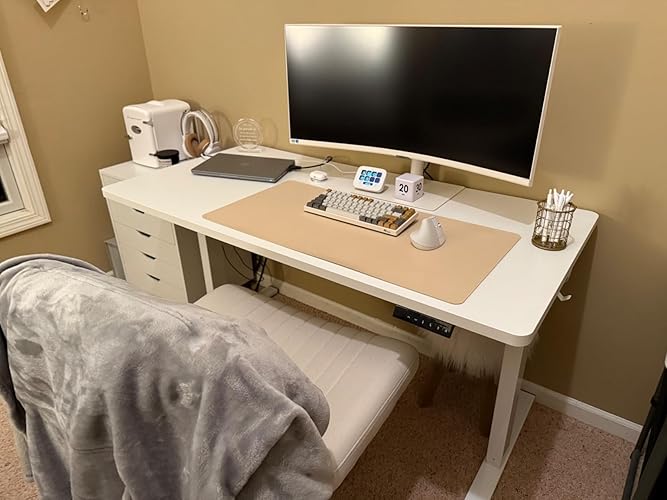
The Elgato Neo has been a delightful addition to my tech setup, significantly enhancing my productivity while adding a dash of fun to my workday. **Productivity Boost:** One of the most immediate benefits of using the Elgato Neo is the drastic increase in my productivity. The ability to program one-button shortcuts for frequently used applications or sequences of actions has streamlined my workflow. No longer do I have to navigate through menus or use multiple keystrokes to perform tasks; a single press on the Neo does the job, saving me time and reducing the mental load of remembering complex command sequences. **Timers and Reminders:** The integration of timers on the Neo is a game-changer for time management. I've set up reminders for breaks, meetings, or to switch tasks, which has helped in maintaining a disciplined work schedule. This feature ensures I don't lose track of time when deeply focused on a project, promoting a healthier balance between work and rest. **Fun and Engagement:** Beyond its utility, the Elgato Neo brings a playful element to the desk. I've programmed some buttons for simple fun, like playing sound effects or triggering desktop animations for a quick breather. This not only lightens the mood during intense work sessions but also makes the work environment more enjoyable. For those who enjoy customization, the Neo offers endless possibilities to personalize your workspace with lights, sounds, or even macros for games or streaming setups. **Design and Build Quality:** The design of the Neo is both aesthetic and functional, with a sleek look that complements any modern desk setup. The build quality feels durable, and the buttons are satisfying to press, providing good tactile feedback. The software that accompanies the Neo is intuitive, making programming the device straightforward, even for those who aren't tech-savvy. **Connectivity and Compatibility:** With USB connectivity, the Neo is easy to set up with virtually any computer. The compatibility extends to both Windows and macOS, ensuring broad usability. **Conclusion:** The Elgato Neo has not only increased my productivity but also made my workday more engaging and less monotonous. The one-button shortcuts, combined with timers and the allowance for simple fun, have transformed how I interact with my computer. If you're looking for a device that can both streamline your work process and inject some fun into your routine, the Elgato Neo is an excellent choice. Highly recommended for anyone looking to optimize their workspace with both efficiency and enjoyment in mind. ... show more
Reviewed in the United States on November 30, 2024 by Shop Savvy Geek Shop Savvy Geek

Can't find a product?

Find it on Amazon first, then paste the link below.
Checking for best price...