




$12.99
Holiday Deal
· 19% off
was $15.99
Buy Now, Pay Later
As low as
$3
/ mo
Learn more
- – 4-month term
- – No impact on credit to apply
- – Instant approval decision
- – Secure and straightforward checkout
Ready to go? Add this product to your cart and select a plan during checkout.
Payment plans are offered through our trusted finance partners Klarna, Affirm, Afterpay, Zip, Apple Pay, and Google Pay. No-credit-needed leasing options through Acima may also be available at checkout.
Learn more about financing & leasing here.
Free shipping on this product
Extended holiday returns
FREE refund/replacement until Jan 31, 2027 Learn more
FREE refund/replacement until Jan 31, 2027 Learn more
This item's return window has been extended for the holiday season: FREE refund/replacement until Jan 31, 2027
To qualify for a full refund, items must be returned in their original, unused condition. If an item is returned in a used, damaged, or materially different state, you may be granted a partial refund.
To initiate a return, please visit our Returns Center.
View our full returns policy here.
Availability:
In Stock.
Arrives
Monday, Nov 23
Recently Viewed


At a glance
- Condition
- New
- Dimensions
- 3.35 x 1.77 x 1.18 in
- Weight
- 0.16 kg
- Color
- Black
- Material
- Metal, Plastic
- Connector Type
- Barrel Connector
- Input Voltage
- 240 volts
- Warranty
- 1 year
Features 5
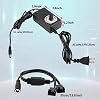
- Fully Adjustable 3-12V Power Control Easily adjust the output voltage from 3V to 12V with the precision knob, directly controlling fan/pump speed, noise level, airflow, and power consumption. Ideal for silent cooling, moderate airflow, or full-speed operation based on your needs.
- Universal Compatibility with 12V Devices Comes with a 35cm DC5521 to dual 4-pin splitter cable, supporting 2-pin, 3-pin, 4-pin, and DC5521-connected 12V fans, pumps, and other small electronics. Works seamlessly with PC case fans, water pumps, routers, cabinets, and DIY cooling projects.
- Reliable & Safe Power Adapter AC 100-240V 50/60Hz input with 2A max output (24W total power). Built-in multi-layer protection including overcharge, overcurrent, overvoltage, short-circuit, and temperature safeguards. Fireproof housing and thick copper wires ensure long-term durability and safety.
- Reliable & Safe Power Adapter AC 100-240V 50/60Hz input with 2A max output (24W total power). Built-in multi-layer protection including overcharge, overcurrent, overvoltage, short-circuit, and temperature safeguards. Fireproof housing and thick copper wires ensure long-term durability and safety.
- Versatile Cooling & DIY Applications Perfect for reducing fan noise in home electronics, optimizing airflow in water cooling systems, adjusting pump flow rates, or powering low-voltage DIY projects. Suitable for PC cases, gaming consoles, network cabinets, aquariums, and more.
Specs 24
| Brand | Delinx |
|---|---|
| Color | Black |
| Material | Metal, Plastic |
| Item Weight | 0.16 kg |
| Connector Type | Barrel Connector |
| Connector Type Used on Cable | Barrel Connector |
| Input Voltage | 240 volts |
| Amperage | 2 A |
| Form Factor | Rectangular |
| Maximum Power | 24 watts |
| Output Current | 2 A |
| Output Voltage | 12 volts |
| Output Wattage | 24 watts |
| Item Dimensions | 3.35 x 1.77 x 1.18 inches |
| Enclosure Material | Metal, Plastic |
| Specification Met | UL, FCC, RoHS, CE |
| Model Number | 3 |
| Item Highlight | 24W Power Adapter, Compatible 2/3/4-Pin, Case Cooling Project for PC Server Cabinet DVR TV Router Receiver Xbox Greenhouse |
| Unit Count | 1 Count |
| UPC | 613966166323 |
| Number of Items | 1 |
| Built-In Media | 1x 12v adjustable power supply, 1x Fan Splitter Cable |
| Manufacturer | Delinx |
| Mfr Part Number | Fan312DX |
No specs match.
Frequently asked questions
If you place your order now, the estimated arrival date for this product is:
Monday, Nov 23
Yes, absolutely! This item's return window has been extended for the holiday season: FREE refund/replacement until Jan 31, 2027.
To initiate a return, please visit our Returns Center.
View our full returns policy here.
To initiate a return, please visit our Returns Center.
View our full returns policy here.
- Klarna Financing
- Affirm Pay in 4
- Affirm Financing
- Afterpay Financing
- Zip Pay in 4
- Financing through Apple Pay
- Financing through Google Pay
Learn more about financing & leasing here.
Similar Products








Top Amazon Reviews
Precise Voltage Regulation for Fan Setups
This is definitely one of those niche products that the average person is probably not out searching for, but for those of us handling custom cooling builds, it is an essential piece of hardware. I ordered this specifically to power the 120mm fan on an aluminum fan stand I picked up the other day, and I am happy to report that it is exactly what the doctor ordered. It is an Amazon's Choice product for a reason. The build quality is solid across the board. The dial feels responsive and accurate, allowing you to sweep smoothly through the full 3v to 12v range. This gives me absolute control over fan speed and noise levels for the stand. Everything included in the box felt like high-quality material, from the power brick itself to the dual four-pin splitter cable. It is a straightforward solution for any project, whether you are trying to silence a cabinet or manage airflow in a custom workstation setup. If you need a reliable way to regulate low-voltage fans or pumps without needing to tie them into a motherboard header, this adapter delivers exactly as advertised.
...
show more
Reviewed in the United States on May 23, 2026 by MamaZ
Worked perfectly.
I hooked a be quiet! silent wing pro 4 on this and had zero issues. The adjustable dial works perfectly. I'm using this for a quiet fan to blow into an oil burner and it showed better results than using a hair dryer at quieter levels so this has been a successful experiment, that was made a lot easier by this being sold. If you need a silent fan that moves a lot of air, computer case fans work perfectly and this makes it so you can run it easily.
...
show more
Reviewed in the United States on June 22, 2026 by Elijah H
Works perfectly, easy to wire, couldn't ask for more.
We have two 12DC computer fans which I custom mounted to the rear of our in-home bug zapper, as my wife's guinea pigs eat so many vegetables and fresh fruit, well, it's just inevitable that fruit flies will find their way into your home. Doesn't seem to be any way of avoiding this, especially when you walk into Trader Joes and see those little buggers buzzing all around the veggies. The computer were a bit too loud so we had to tune them down to about 1/2 speed and this 12 volt DC controller really did the trick. The dial is easy to read, fully adjustable, no issues with current distribution or lack of power, it simply works and works well. The guinea pig cages are now much quieter and the bug zapper is working much better than before this custom addition. I would absolutely recommend this controller.
...
show more
Reviewed in the United States on September 16, 2024 by Wookieecantina
Nice, good speed control.
Seems to work well, plenty of cable tenth. Took off one start as the main power connector is easy to disengage, loose.
Reviewed in the United States on February 19, 2024 by Yositimy
works good
works great for intended purpose not issues good quality
Reviewed in the United States on June 21, 2026 by Daniel
Perfect for my Use Case & Method of Deployment
I recently finished installing & upgrading my structure mdia enclosure from a single Leviton 14” to THREE Leviton 42” Wireless Structured Media Center Enclosures & this involved the pulling, running & dripping of a few dozen more CAT6 cable (for data runs) amongst all of the coax & distributing the satellite feed as well as both outdoor antennas, cat6 (for phone & fax runs), 9.2.2 Surround Sound in the living room along with IR over cat6, RF send/receive antennas and Bluetooth repeaters throughout the home… — …My set up includes: • Harmony Elite in the living room • Harmony Companion for the master bedroom • 5 total Harmony One Touch (Guest Room, Office, Den, Game/Billiard Room & Garage) • Harmony Ultimate Home for the back yard Then, there are the remote controls for my wife (she feels the Harmony is too complicated for her liking) so, for her, I’ve set up: • Sofabaton X1 in the living room • Sofabaton X1 for the back yard components • 4 total Sofabaton U1 (Master Bedroom, Office, Den & Kitchen) As for the Hub based remotes (Harmony Elite & Ultimate Home and Sofabaton X1’s), the actual hubs (including, in the case of the Harmony Hubs, a Harmony hub Extender attached to each one) - 2 each, Harmony & Sofabaton - are in the Media Closet with every other component. [i.e. Living Room 9.2.2 8K Receiver, 5 Blu-Ray players, 1x NVIDIA Shield, 1x Chromecast, 2x Apple TV, DirecTV boxes, primary router, guest network router, smart home/home automation router (it has its on network for obvious reasons), 6 incoming fiber optic internet connections, 3 incoming cable internet connections, 1 incoming satellite internet connection - used ONLY. As a failover connection), 2x 48-port & 2x 24-port Ethernet switches, 2x 48-port CAT6 Patch Panels & 2x 24-port CAT6 Patch Panels, 1x 2-port (FXS/FXO) Multi-Line VoIP Analog/ATA (for FREE home phone & fax service), 1x POTS Landline (run in & through the VoIP ATA), 2x 4-port, (FXS/FXO) Multi-Line VoIP Analog/ATA (to handle our VoIP business local & toll-free phone/fax/PBX lines), 2 back-up POTS/Landlines (for business failover, run in & through the VoIP ATAs), personal private cloud drive, 3x personal servers (home, email hosting, personal domain hosting), 6 bay RAID HDD Enclosure housing 24TB of drives, cell signal booster, 3x business servers (primary, email & domain), infrared distribution, etc. etc. etc. as well all the circuit boards, 110/66 blocks & boards, etc. etc. etc… — Heat & dust are the great killers of electronic components; regardless of one’s setup & total number of components, one should always be cognizant of heat (and it’s dissipation) and dust (plus it’s regular removal). Considering my setup relegates & places EVERY piece of equipment being located in a single closest - at the farthest back corner of the home (about 100 feet from the living room) - the need for that much greater focus & effort to minimize heat & dust is that much greater on my part. Without any sort of air flow, fans, cooling and/dust mitigation efforts, that closet can - and has - easily approached triple digit temperatures (especially in summer!). What is an obsessive compulsive, perfectionist, self taught 40 year old tech-geek to do? Well, short of spending thousands to have an additional cut of HVAC duct run to a vent in the closet for the central a/c to keep it cool, I had to focus on FANS and EFFICIENTLY arranging them… Enter the following: — **STEP 1) In addition to the below setup, I also shaved 1” off the top AND the bottom of the closet door. From there, on the inside of the closet door, at the top of it where I shaved off one inch, I mounted a “strip” of 4 total 75mm fans enclosed in one housing; this is orientated as an “Air Intake” to bring the ambient, HVAC Cooled, air from the hallway/house and into the closet. STEP 2) At the bottom of the door, on the inside of the closet, I did the exact opposite of the above step; that is to say, I mounted a “strip” of 4 total 75mm fans enclosed in one housing; this is orientated as an “Air Exhaust” to expel/push the warm/hot air inside the closet, outward into the hallway.** —— • DEPLOYMENT OF 12V AC FAN POWER SUPPLY • After the steps above, I then set up the following: > I acquired: 9x 50mm Case Fans 9x 50mm blower exhaust fans 6x 12V AC Fan Power Supply (THIS ITEM!) 6x 3-way, 4-pin, Fan DC Power Splitter* *The AC Fan Power Supply comes with a 2- way splitter but can handle additional fans off the one main power supply; thus, I found a 3-way splitter that connects perfectly to this 12V AC power supply & connected 1x 3- way splitter to each of the 6 12V AC Power Supply’s so as to give me capacity to provide power to ^^18 total fans^^! From there, it was deployment time… • STEP 3) EACH of the 42” Leviton enclosures had 3 total 50mm case fans mounted at the very top - left, center & right -and leaving just the right anoint of room for the cable runs that are dropped into the enclosures from the top; each of the fans are orientated such that they are aligned with an opening/hole above them such that the fans then create a vacuum like effect that “pulls”/“sucks”/“intakes” the air from above & outside the enclosures, inward through the openings, downward through the fan blades and generating directional airflow, down & over the components enclosed. • STEP 4) EACH of the 42” Leviton enclosures had 3 total 50mm blower exhaust fans installed / mounted at the very bottom - left, center & right - leaving the perfect amount of room for each of the “drop-in” power supply’s or UPS Battery Bsck-Ups at the bottom of each enclosure; the exhaust blowers are orientated such that they “push”/“blow” the air downward, through a corresponding opening/hole in the bottom of the enclosure, to literally “exhaust” the ambient / component heated air out of & away from the enclosed components. For this deployment, for this use case, for my setup, this 12V AC Fan Power Supply works better than I could have hoped for! AVERAGE AMBIENT CLOSET TEMPERATURES • PRE-Door Fan Arrangement: 93.4°F - 100.1°F • POST-Door Fan: Arrangement: 59.8°F - 72.3°F • PRE-Enclosure Fan Arrangement: 59.8°F - 72.3°F • POST-Enclosure Fan Arrangement: 52.6°F - 68.4°F I NEVER EXPECTED SUCH RESULTS!! If you need something to do anything remotely similar to my usage OR if you need something for your own purposes, o strongly believe you’ll be pleased with this item! I can’t recommend d this power supply strongly enough!!!
...
show more
Reviewed in the United States on April 3, 2023 by Bryan
Miss leading description on this product!

Just received this today, i was hoping it would be good enough to really put a pc fan to the test when it comes to the spinning speed. Unfortunately this does not spin a fan to anything faster then a normal spinning speed the fan would have if just being used as a case fan. I was looking to have this tester spin a fan fast enough if being used as a radiator fan. I have 4 bad fans that make a ringing sound if spinning fast enough, this tester can not spin the fans fast enough to get that ringing sound to occur, there for making this a useless product for me. Also I'd like to point out that this product only has 2 pin connectors not 3 or 4 and there is no way to convert it. The video shown for this product shows how quickly it can spin a fan but that is also false it will get no were near that kind of spinning speed. I added a picture showing it only being 2 pin hook ups and a video showing the speed it spins the fan if maxed out, pay no mind to the audio that you can hear in the video making it sound like a mini engine lol, it's really not that loud it was my phone picking up on the vibration that occurs when I turn on the fan since it's on my counter top.
...
show more
Reviewed in the United States on November 27, 2024 by ALEX
A good PC fan speed controller
Here's all one needs to know: this unit varies the DC voltage to 12 VDC fans (3-12 VDC) for "speed control" and DOES IT QUITE WELL! It's main use is to make "loud" PC fans "quiet" by slowing the blade rotation. The "Y" connector is quite handy for controlling TWO FANS AT ONCE. Operation: 1) connect the device to the fan's power connector 2) plug the unit to a wall outlet 3) rotate the knob to turn it on ("CLICK!"). A GREEN LED indicates it's powered up. 4) rotate the knob enough to get the fan blades spinning 5) back-off the knob to get the required "quietness" from the fan (you'll find the fan is still moving "quite a bit" of air!) 6) if desired, "tape down" the knob to keep it's setting from being changed 7) Walk Away, leave the fan alone, and let it "do its' thing" If you need to change the fan speed later: undo the "tape down", re-adjust the knob "to taste", then tape down the knob again. I ** DO INDEED ** recommend this unit!
...
show more
Reviewed in the United States on July 5, 2024 by Ken Simmons