Search  for anything...

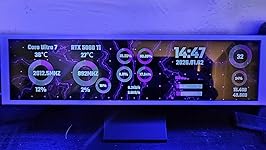
9.16" Computer Temp Monitor, FHD 1920x462 PC Sensor Panel One-Cable Connection(No HDMI Needed), Stretched Bar LCD Dynamic Theme Supported, IPS Mini Secondary Screen for CPU RAM HDD Data Aida64 (Black)

  • Based on 0 reviews
Condition: New
Checking for the best price...
$89.00 Why this price?
Save $110.99 was $199.99

Buy Now, Pay Later


As low as $14.83 / mo
  • – 6-month term
  • – No impact on credit to apply
  • – Instant approval decision
  • – Secure and straightforward checkout

Ready to go? Add this product to your cart and select a plan during checkout.

Payment plans are offered through our trusted finance partners Klarna, Affirm, Afterpay, Apple Pay, and PayTomorrow. No-credit-needed leasing options through Acima may also be available at checkout.

Learn more about financing & leasing here.

Selected Option

Free shipping on this product

FREE 30-day refund/replacement

To qualify for a full refund, items must be returned in their original, unused condition. If an item is returned in a used, damaged, or materially different state, you may be granted a partial refund.

To initiate a return, please visit our Returns Center.

View our full returns policy here.


Availability: In Stock.
Fulfilled by Amazon

Arrives Friday, Apr 24
Order within 21 hours and 16 minutes
Available payment plans shown during checkout

Protection Plan Protect Your Purchase
Checking for protection plans...

Size: Non Touch-Black-One Cable-9.16"


Features

  • [9.16-Inch FHD IPS Display with Metal Build] Features a 9.16-inch IPS screen with a sharp 1920x462 resolution for clear, wide-angle viewing. The display is housed in a premium metal shell (measuring 9.5" x 2.4" x 0.4" and weighing only 0.2 lbs) that ensures durability and effective heat dissipation, while supporting 360-degree screen rotation.
  • [Single-Cable Connection & Universal Compatibility] Offers true plug-and-play compatibility with a wide range of systems, including all versions of Windows, macOS, and other major operating systems on both desktop and laptop computers. Connection is streamlined through a single USB-C cable that handles both power and data.
  • [Pro-Level Brightness & Customization Software] Utilize proprietary software to precisely adjust screen brightness from 200 to 1000 nits for optimal visibility in any environment. The platform also supports extensive customization, including built-in dynamic themes and the ability to import personal designs for a truly unique display.
  • [Comprehensive Real-Time System Monitoring] Serves as a dedicated system dashboard, providing live monitoring and display of critical hardware metrics including CPU/GPU temperature and usage, RAM and storage statistics, fan speeds, and network performance for complete system oversight.
  • [Complete Installation Kit for Flexible Setup] Includes a comprehensive installation kit with a PC case bracket, screw set, and strong adhesive strip for versatile mounting options. The package is completed with a detailed English manual for a straightforward setup process.

Brand: AISHICHEN


Screen Size: 9.16 Inches


Resolution: 1920 x 462


Aspect Ratio: 43


Screen Surface Description: Glossy


Aspect Ratio: 43


Screen Finish: Glossy


Contrast Ratio: 20001


Refresh Rate: 60


Display Type: LCD


Display Technology: LCD


Brightness: 1000 candela_per_square_meter


Has Color Screen: Yes


Screen Size: 9.16 Inches


Item Dimensions D x W x H: 10"D x 2.9"W x 3"H


Item Weight: 0.39 Kilograms


Response Time: 2 Milliseconds


Connectivity Technology: USB Type C


Hardware Connectivity: USB Type C


Color: Black


Brand: AISHICHEN


Model Number: TXP


Manufacturer: AISHICHEN


Warranty Description: Shenzhen Kenowa Electronics Co., LTD


Resolution: 1920 x 462


Display Resolution Maximum: 1920 x 1080 Pixels


Native Resolution: 1920 x 462


Frequently asked questions

If you place your order now, the estimated arrival date for this product is: Friday, Apr 24

Yes, absolutely! You may return this product for a full refund within 30 days of receiving it.

To initiate a return, please visit our Returns Center.

View our full returns policy here.

  • Klarna Financing
  • Affirm Pay in 4
  • Affirm Financing
  • Afterpay Financing
  • PayTomorrow Financing
  • Financing through Apple Pay
Leasing options through Acima may also be available during checkout.

Learn more about financing & leasing here.

Top Amazon Reviews


  • fantastic display quality with high resolution
Size: 8.8"-Touch-Metall Shell
I recently picked up the 8.8 Inch Small Touchscreen Monitor for my Raspberry Pi and overall, I'm quite satisfied. The display quality is fantastic, with crystal clear visuals at a high resolution of 1920 × 480. It's perfect for my PC temperature and sensor panel display needs. The touch screen is a convenient feature, though I did encounter some occasional issues with responsiveness, which was a bit frustrating. The included HDMI and USB cables made setup a breeze, and it connected seamlessly with my Windows setup. However, I find the brightness control a bit lacking, as it could be more intuitive. The build quality seems solid, but given some reviews about durability, I’m hoping it holds up over time. Despite some minor quirks, it’s been a great addition to my ARGB computer case setup and fits perfectly on my desk. ... show more
Reviewed in the United States on July 16, 2025 by Laurie

  • Awesome little device
Size: 8.8"-Touch-Metall Shell
This little thing is pretty amazing. I used HWiNFO64 and a piece of software called Rainmeter to build a PC monitoring app. I'm still fiddling with it, but it works very well. I've only been using it about 3-4 months, so I can't speak on long term reliability. Tips: 1) For completely free software use HWiNFO64 and Rainmeter to make your user interface. Use the HWiNFO gadget that writes data to your registry and Rainmeter can read this information and display it. It's not as easy to use as AIDA64, but it's free! Aida64 will cost you $60 for the software and updates. After a year, Aida64 will still run, but if you want updates you'll have to fork over more $$$. The paid version of HWiNFO64 is over twice as expensive as Aida64 or you have to pay $30/year to use it on a subscription model. The paid version of HWiNFO64 is necessary if you want to use the shared memory feature and don't want to have to re-enable the feature every 12 hours). Shared memory is a bit easier to use when designing your user interface than their registry method. 2) Configure the touch screen to use this monitor go to Control Panel->Tablet PC Settings and you can set this monitor as the touchscreen. 3) Buy a 180° adapter for the USB-C and a 180° mini-HDMI adapter so that the cables can be tucked behind the monitor instead of shooting off to the side. The only real cons I've found are: 1) It's hard to find a tablet stand for this thing. I bought one, but found out the lip on the bottom was too small because the mfr assumed you'll only put a thin+flat tablet on it. I'll end up designing and printing a stand that makes this hover over my keyboard eventually. 2) DPI is very small and windows doesn't support different DPI settings on different monitors. The only place this has really affected me are the tooltips on some of my items on my user interface. You have to use a magnifying glass to read them because it's using the normal DPI from my main 2K monitor. 3) (total nitpick) No monitor driver that I've found. I like my monitors in device manager to say what the monitor is instead of "Generic PnP Monitor". I've attached a pic of the rainmeter user interface (still a work in progress as I learn how to do this) ... show more
Reviewed in the United States on August 17, 2025 by Ishi Carter

  • Busted at 66 days of use
Size: 8.8"-Touch-Metall Shell
The media could not be loaded. Worked great until it didn't. It was a bit annoying to set up and I had to buy a few adapters since the included cable wasn't long enough for my set up, but otherwise happy with the funtionality and quality. However, 6 days after the return window, this screen is unusable. There's a weird burn-in of the exact image that was displayed at 9:38 AM on Sep 30 (it's not actually burn-in, since the "burned in" image is specific to one time--it's clearly something with the display adapter, not the screen itself). The screen is still connected to my PC and still responds, even if the image burn-in wasn't a problem, the color is off, it's blurry, and the motion is all stuttered. I've unplugged and plugged. Restarted the PC. Reinstalled drivers. No apparent solution. ... show more
Reviewed in the United States on September 30, 2025 by Jeffrey P

  • Make sure your case can handle the mounting system
Size: Non Touch-Black-One Cable-9.16"
The 9.16" FHD 1920×462 display looks fantastic — sharp, colorful, and easy to read at a glance. It’s been super helpful to have my system temps, fan speeds, and other key info right there in real time without alt-tabbing out of games or apps. Setup was pretty straightforward and the screen integrated nicely with my software sensor tools. I like that I can customize what’s shown and keep an eye on things like CPU/GPU temps and usage without cluttering my main monitor. The brightness of the screen is more than acceptable. You will be pleased with the picture quality as well. My only wish is that it had magnetic mounting built in. Right now you have to figure out a way to mount it in your case, and depending on your setup that can be a bit of a puzzle. In many cases there isn’t a perfect place to screw or adhere it without taking extra steps. If it supported magnetic attachment as well, it would make mounting way easier and more flexible. The software was a little meh at first but after some time its pretty easy to manage. I personally never attempted it myself but you can fully customize a full screen display and post it on their website for others to download and use as well. I myself just tried what others had posted themselves. Id say as long as your case has an available empty spot that can handle a mount with screws (some fans are capable of having this mounted on to them as well) then you will be pleased with the quality. ... show more
Reviewed in the United States on February 18, 2026 by Justin H

  • Great! Exactly What I Needed!
Size: 8.8"-Touch-Bracket
I honestly didn’t expect to love this little monitor as much as I do. I originally bought it just to monitor time while I work, but it quickly became one of my favorite little gadgets on my desk. The glossy screen looks sharp and modern, and the built-in bracket makes it easy to place wherever I want. It doesn’t take up much space at all, which is perfect for my already cluttered setup. It is also a touch screen! I’ve been using it to show system temperature, RAM usage, CPU load, even my Spotify now-playing. Sometimes I just throw a little animated weather widget on it to brighten up my desk. Setup was super easy, just plug and play with a single HDMI cable and USB for power. No extra drivers, no fuss. Highly recommended! I kind of want to buy another one just to play around with different layouts! ... show more
Reviewed in the United States on August 18, 2025 by TheRookie

Can't find a product?

Find it on Amazon first, then paste the link below.
Checking for best price...