Search  for anything...

24" Ultra-Wide Stretched Bar LCD Monitor FHD1920x380 Industrial Computer Monitor Built-in Dual Speaker, Advertising Display for Subway Mall Restaurant Signage,PC Case Display Dual HDMI & DP Port, VESA

  • Based on 187 reviews
Condition: New
Checking for inventory...

Notify me when this product is back in stock

$129.99 Why this price?
Save $25.00 was $154.99

Buy Now, Pay Later


As low as $21.67 / mo
  • – 6-month term
  • – No impact on credit to apply
  • – Instant approval decision
  • – Secure and straightforward checkout

Payment plans are offered through our trusted finance partners Klarna, Affirm, Afterpay, Zip, Apple Pay, and Google Pay. No-credit-needed leasing options through Acima may also be available at checkout.

Learn more about financing & leasing here.

Selected Option

Free shipping on this product

FREE 30-day refund/replacement

To qualify for a full refund, items must be returned in their original, unused condition. If an item is returned in a used, damaged, or materially different state, you may be granted a partial refund.

To initiate a return, please visit our Returns Center.

View our full returns policy here.


Availability: Unavailable
Fulfilled by Amazon
Available payment plans shown during checkout

Size: 24.0


Features

  • [High-Quality Display]: With a resolution of 1920x380, this AISHICHEN 24" Ultra-Wide Bar LCD Monitor delivers sharp, vivid images with rich details and a wide viewing angle. The shell with heat dissipation holes ensures low power consumption, reduced heat generation, and an extended lifespan compared to non-branded screens.
  • [Multiple Connectivity Options]: This monitor features HDMI and DisplayPort interfaces, delivering a 1920x380p resolution for crisp visuals. Beyond its use as digital signage, it seamlessly connects to Xbox, PC, and laptops, providing high-quality image transmission to enhance both work and gaming experiences.
  • [Professional Technical Support]: Our expert technical team is ready to assist with all your digital signage needs. We guarantee a fast response with the best solution within 12 hours. As a leading manufacturer of advertising displays, we provide dedicated technical support engineers to ensure our products meet your requirements.
  • [Package Contents]: Includes 1x 24 Inch Bar LCD Display, 1x Power Cord, 1x Warranty Card, 1x User Manual, and 1x HDMI Cable. Mount bracket is not included; please purchase separately if needed.

Brand: AISHICHEN


Screen Size: 24 Inches


Resolution: FHD 1080i


Aspect Ratio: 169


Screen Surface Description: Matte


Aspect Ratio: 169


Screen Finish: Matte


Refresh Rate: 60


Display Type: LCD


Display Technology: LCD


Viewing Angle: 178 Degrees


Brightness: 800 Candela


Color Gamut: 100


Has Color Screen: Yes


Screen Size: 24 Inches


Item Dimensions D x W x H: 27"D x 11"W x 5"H


Resolution: FHD 1080i


Display Resolution Maximum: 1920 x 1080


Native Resolution: 1920 x 380


Total Number of HDMI Ports: 2


Number of Component Outputs: 2


Additional Features: Built-In Speakers, Energy Efficient, Eye Care


Color: Non Touch


Brand: AISHICHEN


Model Number: HD-238


Warranty Description: Other


Manufacturer: AISHICHEN


Unit Count: 1.0 Count


Response Time: 3 Milliseconds


Connectivity Technology: DisplayPort, HDMI


Hardware Connectivity: DisplayPort, HDMI


Frequently asked questions

This product is currently out of stock. Please check back later for shipping info.

Yes, absolutely! You may return this product for a full refund within 30 days of receiving it.

To initiate a return, please visit our Returns Center.

View our full returns policy here.

  • Klarna Financing
  • Affirm Pay in 4
  • Affirm Financing
  • Afterpay Financing
  • Zip Pay in 4
  • Financing through Apple Pay
  • Financing through Google Pay
Leasing options through Acima may also be available during checkout.

Learn more about financing & leasing here.

Top Amazon Reviews


  • Sharp, Reliable, and Perfect for System Monitoring
Size: 8.8
The 8.8 Inch 1920x480 Touchscreen PC Sensor Panel Display has been a great addition to my computer build, and it’s still going strong without a single issue. The first thing that stands out is the resolution. The 1920x480 display is sharp and crisp, making system stats easy to read at a glance. Whether it’s CPU temps, RAM usage, or custom AIDA64 layouts, everything looks clean and well-defined—no blurriness or washed-out visuals. The IPS panel does a solid job with brightness and viewing angles, which is important when it’s mounted inside a case. Colors look good, and the screen remains visible from different angles without distortion. Setup was straightforward, and it integrates nicely into a custom build. Once configured, it becomes a seamless part of the system—displaying real-time data without lag or glitches. Reliability has been excellent. No flickering, no connection issues, no drop-offs. It just runs consistently every time the system is on. If you’re looking to add a clean, functional display to your PC build for monitoring temps and performance, this is a solid choice. Sharp visuals, dependable operation, and a great way to elevate the overall look and functionality of your setup. Highly recommended. ... show more
Reviewed in the United States on April 22, 2026 by Dae

  • Awesome little device Awesome little device
Size: 8.8
This little thing is pretty amazing. I used HWiNFO64 and a piece of software called Rainmeter to build a PC monitoring app. I'm still fiddling with it, but it works very well. I've only been using it about 3-4 months, so I can't speak on long term reliability. Tips: 1) For completely free software use HWiNFO64 and Rainmeter to make your user interface. Use the HWiNFO gadget that writes data to your registry and Rainmeter can read this information and display it. It's not as easy to use as AIDA64, but it's free! Aida64 will cost you $60 for the software and updates. After a year, Aida64 will still run, but if you want updates you'll have to fork over more $$$. The paid version of HWiNFO64 is over twice as expensive as Aida64 or you have to pay $30/year to use it on a subscription model. The paid version of HWiNFO64 is necessary if you want to use the shared memory feature and don't want to have to re-enable the feature every 12 hours). Shared memory is a bit easier to use when designing your user interface than their registry method. 2) Configure the touch screen to use this monitor go to Control Panel->Tablet PC Settings and you can set this monitor as the touchscreen. 3) Buy a 180° adapter for the USB-C and a 180° mini-HDMI adapter so that the cables can be tucked behind the monitor instead of shooting off to the side. The only real cons I've found are: 1) It's hard to find a tablet stand for this thing. I bought one, but found out the lip on the bottom was too small because the mfr assumed you'll only put a thin+flat tablet on it. I'll end up designing and printing a stand that makes this hover over my keyboard eventually. 2) DPI is very small and windows doesn't support different DPI settings on different monitors. The only place this has really affected me are the tooltips on some of my items on my user interface. You have to use a magnifying glass to read them because it's using the normal DPI from my main 2K monitor. 3) (total nitpick) No monitor driver that I've found. I like my monitors in device manager to say what the monitor is instead of "Generic PnP Monitor". I've attached a pic of the rainmeter user interface (still a work in progress as I learn how to do this) ... show more
Reviewed in the United States on August 17, 2025 Reviewed in the United States on August 17, 2025 by Ishi Carter

  • Nice mini monitor without any bloatware. Nice mini monitor without any bloatware.
Size: 11.26
Works good and has good picture quality. Is bright enough to look good even with my tinted glass panel. Windows 11 recognized the monitor automatically. Only problem I had with it was the supplied USB-C cable is garbage and broke. Just buy a high speed cable and it will fix the black screen.
Reviewed in the United States on May 16, 2026 Reviewed in the United States on May 16, 2026 by Clinton

  • Busted at 66 days of use
Size: 8.8
Worked great until it didn't. It was a bit annoying to set up and I had to buy a few adapters since the included cable wasn't long enough for my set up, but otherwise happy with the funtionality and quality. However, 6 days after the return window, this screen is unusable. There's a weird burn-in of the exact image that was displayed at 9:38 AM on Sep 30 (it's not actually burn-in, since the "burned in" image is specific to one time--it's clearly something with the display adapter, not the screen itself). The screen is still connected to my PC and still responds, even if the image burn-in wasn't a problem, the color is off, it's blurry, and the motion is all stuttered. I've unplugged and plugged. Restarted the PC. Reinstalled drivers. No apparent solution. ... show more
Reviewed in the United States on September 30, 2025 by Jeffrey P

  • BUY THIS MONITOR!!! read on for some reasons why you should. BUY THIS MONITOR!!! read on for some reasons why you should.
Size: 8.81
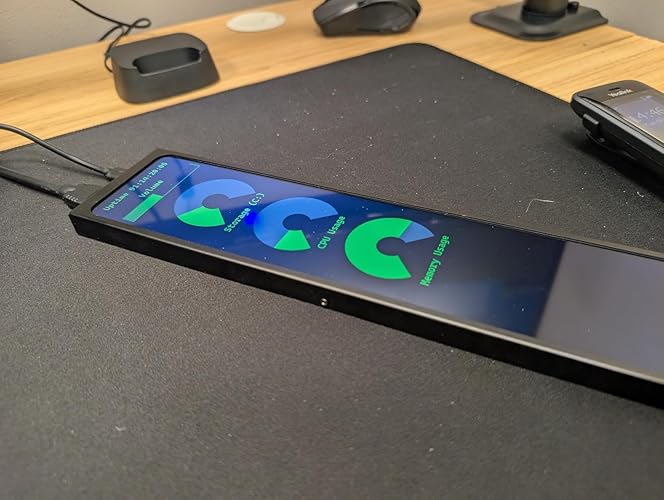
This monitor is one of the best looking screens for use as a system monitoring screen or running anything you want that you don't want running on your main monitor. I created the layout you see and it allows me to monitor all the settings I want to, which has been extremely helpful because I like to undervolt, overclock my OCD keeps me always wanting to monitor my temps, usage, and speeds. (Yes those are some nice undervolted speeds of my ryzen 9950X3D in game mode and to me the results are even nicer then the screen 😀 jk) I prefer to have this screen directly under my Asus pg32ucdp OLED and those who know understand if you put a monitor next to a beautiful OLED it must be bright and have amazing contrast , dark darks, and great viewing angles. This screen has ALL those things. Remember, I have this setup as a normal second monitor in windows. I just changed it to display horizontally so I could place it under my monitor. You can stand it up vertically if you prefer that or want to put it inside your computer case. I highly recommend buying this screen. The price and quality is amazing. Yes, I am a PC nerd who loves building only top of the line machines. I wouldn't use a screen that was garbage with my Ryzen9 9950x3d &RTX5090 system. Personally I recommend using it like i am to watch your sensors. There is plenty of software out there to create nice looking templates to show off your sensors instead of just showing numbers and them covering your gaming monitor. 1)The first photo is the entire screen shot. (You can open any program you want and move it there. I have my sensors panel always load with windows and take up full-screen automatically) 2) I know its extremely hard to see,but even from a distance, with all the different screens and lights on in my game room you can still see how bright and colorful this tiny monitor is.(I have my racing bracket i slid over to my pc because I was just about to play some recers,but I had this photo on my phone already and it shows how amazing this screen really is. 3) this third photo shows this monitor up close, right under my monitor ,above my keyboard. I honestly am one of those people who was constantly switching back and forth or taking up half my gaming screen just to monitor my settings results while gaming. It took alittle bit of time,but I finally got it to look and display everything I want it too. That's how the screen looks in horizontal mode. This is the perfect size screen to get if your using a 32inch monitor as your main screen. ... show more
Reviewed in the United States on April 4, 2025 Reviewed in the United States on April 4, 2025 by jtravapd

  • Good overall, some major flaws in cables and input. Good overall, some major flaws in cables and input.
Size: 11.26
Good image, good brightness, but a little reflective. It doesn't have a stand, but has holes in the back to print anything for it. The cables make it look very bad, so to prevent this, I would highly suggest anyone buying this to also buy a 90 degree cable/adapter for the hdmi and usb. So that they do not stick out into your setup. I can't seem to change the brightness of the screen, but since it is so "small" it doesn't really matter that much :) Great display for showing things like calendar, gmail, discord, stream chat, stock market- anything like that! Bonus is that it also has great viewing angles. One cable is also white, not nice for the final finish. Sellers of this item, consider changing out the cables to what I just suggested! :) ... show more
Reviewed in the United States on October 17, 2025 Reviewed in the United States on October 17, 2025 by Nora Helen Engeslvold

  • Always wanted to get one of these Always wanted to get one of these
Size: 11.26
So, I've seen these little "performance" monitor screens many times in case builds or just on peoples desks and such and they look like fun little toys. Finally decided to buy one and I'm happy with it. As the description indicates it has a 1920x440 resolution (note this model is not a touch screen model). You power it via USB-C, but the video signal only goes out HDMI, so you'll also need a mini-HDMI to HDMI cable (it comes with one for you) to connect it to your computer. Hook it up and it shows up as another screen on your computer, just like any other monitor. Position it as desired with Windows display settings, it starts in landscape mode by default, but depending on what you're doing, portrait mode may make more sense. One thing I might recommend, depending on where you have this is some 180 connector adaptors for the USB-C and Mini-HDMI so the cables plug in "behind" the screen. Oh, and note that it does have VESA mounting, it's a smaller version of VESA than what your standard monitor uses, but gives options. It should work fine and be compatible with any computer, or like a Raspberry Pi or something. Probably not great for using with a game console though. I set it up and ended up using not the app they mention but used InfoPanel instead, in conjunction with HWiNFO. That's what is in my photos. Obviously, a very rough draft of anything, I'll probably eventually find someone's templates and work off those to make whatever I decide to go for. I also experimented with using Wallpaper Engine and that was fun too. Could set up those little avatars that just sorta move around on the screen with that if you were interested in doing such. ... show more
Reviewed in the United States on October 23, 2025 Reviewed in the United States on October 23, 2025 by Michael

  • Great for graphs Great for graphs
Size: 11.26
I purchased this to have a live view of some graphs I have running, and it is absolutely fantastic for that. The size is great for displaying bits of information, and it is very easy to connect to with the additional cable that comes in the box. Unfortunately, there is no touchscreen, but that was expected. It would be a great feature to add to a future model of this device. Overall, it looks and feels great for the price, and I may end up getting multiple for future projects. ... show more
Reviewed in the United States on October 12, 2025 Reviewed in the United States on October 12, 2025 by Kyan G

Can't find a product?

Find it on Amazon first, then paste the link below.
Checking for inventory...