Search  for anything...
HP

HP Envy Photo 7155 All-in-One Photo Printer with Wireless Printing, Instant Ink, Works with Alexa (K7G93A)

  • Based on 4,773 reviews
Condition: Used - Very Good
Checking for the best price...
$226.99 Why this price?

Buy Now, Pay Later


As low as $37.83 / mo
  • – 6-month term
  • – No impact on credit to apply
  • – Instant approval decision
  • – Secure and straightforward checkout

Ready to go? Add this product to your cart and select a plan during checkout.

Payment plans are offered through our trusted finance partners Klarna, Affirm, Afterpay, Zip, Apple Pay, and Google Pay. No-credit-needed leasing options through Acima may also be available at checkout.

Learn more about financing & leasing here.

Selected Option

Free shipping on this product

This item is eligible for return within 30 days of receipt

To qualify for a full refund, items must be returned in their original, unused condition. If an item is returned in a used, damaged, or materially different state, you may be granted a partial refund.

To initiate a return, please visit our Returns Center.

View our full returns policy here.


Availability: Only 1 left in stock, order soon!
Fulfilled by Game Dynasty

Arrives Sep 27 – Sep 29
Order within 21 hours and 42 minutes
Available payment plans shown during checkout

Protection Plan Protect Your Purchase
Checking for protection plans...

Style: Printer


Features

  • Manufacturer: HP

Description

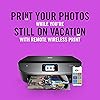
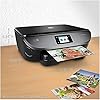
Designed for those that love to share photos, the HP ENVY Photo line allows you to print stunning, true-to life photos for less than 5 cents each with HP Instant Ink (subscription required). With a dedicated photo tray, borderless printing and SD card slot, the ENVY Photo 7155 has all your photo printing needs covered. Pair it with the HP Smart app and you have the power to easily set up your printer, scan documents on the go with your camera, and print from social media or the cloud, such as iCloud, Google Drive, and Dropbox.

Brand: HP


Connectivity Technology: Bluetooth, USB, Wi-Fi


Printing Technology: Inkjet


Special Feature: Auto-Duplex, Cloud Print Enabled, HP Instant Ink Eligible, Network-Ready, Optional High-Yield Cartridges, Scan To Email, Separate Photo Tray, Touch Screen See more


Color: Black


Model Name: HP ENVY Photo 7155


Printer Output: Color


Maximum Print Speed (Color): 9 pages_per_minute


Max Printspeed Monochrome: 14 pages_per_minute


Item Weight: 14 pounds


Printer Type: Inkjet


Other Special Features of the Product: Auto-Duplex, Cloud Print Enabled, HP Instant Ink Eligible, Network-Ready, Optional High-Yield Cartridges, Scan To Email, Separate Photo Tray, Touch Screen


Printer Output Type: Color


Item Weight: 14 pounds


Item Dimensions D x W x H: 6.34"D x 17.87"W x 16.14"H


Print media: Envelopes, Glossy photo paper, Paper (plain)


Scanner Type: Photo


Maximum Copy Speed Black and White: 14 pages_per_minute


Compatible Devices: Laptops, PC, Smartphones


Warranty Type: limited warranty


Maximum Copies Per Run: 50


Ink Color: color


Additional Printer Functions: All In One


Control Method: Voice


Compatible Cartridge: HP 64 Black Ink Cartridge, HP 64 Tri-color Ink Cartridge, HP 64XL Black Ink Cartridge, HP 64XL Tri-color Ink Cartridge


Number of Trays: 2


Processor Count: 1


Display Type: LCD


Number of Drivers: 1


Resolution: 4800 x 1200


Color: Black


Color Depth: 24 bpp


Maximum print Resolution Color: 4800 x 1200 dpi


Maximum Print Resolution Black and White: 1200 x 1200 dpi


Power Consumption: 13.95 watts


Wattage: 14 watts


Maximum Copy Resolution Color: 600 x 600 dpi


Maximum Copy Resolution Black and White: 600 dpi


Brand: HP


Model Name: HP ENVY Photo 7155


Model Number: K7G93A#B1H


Built-In Media: HP ENVY Photo 7155 All-in-One Printer


Model Series: 71


Specific Uses For Product: Home, Photo Printing


UPC: 763236970577 190781030751


Unit Count: 1 Count


Global Trade Identification Number: 51


Manufacturer: HP


Warranty Description: One-year limited hardware warranty, 24-hour, 7 days a week Web support.


Color Pages per Minute: 9 pages_per_minute


B&W Pages per Minute: 14 pages_per_minute


Initial Page Print Time: 16-18 seconds


Maximum Media Size: 8.5 x 11 inch


Maximum Sheet Capacity: 10


Paper Size: 4 x 5 to 8.5 x 12, Letter, Envelope


Printer Connectivity Type: Bluetooth, USB, Wi-Fi


Hardware Interface: USB 2.0


Total USB 2.0 Ports: 1


Total Usb Ports: 1


Duplex: Automatic


Frequently asked questions

If you place your order now, the estimated arrival date for this product is: Sep 27 – Sep 29

Yes, absolutely! You may return this product for a full refund within 30 days of receiving it.

To initiate a return, please visit our Returns Center.

View our full returns policy here.

  • Klarna Financing
  • Affirm Pay in 4
  • Affirm Financing
  • Afterpay Financing
  • Zip Pay in 4
  • Financing through Apple Pay
  • Financing through Google Pay
Leasing options through Acima may also be available during checkout.

Learn more about financing & leasing here.

Top Amazon Reviews


  • Impressive quality
Style: Printer
I was somewhat reluctant to purchase the HP Envy printer due to some negative reviews, but my Epson died. I got the brand new HP5177 printer. Basic set up was easy, with only a minor glitch connecting to WiFi, but I figured it out without needing tech support. Instructions could have been better written. I connects four IOS devices very easily once you download the HP program from HP.123.com website. The print quality is excellent. I put it in ‘quiet ’ mode and it is actually very quiet! It prints on both sides or one side! Wireless connection stays connected! I really like this printer. Easily the best one I have ever owned (about 7 in my life). If you are shopping around you need to definitely consider this one! ... show more
Reviewed in the United States on March 27, 2020 by AmazonSteve

  • Great all around printer
Style: Printer
After 7 years of owning this printer I'm looking to update my setup and can't find a better all around solution than this model. The newer model (7255e) seems to be a little larger and not any better, though since its amazingly being sold for $50 less than this one, I guess I'll give it a try...
Reviewed in the United States on November 13, 2025 by Yotam Ben Ami

  • Great if you can get it connected
Style: Printer
This is a great printer if you can get it connected properly to your internet. I had to have help. The restrictions on how many pages I print & having to actually pay to print pages in order to get more ink that I have only been sent 1 time so far is pretty ridiculous after paying for the printer . I don't know if I can even buy any other ink for it any other way. Why are there such restrictions & an additional cost per page printed for a printer I paid for & now own ? Plus I bought the paper too . And if I lose my internet because I can't afford to keep it , will my printer still work ? Can I connect it wirelessly to my phone somehow ? Or am I going to be stuck with a large paperweight that can't be used ? I don't understand why I need to pay for something I already paid for? I was sent a replacement ink cartridge 1 time in the past couple years and charged extra when I printed a couple more pages than I'm allowed to on the minimum plan I had to agree to. And my printer completely stopped working when there was an issue with my payment choice. Isn't it mine now ? If this is how all the Epson printers are now then I don't think I would be buying another one from them in the future . I hope that they will allow me to connect without wi fi. ... show more
Reviewed in the United States on May 4, 2024 by Pauli B

  • So far so good..
Style: Printer
Set up was really simple, you just have to follow the directions on the screen and continue the setup on your cellphone or computer. The printer came with the 2 cartridges of ink already. For some reason my black one was damaged or something because it would not print even though it said it was full. I tried everything on the support website and it still wouldn’t work. It was very inconvenient....but during set up you get the option to sign up for instant ink. You get 4 months free if you sign up right then. So that’s what I did...I’ll probably cancel after that though because it looks expensive, especially if you don’t keep track of how much you print. Anyway, I got some new ink in the mail a week later which was pretty cool because I didn’t even request it or do anything. The printer has been working very well since I changed the cartridges. It also comes with a small sample of glossy 4x6 photo paper. I’ve printed a few pictures already and it works great. The print quality of regular documents is very good, also. I like that it has a little tray to put in the paper. It holds a good amount so you don’t have to keep refilling it often. The printer is wireless but you do have the option of a wired connection, you just need to buy the cable because it’s not included. It has a lot of features my favorite being that you can scan to your email as well as print wirelessly from your phone wherever you are in the house. Overall, I’m happy with my purchase. ... show more
Reviewed in the United States on May 14, 2020 by Maxine Garcia

  • Really nice printer/scanner for the price
Style: Printer
So far, I'm really happy with this printer. The print quality is good. I was easily able to print to it from my Macbook, a Dell laptop, an HP laptop, and from both my wife and my iPhones. I printed a photo directly from an iPhone - it was really easy to do and the print quality on the 4x6 photo paper (that it has a separate tray for) was outstanding. I scanned a photo as a *.jpg file and a legal pleading as a *.pdf file, and both digital files looked great. The touchscreen works fine and is easy to read, but aside from using the "Copy" button to copy/print something on the scanner, I doubt I'll use it much. Most of my print jobs will come from a computer (or even my phone). There wasn't a user manual, or even a remotely helpful "quick start" guide - but it was so easy, I didn't even bother to go online and download the user manual until well after I started using the printer, and I frankly haven't even looked at it yet. There's a piece of paper included with directions to go to a website to download drivers - I had no problems following the directions once on the website to download the drivers for my Macbook and the HP laptop . . . I tried to print something from my Dell laptop before installing the driver - the Dell found the printer on its own, and I was able to print from it without installing a driver. You also should download the HP Smart App and install it on your devices. This app gives you access to various functions of the printer (e.g., scan, print, fax, print photo, etc.) and there's a nice image depicting your the ink level in the Black and Tri-color cartridges. I'm not sure if it is going to take a lot of ink - I've only had it up and running for about a week, and I haven't used it extensively. I'm still using the small cartridges that come with the printer and there's about 3/4ths ink left in both cartridges. I suspect it will guzzle ink, but the cartridges are standard and appear to be readily available on Amazon (I bought a couple along with the printer) and it won't get high-volume use at my house. They encourage you to sign up for some "Instant Ink" deal where they automatically send you cartridges on a schedule you establish, but I declined that option. So far, the ONLY thing about it that I'm not happy with is it doesn't have a auto-document feeder. If you need to make a copy of a 10 page report, you have to copy each individual page. I was aware it didn't have this feature when I bought it (they don't hide that if you read the product description) but I still wish it had it! The printer looks great, it's compact, it's light . . . because it doesn't physically connect to your computer (the connection is via Wi-Fi and Bluetooth) you can easily move it to a different room if you want. It seems to me this is a really fantastic printer for the price. It's perfect for home and home-office use. ... show more
Reviewed in the United States on January 22, 2021 by Clouseau

  • Good Printer - Worst Warranty Service I Have Ever Had
Style: Printer
I like this printer, fits my needs perfectly, and used it for seven months until it died. Then why would I give it one star? Warranty service is awful! I went three weeks through the various slow steps HP took, including a "refurbished" replacement, and that one didn't work either. I know it may seem stupid, but I just gave up and bought a new one here at Amazon because the price was so good and I got it in two days. It's currently working fine. Fingers crossed. For my first printer, after a long hour of troubleshooting steps with HP Support person on the phone, we decided it needed replacement. He said he would have a "refurbished" replacement sent. It showed up five days later. Looked good as new, but couldn't make it work. Turns out the written instructions clearly said to install the used cartridges from my previous (failed) printer. Wrong! The printer kept rejecting the cartridges and wouldn't let the setup proceed. More time troubleshooting this on the phone. Finally that HP person decided that I really needed new cartridges. So, she arranged for those to be sent. Took 9 days to get here (HP Instant Ink usually takes a day or two). Installed these new cartridges and again the replacement printer wouldn't proceed through setup. The screen said I needed "Setup" cartridges, which is not what I was sent. Google research (and reviews here) show "Setup" cartridge issues abound. And you can't buy them, so unless they show up with your printer you are out of luck. So, here I am with the new "refurbished" printer, and it won't work either. Three weeks gone without a printer and scanner. Good thing my lifestyle and patience allowed it. So, since I really do like this printer, and it's just right for me, I bought another from Amazon this week for a very good price. It showed up in two days, had the proper "Setup" cartridges, and put in use in a few minutes. And I had that perfectly good replacement printer (without "Setup" cartridges) in my closet and unusable. What a waste! Since I had that unusable printer I took a whack at calling HP support again today to see if they will send me "Setup" cartridges for that now unusable printer, so I could use it as a spare. Not possible! All they wanted to do was put me through all the troubleshooting steps again, even though the HP website says I should call them if a printer shows up without "Setup" cartridges. When I said I had already done that the support person had his boss call me. Very pleasant and apologetic, but nothing he can do excpt refer this up the line to their complaints person who will call me in two days. He did call, and told me there is no way they can send just "Setup" cartridges by themselves, so they will instead send me an entirely new printer, which will include "Setup" cartridges as all new printers do, if I will return the unusable refurbished printer they sent me to replace my first printer which failed a month ago. That new printer arrived in two days. Seems like an expensive and inefficient system for HP to do things this way. I now have a new spare printer which can be set up as new, and the other printer I bought myself (see above), which is working fine. While I am out the cost of a printer, I've recovered a good bit of the cost from the non-Setup replacement cartridges which HP sent for the non-setup-able refurbished printer. I can use these as replacements for my working printer. Also, now I have a brand-new spare printer. Egad! All of this took a month. So, rant over. Great printer, for me. Warranty service the worst I can recall. YMMV. ... show more
Reviewed in the United States on August 11, 2018 by James Palmer

  • This printer is SOOOOO much better than my last printer
Style: Printer
This printer is SOOOOO much better than my last printer, which was an older HP All in One. This prints really fast, setup was a breeze, and it's quiet. My old HP used to make noises for all kinds of different notifications, and after a while it became annoying. I did have a scary moment during setup where I got an error message on my Chromebook screen stating that the printer software did not support my operating system. Apparently that was WRONG, since 5 minutes later it was printing perfectly from both my laptop and my phone. Prints nice photos--the best printer for photos that I have ever had. And documents print very well--the ink is nice and dark. My only wish would be for a document feeder for big copying or scanning jobs.....but in my case, I can still use my old HP for that, and it actually does a great job copying documents. I signed up for the $3 a month ink shipments from HP, and already received my first one. Highly recommended. ... show more
Reviewed in the United States on July 4, 2018 by Robert Cox, NYC

  • Easy Set Up
Style: Printer
Before I even opened the box I said to my husband how much I hated setting up printers. I am tech savvy and find that printer set up is never easy. I find them quirky and there is always something that just doesn't go right. I was fully prepared for this to be a big pain in the neck but I had to get it done. I waited until half time because I knew it was going to take me half the day and I had it set up and printing in ten minutes, to say I was presently surprised is an understatement. It is printing from my computers, it is printing from my phones, it is working from the ipads. I can say that the print doesn't seem quite as dark as it was with my canon pixma (pain in the neck printer) but I will take slightly less quality for the ease of set up and for what I do it doesn't matter so much. I will say that this is not a laser printer and it doesn't have the speed of a laser printer but the photo quality was nice, and the print quality was fine for me. It came with a manual and I could easily access all menus. The scanner menu showed up on my computer without a problem and it did take a few secibds but scanners do have to warm up so I expected that. I do not find this printer to be regressive at all, and for the price it will do everything that the average user wants. I print documents, charts, powerpoints, some images (usually not photos) and templates. I do a great deal of resizing of images and scanning and I have tested all of these features and have had no issues. Personally I don't care about the color of the actual printer and I certainly don't want to pay more for a pretty color. ... show more
Reviewed in the United States on October 29, 2017 by Stephanie G

Can't find a product?

Find it on Amazon first, then paste the link below.
Checking for best price...