Search  for anything...

Apple Magic Keyboard: iPad Keyboard and case for iPad Pro 12.9 inch (3rd, 4th, 5th and 6th gen) and iPad Air (M2), Great Typing Experience, Built-in trackpad, British English - Black

  • Based on 0 reviews
Condition: New
Checking for the best price...
$241.60 Why this price?
Save $57.40 was $299.00

Buy Now, Pay Later


As low as $40.27 / mo
  • – 6-month term
  • – No impact on credit to apply
  • – Instant approval decision
  • – Secure and straightforward checkout

Ready to go? Add this product to your cart and select a plan during checkout.

Payment plans are offered through our trusted finance partners Klarna, Affirm, Afterpay, Apple Pay, and PayTomorrow. No-credit-needed leasing options through Acima may also be available at checkout.

Learn more about financing & leasing here.

Selected Option

Free shipping on this product

FREE 15-day refund/replacement

To qualify for a full refund, items must be returned in their original, unused condition. If an item is returned in a used, damaged, or materially different state, you may be granted a partial refund.

To initiate a return, please visit our Returns Center.

View our full returns policy here.


Availability: Only 5 left in stock, order soon!
Fulfilled by Amazon

Arrives Sunday, Jun 14
Order within 18 hours and 49 minutes
Available payment plans shown during checkout

Protection Plan Protect Your Purchase
Checking for protection plans...

Style: British English


Color: Black


Features

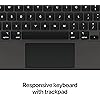
  • WHY MAGIC KEYBOARD The perfect companion for iPad Pro and iPad Air, Magic Keyboard features a great typing experience, a trackpad, backlit keys, a USBC port for passthrough charging, and front and back protection. No charging or pairing required. Simply attach it and start typing.
  • COMPATIBILITY Magic Keyboard works with iPad Pro 12.9inch (3rd, 4th, 5th, and 6th generation).
  • KEYBOARD LANGUAGES Arabic, British English, Chinese (Pinyin), Chinese (Zhuyin), Danish, French, German, Italian, Japanese, Korean, Portuguese, Russian, Spanish (Latin America), Spanish (Spain), Swiss, Ukrainian, US English.
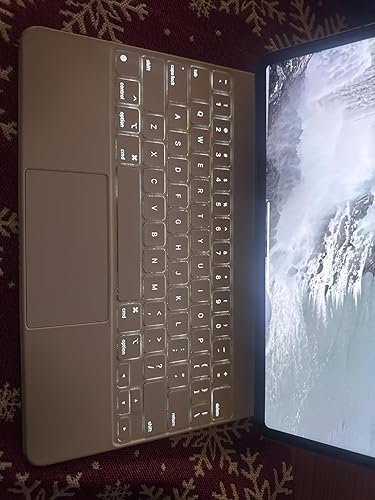
  • DESIGNED FOR COMFORT Magic Keyboard has a floating cantilever design. It smoothly adjusts to the perfect viewing angle. Backlit keys and a scissor mechanism deliver quiet, responsive typing. The built-in trackpad is designed for MultiTouch gestures and using a cursor.
  • PROTECTIVE KEYBOARD AND CASE Folds to provide front and back protection wherever you go. Available in black or white.

Brand: Apple


Compatible Devices: iPad Air 13-inch (M2), iPad Pro 12.9-inch (3rd generation), iPad Pro 12.9-inch (4th generation), iPad Pro 12.9-inch (5th generation), iPad Pro 12.9-inch (6th generation) See more


Connectivity Technology: Bluetooth, Smart Connector, USB-C


Keyboard Description: Flexible, Integrated, Gaming, Mechanical, Multi Functinoal, Multimedia, Wireless


Recommended Uses For Product: Office


Special Feature: Backlit, Ergonomic, Foldable, Integrated Stand, Trackpad


Color: Black


Keyboard backlighting color support: Single Color


Style: British English


Product Dimensions: 11.5"L x 9.37"W x 0.87"H


Product Dimensions: ‎11.5 x 9.41 x 0.87 inches


Item Weight: ‎2.42 pounds


Manufacturer: ‎Apple


Language: ‎Irish


Item model number: ‎MJQK3CG/A


Batteries: ‎1 Lithium Ion batteries required.


Date First Available: ‎April 20, 2021


Frequently asked questions

If you place your order now, the estimated arrival date for this product is: Sunday, Jun 14

Yes, absolutely! You may return this product for a full refund within 15 days of receiving it.

To initiate a return, please visit our Returns Center.

View our full returns policy here.

  • Klarna Financing
  • Affirm Pay in 4
  • Affirm Financing
  • Afterpay Financing
  • PayTomorrow Financing
  • Financing through Apple Pay
Leasing options through Acima may also be available during checkout.

Learn more about financing & leasing here.

Top Amazon Reviews


  • Love it Love it
Style: US English Color: White
I travel a lot for work, and use the iPad Pro as my entertainment on the plane or in the hotel, my presentation tool with clients, and for general computer tasks. But it was never quite ‘there’ for everything I needed. Sometimes I might want to do various tasks that still had me reaching for my MacBook Air or Mac Studio when I returned home. Eventually, however, I went on a minimalist spree of lightening the load for travel. So I took a punt on this ridiculously priced keyboard. While I am still in the honeymoon phase, and only on my first business trip, I am already completely converted. The keyboard itself is outstanding. Feels as good as a laptop. The lighting is smart, coming on at just the right moment when ambient light in the room would make seeing the keys a little tough. The touch pad is smaller than a laptop, but super functional, and integrated into the OS far better than I imagined it would be. So between that and the ability to touch the screen, it is an absolute winner. On the plane, and in the hotel, if I just want to watch a movie or TV show, I sometimes use a relatively cheap stand. But when I want to type something, I can just pop this onto the magnets and type away. A few years back, I had a different MacBook which developed a flaw and needed a repair. So I bought a keyboard for my iPad, and remember being very disappointed. There was lag, it was a very cheesy solution, and as soon as my Mac came back from repair, I returned the keyboard for a refund. Fast forward, and my M1 iPad Pro 12.9 flies with this keyboard. No lag, in fact it is as fast as my Air. The only real issues are the limitations of iPadOS, and various applications that either offer a cut down or no version for the iPad. However, I think for most users, it will be fine. Now, would I advocate having the iPad Pro and this keyboard instead of a laptop? No, absolutely not. But for travel, it does 95% of what I need it to very well. I find the iPad to be an extremely versatile product for business and fun. Thanks to this keyboard, I now have a travel solution that weighs considerably less than also carrying a laptop. I was originally going to go with black, but then Amazon offered me the instant gratification of next day delivery on the white one. I also heard from some reviewers that while it might be counter-intuitive, the white is easier to keep clean. The matte black is easier to get noticeable fingerprints on it. Unless something radically changes, I’m going to turn in my old MacBook Air for a trade in that I can put towards my next Apple purchase. Thanks expensive Apple keyboard! ... show more
Reviewed in the United States on May 16, 2023 Reviewed in the United States on May 16, 2023 by Chris Healey

  • Hard to find but worth it
Style: US English Color: White
This case was hard to find, but it ended up being perfect for my iPad. It has the premium fit and feel you would expect from Apple, and everything works exactly like it should. Great build quality, solid keyboard, and overall a really good match for the iPad Pro.
Reviewed in the United States on April 22, 2026 by Wes

  • I’m Happy!
Style: US English Color: Black
Okay, so the first question that every one has when it comes to this case/keyboard, “is it worth the full price?” In short, I can’t say that it is, BUT, I can say that I have no regrets about purchasing it. Apple has superior quality, that’s why I stick with them so hard, but unfortunately that does come with a high sticker price. I also have a MacBook Air, so I didn’t NEED this keyboard, but it has brought even more enjoyment to my iPad Pro, so for me it is money well spent. Something I have noticed a lot of people saying is that they hate that the keyboard brightness cannot be adjusted, but it can, so I am not sure where they’re getting that information. Although there is currently not a shortcut to adjust the brightness, it can be dimmed and brightened through the keyboard settings. It is also very easy to clean, but I would advise not to use anything harsher than a damp cloth to do so. In the future, a top row of shortcut keys would be a great upgrade, but I also understand why they opted not to have them on this version, as they would be directly under the floating iPad and would be hard to reach. The alternative would be making the keyboard bigger, which would go against the portability and slim design. I’m interested to see where they improve it in the future though. Also, the keys are super easy to navigate, just like a regular laptop keyboard. The keys are very responsive and the trackpad, although smaller than normal, is still great and easy to use. The keyboard out of the box requires a full click on the trackpad to select, but if you go into trackpad settings, you can change the click to simply a tap, which is my preferred option. If you’re on the fence about this purchase, or trying to justify it to yourself, just go ahead and hop on board, you won’t be disappointed! ... show more
Reviewed in the United States on May 22, 2023 by Brittany

  • Perfect for Working Perfect for Working
Style: US English Color: White
I absolutely love this keyboard case for my iPad. The keyboard feels smooth and comfortable, and it makes working, typing emails, and using my iPad so much easier. It also gives the iPad a very elegant look while protecting it at the same time. Definitely worth it!
Reviewed in the United States on May 14, 2026 Reviewed in the United States on May 14, 2026 by Dleon Services

  • ⭐️⭐️⭐️⭐️⭐️Premium Quality item as expected from apple⭐️⭐️⭐️⭐️⭐️
Style: US English Color: White
This is just what the pictures show, a keyboard that is perfectly compatible with the new 12.9 inch iPad Pro. While the price point is quite steep in comparison to the other tablet keyboards found on amazon, the authenticity, quality, and feel of an original apple product is unparalleled. As you have come to expect from apple the unboxing experience alone is second to none. This keyboard boasts a very rigid/durable build that resists scratches even in a use case like mine where I carry it in my backpack most of the day. It has a very tactile and pleasant feel similar to the one you get while using a MacBook. The touchpad as well is in a league of it's own its quite cool how apple can fit such a trackpad into such a small form factor, even though its area is quite small you feel in no way limited by it, it feels nice to the touch and is very responsive. This thing essentially transforms your iPad into a mini laptop I can honestly say it brings you as close to a full-fledged MacBook experience as possible, despite a few inevitable limitations that come with it being a tablet. If you are looking for a top of the line keyboard for your iPad go for this one. Don't be put off by its price point it is well worth it. ... show more
Reviewed in the United States on March 31, 2023 by Pablo

  • Not quite fully worth the price but not bad!
Style: US English Color: White
My previous iPad having been declared dead by the Genius Bar Doctor I had to replace it. For a number of valid reasons I chose to bypass any of the intermediate models and purchased the Pro 12.9” 6th Gen 256gb.This keyboard review was based solely on the device itself and not not Amazon . Amazon’s rating both as to price and shipping is a solid 5+! That iPad purchase, of course required that I purchase a case/folio in order to protect my purchase. After looking at all available including third party I narrowed it down to the top two offered by Apple those, of course being the Smart and Magic keyboards. Doing a side by side comparison I opted initially for the Smart Keyboard Folio, price being the determinant factor. I know, I know this a review of the Magic Keyboard Folio. I am getting there! I subsequently was browsing Amazon and they had the Magic Keyboard Folio on sale. Less you think I’m crazy wait until I tell you there’s a third party keyboard I’m seriously considering purchasing. Yes, I’ll have eventually three folios for my iPad. I’ll have three folios/cases for the same reason I have more than one wristwatch, more than one fountain pen, more than one set of earbuds/headsets, more than one cigar cutter and more than one cigar lighter. I like having situational flexibility. Having the Smart Keyboard Folio, though were the differences worth the increased cost in acquiring the Magic Keyboard Folio? I cannot give either a solid yes or no! It is, however, a very strong, maybe. I do like the cantilever design on the Magic which allows for better viewing angle adjustment than the Smart Keyboard Folio which has but the two fixed positions. I find having a multitude of different viewing angles for different uses to be very convenient especially as my eyesight and eye comfort now as I’m in my mid-70s ain’t what it used to be. If one is good, two has to be better, right? Maybe, maybe not. The Magic Keybard has a “pass through “ USB-C Charging port. From what I can discover it is for power only no data. As the keyboard has no battery is it supplying power to both the iPad and the Magic Keyboard (power only )? The logical assumption is, maybe. It follows that I can have charging power for the iPad using the pass through port and one of a number of accessories through the iPads USB-C port as that port has both charging and data capabilities. With no cable in either USB-C port the keyboard has no pwer whatsoever.. Convenient but it is not directly addressed. Oddly enough there is cautionary remark not to utilize a cable to interconnect the two ports. Well, duh! To track or not to track is the question and quandary. As I’ve Apple products going back so far I think some were shipped from their garage. I’ve had an iPod Classic, iPod Touch, an Apple Watch, an iPhone and many models of the iPad. Concurrently, I’ve owned and still ownvarious Android tablets and three Amazon Fire tablets. For my Android Tablets I’ve had their version of the Magic Keyboard Folio. The cost, of course was markedly less expensive than my purchases from the Apple orchard. Having a trackpad can be a convenience for those times when you want to maneuver about in page rapidly. Being able to turn the trackpad off when it works to your detriment is just as convenient and at times even more so. When it is on and you inadvertently, generally by your thumbs or the back of your palm it can be downright aggravating. My Android keyboard utilizes the simultaneous Fn + spacebar to toggle the trackpad on/off. This Magic Keyboard has no means to turn the trackpad off. None, not all, not anticipated for. Back in the day once people discovered it was possible for your camera to be spying on you it was a common life hack to tape a piece of a post-it note over the camera., A cut to measure piece of card stock will, I think effectively “turn off the trackpad. It’s indeed a sad state of affairs that has to be the workaround. It’s effective, but ever so ugly, While writing the review, I received a call from Apple technical support,. That was the source of the trackpad on/off information along with some information on the simultaneous use of both the keyboard’s pass through and the iPad’s USB-C ports. Those two questions alone necessitated me me being placed on hold for twenty minutes while he queried his colleagues plus the Senior Tech representative on duty, While the trackpad was a definite no, the simultaneous usage of the USB-C ports was a consensus opinion that you can. The pass through port on the keyboard for charging the iPad and the iPad’s USB-C port for an accessory device such as a mouse or data hub. There is not anything written down but all agreed it’s the only logical usage. Off topic in a way, I brought up to the tech rep an issue on using the Apple Pen to take a screenshot/open a quick note. The guidance as written is ambiguous to the point of being wrong, As written, it says to go diagonally up from the left or right (or depending on how you designate in settings) corner OF THE SCREEN. This will result in your scrolling. You must place the pen in the extreme corner of the iPad virtually offscreen entirely and touching the aluminum bezel. For me, taken altogether the pros outweigh the cons and the Magic Keyboard is worth the expenditure. It’s definitely a weighty personal decision based on a knife’s edge of pro/con thought. On the probable third case purchase. For the iPad that just died I had a Zugu case. The Zugu ain’t near as purty as either the Smart ot Magic cases. It is, however as rugged as a tank with a mind boggling number of viewing angle adjustments. When I was notified that my wife had passed away the cased iPad hit the floor and bounced from a rather high distance. Not that I was at all concerned about it at all. While the iPad for which I had the Zugu is no longer functional I’m keeping the case itself as a memento mori, it being festooned with many, many hospital visitor badges including the last one I ever received the morning of the day that she passed away. I had just reentered the hospital when I received the call from her nurse informing me of her death. I had stepped out for a brief. moment. A moment forever burned into my soul. Please forgive my going so far astray and off topic. ... show more
Reviewed in the United States on February 12, 2023 by FA1SGL

  • Great keyboard for my iPad.
Style: US English Color: Black
Great keyboard for my 12.9 in iPad.
Reviewed in the United States on May 7, 2026 by Joe

  • Has lasted over two years Has lasted over two years
Style: US English Color: White
I bought the keyboard in the fall of 2023 as a college student who weighed the cost vs necessity. Since graduating I still find the keyboard useful as it also works as a great case. While most people at the time were buying iPads for note taking I bought the iPad Pro to replace my MacBook that quit in the first week of a new semester. I’ve never had much connectivity issues and if I did I simply lifted my iPad from the magnetic portion of the case and placed it back on and it was fine. All the keys work and the backlighting works great. You can charge from the case as well which can be useful in certain areas. I do find the case to be a good protector for the iPad. In my opinion it has a sleek look and good keyboard size comparable to having an averaged sized laptop. Very minor peeling around the edges from constantly shoveling into a bookbag but otherwise I think it is was worth for me. ... show more
Reviewed in the United States on March 30, 2026 Reviewed in the United States on March 30, 2026 by NiaC

Can't find a product?

Find it on Amazon first, then paste the link below.
Checking for best price...