Search  for anything...

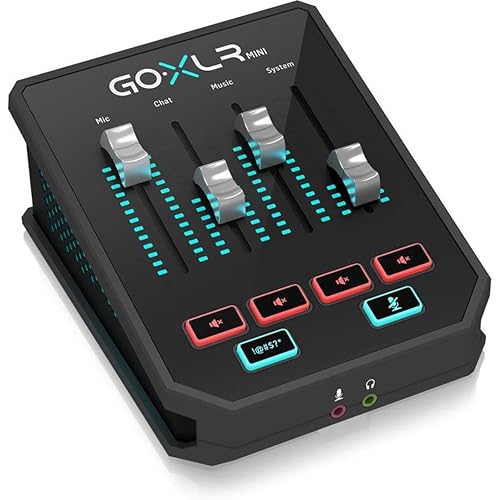
TC-Helicon GoXLR Revolutionary Online Broadcaster Platform with 4-Channel Mixer, Motorized Faders, Sound Board and Vocal Effects, Officially Supported on Windows

  • Based on 4,704 reviews
Condition: New
Checking for the best price...
$456.46 Why this price?

Buy Now, Pay Later


As low as / mo
  • – Up to 36-month term if approved
  • – No impact on credit to apply
  • – Instant approval decision
  • – Secure and straightforward checkout

Ready to go? Add this product to your cart and select a plan during checkout.

Payment plans are offered through our trusted finance partners Klarna, Affirm, Afterpay, Apple Pay, and PayTomorrow. No-credit-needed leasing options through Acima may also be available at checkout.

Learn more about financing & leasing here.

Free shipping on this product

This item is eligible for return within 30 days of receipt

To qualify for a full refund, items must be returned in their original, unused condition. If an item is returned in a used, damaged, or materially different state, you may be granted a partial refund.

To initiate a return, please visit our Returns Center.

View our full returns policy here.


Availability: Only 4 left in stock, order soon!
Fulfilled by Amazon

Arrives Tuesday, May 26
Order within 11 hours and 6 minutes
Available payment plans shown during checkout

Protection Plan Protect Your Purchase
Checking for protection plans...

Features

  • Multi-channel mixer: Motorized faders let you control mic, game, music, chat, and more for the perfect Broadcast mix
  • Studio quality MIDAS preamp: Make your XLR mic sound great with 48V phantom power, equalizer, compressor, limiter, de-esser, and Gate
  • Sampler: Record samples on-the-fly or load your own audio files to engage and entertain your community
  • Voice FX: Add reverb, echo, pitch shift, megaphone, Robot, and hard tune to your voice in real time
  • GoXLR Windows app: Youre in control with basic and advanced audio parameters, sample import, and voice FX preset library. App required for functionality.
  • Officially supported on Windows 7, 8, 10, 11. No official Linux support. No macOS support.

Description

GoXLR is an all-in-one audio solution for streamers and online broadcasters. What would take dozens of pieces of hardware and software can now be achieved by one sleek and intuitive package. Mix your audio in real time, change your voice, playback samples on-the-fly, and engage your audience like never before.

Specs & Other Info

Specification Details
Manufacturer TC-Helicon
Channel Capacity 4
product Dimensions (L x W x H) 15.35 x 8.55 x 4.7 inches
Product Weight 3.53 pounds (~1600 grams)
Interconnectivity Type XLR
Manufacturer's Origin Made in China
Model No. GOXLR
Product Availability Continued by Manufacturer
First Date of Availability October 25, 2018
Hardware Interface USB 2.0
Maximum Output 10 Watts
Compatible Operating System Windows 8, 7, 10 (*OS may limit routing features; Windows 10 Spring 2018 Update or later for advanced routing features, no support for macOS or Linux)
Power Source Requirement Plug-in Electric
Operating Voltage 12V

Frequently asked questions

The TC-Helicon GoXLR online broadcaster platform is officially supported on the Windows operating system.

The GoXLR mixer is equipped with 4 channels, allowing for optimal sound control and mixing.

The GoXLR boasts a variety of features, including motorized faders, a sound board and a selection of vocal effects to enhance your broadcasting experience.

The GoXLR is designed to offer a revolutionary broadcasting experience. It allows for real-time control and manipulation of audio levels, sound effects, and vocal character, enabling you to create a more engaging and professional-sounding broadcast.

Top Amazon Reviews

🚀 Abunda's Overview

This is our summary and key points to consider based on customer reviews.


The GoXLR Mixer is applauded for its ability to simplify audio routing for streamers, bloggers, and podcasters, making their broadcasts more streamlined with fun effects. High-quality audio results and the fun of voice changing, sampling along with the mixer, are commended. The device also includes some advanced features that a single user needs. However, a few minor drawbacks such as limited ports and reliance on software were also mentioned.

Pros

  • 👍 Provides independent control over various audio levels and channels.
  • 🎤 Comes with built-in pre-amp, compressor, de-esser, and equalizations options which significantly enhance the audio quality.
  • 🎚 Compact size, offering the same utility as larger mixers and saving desk space.
  • 🎧 Comes with easy-to-use, intuitive voice effect and amplitude controls.
  • 📣 Boasts a unique and powerful sampler feature, allowing users to record sounds on-the-fly.
  • 💡 Provides comprehensive lighting customization.

Cons

  • 🔌 Only has one port for a mic, limiting its capability for multiple users.
  • 🎚 Limited by having only 4 faders.
  • 🔊 No inbuilt headphone volume control or mic playback volume control.
  • 🔘 Power button is missing, which could lead to light disturbances during off-use hours.
  • 🔧 The heavy dependency on software can potentially cause complications.

Should I Buy It?

If you're a content creator looking for a comprehensive and intuitive solution for managing your audio needs, it's highly recommended to consider the GoXLR Mixer. Its minor hardware drawbacks can be easily managed and should not overshadow its capabilities and unique features that offer great value for its price.


  • A solid device worth the pricetag!
I've been using this mixer for about a week now. There's a lot of good things (and a few oddities) I'd like to go over. Let's go over it all! [Note: I use a one-PC setup to broadcast all sorts of different things and it works just fine for that configuration. It doesn't seem overly complicated to use this for a 2-PC setup, but I don't have any direct input on that.] AMPLIFICATION: My primary concern when buying this was "Can this make my microphone audible? Will there be any noise?" I use a Rode Procaster, a very quiet dynamic mic that requires some help to be audible. In the past, cheaper mixers have let me down. I'm happy to report that this wasn't an issue at all with the GoXLR; I come in loud and clear with some room to spare. I don't hear any noise unless I really crank it all the way up. My former setup was an affordable preamp/mixer combo and I did have some noise issues then. Both of those are in the closet now. MIXER/FADERS: The mixer side of the GoXLR, without a complicated mess of cables, lets you independently fade music, game, system, mic and other channels. That's a new function for me. I've have had to use virtual audio cables in the past, because trying to physically separate those channels in the manner I required was not realistic on a physical mixer. This mixer simplified the routing and gave me a higher level of control over all of these volume levels. The mute buttons can be configured to do special things too rather than just globally mute; You can set it to only mute your mic in discord, or on stream. There's only the 4 faders on the GoXLR, so If you need more than 4, you'll have to work around the limitation. There have been a few hiccups too. For example, one reboot didn't open the software correctly and my system channel was muted until I reopened the software. VOICE EFFECTS: The effects are the largest section on the mixer, so they're obviously a huge selling point. I feel like this is where my priorities shifted a bit. Most of the effects on the GoXLR are things I've seen and used before. I like voice effects alright, but I won't be adjusting them on the fly ever, and that's the purpose of most of these knobs. I'm just going to design 6 presets, maybe adjust the reverb sometimes and go. You have more fine-tuned control in the software which you then save to a preset button anyway, so having knobs for things like Gender and Pitch feels like a wasted opportunity for other controls. There are some basic things missing on the device and it aggravates me a bit that the focus was placed here instead (Headphone volume has to be on a fader too? Mic playback volume knob?? Power switch???) The effects controls that I've seen often on other mixers seem like a more effective way to save on space, though a bit clunkier... (Choose a number for the effect, set the power of the effect and turn it on.) SAMPLER CREATOR/PLAYER: The sampler, on the other hand, is incredible. It works like a charm. I can record myself or my discord friends on the fly and that's something unique and powerfully fun. I actually wish this section were larger than it is because it is the most special and interesting part of the product for me! 12 Samples runs out real fast when you have lots of sound clips and new recordings being made! The software lets you randomize sound effects on buttons and create playlists of a sort. I love the features, and will probably design multiple profiles to help organize my sound bank. CUSTOMIZATION: The lighting is great. You don't have a ton of colors on it, but you can easily make a rainbow like in my attached image. Lots of interesting settings you can do to the fader volume bars and effects knobs. You can have gradients for volume or solid, lights above and below the level can all be colored on everything. The fader can be set to a monitor or just a solid bar on each source. You can also set the icons and text above each fader, and color those too! For added flare worth mentioning, the mechanized faders roll up and down when you hit mute or switch profiles. They sync up with the software and one will control the other. It's a real neat visual. PROS: +The built-in Pre-amp, compressor, de-esser, and equalization options are solid. This stuff alone makes the device worth around the price to me honestly, being that its all-in-one. I feel like this should be your biggest concern with an audio device, and everything else is fluff... The hardware is good and will do the job you need it to do! You probably won't need your old pre-amp any more. +Hoo boy, that sampler!!! +Has the means to solve digital mixing problems, which is often a complicated task to solve. +Effects are fairly configurable and come with enough presets to satisfy most people. +The mute buttons are configurable and easily accessible. +Nice, large cough button that does the job well. The BLEEP button is fun, though I try not to over-use it myself! +Configurable lightshow. Very attractive to look at. Easy to set up and profile the color schemes. The customization really makes it feel like a modern device. +Everything feels nice. I like the feel of the buttons and the faders. +In general, it's very easy to see what's on and off, and you can configure it to be even easier if you're concerned about that. You can set the on/off lights to anything you want, dimmed or off. +Size. It's not tiny, but it is almost half the size of my old mixer and I'm real happy about that. I'm also happy that I use just about everything on the mixer, for a change. CONS: -You only have one port for a mic. If you want a second mic, you're going to need... another mixer to plug into this mixer. -Only 4 faders. The software lets you control the volume of many more than 4 devices. You'll have to pick and choose what's important for you to fade and set the rest in software. -No headphone volume control knob means you'll either control your headphone volume elsewhere, or set it to a fader. Seems like an odd thing to skip out on. -No volume control for mic playback at all, even in the software. Again, this seems an odd thing to skip out on. There IS a way to shut off the mic playback in the software. -No power button anywhere? I enjoy the lights when I'm awake, but not when it's bedtime! So I find myself unplugging the device when I'm done for the day. But I make sure my computer is off too before I do that, or it causes hiccups. I hear they are implementing a sleep mode of some kind in the future, but it isn't here at the time of this review. -Because so much of the functionality is software-driven, it's likely to cause headaches down the road. As I said earlier, I've already encountered times where my system volume just isn't on at all, and I had to mess with rebooting the software to fix it. Ultimately, what we have here is a great mixer that will consolidate all your devices into one. The mixers I've had before have been enormous 12-channel beasts with me only using 10% of the board, for less control than this device provides... I use nearly everything on here, and I come out sounding great. I gotta give it an ace rating for that, even if I do think they could improve on it. I do think it is missing a few minor things, and I'm working around those. For example, I'm using my keyboard's volume control to control my headphone volume. I'm really happy that I stumbled upon this product, because there really isn't anything out there like it, and for this price. ... show more
Reviewed in the United States on February 10, 2019 by Josh

  • A must have
This gets the job done and has eliminated the need to string together unreliable and confusing software solutions and hardware MIDI devices to do the same thing. I've owned this for about a year and it has gotten better and better with regular software and firmware updates as well. The software is easy to use given the complexity of how you're able to set everything up. The routing section is top notch and extremely useful and easy to follow. The ability to save and load profiles makes switching between your different setups easy and immediate. The ability to assign text, colors, and images to your inputs is nice as well, and makes it easy to customize for whatever your setup calls for. It's been rock solid for me in terms of reliability, and I can only recall one time where I had to power-cycle it to resolve an issue. That's far better than what I was experiencing with previous software solutions. I'd hate to call the next items "cons" or "downsides", because these features were never advertised as being part of the product. But here is a list of suggestions, or things I'd love to see added in a future update: -Personally, I don't use the effects or sampling at all. I would love to see configuration options in the software to reconfigure some of the buttons and knobs for other functions. For example: switching profiles with the press of a button, assigning a knob to quickly change the microphone gate and/or gain, panning a channel's audio left or right. -Make the mic mute/cough button configurable on a specific mixer channel instead of just on the XLR input. I sometimes would like to instantly mute/unmute an input other than the XLR channel just by holding down a giant button. -Add an option to configure the level LED's as pre or post fader. Early on, I noticed that the levels were pre-fader levels, and somewhere along the lines with a software update this changed to post-fader levels (thank you). I've had scenarios where it would be nice to configure this on a per-channel level though. -If it's possible, add the ability to re-name the hardcoded channel names. Mic/Chat/Music/Game, etc. It becomes less of an issue with profiles, it would be awesome to have custom names for inputs. That's really about it... I have no hesitation recommending this product to anyone who needs a digital mixing solution or a good hardware audio interface for a hybrid software & hardware audio setup. Personally, I think it's underpriced just right when you consider any true alternatives (Consider reliability, ease of use, and fit & finish) that are on the market. This line could have an interesting future, and I think there's a gap between cheap analog solutions, expensive digital solutions, and buggy software solutions that TC Helicon has managed to balance with this. I'd be the first customer in line if: -A "pro" version was created that nixes the effects and sampling, at least devote less hardware real-estate to it. Use the space to add more hardware faders, maybe keep a few knobs if they're configurable for things like gain, gate, and compressor. -For the "pro" version, more XLR inputs & outputs on it, rather than having to re-use the 3.5mm connections for different things. -A multi-USB output, so you could have one digital mix to your main PC, and another digital mix to your streaming PC. - Or even better, an ethernet connection and driver package for pulling/sending audio to any PC on your LAN. -A USB-A input/output that uses a generic audio driver, I don't think it's uncommon that a lot of gamers have existing USB headsets or microphones they might prefer to use over an XLR/3.5mm device, just for convenience. It could also be a nice stepping stone to move up from an existing USB only mic . ... show more
Reviewed in the United States on May 1, 2020 by MrEric

Can't find a product?

Find it on Amazon first, then paste the link below.
Checking for best price...